
A healthy email list should keep hard bounces below 2%, while regularly maintained lists can approach 98% inbox placement. An email list cleaning service verifies each address across multiple deliverability signals and returns a send, suppress, fix, or review decision before your campaign reaches real inboxes.
You're probably not dealing with an obviously broken database. The row count looks healthy, your CRM is full of opted-in contacts, and your email platform may report no immediate disaster. Yet open rates are sliding, bounce warnings are appearing, and messages that used to reach the inbox are drifting toward spam.
The problem is usually hidden in the records. Dead addresses, catch-all domains, generic role accounts, temporary inboxes, and old contacts can sit in a list until every campaign carries their risk. Email list cleaning isn't a cosmetic spreadsheet exercise. It's an operating control between raw data and the send button.
Table of Contents
- What an Email List Cleaning Service Actually Does
- The Eight Signals Behind Every Verification Result
- Inside the Verification Workflow
- Why Cleaning a List Pays for Itself
- How to Evaluate Any Email List Cleaning Service
- Integrations, Privacy, and Ongoing Hygiene
- When to Delete, Suppress, or Win Back a Risky Address
- Putting It Together and Next Steps
What an Email List Cleaning Service Actually Does
An email list cleaning service checks each address before you send to it. The service examines more than whether an address contains an @ symbol, then assigns a result that tells your team what to do with that row.
The practical workflow is simple:
- Upload or paste your list.
- Let the service inspect every address.
- Review the reason attached to each verdict.
- Send only to the segment that meets your risk standard.
- Suppress, correct, or review the rest.
That makes list cleaning different from a re-engagement campaign. Re-engagement tries to recover people who stopped responding. Verification asks whether an address is technically and operationally safe to mail. It also isn't a content rewrite, a bulk unsubscribe job, or a substitute for consent management.
The missing filter before every send
A list can be large and still be commercially weak. Old acquisitions, abandoned inboxes, mistyped signups, and addresses collected without enough form protection create problems long before someone notices a dramatic bounce spike. The history of email list cleaning and deliverability practice follows the maturation of Internet mail standards, including RFC 5321, published in April 2001, which standardized SMTP and made bounce handling and sender reputation more measurable at scale.
Mailbox providers use bounce and complaint behavior as sender-quality signals. Industry guidance recommends keeping total bounce rates below 2%, with hard bounces below 1%, while rates above 5% can lead to penalties, weaker inbox placement, or blacklisting, as summarized in this email validator guide.
Practical rule: Treat verification as a pre-send gate, not a repair tactic after your sender reputation has already deteriorated.
The output should preserve your original data and add a clear decision for every row. A useful report won't label addresses “good” or “bad.” It will separate valid, invalid, risky, and unknown records so you can choose whether to send, suppress, fix, or attempt a win-back.
That distinction matters because aggressive deletion can waste recoverable pipeline. The right service gives you enough detail to protect deliverability without blindly shrinking the audience you worked to build.
The Eight Signals Behind Every Verification Result
A serious verifier doesn't rely on one test. It combines multiple signals because an address can pass a basic check and still be a poor recipient for an important campaign. The practical mechanics are also covered in this guide to how email validation works.
| Signal | What It Checks | Why It Matters |
|---|---|---|
| Syntax check | Whether the address follows valid email formatting rules | Catches malformed entries and common typing errors |
| Domain and MX verification | Whether the domain exists and can receive mail | Separates dead domains from potentially reachable ones |
| Mail server handshake | Whether the server responds to a mailbox-level SMTP probe without receiving a message | Adds evidence about mailbox existence |
| Catch-all detection | Whether the server accepts mail for unknown recipients | Prevents false confidence from accept-all domains |
| Role-based flagging | Whether the address belongs to a generic function, such as support or admin | Generic inboxes often behave differently from personal contacts |
| Disposable detection | Whether the address comes from a temporary email provider | Temporary inboxes may disappear quickly and rarely belong in long-term marketing audiences |
| Spam-trap and honeypot identification | Whether the address resembles a planted or dangerous recipient | Helps avoid deliberate reputation traps |
| Activity and depth signals | Whether historical activity or additional behavioral evidence is available | Adds context beyond technical reachability |
Why the signals must be combined
A syntax check is the easiest layer and the least informative by itself. It can identify a typo, but it can't prove that the mailbox exists, that the person wants your message, or that the address won't damage your sending reputation.
Domain verification answers a different question. A domain may exist and accept mail while the individual mailbox is gone. The SMTP handshake adds another layer, but even a responsive server can be configured to accept uncertain recipients. That's why catch-all detection matters.
Role-based and disposable addresses deserve separate treatment. A role account may be valid but unsuitable for a personal newsletter or sales sequence. A temporary address may pass syntax and domain tests but have little durable value. Research on these categories reported role accounts as invalid at 52.1% and disposable addresses as invalid at 94.8%, according to this role-based and disposable email study.
The final verdict should synthesize the evidence. A passing SMTP probe on a catch-all domain isn't equivalent to a confirmed personal mailbox. Look for a confidence or risk explanation, not just a green badge. That plain-English reasoning is what lets an operator make a defensible send or suppression decision.
Inside the Verification Workflow
A useful cleaning workflow begins with the file you already have. With CleanMyList, you can upload a CSV or paste addresses, map the email column to names and custom fields, and leave the original list untouched while the verification job processes each row.
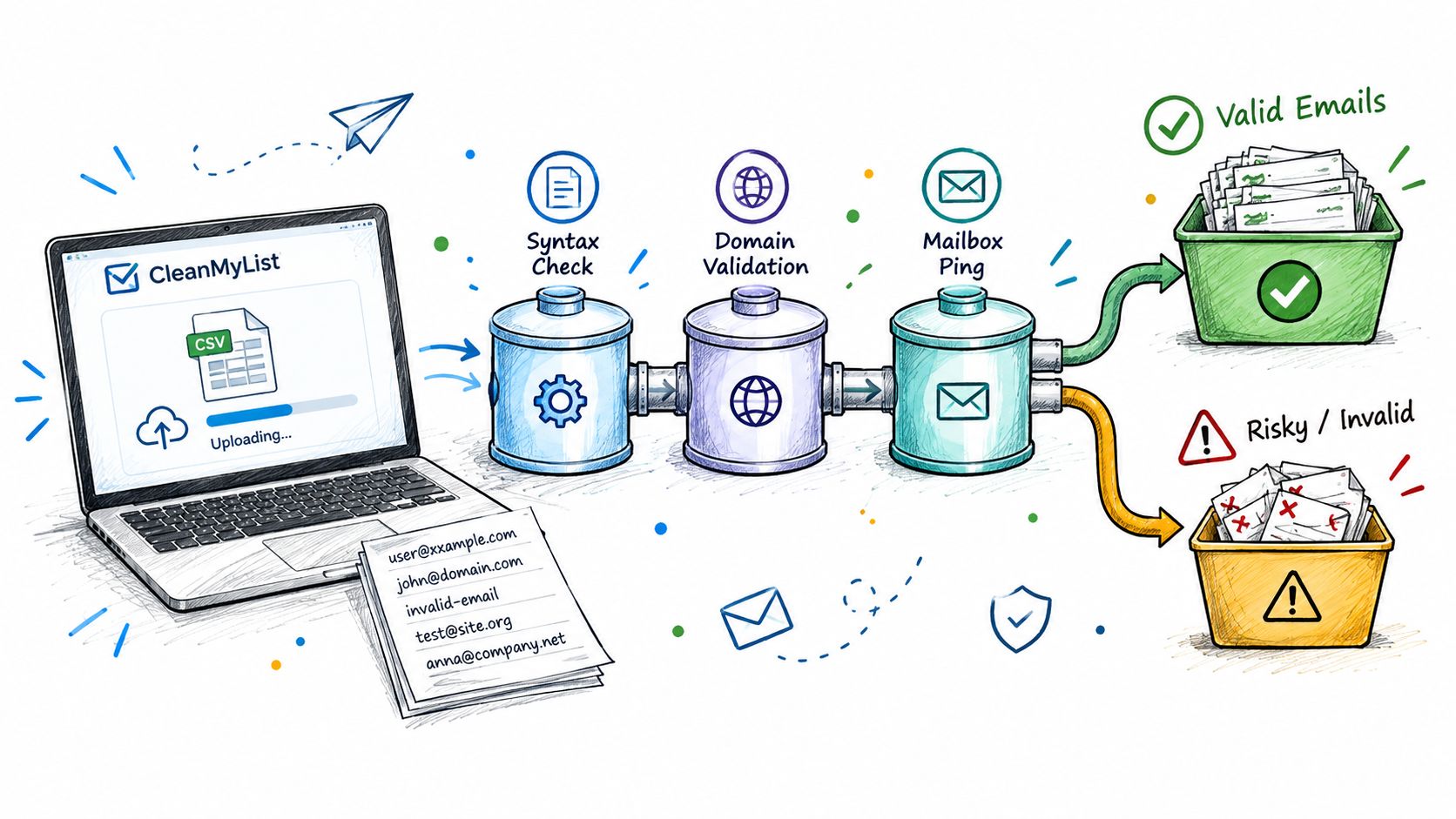
The queue should show progress rather than forcing you to guess whether the job is moving. Once results return, don't reduce the export to a binary clean or dirty file. Keep separate segments for valid, invalid, catch-all, role-based, disposable, and accept-all unknown addresses.
Attach an action to every verdict
A practical export might use the following routing:
- Valid: Send through the normal campaign or sales sequence.
- Invalid: Suppress, correct from a trusted source, or remove after checking the record.
- Catch-all: Hold for review or a controlled seed test.
- Role-based: Route to a lower-priority segment or suppress from personal outreach.
- Disposable: Suppress unless there's a compelling transactional reason to retain the record.
- Accept-all unknown: Re-verify before a major send and avoid treating it as confirmed.
If your team needs validation inside a product or signup flow, an email address validation API is more useful than repeatedly downloading spreadsheets. For narrower technical checks, a resource covering Gmail code service can help developers understand how mailbox confirmation fits into a broader verification process.
The export is only valuable if it fits your operating system. Download a clean file for your ESP, export suppressions separately, and retain the reason codes for audit and troubleshooting. A good service should make those decisions visible instead of hiding them behind a single score.
The exact composition of a list will vary by source, age, acquisition method, and audience. Don't accept a vendor's generic yield promise as a forecast for your database. Upload a representative sample and compare the returned categories before committing the rest of your credits.
Why Cleaning a List Pays for Itself
List cleaning creates value in three places: fewer bounces, more stable sender reputation, and less wasted volume. The business case doesn't require a dramatic open-rate claim. It starts with preventing messages from going to addresses that were never viable recipients.
A healthy campaign should keep hard bounces below 2%, and industry guidance places hard-bounce expectations below 1%. At the other end, bounce rates above 5% can trigger throttling, reduced inbox placement, or temporary restrictions, according to this deliverability risk guide.
Read the economics in layers
Suppose your team pays to verify a list and then removes or suppresses risky records. The immediate calculation is straightforward:
verification cost per address × addresses checked compared with recovered sendable addresses × value generated by a successful send.
That isn't a promise of revenue. It's a decision model. Add the cost of wasted sends, reputation recovery, campaign delays, and manual cleanup, and the fee becomes easier to evaluate. A list that looks inexpensive to mail can become costly when poor records reduce the reach of future campaigns.
| Metric | Before cleaning | After cleaning |
|---|---|---|
| Hard bounces | Risk may exceed the accepted threshold | Target below the healthy operating threshold |
| Sender reputation | Exposed to invalid and risky records | Protected by suppression and segmentation |
| Inbox placement | Vulnerable to filtering and restrictions | More consistent when engagement and complaints remain healthy |
| Campaign volume | Includes addresses with uncertain value | Focused on recipients with stronger evidence of reachability |
Regular maintenance also protects against decay. One industry estimate puts annual list-value loss at 22.5%, meaning a 10,000-address list could lose about 2,250 usable addresses in a year without refresh work, according to these 2026 deliverability benchmarks. The point isn't to worship a benchmark. It's to stop treating an old export as permanent infrastructure.
For an operational explanation of how teams monitor this exposure, see the guide to email bounce rate. The useful outcome is not a prettier dashboard. It's a sending decision that reduces avoidable risk before volume scales.
How to Evaluate Any Email List Cleaning Service
Don't choose a vendor because its homepage says “accurate.” Make it prove that the verification output supports the decisions your team needs to make.
Start with the signal checklist. Ask whether the service runs syntax, domain, SMTP, catch-all, role-based, disposable, spam-trap, and historical or activity checks. If it only validates formatting and domains, you're buying a surface filter, not a complete deliverability control.
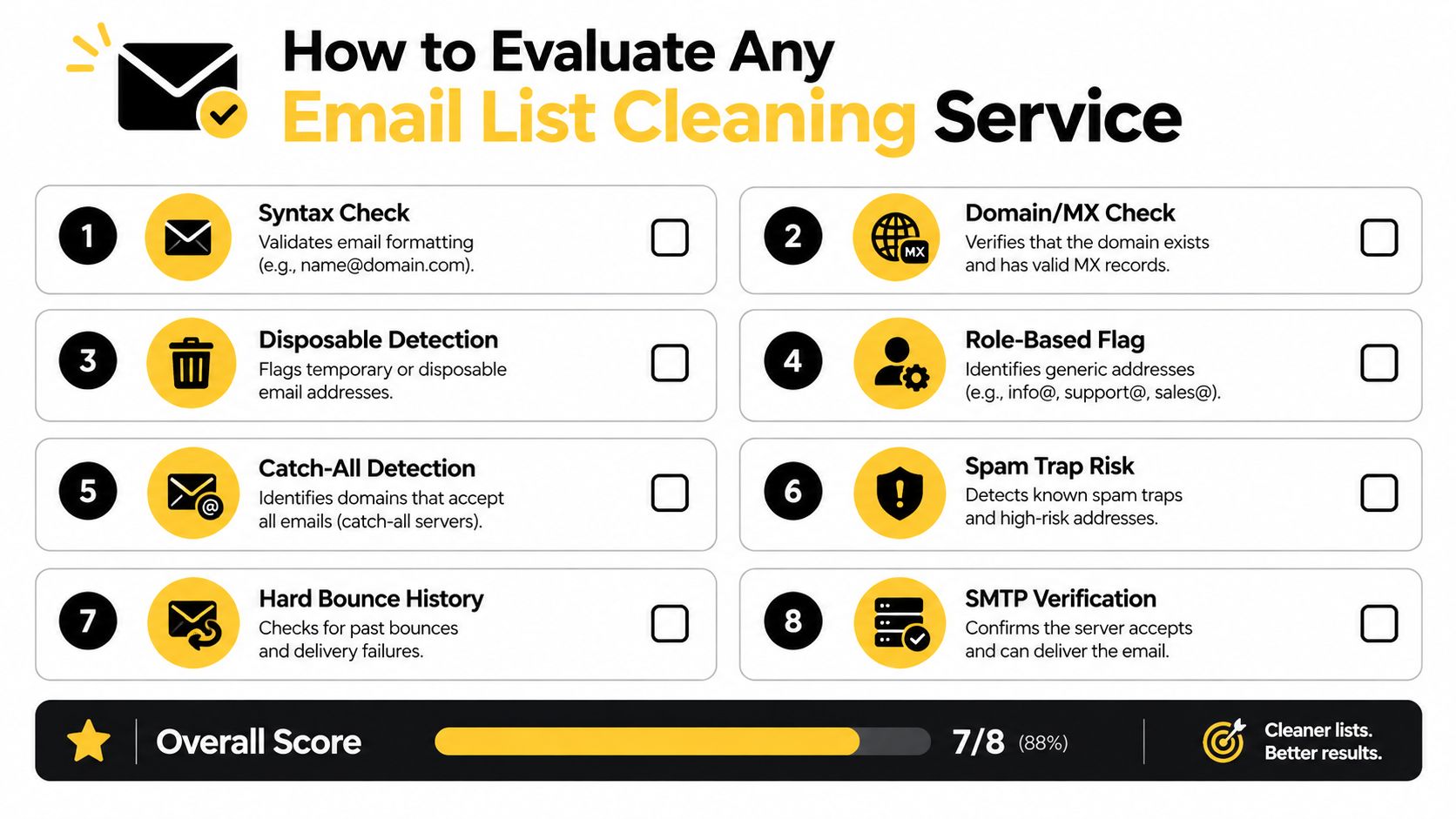
Score the output, not the sales page
Use a buying checklist that your marketing, sales, engineering, and privacy teams can all review:
- Signal coverage: Require a written list of checks, including catch-all and SMTP behavior.
- Verdict detail: Confirm that valid, invalid, risky, and unknown records remain distinguishable.
- Reason codes: Look for plain-English explanations that let operators audit decisions.
- Accuracy evidence: Request a test sample, methodology notes, and any accuracy or refund policy.
- Pricing clarity: Compare pay-per-email, subscriptions, bundles, minimums, and overage fees.
- Privacy controls: Review encryption, retention, deletion, processing terms, and GDPR alignment.
- Integration depth: Check native ESP and CRM connections, export formats, webhooks, and API access.
- Operational fit: Test queue visibility, file size handling, support responsiveness, and re-verification workflows.
Pricing deserves particular scrutiny. A low headline rate can become expensive if the provider charges for retries, marks uncertain addresses as valid, or forces you into unused monthly capacity. A no-subscription model may suit a publisher cleaning before campaigns, while an API-led workflow may suit a company validating every signup.
Ask what happens to uploaded data after processing. Require a clear retention period and a contract that prevents repurposing your list for training, enrichment, or third-party resale. A vendor that won't answer those questions hasn't earned access to your customer data.
Integrations, Privacy, and Ongoing Hygiene
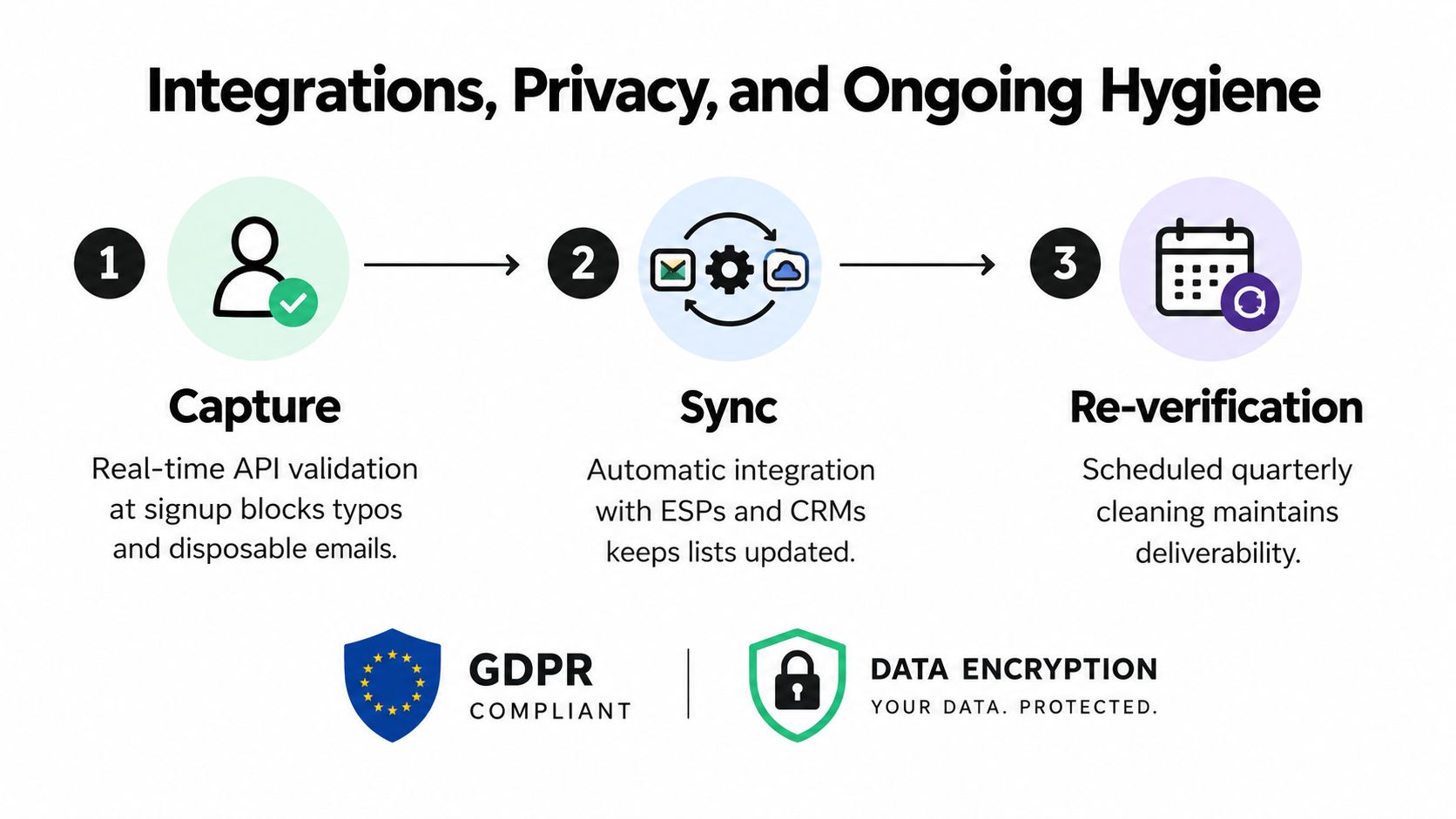
The strongest setup has three connected moments: capture, sync, and re-verification. A one-time bulk upload is useful, but it leaves the front door open for the next typo, bot submission, disposable address, or stale contact.
Capture clean data before it enters the CRM
Place real-time validation at signup when the form is tied to a valuable workflow. The API should catch obvious formatting errors, dead domains, and disposable providers before the address reaches your ESP or CRM. High-value forms may also need confirmation steps, especially when a bad record would trigger an expensive or reputation-sensitive sequence.
Sync verdicts back into the systems people use
Your verifier should connect to the tools where sending decisions happen. New contacts can enter a verification queue automatically, while verdicts return to suppression segments or review queues without a manual spreadsheet handoff.
That integration matters because a clean export becomes stale the moment new records keep entering an unprotected database. It also gives sales teams a reason code they can understand instead of an unexplained suppression flag.
Re-check aged records and protect personal data
Email addresses decay, so aged segments need periodic review. The appropriate schedule depends on list source, sending frequency, and audience behavior. Cold outbound data deserves more frequent scrutiny than a recently confirmed transactional audience, while old newsletter records should be re-verified before a large reactivation effort.
Privacy controls are not optional. Review encryption in transit and at rest, retention and deletion behavior, regional processing options, access controls, and contractual restrictions on secondary use. If you need a practical reference point for reviewing vendor disclosures, inspect the data handling at Securify alongside your own legal and security requirements.
Don't accept “GDPR compliant” as a complete answer. Ask where data is processed, who can access it, how long it remains available, and whether your uploaded addresses are used for anything beyond verification.
When to Delete, Suppress, or Win Back a Risky Address
Deleting every record marked risky is lazy operations. Some addresses should disappear permanently. Others should stop receiving ordinary campaigns but remain available for a controlled recovery path.
Use deletion for records with clear permanent failure. Hard bounces, confirmed honeypots, and addresses you know are invalid have no place in an active sendable segment. Keeping them only inflates the database and creates another opportunity for accidental mailing.
Use suppression when the record may still represent legitimate value but doesn't meet your current sending standard. Catch-all domains are the obvious example. A server that accepts every recipient can hide a nonexistent mailbox, so hold those contacts out of the main campaign until you have stronger evidence. Role accounts such as info@, sales@, and support@ can also remain in a separate business-contact segment rather than entering a personal nurture flow.
Behavioral risk needs a different response
An inactive subscriber isn't automatically a technically invalid subscriber. If the address remains valid and the contact previously opted in, a win-back flow can test whether the relationship is recoverable. Keep the message focused, give the recipient a clear choice, and remove or suppress the address when it fails the reactivation criteria.
Industry guidance increasingly favors segmentation, win-back, and suppression over immediate deletion for some inactive contacts. That approach is especially useful when the contact has commercial history or represents a meaningful account, but it shouldn't become an excuse to mail everyone forever.
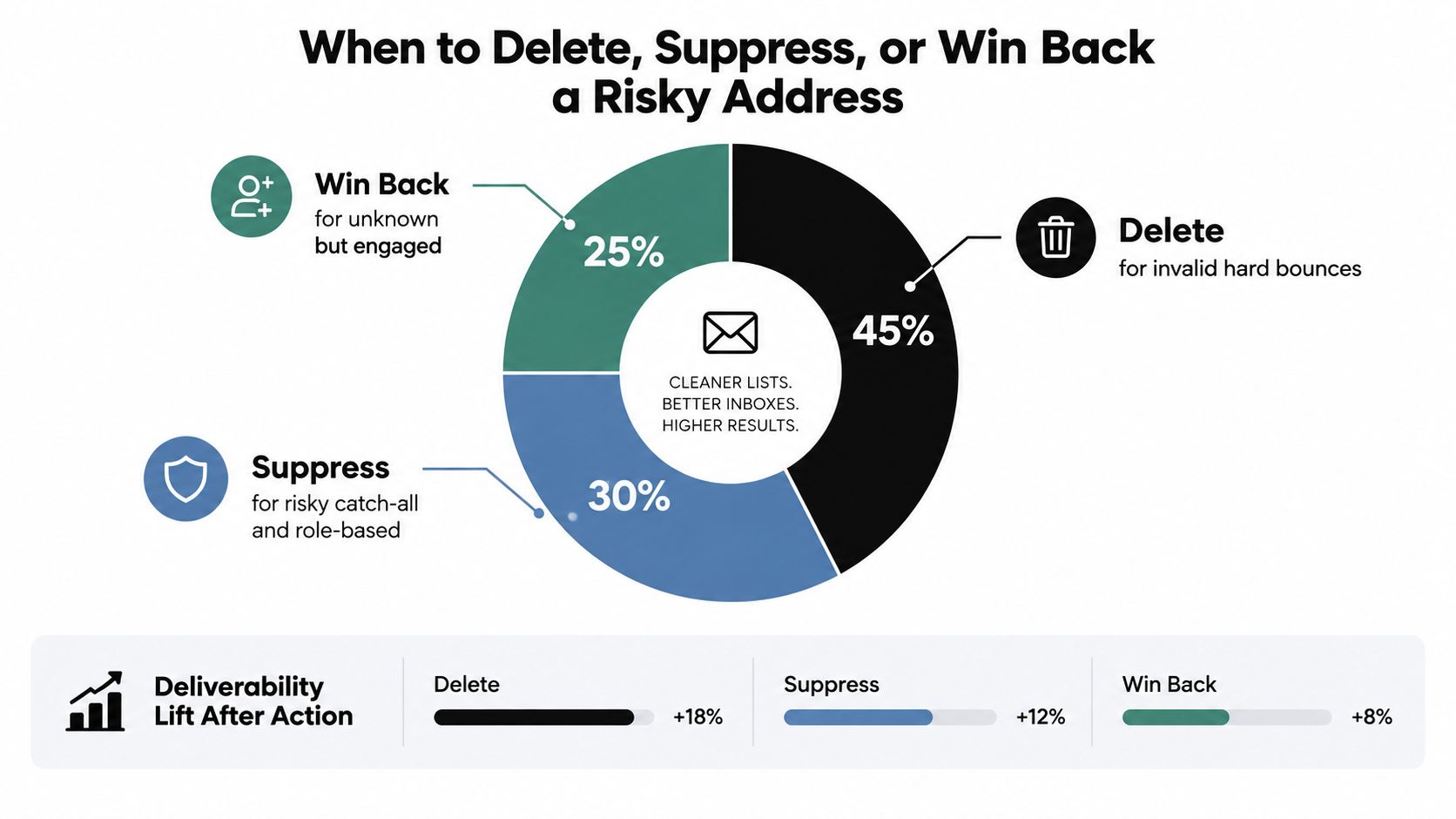
Map every verdict to an action before the report reaches the campaign manager:
- Delete: Confirmed hard bounce, honeypot, or permanently invalid record.
- Suppress: Catch-all, disposable, role-based, or uncertain address that needs isolation.
- Win back: Technically valid but inactive contact with consent or account value.
- Review: Conflicting signals, important customer, or address requiring business context.
The trade-off is clear. Deletion protects reputation but reduces list size. Suppression preserves potential revenue but requires disciplined segmentation. Win-back can recover value, but only if you stop treating inactivity as proof of deliverability.
Putting It Together and Next Steps
Turn the first cleanup into a thirty-day operating routine. Don't wait for your next campaign to expose the problem.
Week 1
Audit the current database, identify the oldest and highest-volume segments, and export a representative sample. Run that sample through a verification service and record the distribution of valid, invalid, risky, and unknown outcomes. Establish your current bounce baseline before changing the list.
Week 2
Apply the verdicts. Build separate send, suppress, and win-back segments, then import suppressions into the ESP before the next campaign. Start a focused re-engagement sequence for inactive contacts that remain technically valid, and keep the sequence separate from your primary audience.
Week 3
Close the acquisition leak. Add real-time validation to signup forms, review confirmation behavior for valuable segments, and inspect the source of suspicious records. If one channel repeatedly produces disposable or malformed addresses, fix that channel instead of paying to clean the same problem forever.
Week 4
Set the recurring process. Schedule re-verification for aged data, produce a monthly hygiene report, and define the conditions that trigger an out-of-cycle check, such as a sudden bounce increase, a major list import, or a new outbound domain.
The operating habit: Every new address gets checked at capture, every important send uses a current verdict, and every risky record has a documented next action.
Use this seven-item checklist in the next seven days:
- Export: Pull the current list without overwriting the source file.
- Sample: Select records from recent signups, old contacts, and imported data.
- Verify: Run the sample through a multi-signal service.
- Segment: Separate send, suppress, win-back, and review groups.
- Protect: Add signup-time validation where bad records enter.
- Document: Record verdict meanings and ownership for each action.
- Schedule: Put the next re-verification and hygiene review on the calendar.
Cleaning isn't a project with an end date. It's a routine that keeps your sending audience known, explainable, and safer to mail.
CleanMyList lets you upload or paste a list, review multi-signal verdicts with plain-English reasons, and export sendable and suppressible segments without a subscription. Visit CleanMyList to test the workflow with free credits and make list hygiene part of your next campaign process.