
You've checked the subject line, reviewed the creative, and scheduled the campaign. Then the first results arrive: rejected messages climb, engagement looks strangely weak, and the sender reputation that seemed stable starts moving in the wrong direction. The list looked usable because most addresses had the right shape. That doesn't mean those mailboxes were still valid, routed correctly, or safe to contact.
Bulk email list cleaning is a deliverability control, not a spreadsheet-formatting exercise. It combines data preparation, domain checks, mailbox signals, risk classification, suppression, and post-send measurement. The strongest programs also treat cleaning as a recurring data-lifecycle discipline, because an address can become stale after it passes verification.
Table of Contents
- When a Bouncing List Costs You the Inbox
- Preparing and Backing Up the List Before Verification
- The Verification Stack from Syntax to SMTP
- Beyond Deliverable, a Risk Tiered Decision Matrix
- Automation, Rechecks, and Sync That Protect Sender Reputation
- Cleaning as a Continuous Data Lifecycle
- Measure Whether Cleaning Actually Worked
When a Bouncing List Costs You the Inbox
A campaign can fail before anyone reads the message. If a large volume of addresses rejects mail, providers receive a clear signal that the sender isn't maintaining reliable recipient data. The practical benchmark is straightforward: a total bounce rate below 2% is generally treated as healthy, 2% to 5% is a warning range, and above 5% is critical, according to email bounce-rate benchmark guidance.
The arithmetic makes the risk easier to understand. On a 100,000-address send, a 2% bounce rate means 2,000 rejected messages, while 5% means 5,000. Those failures can't be recalled after the campaign leaves your system, and the consequences can extend beyond the bad addresses to future delivery for recipients who are valid.
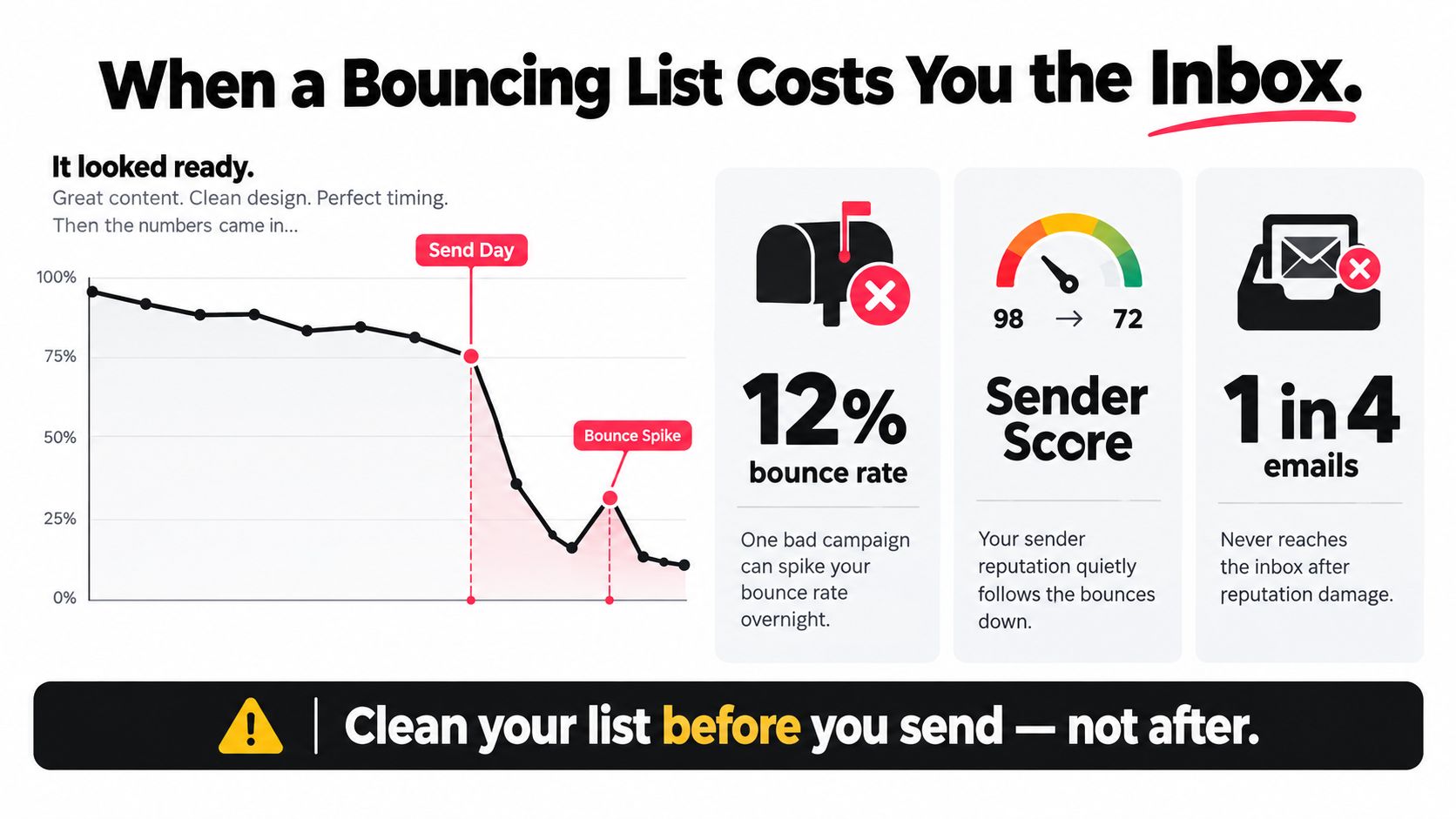
A 2024 benchmark cited an average marketing-email bounce rate of 1.98%, while a separate 2025 analysis based on Mailchimp data reported a 0.21% average hard-bounce rate and a 0.70% average soft-bounce rate across billions of emails, as documented in the same deliverability benchmark reference. The figures aren't interchangeable because they measure different categories and datasets, but they illustrate why “the addresses look valid” isn't a sufficient quality test.
Practical rule: Clean before the send. Post-send suppression is necessary, but it can't prevent the first wave of rejected mail.
The first operational question should be, “How many recipients might fail, and why?” A reliable process preserves the original data, removes obvious defects, checks the domain and mailbox, separates uncertain addresses, and suppresses contacts that carry clear risk. Teams that want a concise explanation of the wider deliverability context can also review this guide to protect your inbox.
If you need a deeper explanation of how bounce categories affect campaigns, use the email bounce-rate guide alongside your provider's own reporting. A list is a deliverability variable because its condition changes the number and type of delivery failures your infrastructure produces.
Preparing and Backing Up the List Before Verification
The verification tool isn't the first place to start. The first step is to protect the evidence you already have, then create a clean working copy that can be processed without destroying the source of truth.
Freeze the original before changing anything
Export the source list exactly as it exists in the CRM, ecommerce platform, spreadsheet, or email service provider. Store the untouched file with its export date, source system, owner, and campaign or segment name. Never use this master file as the working file, and don't overwrite it with a cleaned export.
That backup matters because list cleaning is comparative work. You need to know which addresses were present before verification, which verdict they received, when the verdict was created, and whether a later import reintroduced an address that had already been suppressed. If the original disappears, your team can't distinguish a newly stale contact from a processing mistake.
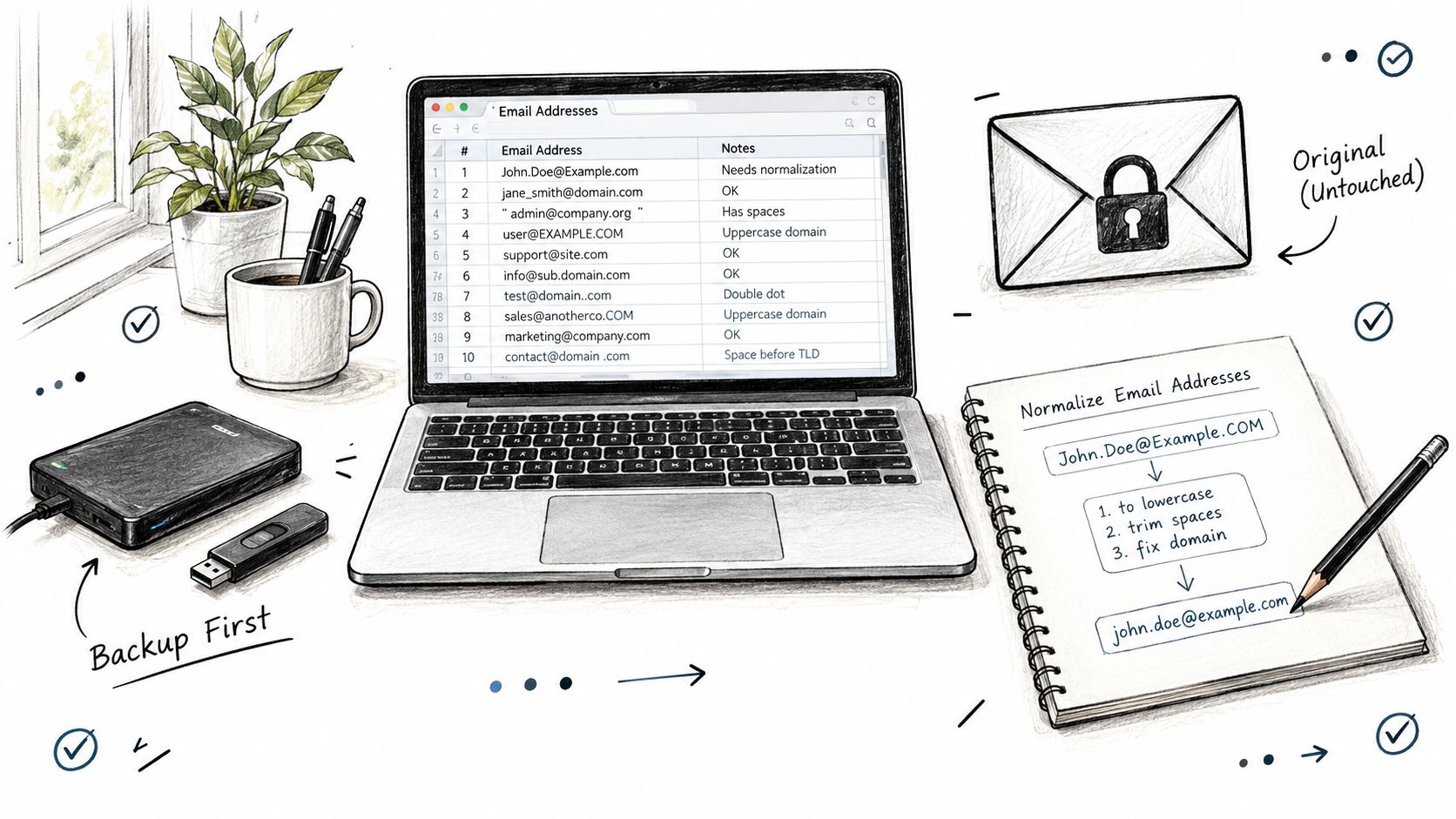
Create a working file with stable columns rather than copying only the email field. Useful fields include:
- Email address: Preserve the original value in a separate column, then create a normalized value for processing.
- Source: Record the form, import, partner, event, product, or salesperson that supplied the address.
- Acquisition context: Keep geography, audience type, consent context, and lifecycle stage where available.
- List age: Capture the collection date or the best available estimate.
- Suppression status: Carry forward unsubscribes, complaints, hard bounces, legal restrictions, and previous verification results.
Normalize without “fixing” uncertain addresses
Trim leading and trailing whitespace. Lowercase the domain portion. Remove exact duplicates while retaining a mapping to every original row and source. Don't casually rewrite the local part, change punctuation, or guess a correction because a spreadsheet formula makes the address look better.
Excel is a common source of silent damage. Reformatting a column can convert values, merge rows, remove leading characters, or lose the relationship between an address and its consent record. Merging CSVs from different products can also create duplicate contacts with conflicting suppression states. Before verification starts, compare the row count, column names, duplicate logic, and suppression history against the untouched export.
Teams managing recurring newsletters or creator audiences may find this practical guide to manage your course creator email list useful for documenting ownership and list operations. The same discipline applies to commercial databases: normalize once, preserve provenance, and make every later decision traceable.
The Verification Stack from Syntax to SMTP
A regular expression catches obvious formatting defects. It doesn't prove that the domain routes mail or that the mailbox exists. Serious bulk email list cleaning uses layered signals because each layer catches a different failure mode and produces a different kind of uncertainty.
Order checks by cost and certainty
Start with inexpensive checks, then apply network and mailbox signals to the addresses that survive. A practical stack contains eight decision inputs:
- Syntax and standards-aware inspection. Detect missing separators, spaces, invalid characters, malformed domains, and impossible structures. This is a filter, not a deliverability verdict.
- Domain and DNS evaluation. Confirm that the domain exists and has plausible mail-routing information. Internet email standards distinguish the local part from the domain, and the domain requires its own checks. The IETF's historical record shows why static assumptions age badly: the number of top-level domains with MX records changed from 18 in 2013 to 17 in 2021 and 11 in 2025 in the referenced record, despite the addition of new top-level domains. Review the IETF email-core historical guidance for the standards context.
- Disposable-provider detection. Flag temporary services. A disposable address may reflect testing, fraud, or a privacy-conscious person, so the flag should inform the policy rather than automatically erase the record.
- Role-account identification. Identify addresses such as info, sales, admin, or support. These can be useful for an announcement but usually provide weak individual-level personalization.
- Catch-all detection. Determine whether the receiving domain accepts arbitrary recipients. Acceptance alone doesn't establish that the named mailbox exists.
- Temporary-failure and greylisting interpretation. Separate deferrals and throttling from permanent invalidity. A server may obscure recipient existence or temporarily reject unfamiliar connections.
- SMTP mailbox probing. Connect to the receiving server without sending a message and interpret its response. Providers may throttle, defer, or deliberately hide mailbox status, so the result can be inconclusive.
- Historical and behavioral context. Combine prior bounces, complaints, suppression records, engagement, acquisition source, and campaign purpose into a send, review, or suppress recommendation with a plain-English reason.
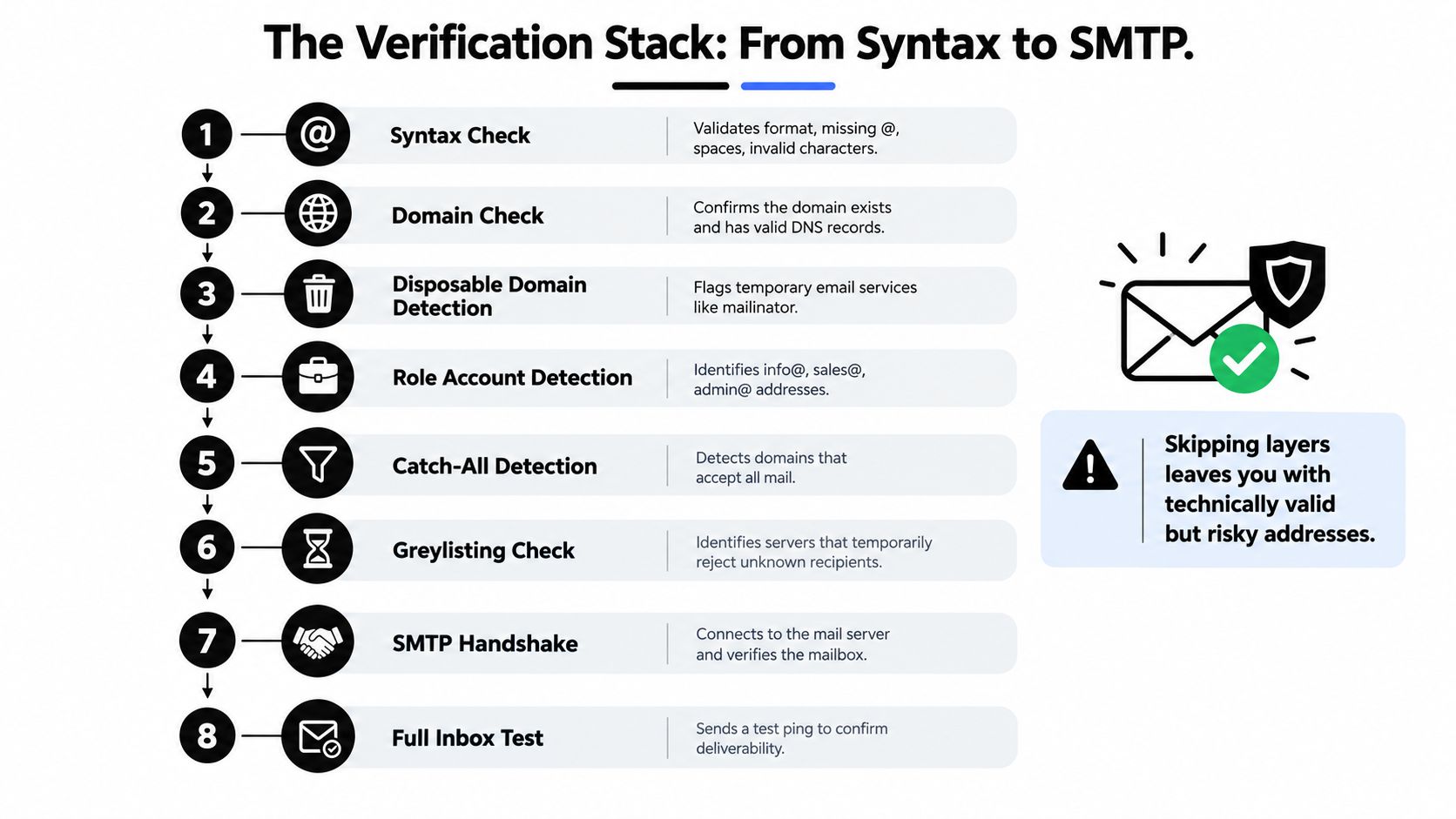
The stack exists because no individual signal is sufficient. A clean pattern can hide a dead mailbox. An SMTP-accepted address can be a catch-all recipient, a role account, or an address with poor historical behavior. A temporary failure can be misclassified as invalid if the system doesn't preserve response codes and retry context.
| Signal | What it verifies | Common false positive | Needs network contact |
|---|---|---|---|
| Syntax | Whether the address has a plausible structure | Unusual but valid local-part characters | No |
| Domain | Whether the domain appears to route mail | Newly configured or unusual domains | Usually |
| Disposable detection | Whether the provider is associated with temporary mail | Legitimate privacy-focused use | No, if the provider list is current |
| Role detection | Whether the address appears generic | A real team-managed recipient | No |
| Catch-all detection | Whether the server accepts unknown recipients | A valid mailbox on a catch-all domain | Yes |
| Temporary-failure check | Whether a response may be deferred | A permanent problem presented as temporary | Yes |
| SMTP probing | Whether the server accepts the recipient during a handshake | Throttling or deliberate obscurity | Yes |
| History and policy | Whether the address fits your sending rules | A low-engagement but consented recipient | Requires your own records |
For a more detailed explanation of the difference between formatting, routing, and mailbox checks, see how email validation works. The practical output shouldn't be a simplistic valid or invalid label. It should be a defensible recommendation that explains what the system knows, what it doesn't know, and what the campaign can tolerate.
Beyond Deliverable, a Risk Tiered Decision Matrix
A valid address isn't automatically a safe address to mail. That distinction matters most in the middle of the list, where catch-all domains, role accounts, disposable addresses, temporary failures, and technically accepted mailboxes don't fit a clean keep-or-delete rule.
The scale can be material. A 2026 benchmark reports that catch-all addresses may represent 10% to 20% of enterprise-heavy lists, while disposable addresses may account for 5% to 15% of unverified B2C lists and 2% to 5% of B2B lists, according to the email data quality benchmark. The same reference places heightened concern around complaint rates approaching 0.30%. These are planning signals, not universal laws, and the right response depends on consent, acquisition source, audience, and campaign risk.
Use campaign purpose to set the threshold
A low-volume newsletter and a high-stakes cold-outbound campaign shouldn't inherit the same acceptance policy. A catch-all address may remain useful when the cost of excluding a legitimate reader is high and the send is controlled. The same address can be inappropriate for a campaign where an uncertain recipient could create a serious reputation or compliance problem.
| Verdict category | Newsletter send | Cold outbound | High-stakes promo | Watch metric |
|---|---|---|---|---|
| Valid, no material risk signal | Keep | Keep if permitted and relevant | Keep | Hard bounces and complaints |
| Catch-all | Keep in a controlled segment | Review or suppress | Review first | Bounce, complaint, conversion |
| Role account | Keep for broad announcements | Review | Keep only when the message suits a team inbox | Unsubscribe and response quality |
| Disposable | Review the relationship and source | Suppress in most cases | Suppress unless a documented exception exists | Fraud, complaint, conversion |
| Temporary failure | Quarantine and retry | Quarantine | Quarantine | Repeat response and later delivery |
| Unknown or inconclusive | Controlled test cell | Suppress or test only with strict limits | Suppress until resolved | All downstream outcomes |
| Prior complaint or hard bounce | Suppress | Suppress | Suppress | Suppression integrity |
Quarantine is the important middle path. Unknown, catch-all, and temporary-failure results shouldn't automatically disappear, but they shouldn't flow into the main send population either. Put them in a controlled test cell, use a modest volume appropriate to the campaign and consent, and compare their outcomes with the high-confidence segment.
Measure the trade-off using bounce rate, complaint rate, conversion, unsubscribe rate, and revenue per thousand delivered. Aggressive suppression can reduce risk while also removing real customers, infrequent readers, or privacy-conscious subscribers. Over-cleaning is still a data-quality failure if it turns uncertainty into permanent deletion without evidence.
A suppression rule should answer two questions: what risk does this address carry, and what business outcome would justify retaining it?
Keep the reason code, verification timestamp, source, campaign type, and final decision. A matrix becomes useful only when the team can review its outcomes and adjust policy by segment rather than treating every address as interchangeable.
Automation, Rechecks, and Sync That Protect Sender Reputation
A clean file is an output, not an operating model. The workflow should automatically create a new verification event when the data changes or when the age of the previous verdict makes it less trustworthy.
Trigger verification where the list changes
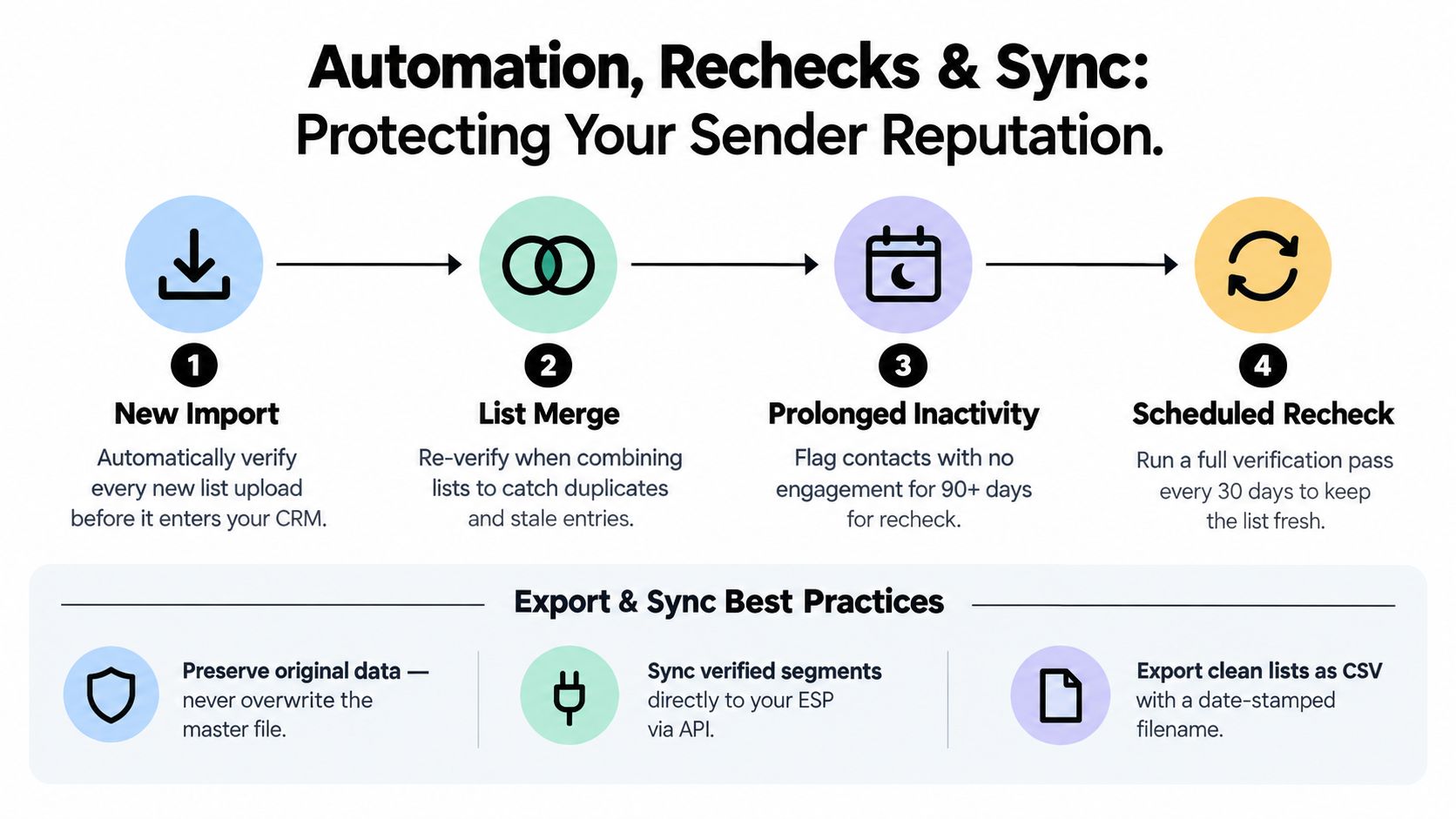
Use event-based controls for the moments most likely to introduce stale or risky data:
- New imports: Verify addresses before they enter the CRM or become eligible for a campaign.
- List merges: Recheck duplicates, conflicting suppression states, and addresses inherited from older systems.
- Prolonged inactivity: Route old or disengaged contacts into review rather than deleting them solely because they haven't clicked.
- Scheduled rechecks: Revalidate active commercial segments before significant sends and older databases on a risk-based schedule.
Twilio's benchmark found an average sender bounce rate of about 1.06% and a median of 0.21%, while Mailgun reports that leading industries commonly remain below 0.5% and treats rates above 2% as a warning that hygiene needs attention, as summarized in the Twilio email marketing benchmark. Use those figures as reference points, not guarantees. Your own sending history and provider responses should set the working threshold.
Make the suppression history authoritative
Every result should carry a reason code and timestamp. Sync hard bounces, repeated invalid responses, complaints, and policy suppressions back to the email platform. Don't export only the “clean” addresses and leave the suppression state behind in a separate spreadsheet, because a later CRM import can revive contacts your sending system had correctly blocked.
A reliable export process should:
- Keep the untouched master file unchanged.
- Write a date-stamped working export.
- Preserve original address, normalized address, verdict, reason, timestamp, and source.
- Push suppression updates to the ESP or CRM.
- Prevent previously suppressed records from re-entering through an import.
- Record the job identifier and operator or automation event.
After cleaning, send to the highest-confidence segment first and monitor provider responses before expanding the audience. If the result differs sharply from the verification prediction, pause the rollout and inspect the sample, routing conditions, and classification rules. An email verification API can support this kind of event-driven workflow when the team needs verification inside forms, imports, or backend jobs.
Cleaning as a Continuous Data Lifecycle
A one-time pass becomes stale because the underlying people and domains change. Independent benchmark reporting attributes roughly 23% annual email-list decay, while a separate industry report describes approximately 22.5% annual decay, equivalent to about 2.1% monthly attrition, as described in this email list decay analysis. A separate 2026 report uses 2.1% monthly B2B decay and roughly 22.5% annually as planning assumptions in its B2B data decay guidance.
Those figures shouldn't become a universal calendar rule. Decay varies with acquisition source, geography, B2B or B2C composition, job mobility, list age, and sending frequency. A sales database with work addresses needs a different policy from an opted-in publication whose readers engage intermittently.
Put controls at each lifecycle stage
At signup, use real-time validation to catch typos, malformed addresses, and obvious fakes before they enter the database. A confirmation step can also verify that the person controls the address, while clear expectations reduce later complaints.
After data changes, trigger checks after imports, list merges, migrations, and prolonged inactivity. Teams catch stale records here that a quarterly schedule may miss.
Before important sends, reverify older or high-value segments and apply the campaign-specific decision matrix. Don't assume an address that passed during collection remains safe indefinitely.
Cleaning more often isn't automatically better. Rechecks consume resources, can remove legitimate infrequent readers if engagement is treated as proof of invalidity, and may create compliance problems when suppression logic isn't documented. Report decay by source, geography, lifecycle stage, and address type, rather than publishing one number for the whole database.
A practical operating policy might validate new addresses immediately, recheck imported or merged data when it arrives, quarantine uncertain records, and review aged segments before major campaigns. The cadence should follow risk. A newly collected, confirmed subscriber shouldn't be treated like an old purchased or scraped file, and neither should be mixed into the same acceptance rule.
Measure Whether Cleaning Actually Worked
The clean file isn't proof of success. The proof arrives when you compare the verification run with the delivery outcomes that followed it.
Build a cohort dashboard for each cleaning job and track:
- Valid-rate change: Did the usable share change, and which source contributed the difference?
- Hard-bounce rate: Did permanent failures fall after suppression?
- Soft-bounce rate: Are temporary delivery problems concentrated in a domain, segment, or provider?
- Catch-all share: Is uncertainty growing in a particular acquisition channel?
- Complaint rate: Did the policy retain recipients who should have been reviewed or suppressed?
- Revenue per delivered message: Did the smaller or more carefully segmented audience produce better economic output?
A rising bounce rate is a diagnostic signal, not an instruction to delete more contacts. Inspect signup forms, imports, domain quality, merge logic, suppression synchronization, and the difference between verification timestamps and send dates. Teams that publish their own cohort results learn which rules work for their audience instead of chasing a new tool after every campaign.
The next time you clean a list, freeze the original, record every verdict, send the highest-confidence segment first, and compare the outcomes with the prior cohort. That measurement loop is what turns bulk email list cleaning from list shrinkage into sender-reputation management.
CleanMyList lets you upload a CSV or paste addresses, review per-address verification reasons, export the resulting segments, and rerun aged lists without sending messages during verification. Use CleanMyList before your next major campaign to separate send, review, and suppress records while preserving the audit trail your email operation needs.