
An email deliverability score is a multidimensional risk indicator that estimates whether a message will reach the inbox, not a guarantee of delivery. Gmail's average inbox placement fell from 89.8% across 2024 to 84.2% in the fourth quarter, showing how quickly performance can change even when your mailing list looks unchanged.
You may have opened your campaign dashboard to find that yesterday's strong open rate has suddenly collapsed. The copy is the same, the design is unchanged, and the send time followed your usual schedule. Yet recipients at Gmail, Yahoo, or Microsoft may be seeing your message in spam, while others never receive it at all.
The right response isn't to stare at one blended score or rewrite the subject line at random. You need to separate list quality, sender reputation, technical authentication, and provider-specific inbox placement. This guide explains what an email deliverability score measures, where its math can mislead you, and which operational fixes deserve attention first.
Table of Contents
- The Morning Your Open Rates Disappeared
- What an Email Deliverability Score Measures
- Signals and Metrics Behind the Score
- How Gmail, Yahoo, and Microsoft Score You Differently
- Why a Single Score Is a Dangerous Shortcut
- Common Causes of a Low Deliverability Score
- Measuring and Monitoring Your Score Over Time
- Concrete Steps to Improve Your Score
The Morning Your Open Rates Disappeared
At 9:05 a.m., Maya, the marketing manager at a growing software company, refreshes the campaign dashboard. Her newsletter normally produces a healthy stream of opens and clicks. Today, the open-rate graph has dropped sharply. The campaign went to the same audience, used the same template, and passed the same pre-send approval process.
Her first instinct is to blame the subject line. Then she checks the sending volume, recent bounces, complaint activity, and mailbox-provider breakdown. That investigation reveals the problem isn't necessarily the message itself. A change in authentication alignment, a rise in invalid addresses, lower engagement from an older segment, or filtering at one provider can affect inbox placement without changing the campaign creative.

An email deliverability score gives Maya a starting diagnostic. It estimates how likely her messages are to reach the intended inbox instead of landing in spam or failing to arrive. It doesn't tell her which single button to press, but a well-designed score can reveal whether she should inspect address quality, authentication, complaint behavior, or provider-level placement.
Practical rule: Treat a score as a set of warning lights, not as a permanent health certificate.
Open rates also need careful interpretation. Apple Mail Privacy Protection, Gmail image caching, and security scanners can trigger tracking pixels without a person reading the message, so opens are directional rather than definitive. If you need help improving the engagement side of the problem, this guide to boost SaaS email open rates provides useful campaign ideas, but engagement improvements should follow a deliverability diagnosis rather than replace it.
The useful question isn't “Is my score good?” It's “Which component is failing, at which provider, and what business outcome is being affected?” That shift turns a frightening dashboard change into a manageable workflow.
What an Email Deliverability Score Measures
A campaign can show “delivered” in your platform while readers never see it in the inbox. An email deliverability score estimates the likelihood that a message reaches that visible destination. Depending on the model, it may account for rejection, spam placement, filtering into another folder, or technical failure.
The score works like a weather forecast for email. It estimates conditions for a particular sending situation, while the mailbox provider makes the final decision when the message arrives. A score is therefore a diagnostic, not a universal 0-to-100 truth.
Keep three outcomes separate:
- Sent: Your platform handed the message to the sending system.
- Delivered: The recipient's server accepted it.
- In the inbox: The message reached the place where the recipient is most likely to see it.
A message can be delivered and still placed in spam. SMTP acceptance is therefore weaker evidence than inbox placement. The email sender reputation guide explains the reputation layer that shapes these decisions over time.
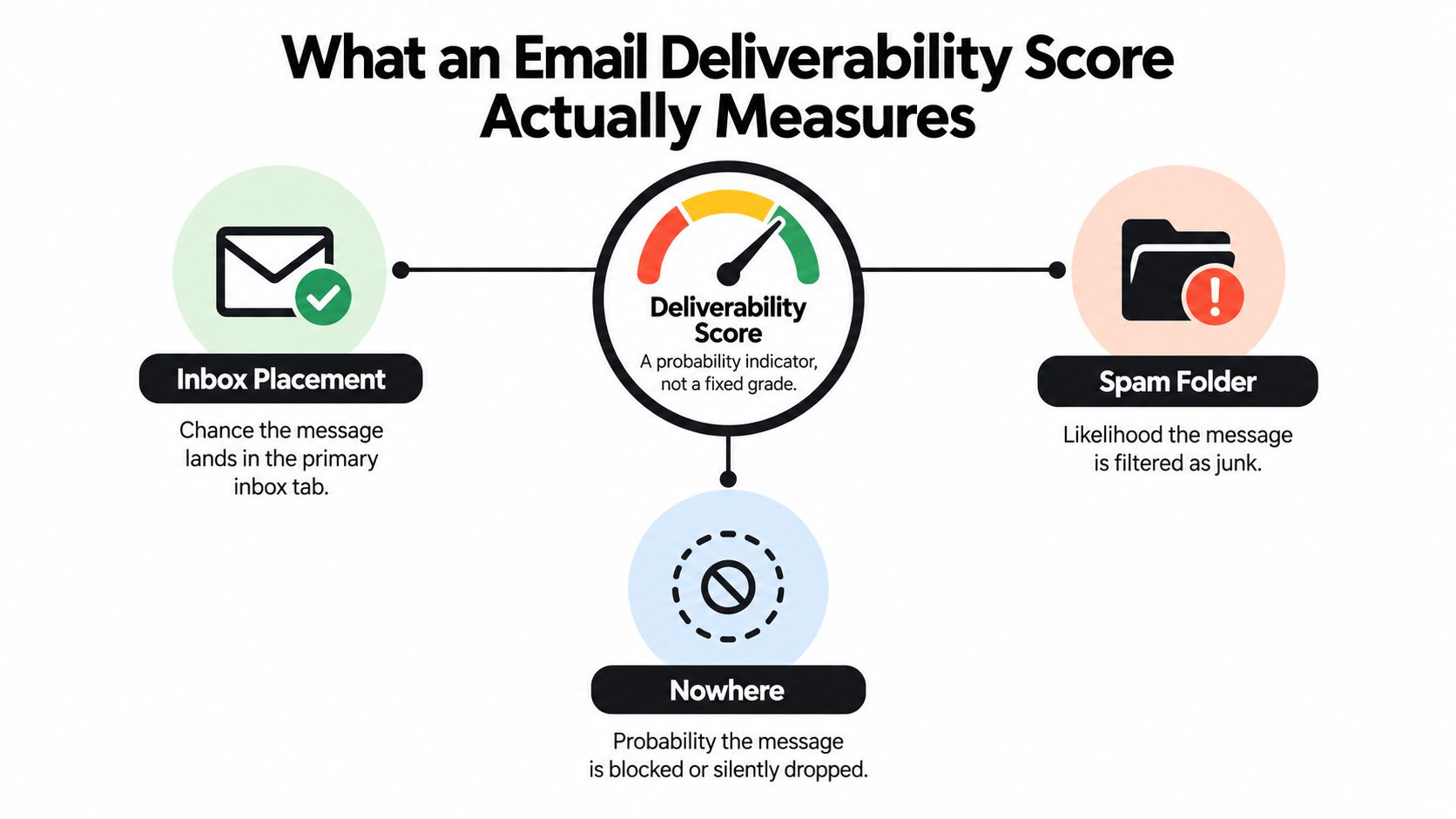
A high score cannot guarantee that every campaign reaches the primary inbox. Results can vary by mailbox provider, geography, campaign type, sending volume, and recipient group. Providers also weigh different evidence, so a score from one dashboard may not be comparable with a score from another.
Some dashboards compress their inputs into a number from 0 to 100. One published model assigns 60% to inbox placement, 25% to authentication, 10% to reputation, and 5% to technical compliance (Unspam's deliverability report). Those weights describe that model only. Another tool may prioritize different signals.
For practical diagnosis, separate list-quality problems from sender-reputation problems. Invalid addresses can cause bounces, while complaints, weak engagement, or authentication issues point to different fixes. The score becomes useful when it shows which category is creating risk, for which provider, and with what delivery outcome.
Email is one channel in a broader marketing system. Resources that help teams grow your LinkedIn audience can support reach elsewhere, while the email-specific outcome remains clear: getting wanted messages in front of real recipients without avoidable bounces, spam placement, or silent loss.
Signals and Metrics Behind the Score
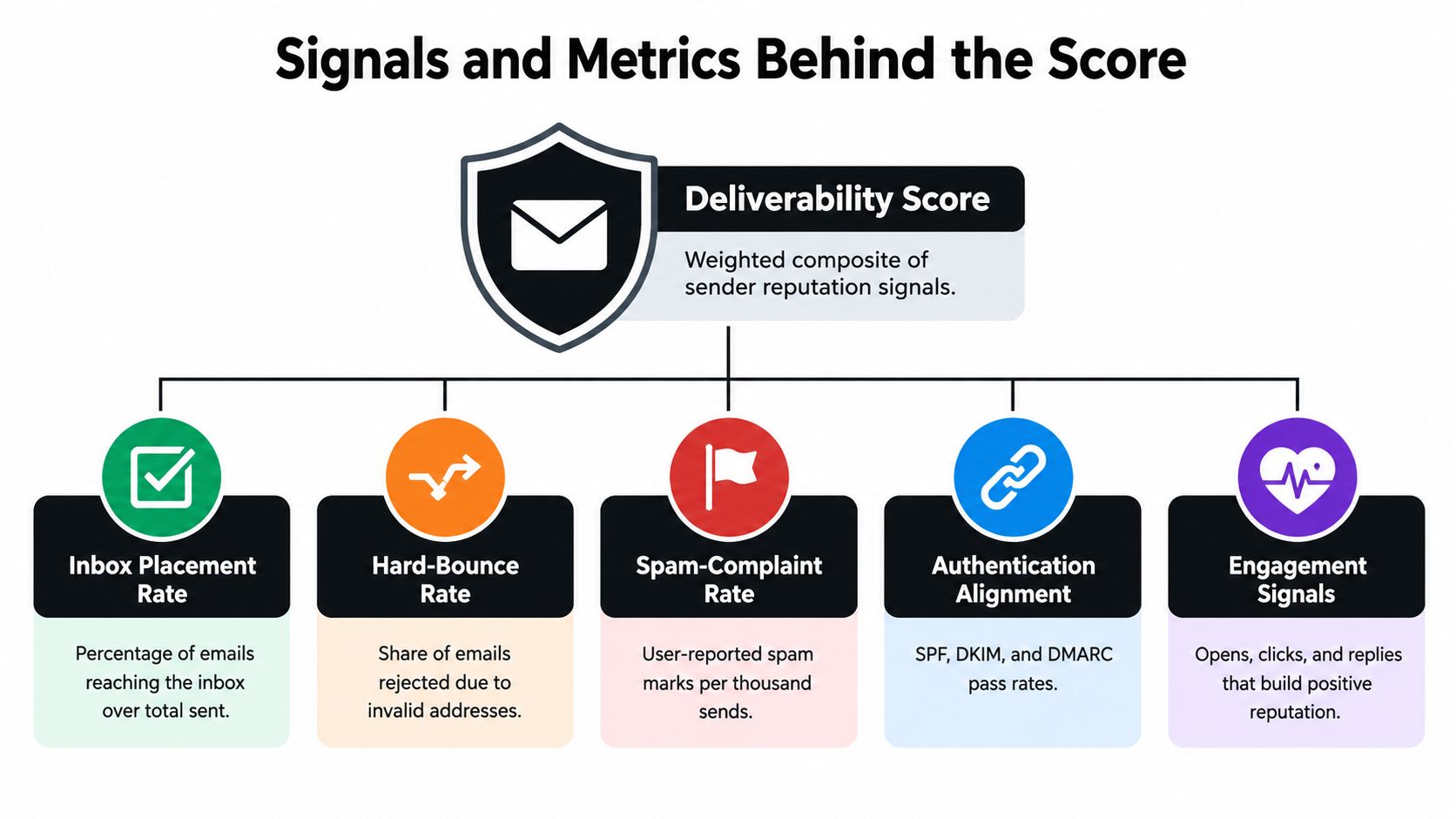
A useful score combines several types of evidence. It should distinguish a bad address from a bad sending reputation, because the fixes are different. Removing invalid contacts can reduce preventable bounces, but it won't repair weak engagement or an authentication failure.
The signals that deserve the most attention
Inbox placement measures the outcome marketers want. It tells you whether messages arrive in the inbox rather than merely being accepted by a server. Placement should be viewed by provider because a blended average can conceal a serious weakness at one mailbox network.
Hard bounces indicate permanent delivery problems, often because an address is invalid or no longer exists. They're a list-quality signal and should lead to suppression or verification before the next campaign.
Spam complaints are reputation signals with unusually high importance. Gmail recommends keeping spam rates below 0.1% and avoiding 0.3% or higher. Gmail and Yahoo's bulk-sender requirements also identify 0.3% as a critical complaint threshold, which is roughly three complaints per 1,000 delivered messages (Gmail sender guidelines).
Authentication alignment covers SPF, DKIM, and DMARC. A message may pass one technical check while still failing alignment with the visible From identity. Providers use these signals to assess whether the sender is legitimate and whether the message has been altered or impersonated.
Engagement includes clicks, replies, and other recipient behavior. Opens can provide context, but privacy features and automated image loading make them unreliable as a standalone measure. The email deliverability issues guide provides further context on how these failures appear in practice.
Why syntax alone isn't enough
An address can have valid formatting and still be risky. It may belong to a disposable provider, a role account, a catch-all domain, or a recipient who hasn't engaged with your messages for a long time. A score that checks only whether an address contains an @ symbol will miss those distinctions.
The weighting should reflect business impact. Complaint spikes and authentication failures deserve severe penalties because they can affect future placement across many recipients. Syntax checks are necessary, but they're only an entry point.
A receiving server can accept your message and still place it in spam. “Delivered” doesn't mean “seen.”
The result is a layered model. List risk asks whether the address is safe to mail. Sender reputation asks whether providers trust your sending behavior. Campaign performance asks whether recipients respond positively. Keeping those layers separate tells you which lever to pull.
How Gmail, Yahoo, and Microsoft Score You Differently
Mailbox providers don't share one universal scoring formula. Gmail and Yahoo introduced stricter requirements for bulk senders in 2024, generally applying to senders delivering at least 5,000 messages in a day to their recipients. Those requirements include SPF and DKIM authentication, a DMARC policy, aligned sender identity, one-click unsubscribe for promotional messages, and low complaint rates (CyberImpact's overview of the 2024 Gmail and Yahoo changes).
Microsoft also evaluates reputation across its own network, so a sender can look stable in a blended dashboard while seeing weaker placement in Outlook or other Microsoft-hosted mailboxes. The provider may respond to different engagement patterns, complaint behavior, traffic changes, and infrastructure signals.
| Provider | Daily Volume Trigger | Spam-Complaint Target | Authentication Required | One-Click Unsubscribe |
|---|---|---|---|---|
| Gmail | At least 5,000 messages | Aim below 0.1%, avoid 0.3% or higher | SPF, DKIM, DMARC, aligned identity | Required for promotional bulk mail |
| Yahoo | At least 5,000 messages | Below 0.3% | SPF, DKIM, DMARC, aligned identity | Required for promotional bulk mail |
| Microsoft | No matching threshold stated here | Monitor provider-specific complaints | Authenticate sending domains | Follow applicable mailbox and campaign requirements |
The table separates documented Gmail and Yahoo requirements from Microsoft monitoring practice. It doesn't imply that a sender below the volume trigger can ignore authentication or recipient expectations. Smaller senders can still lose placement when they mail invalid addresses, generate complaints, or send unwanted content.
If Gmail is the problem, start with provider-level evidence rather than changing every campaign element. This resource on how to stop emails going to spam in Gmail can help with Gmail-specific troubleshooting.
Your dashboard should show placement, bounces, and complaints separately for Gmail, Yahoo, and Microsoft. An average may look stable while one provider is already diverting a commercially important segment.
Why a Single Score Is a Dangerous Shortcut
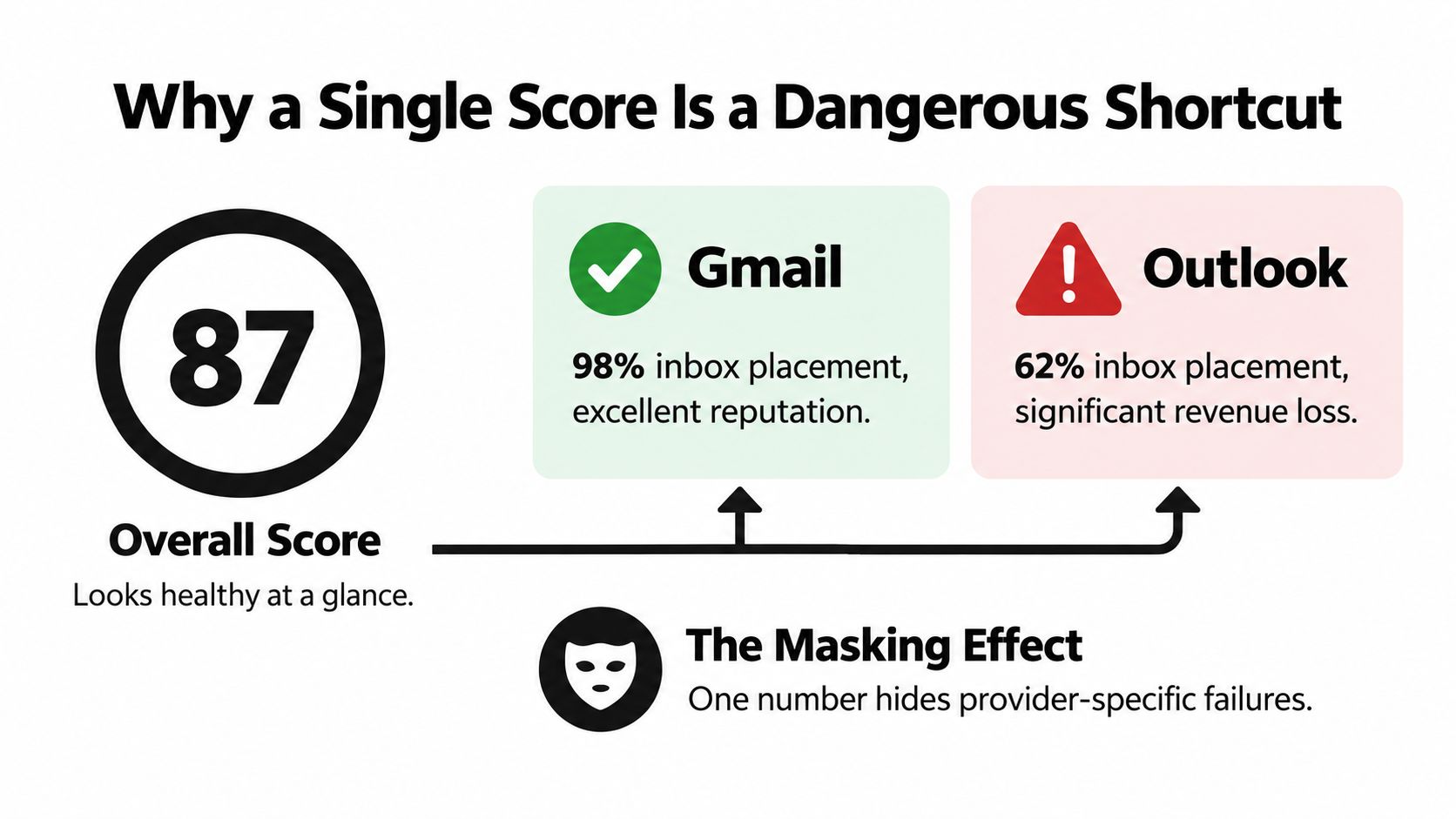
A marketing manager may see a healthy overall score while Outlook sends a large share of the same campaigns to spam. The average feels reassuring, yet it can hide the provider and audience segment causing the commercial problem. A blended score may combine sound authentication and acceptable list quality with weak placement at one mailbox provider.
The visual below shows how an overall score can mask different provider outcomes. The figures are illustrative, not a benchmark or a claim about any particular sender.
Authentication gives providers evidence that your domain authorized the message. It does not predict inbox placement by itself. Providers also evaluate recipient behavior, including spam reports, ignoring, unsubscribing, and clicking. Authenticated mail can still reach spam when engagement is weak. As noted earlier, one 2025 corpus analysis found that authenticated mail reached spam more than 30% of the time in that corpus.
Use that distinction to choose the next action. If SPF, DKIM, and DMARC pass, examine recipient responses rather than treating authentication as a final diagnosis. Compare the results by provider, campaign type, and audience segment. A problem limited to one provider calls for a different investigation from a decline across the whole program.
Replace the grade with a diagnostic
A useful dashboard separates three layers:
- List risk: Invalid, disposable, role-based, catch-all, or historically problematic addresses.
- Sender reputation: Complaints, hard bounces, authentication alignment, volume behavior, and provider blocking.
- Campaign outcome: Inbox placement, clicks, replies, unsubscribes, and conversions.
Each layer points to a different lever. High list risk calls for verification or suppression. Rising complaints require a review of permission, frequency, segmentation, and content. Weak results at one provider call for provider-specific investigation, while broad weakness warrants a wider review of reputation and sending practices.
Common Causes of a Low Deliverability Score
Low scores usually have identifiable causes. The fastest investigation begins with symptoms, then confirms the likely source before changing the entire sending program.
List-quality problems
Invalid addresses create hard bounces. Role accounts such as generic support or sales inboxes may be technically real but less useful for permission-based marketing. Disposable domains can accept mail briefly and then disappear. Catch-all behavior makes mailbox existence harder to confirm because the domain may accept messages for addresses that aren't actively monitored.
Look for a sudden hard-bounce increase, repeated failures from the same acquisition source, or a segment that performs much worse than older subscribers. Verify questionable addresses before sending again, and suppress contacts that consistently fail.
Authentication and infrastructure gaps
Missing SPF, DKIM, or DMARC alignment can weaken trust in the visible sender identity. A message may pass authentication in one part of the chain while failing alignment with the domain recipients see. Reverse DNS problems, inconsistent infrastructure, shared IP reputation, or slow server responses can add technical risk.
Confirm authentication results in your email service provider and review provider-specific failure logs. Don't assume a successful send from your platform proves that every mailbox provider sees the same authentication outcome.
Content, volume, and engagement issues
A sudden volume increase can look unlike your established sending pattern. Recipients may also react badly to irrelevant content, aggressive frequency, misleading subject lines, or unclear unsubscribe paths. Low clicks, few replies, rising complaints, and growing unsubscribes are stronger warning signs than a falling open rate alone.
| Symptom | Likely cause | First confirmation |
|---|---|---|
| Hard bounces rise after importing a new segment | Stale or invalid addresses | Compare the segment with bounce logs |
| Messages pass authentication but land in spam | Reputation or engagement weakness | Check placement and complaints by provider |
| One provider declines while others remain stable | Provider-specific filtering | Compare placement across mailbox networks |
| Complaints increase after a frequency change | Recipient fatigue or poor expectations | Review send cadence and subscription preferences |
| Delivery slows during a volume jump | Throttling or infrastructure pressure | Compare response timing and volume history |
This process keeps teams from treating every problem as a copywriting problem. Diagnose the signal first, then apply the narrowest fix that addresses it.
Measuring and Monitoring Your Score Over Time
Monitor deliverability as a trend, not a one-time grade. Begin with seed accounts across Gmail, Yahoo, and Microsoft so you can observe where messages land. A seed test won't reproduce every recipient's experience, but it can reveal provider-specific placement changes before campaign revenue makes the problem obvious.
After each campaign, record:
- Hard-bounce rate, separated from temporary failures.
- Spam-complaint rate by provider and audience segment.
- Unsubscribe rate, especially after changes in frequency or content.
- Inbox placement, not just server acceptance.
- Clicks, replies, and conversions, with appropriate privacy caveats.
Open rates need a smaller role in this dashboard. Apple Mail Privacy Protection, Gmail image caching, and security scanners can inflate tracking pixels, while blocked images can suppress them. Treat opens as directional evidence, then give more weight to clicks, replies, conversions, complaints, and placement tests.
Dashboard design: Keep list risk, sender reputation, and campaign engagement in separate panels.
Review core indicators after every major send and inspect trends regularly. Escalate from monitoring to intervention when hard bounces or complaints rise, authentication alignment fails, or a provider-specific placement test shows a sustained decline. The exact trigger should reflect your baseline, but the decision should be based on a pattern rather than one unusual campaign.
A score that improves because you removed risky addresses may still leave a reputation problem unresolved. Conversely, a clean list won't compensate for complaints caused by unwanted content. Your monitoring routine should make that distinction visible.
Concrete Steps to Improve Your Score
Start with the highest-impact controls, then use list verification as one part of the wider program.
-
Authenticate every sending domain. Configure SPF, DKIM, and DMARC so the authenticated identity aligns with the address recipients see in the From field.
-
Verify before major sends. Remove invalid, disposable, and unsuitable role-based addresses before they create avoidable bounces. CleanMyList checks syntax, DNS, SMTP mailbox existence, catch-all behavior, disposable providers, role accounts, historical bounce reputation, and provides a send-or-skip recommendation without sending an email during verification.
-
Increase volume gradually. New domains and IPs need consistent sending behavior rather than abrupt traffic changes. Keep the audience engaged and avoid using sudden volume spikes to compensate for a weak campaign.
-
Segment inactive subscribers. Re-engage people who have stopped responding, then suppress contacts who continue to show no meaningful activity. A sunset policy protects your sending reputation from chronically unresponsive segments.
-
Review provider trends weekly. Compare complaints, bounces, placement, and engagement across Gmail, Yahoo, and Microsoft. If one provider weakens, investigate that environment instead of changing every channel at once.
For ecommerce teams, these additional email deliverability tips for Shopify can help connect store messaging, list practices, and campaign operations.
Before each major campaign, run this short checklist:
- Is authentication aligned?
- Has the audience been verified and segmented?
- Are inactive or risky addresses suppressed?
- Is the unsubscribe path clear?
- Has recent provider-specific placement been reviewed?
- Are complaint and bounce trends stable?
An email deliverability score becomes useful when it leads to that kind of decision. It's not a universal grade, and list cleaning isn't a silver bullet. Together with authentication, responsible volume, relevant content, and provider-level monitoring, it gives your team a clearer path to protecting inbox access.
CleanMyList helps you check recipient addresses before sending, using list-quality signals that identify likely bounces and other risky contacts with plain-English verdicts. Upload a CSV or paste addresses, review the results, and use the cleaned list as one input in your broader deliverability workflow by visiting CleanMyList.