
A list of 100,000 contacts could contain roughly 28,000 invalid or risky records after a year, using the average decay reported in ZeroBounce's 2024 email list decay analysis. That's why email validation isn't a one-time cleanup before your first campaign. It's an operating habit that protects deliverability, sender reputation, and the money you spend reaching people who can actually receive your messages.
The practical answer to how to validate your email list is layered. Check new addresses when they enter your database, examine older records before important sends, quarantine uncertain verdicts instead of deleting them blindly, and use post-send bounce data to test whether your rules work. A technically valid address can still be unsuitable for marketing, and an address that passed yesterday can become risky later.
Table of Contents
- Why Email Addresses Decay Faster Than You Think
- How to Validate a Single Email Address Layer by Layer
- Running Bulk Email Verification the Smart Way
- Stopping Bad Addresses at the Signup Door
- What to Do With Catch-All, Role, and Unknown Results
- Using Bounce Data to Keep Your List Healthy
- Your Ongoing Email Validation Routine
Why Email Addresses Decay Faster Than You Think
ZeroBounce's analysis of data processed during 2024 found that 28% of email lists became invalid or risky within one year, while only 62% of submitted addresses were classified as valid and safe to send. The same analysis identified approximately 2.5 billion invalid addresses and more than 1 billion catch-all addresses. Those figures make list age a data-quality risk, not just an administrative detail.
Addresses disappear for ordinary business reasons. People change jobs, companies let domains expire, providers close inboxes, and temporary addresses vanish. A contact who received your last newsletter may no longer exist in the same form when you send the next one. Disposable addresses can also remain in a database long after their original purpose has ended.
Practical rule: Treat a previously deliverable address as a time-stamped observation, not a permanent guarantee.
That changes the workflow. A list should be checked before major campaigns, and older segments should be revalidated rather than trusted because they once produced successful deliveries. A database that grew through several forms, imports, events, or sales tools also needs source-level review, because different acquisition paths produce different levels of risk.
For a broader explanation of why verification matters to deliverability, see this guide to why email verification is important. The same discipline applies to growth research. Teams evaluating new companies can browse pre-seed to Series B rounds while keeping their outreach data subject to the same quality controls as newsletter subscribers.
A complete process has four parts:
- Single-address checks: Inspect one record when a user signs up or a salesperson adds a prospect.
- Bulk cleaning: Review the full database before a high-value send.
- Signup prevention: Catch typos, disposable addresses, and suspicious submissions before they enter the CRM.
- Edge-case handling: Separate catch-all, role, temporary-error, and unknown results from clear invalid records.
Validation reduces predictable waste, but it doesn't promise inbox placement. It tells you what an address appears to be at the time of checking. Your sending history, authentication, content, complaints, and recipient engagement still influence what happens after delivery is attempted.
How to Validate a Single Email Address Layer by Layer
A reliable single-address check starts with normalization, not an SMTP probe. Trim surrounding whitespace, preserve meaningful characters in the local part, and lowercase only the domain. Avoid “correcting” a user's address by changing characters you don't fully understand. A normalization step should make the input consistent without rewriting it in the background.

Start with syntax and domain signals
Syntax screening catches missing components, malformed separators, and other obvious input errors. It doesn't prove that a mailbox exists. A correctly shaped address can point to a nonexistent domain, a disposable provider, a shared role account, or a catch-all system.
Next, query the domain's DNS records for mail routing. An MX record indicates where mail should be delivered. If no MX record exists, SMTP delivery may fall back to the domain's A or AAAA record. A null MX record explicitly means that the domain doesn't accept mail. These details are covered in the RFC 5321 explanation of email transport behavior.
Use SMTP as evidence, not proof
An SMTP check can connect to the recipient domain's mail server and issue a sequence such as EHLO, MAIL FROM, and RCPT TO without sending message content. A 2xx response means the address appears potentially deliverable. It doesn't guarantee inbox placement, permission to contact the person, or future acceptance.
A 4xx response is inconclusive. Greylisting, throttling, provider defenses, and anti-enumeration controls can cause temporary or deliberately vague responses. Many providers also disable mailbox-verification commands, so a checker shouldn't force every result into a pass or fail.
Report the outcome in a way that reflects uncertainty:
- Valid: Syntax and technical checks support sending, subject to your policy.
- Risky: The address may accept mail but has a signal such as catch-all behavior, a role account, or a disposable domain.
- Unknown: The system couldn't reach a reliable conclusion, often because of a temporary response.
- Invalid: The address fails a decisive syntax, domain, or mailbox check.
For additional practitioner perspectives on the limits of verification, Reddit verification insights can help teams compare how different checks behave in real workflows. Whatever tool you use, quarantine ambiguous results with the reason and timestamp. That record lets you recheck them later instead of losing potentially useful contacts or repeatedly mailing addresses nobody has evaluated carefully.
Running Bulk Email Verification the Smart Way
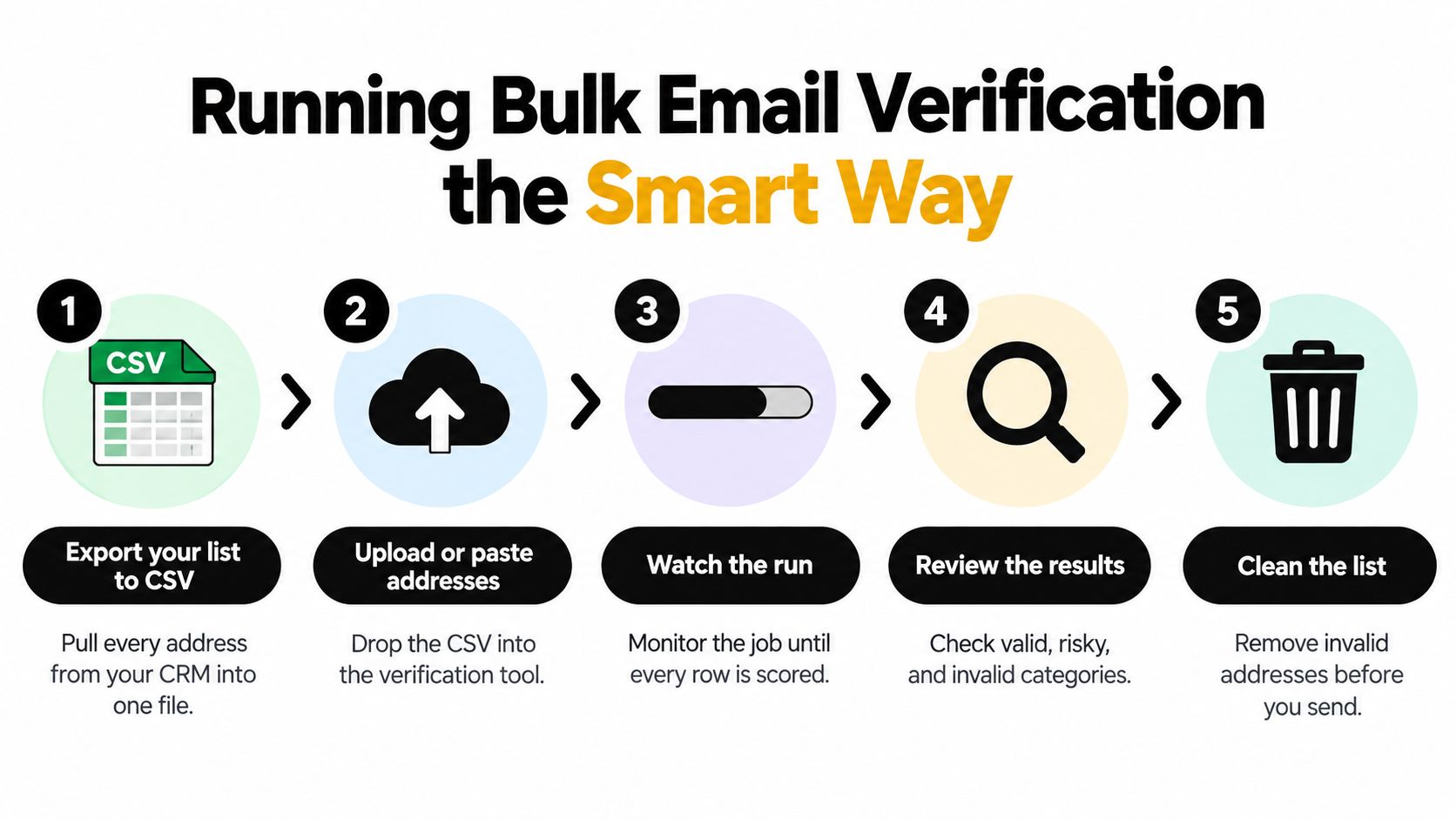
Bulk verification is an operational process, not a button you press at the last minute. Start by exporting the relevant records to a CSV file. Keep the original export untouched, including the source fields and acquisition date, so you can audit decisions and restore data if a suppression rule is too aggressive.
Upload the file or paste the addresses into your verification service. A useful run should return results progressively, allowing you to monitor whether the job is moving and identify unexpected issues before you plan the send. Once the run finishes, review the categories, export the approved segment, and sync only the appropriate records to your email platform.
Know what the checker is actually measuring
A meaningful bulk result should go beyond formatting. Look for checks covering:
- Syntax: Is the address structurally plausible?
- DNS routing: Does the domain appear configured to receive mail?
- SMTP acceptance: Does the recipient server appear willing to accept the address?
- Catch-all behavior: Does the domain accept unknown mailbox names?
- Disposable providers: Is the address associated with temporary use?
- Role accounts: Is it something like a shared team inbox rather than an individual recipient?
- Historical bounce risk: Has the address or segment produced delivery failures?
- Send recommendation: Does the combined evidence support sending, review, or suppression?
Plain-English reasons matter as much as labels. “Risky” is not enough for a marketer deciding whether to suppress a record. “Catch-all domain, SMTP result inconclusive” supports a different decision from “invalid domain” or “disposable provider.”
Consider the practical stakes of a 100,000-contact list. Applying the reported 28% one-year invalid-or-risky rate would imply roughly 28,000 records requiring attention if that list experienced the same average decay described by ZeroBounce. That isn't a prediction for every database, but it shows why a stale export can create a large number of failed or questionable send attempts. The right response isn't to assume every record is bad. It's to validate, classify, preserve the original, and suppress according to evidence.
A service such as CleanMyList supports this workflow by accepting CSV uploads or pasted addresses, returning verdicts with reasons, and allowing aged lists to be checked again without requiring a recurring subscription. For one-off cleanups, pay-as-you-go credits can be more practical than paying for an ongoing plan you won't use between campaigns. The important requirement is operational control, not a particular pricing model.
Before a major send, re-run lists that have materially aged, especially if they contain imported leads, old event contacts, or records collected through unprotected forms. You can find a more detailed process in this guide to bulk email verification online.
Stopping Bad Addresses at the Signup Door
A list often starts deteriorating at the moment someone submits a form. A mobile visitor intends to enter a Gmail address, misses a character, and taps submit. A bot enters a disposable address that looks syntactically perfect. If your system stores both without checking them, the first campaign becomes the moment you discover the problem.
Real-time validation changes that sequence. A lightweight form integration can inspect the address while the visitor is signing up, flag a typo or suspicious provider, and ask the person to correct it before the record reaches your CRM. That's more efficient than importing bad data and trying to identify its origin months later.
Combine validation with confirmed opt-in
Validation alone can't prove that the person owns the address or wants your messages. Confirmed opt-in adds that human confirmation step. The subscriber submits an address, receives a confirmation request, and enters your active audience only after completing it. This can reduce fraudulent and mistyped submissions, although it also introduces friction and may reduce immediate list growth.
Use the two controls for different jobs:
- Real-time validation: Screens technical and risk signals at entry.
- Confirmed opt-in: Confirms control of the inbox and intent to subscribe.
- Form safeguards: Limit automated abuse and make correction easy.
- Source tracking: Preserve the form, campaign, or partner that created the record.
There's a privacy trade-off in real-time checking. It minimizes the need to store unverified addresses in your own database, but it transmits those addresses continuously to the validation system. Before implementation, check where processing occurs, what the provider retains, how logs are handled, and whether your legal basis and notices match the workflow.
Teams that qualify signups before routing them to sales can also review this resource on scoring inbound leads with CapyScout. The same principle applies to newsletter forms and ecommerce accounts: stop questionable data at the point of entry, then document what happened so users aren't forced through confusing retries.
What to Do With Catch-All, Role, and Unknown Results
The hardest records aren't obvious failures. They're addresses that pass one layer and raise concerns at another. A catch-all domain may accept mail for almost any mailbox name. A role account may belong to a team such as support or sales. A disposable address may technically receive a message while offering little long-term value. Historical bounce behavior can make an apparently valid address a poor sending choice.
Separate four outcomes that are often collapsed into one label:
- Syntactically valid: The address follows the expected format.
- Technically deliverable: The domain and mailbox checks suggest that mail may be accepted.
- Acceptable for sending: Your policy allows the risk based on source, consent, history, and segment.
- Likely to reach the inbox: The address and your sending practices support inbox delivery, which technical validation alone cannot guarantee.
This distinction matters because authenticated mail can still be filtered. A 2025 worldwide deliverability benchmark reported that roughly one in six legitimate marketing emails failed to reach the inbox, with Microsoft showing a 75.6% inbox-placement rate in that study. The 2025 deliverability benchmark report supports a cautious interpretation of every technical pass.
| Verdict | Risk Level | Recommended Action |
|---|---|---|
| Valid, DNS-routable, and high-confidence | Lower | Send if consent, source, and engagement policies are satisfied |
| Catch-all or role account | Moderate | Segment, review the source, and consider a controlled test |
| Temporary error or unknown | Unclear | Quarantine with the reason and timestamp, then recheck |
| Disposable provider | High | Suppress for ordinary marketing unless the use case specifically permits it |
| Invalid domain or mailbox | Critical | Suppress immediately and preserve the failure reason |
Aggressively deleting every uncertain address can remove people who are real but difficult to verify. Quarantine is the better default for many teams. Place ambiguous records in a separate cohort, keep them out of ordinary sends, and use a controlled confirmation or re-engagement workflow at low volume. If they respond or confirm, update the record with that evidence. If they fail again, suppress them.
You can review the specific behavior of catch-all addresses in this guide to catch-all email addresses. The policy should be explicit: clear invalids are suppressed, high-confidence valid records may send, and uncertain records require a reasoned review rather than an automatic pass.
Using Bounce Data to Keep Your List Healthy
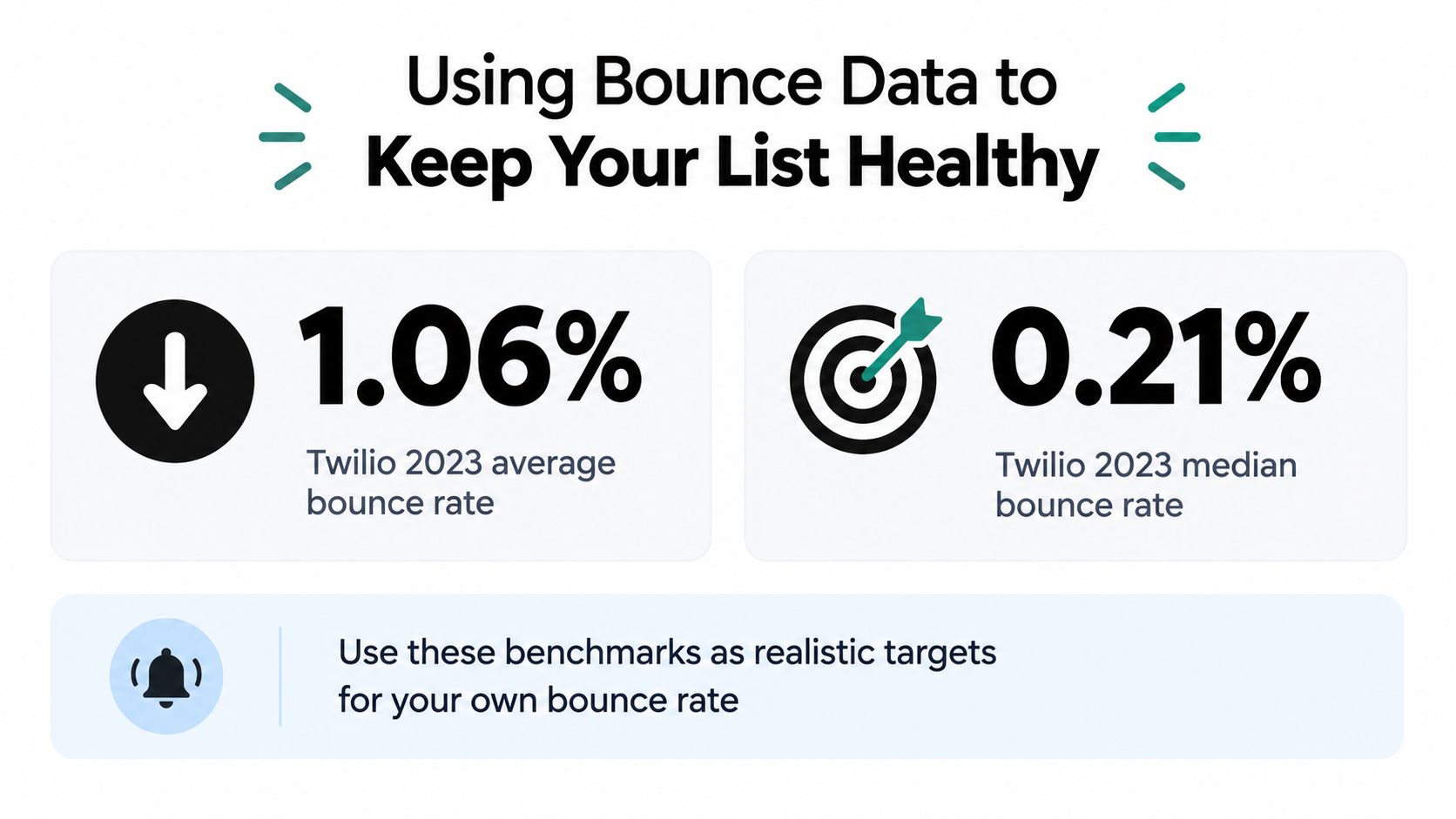
The verification report predicts risk. The bounce report tells you what happened after you sent. Twilio's 2023 Email Marketing Benchmark Report found an average bounce rate of 1.06% and a median of 0.21%. Those figures provide useful reference points, but your own campaign history should determine how strict each source and segment needs to be.
A practical operating range treats below 2% as normal, 2% to 5% as a warning range, and above 5% as critical. Calculate hard bounces as permanent failures divided by accepted send attempts. Suppress permanent failures immediately, then investigate the source rather than repeatedly retrying the same records.
On a campaign of 50,000 messages, a 2% bounce rate represents 1,000 failed deliveries, while a 0.21% rate represents about 105. That is a difference of 895 delivery attempts. The calculation makes the operational value of list quality easier to see, but it still doesn't mean every campaign should match the benchmark.
After each send, segment permanent failures by:
- Acquisition source: Form, import, event, partner, or sales entry.
- Acquisition age: Recent records versus older records.
- Domain: Consumer providers, business domains, and unusual domain groups.
- Validation verdict: Valid, risky, unknown, or invalid before sending.
A single SMTP probe can't prove that a message will be accepted later. Providers can accept a connection and reject the message afterward, or change their behavior when traffic patterns shift. Compare predicted verdicts with actual bounces, then adjust suppression and quarantine rules based on observed false positives and false negatives. That feedback loop is more useful than claiming a universal validation accuracy.
Your Ongoing Email Validation Routine
Email validation works best as a recurring operating rhythm. Check every new address at signup, protect the original database during bulk cleaning, recheck materially aged lists before major campaigns, and keep ambiguous results in a review cohort instead of mixing them with approved recipients.
Use a simple routine that someone on the team can run without interpretation:
- Validate at signup: Check each address before it enters the active database.
- Clean before campaigns: Run a bulk review before important sends and export a controlled send segment.
- Monitor bounce data: Compare hard bounces with the 1.06% average benchmark from Twilio's report, while treating your own history as the more relevant control.
- Suppress repeat failures: Remove permanent failures promptly and investigate the source that created them.
- Repeat on schedule: Review older lists regularly instead of waiting for a campaign to fail.
Privacy deserves a place in that checklist. Ask any verification provider whether raw uploads are stored, how long files and logs persist, whether encryption is used, where processing occurs, whether subprocessors are involved, and whether you can delete data on demand. Bulk cleaning creates a larger exposure window because an entire file may be uploaded, while real-time checks transmit addresses continuously. Neither approach is automatically private without clear retention and processing controls.
Also separate validation from compliance and reputation. Authentication alignment, complaint monitoring, consent records, suppression management, and engagement still matter after an address passes technical checks. A clean list is a momentary result. A healthy program combines prevention, periodic rechecks, quarantining, and post-send evidence.
CleanMyList lets you upload a CSV or paste addresses, review verdicts with plain-English reasons, export a clean send segment, and recheck aged lists without a subscription. Visit CleanMyList before your next campaign, preserve your original data, and turn your bounce report into the feedback loop that keeps future sends safer.