
You've got a CSV export that looks ready to send. The columns line up, the addresses appear familiar, and the file opened without errors. Then the campaign goes out, hard bounces rise, inbox placement weakens, and your reporting becomes difficult to trust. A clean-looking spreadsheet can still contain stale accounts, typos, abandoned domains, role addresses, and mailboxes that no longer exist.
A CSV email list isn't a finished asset. It's a snapshot of email data at one point in time. Preparing it properly, checking it through multiple validation layers, and re-verifying it throughout its lifecycle protects deliverability far better than treating cleanup as a one-time upload task.
Table of Contents
- The Hidden Reality of Email List Decay
- Formatting and Preparing Your CSV File
- Running the Three Layers of Verification
- Evaluating Verification Safety and Privacy
- Interpreting Results and Cleaning the Data
- Building a Long-Term List Hygiene Schedule
The Hidden Reality of Email List Decay
A CSV can pass yesterday's checks and still fail during next month's campaign. People change jobs, companies migrate domains, small businesses abandon inboxes, and providers disable accounts after prolonged inactivity. The address stays in the file while its ability to receive mail disappears.
Email verification therefore belongs in the list's lifecycle, not at the end of a one-time import. Independent 2026 reporting found at least 23% annual decay, with historical figures of 28% in 2024, 25% in 2023, 22% in 2022, and 23% in 2021. The same report found that only 62% of submitted addresses were valid (ZeroBounce's email list decay reporting). An old export can become a deliverability risk even when it was collected lawfully and performed well at the time.
That 62% result does not define every company's list quality. It does show why a large CSV needs inspection before activation. Verification should identify which records require action and establish a baseline for later checks.
Why stale rows cause campaign problems
An invalid address creates more than one failed delivery. A cluster of bad rows can raise bounce rates, weaken sender reputation, and distort campaign reporting. A team may blame subject lines or declining engagement when the audience file has deteriorated.
Historical benchmark reporting puts the average bounce rate at 2.33% across industries, based on 4.4 billion messages sent in 2023 by active senders with 500 or more contacts (Cirrus Insight's B2B email marketing statistics). Other summaries report average rates from 1.98% to 2.57%, describe under 2% as generally healthy, and treat above 5% as critical. Use these figures as diagnostic context, not as a substitute for your own campaign history and mailbox-provider feedback.
Practical rule: Treat every exported CSV as dated data. The older the file, the less confidence you should place in its previous validation result.
A verification scan answers, “What did this address look like when checked?” It cannot confirm that the address will remain safe for a send next month. Rechecking after inactivity, before major campaigns, and on a recurring schedule turns CSV verification into ongoing protection against natural list decay.
Formatting and Preparing Your CSV File
Verification tools can't fix a badly structured file before they read it. Spend a few minutes preparing the CSV, and you'll avoid upload failures, mismatched fields, duplicate checks, and confusing result exports.
Start with a clean email column
Open the file in a spreadsheet editor or text editor and identify the column containing email addresses. Use a clear header such as Email, keep one address per row, and remove merged cells. If your campaign tool needs names or tags, place them in separate columns such as First Name, Last Name, and Tags.
Remove columns that don't belong in the verification workflow, especially notes, internal comments, formulas, or unrelated customer data. A smaller file is easier to inspect and makes field mapping less error-prone. If you need help opening the file safely before editing it, use this guide to open a CSV file.
Remove spreadsheet problems before upload
Check for leading or trailing spaces around addresses. A row that looks correct visually may contain hidden whitespace that causes a parser or verification service to reject it. Also inspect quotation marks, line breaks inside cells, unusual characters, and rows that contain multiple addresses.
Save a working copy before making changes. Then apply this preparation sequence:
- Preserve the original: Keep an untouched export so you can compare corrections and restore missing context.
- Standardize headers: Use simple, recognizable names and make sure the first row is clearly a header.
- Normalize addresses: Remove accidental spaces and convert inconsistent capitalization where your workflow requires it.
- Deduplicate rows: Keep one record per email address before spending verification credits.
- Check row alignment: Confirm that names, tags, and other fields remain attached to the correct address.
- Export as CSV: Don't upload a proprietary spreadsheet format if the verification workflow expects comma-separated values.
Deduplication deserves special attention. Duplicate addresses can waste processing capacity and create repeated contacts in downstream systems, even if an importing platform later suppresses them. Decide which duplicate record to retain using a consistent rule, such as keeping the row with the latest consent or most complete profile.
A clean file should be easy to explain. If nobody on the team can say which column is authoritative, the CSV isn't ready for a bulk scan.
Running the Three Layers of Verification
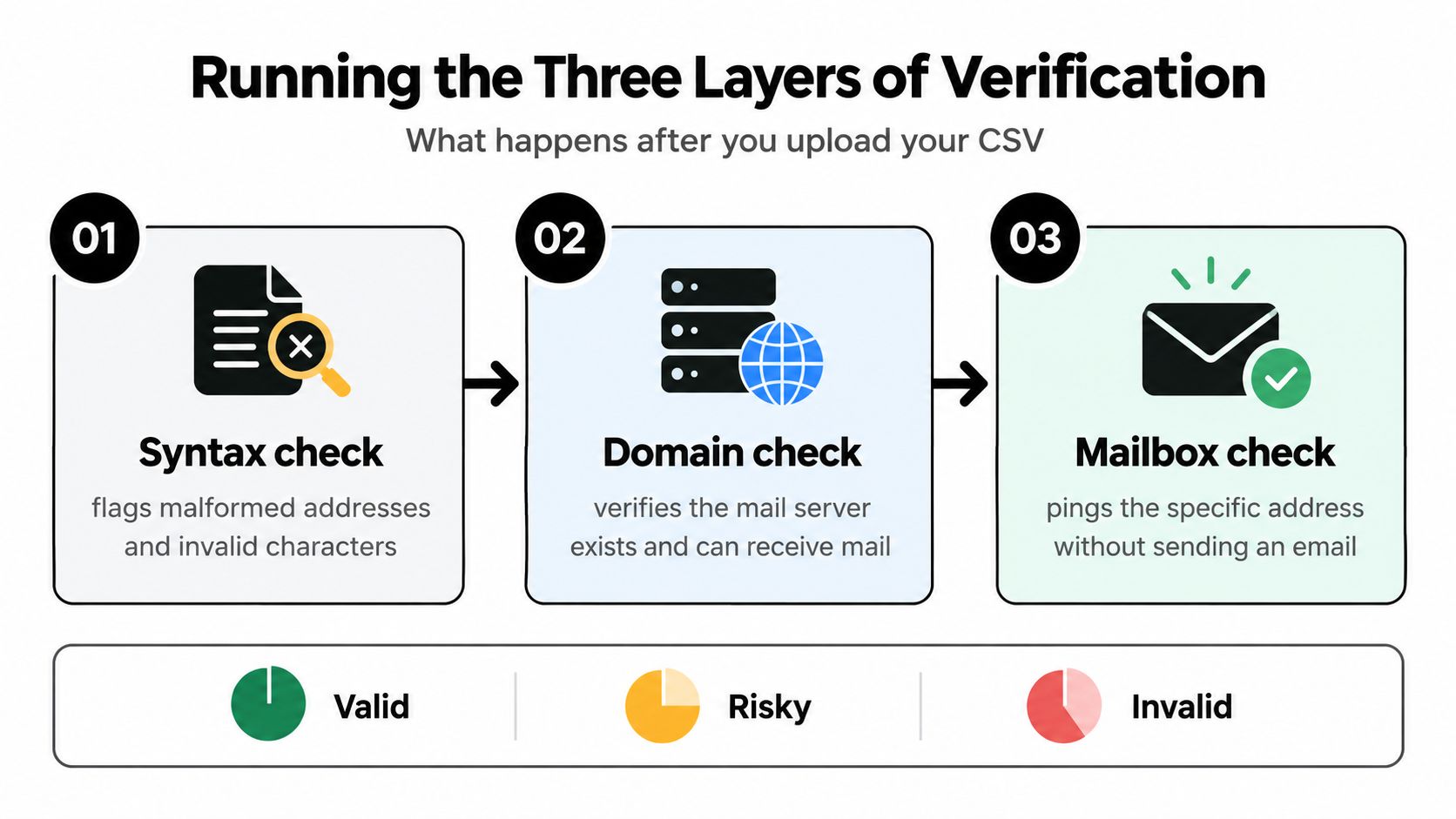
A CSV scan should follow the address through its lifecycle, not stop at a green syntax result. New typos, closed mailboxes, and changing domain behavior can erode a B2B list over time, so verification works best as a recurring defense against natural list decay.
Layer one checks the address structure
Syntax validation identifies malformed addresses, invalid characters, missing components, and obvious formatting errors. It catches a missing @, a broken domain structure, or accidental spaces. This check is quick, but it only confirms that the address follows a recognizable pattern.
Typos remain a costly failure mode. One analysis estimates that roughly 2% to 5% of collected addresses contain a typo, so 10,000 signups could lose 200 to 500 contacts unless errors are corrected during capture or before sending (AOFIRS email verification analysis).
Layer two checks the receiving domain
Domain and MX validation checks whether the domain has a mail system configured to receive messages. It removes dead or misspelled domains that pass syntax checks. A valid MX record still does not confirm that a particular person's mailbox exists, so treat this result as an intermediate signal.
Layer three probes mailbox existence and risk
SMTP mailbox probing checks whether a specific address appears to exist without sending a marketing email. Results can remain uncertain when providers use catch-all behavior or hide mailbox status. Risk classification should therefore account for disposable domains, role accounts, catch-all domains, and other warning signals.
Run the checks in sequence: syntax and domain validation, SMTP mailbox probing, then risk classification. This order prevents deeper checks from consuming resources on addresses that already fail basic requirements. For a closer explanation of how email validation works, review the underlying verification process before setting your CSV workflow.
The output should preserve uncertainty. Mark addresses as invalid, risky, or unknown where appropriate, then schedule another scan as the list ages rather than treating verification as a one-time cleanup.
Evaluating Verification Safety and Privacy
Some teams avoid SMTP verification because they assume it sends a message to every address. That assumption confuses mailbox probing with email delivery. A responsible checker can communicate with the receiving mail system to evaluate signals without sending a campaign email or placing a message in the recipient's inbox.
That distinction matters for sender reputation. Verification shouldn't create opens, clicks, complaints, or unwanted mail. It should also make uncertainty visible instead of labeling every ambiguous response as safe.
Questions to ask before uploading a file
Review the provider's technical and privacy documentation before processing customer, subscriber, or prospect data. Look for clear answers to these questions:
- Does it send email: The service should state whether checks happen without sending messages.
- How is data protected: Look for encryption during transfer and storage.
- How long are files retained: Automatic deletion reduces the exposure window for uploaded lists.
- Who can access results: Understand account permissions, exports, and support access.
- How are uncertain addresses labeled: Catch-all and blocked responses should not be presented as guaranteed deliverable.
- What compliance controls exist: Your own consent, retention, and deletion obligations still apply.
Industry guidance describes validation signals such as syntax, DNS/MX, disposable-domain detection, typo detection, and optional SMTP verification, with some services explicitly stating that SMTP checks happen without sending email (Sidemail's email list validation guide).
For a practical review of reputation concerns, see whether checking is safe for your reputation. Verification is a data-processing step, not permission to email everyone in the file. Continue to respect consent records, suppression lists, regional privacy requirements, and your email provider's rules.
Interpreting Results and Cleaning the Data
A verification export becomes useful only when every verdict produces a defined action. Do not import every address marked “not invalid” into your sending platform. Separate confirmed deliverable addresses from uncertain records, possible corrections, and contacts that must stay out of the campaign.
Keep the original export unchanged, then create a working copy with fields such as Action, Correction, and Campaign Eligibility. Retain the verifier's reason code beside each verdict. It helps distinguish a fixable typo from a disposable domain, a role account, or a mailbox that could not be confirmed.
Use verdicts to determine the next action
| Verdict Status | Definition | Recommended Action |
|---|---|---|
| Valid | The address passes the available structural, domain, and mailbox checks. | Keep it for the appropriate audience, subject to consent and suppression rules. |
| Invalid | The address is malformed, tied to an unusable domain, or fails mailbox checks. | Remove it from the send file and record the reason. |
| Risky | The address may involve catch-all behavior, a disposable provider, a role account, or an inconclusive response. | Isolate it, review the campaign purpose, and avoid automatic inclusion in high-volume sends. |
| Typo suspected | The address resembles a valid address but contains a likely spelling or formatting error. | Correct it only when the intended address can be confirmed. |
| Role account | The address belongs to a function such as sales, support, or info rather than an individual. | Keep only when the role address is appropriate for the campaign and permission is clear. |
| Disposable | The domain is associated with temporary inboxes. | Exclude it from durable subscriber or customer segments. |
Correct, don't guess
A typo correction can recover a legitimate contact, while an unverified guess can route mail to the wrong person. If jane@company.co appears where the customer's confirmed address is jane@company.com, check signup context, CRM history, or a direct permission-based interaction before changing the record. Similar-looking domains should not be rewritten automatically.
After cleanup, map the approved records back to your CRM or email service provider. Preserve consent dates, acquisition source, tags, and suppression status. Keep the verification outcome and cleanup date too, so a later review can show which rows were checked and what changed. Send only to the approved segment, not to the full export.
Set a bounce threshold based on your normal performance and the quality of the source list. If a campaign rises above that range, pause the next send and investigate the affected rows, including their source, age, prior engagement, and validation history. A clean result today does not make an old CSV permanently safe. Addresses change, domains expire, and inactive mailboxes become risky, so each verification result belongs to a wider data lifecycle rather than a single upload.
Building a Long-Term List Hygiene Schedule
A CSV that passed verification last quarter may already contain risky addresses today. B2B lists decay at about 22% annually, according to Mailtester's B2B email list decay guidance. Treat verification as a recurring control, not a one-time upload. The right schedule depends on contact turnover, acquisition method, consent quality, and campaign risk.
Match the check to the list lifecycle
Use different checks at each stage of the data lifecycle:
- At signup: Add inline validation to catch obvious typos and fake entries before they enter the database. A response ideally under 500 milliseconds keeps the capture process from becoming a barrier.
- Before a major campaign: Verify the exact send segment, particularly when it comes from an older CSV export, event registration, acquisition campaign, or manual sales workflow. Do not recheck only a small sample if the source or age of the file is uncertain.
- After dormancy: Re-check contacts that have not engaged for 6 to 12 months, then place uncertain results in a separate segment rather than forcing them into the active audience.
- During ongoing operations: Validate new addresses as they arrive and run periodic bulk scans against stored data. Continuous checking may cost $0.003 to $0.008 per contact per month, while removing hard bounces and inactive addresses can reduce delivery costs by up to 35% over six months in re-engagement scenarios.
Record the verification date, verdict, source, consent status, and any manual decision. That history lets the team distinguish a newly risky address from one that has repeatedly failed checks. It also prevents an old CSV from being treated as permanently safe.
Double opt-in reduces bad data at signup, although stricter controls can slow list growth. Independent reporting says nearly 40% of senders use double opt-in, reflecting a shift toward preventing invalid records instead of relying only on later cleanup (Clearout's email data quality benchmark). A practical setup combines typo checks at capture, confirmation where appropriate, and scheduled reviews of the stored database.
Before a sensitive campaign, run an email blacklist checker alongside address verification. This can reveal reputation problems that syntax, DNS, and mailbox checks cannot. A clean CSV does not correct weak authentication, complaint patterns, or an already damaged sending domain.
CleanMyList lets teams upload a CSV or paste addresses, review verdicts, and export an approved file for their email platform. Its checks cover syntax, DNS, SMTP mailbox existence, catch-all behavior, disposable providers, role accounts, historical bounce reputation, and a final send-or-skip recommendation. Re-run aged files instead of trusting their previous results.
Clean your next CSV before it reaches your sending platform with CleanMyList. Review each verdict, export the approved segment, and schedule re-checks so stale addresses do not quietly affect the next campaign.