
You've cleaned the list, checked for the @ symbol, and confirmed that every address looks valid. Then the campaign goes out and the bounce rate is still painful. The problem often isn't the text of the address. It's the infrastructure behind the domain.
Email address domain validation checks whether the domain can receive mail before your system spends time on slower mailbox checks or sends a message. That hidden DNS layer is where many hygiene workflows either protect sender reputation or put it at risk.
Table of Contents
- Why Syntax Checks Fail Your Email Campaigns
- The Mechanics of DNS and MX Record Probing
- Beyond MX Records, SPF, DKIM, and DMARC Signals
- Domain Validation Versus Mailbox Verification
- Implementation Patterns and Timeout Thresholds
- Protecting Sender Reputation with Clean Data
Why Syntax Checks Fail Your Email Campaigns
A syntax validator can confirm that alex@example.com has a recognizable structure. It can check for an @ symbol, a plausible domain name, and an acceptable top-level domain. Those checks are useful, but they only inspect the characters, not the destination.
An address can be perfectly formatted while its domain has expired, lost its mail configuration, or stopped accepting inbound messages. A regex pattern won't detect that. If your platform treats syntax as the final verdict, it may pass addresses that are impossible to deliver to.
That distinction is central to email address format validation. Format validation answers, “Does this string resemble an email address?” Domain validation answers, “Does the domain behind this string have working mail infrastructure?”
The cost of trusting the string
Suppose a subscriber entered an address at a company domain that was later retired. The address still contains a local part, an @ symbol, and a valid-looking domain ending. Your campaign system may accept it, queue it, attempt delivery, and only then discover that the destination cannot receive mail.
The operational consequences are predictable:
- More failed deliveries: Your sending platform spends resources processing addresses that should have been filtered earlier.
- Less reliable campaign reporting: Invalid infrastructure gets mixed with genuine subscriber inactivity, making engagement data harder to interpret.
- Reputation pressure: Repeated delivery failures can weaken the signals mailbox providers use when evaluating future mail.
- Wasted acquisition value: A lead or customer record that can never receive mail still consumes space in your CRM and audience tools.
Domain validation became a separate hygiene layer because syntax alone misses the question that matters most before sending: is there a reachable mail destination for this domain?
What the data reveals
A 2026 verification study covering 10,241,981 email checks across 293,934 recipient domains found that 12.3% of all addresses were invalid, while only 0.3% of checks failed specifically at the DNS level because the domain was missing MX records. The distinction is important because broken or missing DNS isn't the only reason an address fails. Broader invalid-address conditions account for many failures, so DNS validation should be treated as an essential filter, not a complete mailbox verdict. (TruList's advanced reporting)
Practical rule: A valid-looking address is an input format, not proof that the destination exists.
The Mechanics of DNS and MX Record Probing
A syntactically correct address can still point to a domain with no working mail route. DNS validation checks that hidden infrastructure before an SMTP connection or message delivery attempt consumes time and creates avoidable reputation risk.
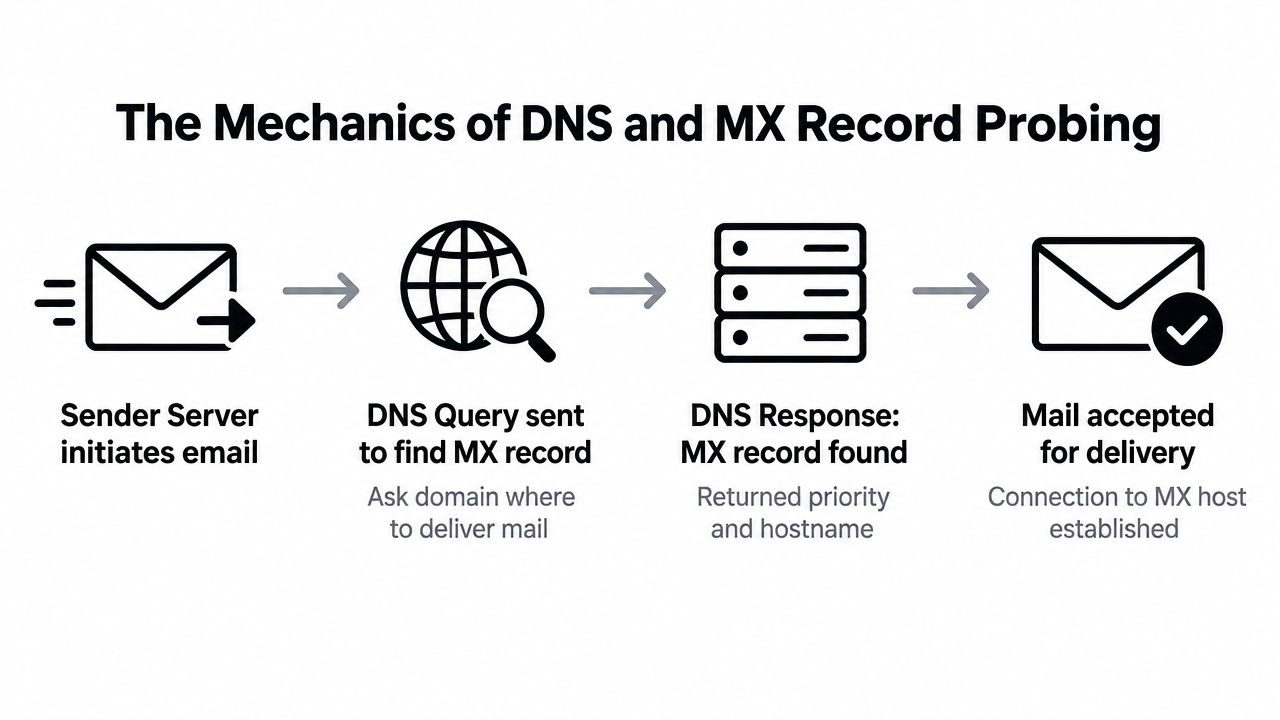
The Domain Name System, or DNS, maps a domain to the services operating behind it. For inbound email, the key entry is the Mail Exchange record, usually called an MX record. It identifies the mail hosts that a sending system should contact for that domain.
A practical validation flow has four stages:
-
Parse the address. Separate the local part before the
@from the domain after it. Reject malformed input before starting network requests. - Query DNS for MX data. Ask the domain's DNS infrastructure whether it publishes mail exchange information.
- Read the response. If MX records exist, capture the mail hosts and their priority order.
- Classify the domain. Mark the result as configured, unavailable, ambiguous, or requiring a fallback check.
MX priority determines the order in which hosts should be attempted. A lower value generally indicates the preferred host, while another host can provide fallback service. Domain validation does not need to send a message to use this information. It only needs to establish whether the domain advertises a plausible inbound route.
Why DNS failures need classification
A timeout, an empty answer, and an explicit refusal represent different operational conditions. A temporary timeout may come from network conditions, resolver behavior, or an overloaded authoritative server. A domain that clearly publishes no usable mail route should receive a different result.
Validation guidance commonly places the MX lookup immediately after syntax parsing and uses a short timeout, around 3 seconds, because DNS can fail intermittently. The same guidance describes healthy MX lookup timeout rates as under 1%, 1-3% as concerning, and above 5% as broken. (BounceZero's 2026 email deliverability benchmarks)
Those thresholds support infrastructure monitoring, not automatic rejection of every timeout. Retry transient failures, defer uncertain results, and reserve rejection for conditions that provide a clear negative signal. Keeping DNS validation separate from SMTP probing also prevents slow or inconclusive mailbox checks from blocking the entire hygiene pipeline.
The null MX edge case
A null MX record explicitly states that the domain does not accept email. That is a strong negative signal, so the validator can reject addresses at that domain without waiting for an SMTP connection to fail.
A domain with no MX record requires more care. Some mail systems may use A-record fallback, treating the domain's general address record as a delivery destination. An MX-only implementation can therefore create false negatives if it treats every missing MX record as proof that delivery is impossible. (Email address deep dive from LaSans)
Classify results as valid MX, null MX, missing MX with possible fallback, or unresolved or timed-out DNS. Downstream systems can then choose whether to skip, retry, defer, or continue to mailbox-level verification.
For a practical explanation of this lookup layer, see MX record verification.
Beyond MX Records, SPF, DKIM, and DMARC Signals
An MX record answers a narrow question: can this domain advertise a destination for inbound email? It doesn't establish that the domain is trustworthy, that the specific sender is authorized, or that messages claiming to come from it are authentic.
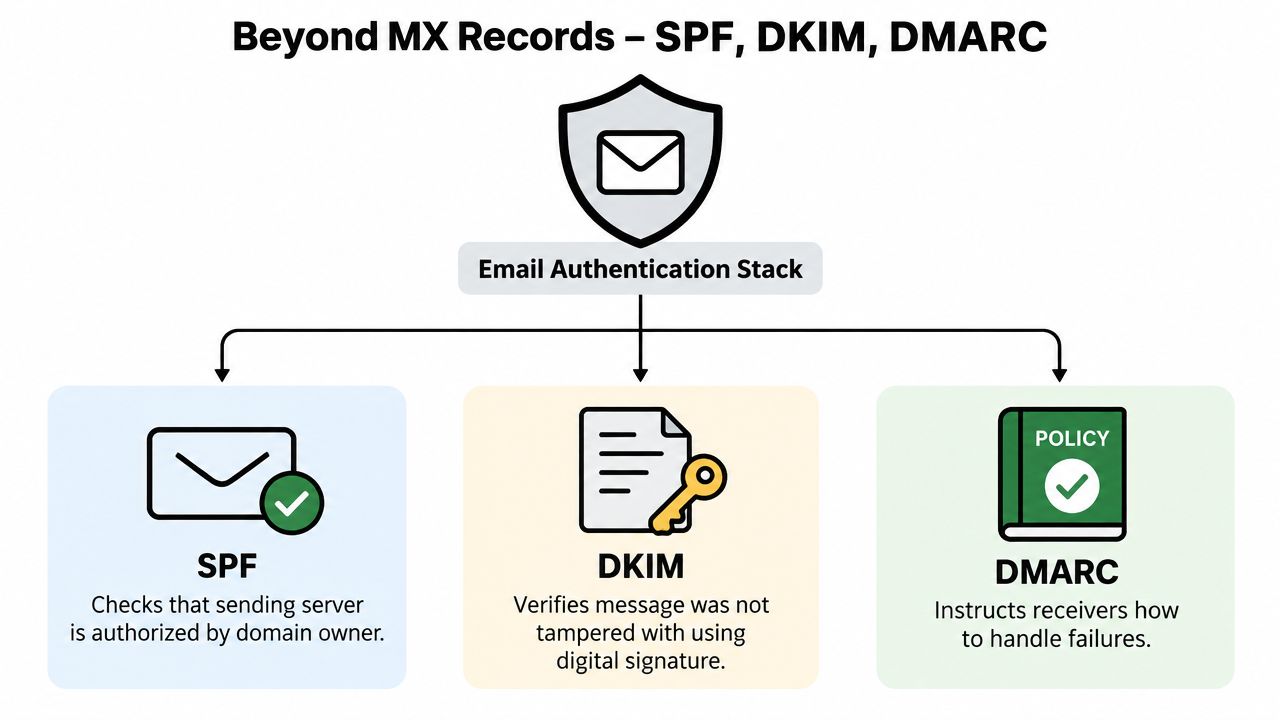
That's where outbound authentication signals enter the picture. SPF, DKIM, and DMARC are DNS-backed mechanisms that help receiving systems evaluate whether mail is authorized and whether the visible From domain aligns with the authentication results.
What each signal contributes
SPF, or Sender Policy Framework, publishes a policy identifying servers permitted to send mail for a domain. A validator can inspect whether that policy exists and whether it appears structurally coherent, but SPF alone doesn't prove that a particular mailbox exists.
DKIM, or DomainKeys Identified Mail, uses a cryptographic signature associated with the sending domain. The receiving system checks the public key published in DNS to determine whether the message signature can be validated and whether the signed content remained intact in transit.
DMARC, or Domain-based Message Authentication, Reporting, and Conformance, builds on SPF and DKIM. It gives a domain owner a way to define how receiving systems should handle authentication failures and whether the visible From domain aligns with the authenticated domain.
| Signal | Primary question | What it doesn't prove |
|---|---|---|
| MX | Where can inbound mail be delivered? | That a named mailbox exists |
| SPF | Is this sending service authorized? | That every address at the domain is active |
| DKIM | Can the message signature be verified? | That the recipient will engage |
| DMARC | How should authentication failures be handled? | That the domain is free from every form of abuse |
Use authentication as context, not a shortcut
For list hygiene, these records are supporting evidence. A domain with working MX records and coherent authentication may look actively maintained, but that still doesn't validate person@domain.example as a real mailbox. Conversely, a small organization may have imperfect authentication while operating legitimate recipient accounts.
This matters for B2B teams and ecommerce brands. A domain can be parked, disposable, abandoned, or configured for mail without offering useful recipients. Authentication checks can help identify suspicious or poorly maintained infrastructure, but they shouldn't replace mailbox-level signals or business rules.
A healthy domain is not automatically a healthy contact.
A mature pipeline records these outcomes separately. Store the MX result, authentication observations, disposable-provider classification, and mailbox result as distinct fields. That makes the final decision explainable instead of reducing every address to an opaque “valid” label.
Domain Validation Versus Mailbox Verification
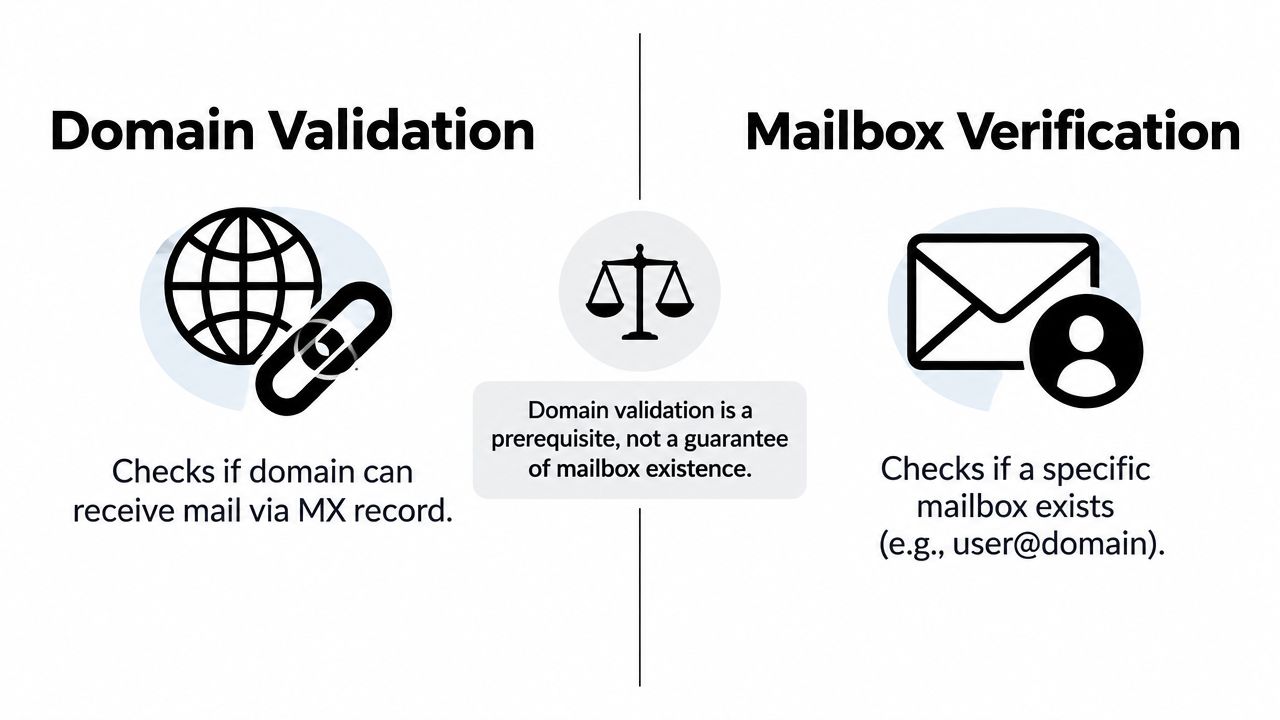
Domain validation and mailbox verification operate at different levels. Confusing them is one of the fastest ways to overstate the quality of a cleaned list.
Domain validation evaluates the destination named after the @. It checks whether the domain publishes mail infrastructure, with MX lookup as the central signal. Mailbox verification evaluates the complete address, including the local part before the @, and uses additional signals such as SMTP probing or historical reputation checks.
A useful comparison
| Process | It can tell you | It can't tell you |
|---|---|---|
| Domain validation | The domain has, lacks, or explicitly refuses inbound mail infrastructure | Whether john.doe exists on that domain |
| Mailbox verification | Whether the specific address appears accepted, rejected, or ambiguous during deeper checks | Whether the person will read or respond to your message |
| Reputation analysis | Whether prior delivery behavior creates additional risk | Whether current DNS alone guarantees future delivery |
The MX record only proves domain-level reception. It doesn't prove that a specific mailbox exists, and it doesn't prove that the server will accept a message for that mailbox. Reliable validation guidance makes this separation explicit and recommends additional signals for mailbox-level decisions. (ZTools' email validator guide)
Why the order matters
Running SMTP probing against every raw address is inefficient. Start with syntax, then remove domains that clearly cannot receive mail, then reserve mailbox-level checks for addresses that pass the infrastructure gate. This reduces unnecessary connection attempts and keeps your verification workflow focused on addresses with a plausible delivery path.
SMTP probing also has its own ambiguities. Some servers reject unknown recipients clearly. Others delay their response, block probing behavior, or accept all recipients at the connection stage.
Catch-all domains need a separate status
A catch-all, or accept-all, domain accepts mail for local parts whether or not those mailboxes are individually provisioned. An SMTP probe may therefore receive a positive response for an address that nobody monitors.
Treat catch-all as ambiguous, not as a clean pass. A useful verdict can say that the domain is configured and the server accepts arbitrary recipients, while avoiding the stronger claim that the mailbox is confirmed. That nuance matters for outbound sales lists, where a false positive can waste repeated sending attempts and create poor engagement signals.
The result should preserve the distinction: domain valid, mailbox confirmed, mailbox rejected, or mailbox uncertain. A single binary field throws away the information your sending and suppression rules need.
Implementation Patterns and Timeout Thresholds
Reliable domain validation depends on explicit handling of uncertainty, not one clever DNS query. Large lists include expired domains, slow resolvers, malformed records, catch-all servers, and domains that depend on fallback behavior. Store a distinct state for each condition so later sending and suppression rules can act on evidence rather than a vague pass or fail.
A practical processing sequence
Use a staged workflow:
- Normalize carefully. Trim accidental whitespace, retain the submitted value for audits, and parse the domain without altering the address.
- Run syntax checks. Reject malformed strings before starting DNS work.
- Probe MX records. Record valid MX, null MX, missing MX, timeout, and resolver errors separately.
- Apply fallback policy. Decide whether the use case permits A-record fallback when MX is absent. Document that decision instead of hiding it in a default.
- Continue to deeper checks. Send only plausible domains to SMTP probing, catch-all analysis, disposable-provider detection, and reputation evaluation.
- Return an explainable verdict. “Skipped because null MX” provides more operational value than “invalid.”
This order puts inexpensive, broad filters ahead of slower address-specific checks. It also keeps retries safe. A timeout can enter a retry queue, while a null MX result usually supplies a clear reason to suppress the address.
Set timeouts for throughput, not wishful certainty
DNS lookup timeouts should be short enough that one unresponsive domain cannot stall a batch. Use operational thresholds based on your resolver behavior, and monitor the share of requests that time out rather than treating every delayed response as invalid.
A sound design can retry transient failures, query more than one resolver, and expose an “unknown” state when the evidence is incomplete. Keep timeout handling separate from permanent rejection.
Implementation rule: Never turn a network timeout into a permanent rejection without a retry or a documented policy.
Decide whether to manage infrastructure yourself
Running resolver and SMTP layers in-house gives an engineering team control over caching, concurrency, retry logic, observability, and data retention. It also adds maintenance. The team must handle resolver failures, provider throttling, privacy controls, and the risk that aggressive probing makes verification traffic appear abusive.
An API or bulk service moves that maintenance to another provider. Teams can upload a CSV, receive reasoned verdicts, and connect results to a marketing platform without operating DNS probing servers. For application workflows, an email address validation API can provide the integration point while signup and suppression logic remain in the application's own systems.
The choice depends on volume, compliance requirements, latency needs, and how much deliverability infrastructure the team wants to own. Separate DNS validation from SMTP probing in either design. DNS establishes whether a domain has a plausible mail path, while SMTP probing consumes more time and produces less certain mailbox-level evidence. That separation preserves resources and reduces unnecessary verification traffic to remote mail servers.
Protecting Sender Reputation with Clean Data
A campaign can fail before the first message leaves your infrastructure. If the database contains addresses tied to dead domains or domains that explicitly reject mail, those failures become part of your sending history. Removing them before delivery separates preventable infrastructure errors from genuine recipient behavior.
DNS filtering improves list quality, but it does not guarantee inbox placement. Subscribers may disengage, domains may change configuration, and mailbox providers still apply their own reputation and policy decisions. Clean data gives every campaign a stronger starting point because it distinguishes domain-level failures from mailbox and engagement signals.
Make hygiene continuous
A one-time cleaning job fixes the records currently in your database. An operational process stops the next batch of bad data from accumulating.
- Validate at capture: Add real-time checks to signup, checkout, lead forms, and account creation. Block obvious typos and unusable domains before they enter the database.
- Keep raw values: Store the submitted address alongside normalized and evaluated fields. This preserves an audit trail and makes parsing errors easier to correct.
- Store reasons: Record whether an address failed syntax, DNS, null MX, SMTP, catch-all, disposable-provider, or reputation checks.
- Suppress intelligently: A temporary timeout needs a retry path, not an immediate permanent rejection. Suppress clear infrastructure failures and queue uncertain results for another attempt.
- Recheck aging lists: Ownership changes, provider migrations, and inactive addresses can make an old verdict unreliable. Include revalidation in routine list maintenance.
- Monitor your own domain: If campaigns produce unusual failures, run a domain blacklist lookup to see whether the sending domain appears on relevant blocklists.
Keep the verdict readable
Marketing and sales teams should receive a plain-English result rather than raw DNS responses or SMTP codes. Include enough detail for a consistent decision:
| Verdict | Recommended action |
|---|---|
| Domain unavailable | Suppress before sending |
| Null MX | Suppress because the domain explicitly rejects email |
| Domain configured | Continue to mailbox-level checks |
| Catch-all | Treat as uncertain and apply campaign risk rules |
| Temporary timeout | Retry before making a final decision |
| Mailbox rejected | Suppress the specific address |
CleanMyList is one option for this workflow. It accepts a CSV or pasted list and evaluates syntax, DNS, SMTP mailbox existence, catch-all behavior, disposable providers, role accounts, historical bounce reputation, and a final send-or-skip recommendation. The service states that verification does not send email, data is encrypted, and lists are deleted after 30 days. It offers 50 free credits at account start, with bundles beginning at $6. (CleanMyList)
The practical goal is clear: domain validation protects the front door of your sending process. Combine it with mailbox verification, controlled retries, signup checks, and ongoing monitoring. The result is a maintained operational asset, not a database of strings that merely resemble addresses.