
A small sales team exports a few hundred prospects from a free finder, adds them to a campaign, and only then sees the actual limits. Half the addresses are unverified. The daily cap ended the session early. The export contains fewer rows than the search produced. Some results are catch-all domains or role accounts, not dependable personal inboxes.
The problem usually isn't the finder alone. Free credits, reveal rules, verification depth, and export limits determine how much of a list you can use. A lookup can discover an address without proving that a mailbox exists, that a receiving server will accept the message, or that the email belongs in an inbox.
This roundup ranks ten free email lookup tools by what their free tiers let you finish. It covers practical limits, charging behavior, export restrictions, privacy caveats, and the workflow each tool suits best for sales, marketing, outbound, and newsletters. Each finder is paired with a verification step, so you can tell when a free lookup is enough and when a dedicated verifier is the safer next move.
Email remains core infrastructure. The Radicati Group estimated approximately 4.481 billion email users in 2024, with a projection of 4.970 billion by 2028. It also estimated 361.6 billion daily messages in 2024, projected to reach 424.2 billion by 2028. These figures support email lookup as a data-quality function, not just a prospecting shortcut.
Table of Contents
- 1. CleanMyList
- 2. Hunter
- 3. Snov.io
- 4. Apollo.io
- 5. RocketReach
- 6. Lusha
- 7. GetProspect
- 8. Skrapp
- 9. VoilaNorbert
- 10. Anymail Finder
- Top 10 Free Email Lookup Tools Comparison
- Turning a Free Lookup Into a List You Can Actually Mail
1. CleanMyList
A finder can return an address that still fails at send time. CleanMyList focuses on the next decision: whether an address belongs in a mail-ready list. It is a no-subscription, pay-as-you-go bulk verifier. Upload a CSV, paste addresses, or validate one during signup with its one-line widget.
Each address passes through eight signals: syntax, DNS, SMTP mailbox existence, catch-all behavior, disposable providers, role accounts, historical bounce reputation, and a final send-or-skip recommendation. The result includes a plain-English reason. That helps when a catch-all domain or protected server needs review instead of a simple “valid” label.
The free tier includes 50 credits, with no card required. Paid-bundle credits do not expire. That charging rule suits projects that pause between campaigns, unlike monthly finder plans where unused credits can disappear at renewal.
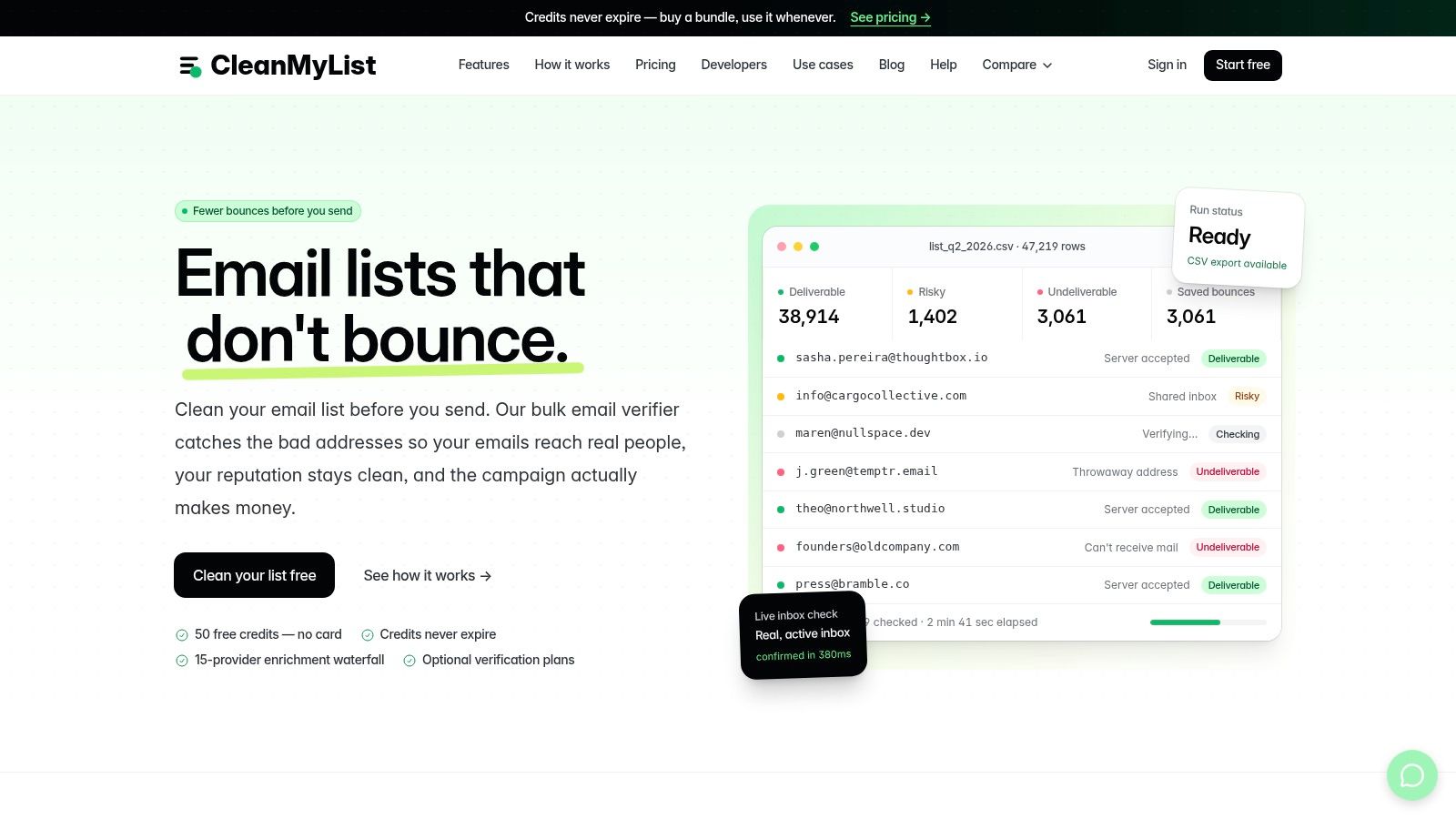
What the free allowance actually lets you finish
Use the free allowance for a controlled verification pass, not for building a large prospect database. Start with a sample from the audience you plan to mail. Compare its verdicts with the finder's results, then separate clear sends from records that need review.
Results stream as processing runs, and the original list remains untouched. The company reports typical processing benchmarks of about one minute for 10,000 addresses and about six minutes for 100,000, with active inbox confirmations seen in about 380 milliseconds. Those product benchmarks are published by CleanMyList, so treat them as operational guidance and test your own list.
Practical rule: A finder result is a lead candidate. A verifier verdict is a sending decision.
CleanMyList does not send verification emails to contacts. Its product information says stored lists are encrypted and uploaded lists are deleted after 30 days. Integrations include Mailchimp, Brevo, Klaviyo, ActiveCampaign, MailerLite, GetResponse, beehiiv, and other email platforms. Bundles start at $6 for 1,000 credits, with larger bundles lowering the per-credit cost.
Where it fits, and where it doesn't
CleanMyList fits newsletter publishers, ecommerce teams, startups, SMB marketers, and outbound operators that already hold a list. Developers can also use it for real-time signup validation or API-based checks.
The trade-off is that some addresses remain risky or inconclusive. Catch-all domains and protected mail systems still require judgment. The product also does not publish a prominent third-party accuracy audit or a large set of customer testimonials, so pilot it against known records before making it part of a standard workflow.
For list hygiene, monitor actual bounce performance after verification. Aggregate benchmark guidance places total bounce rates below 2% in the generally safe range, 2% to 5% in a warning range, and above 5% in a critical range. Use those bounce-rate bands as a monitoring framework, not as a guarantee from any tool.
2. Hunter
Hunter is a practical free option for professional email discovery when you know the person's name and company domain. Its main workflow combines Email Finder, Domain Search, verification, a browser extension, an API, and a Google Sheets add-on. That makes it more useful for steady, light prospecting than for cleaning an existing newsletter database.
The free plan renews with 50 credits per month, and the core tools remain available. Hunter's credit model is easy to understand. A find or verification consumes one credit, so you can estimate usage before running a batch.
The free-tier constraint that matters
Hunter's free tier becomes restrictive when you need a usable export. CSV exports are limited on the free plan, including a cap on results per domain. A search can therefore produce more visible records than you can take into your working spreadsheet.
That makes Hunter strongest for targeted lookups. Search a small group of decision-makers, review the returned evidence, and save only the contacts you can act on. It's less suitable when your workflow depends on exporting a large domain search and cleaning it elsewhere.
For a broader explanation of the difference between finding and checking an address, use this guide to finding someone's email before adding guessed addresses to a campaign.
Best use and verification step
Hunter works well for B2B sales reps, recruiters, and marketers researching company domains. Coverage can be thinner for niche industries, so don't treat a blank result as proof that a person has no professional email address.
Verify every high-value result before sending. Use Hunter's built-in verifier for a first pass, then send a sample through a dedicated verifier if the list includes old records, guessed patterns, or catch-all domains. Hunter is enough for a few carefully selected contacts. It isn't a complete list-hygiene workflow.
If you want to compare similar prospecting products, this comparison of Hunter alternatives gives you a broader shortlist.
3. Snov.io
Snov.io is built for teams that want discovery and outreach in one workspace. It combines person and domain searches with Chrome extensions, LinkedIn capture, verification, a lightweight CRM, sequences, and warm-up utilities.
That breadth is useful for a scrappy sales process. You can find a contact, place the record in a list, and prepare an outreach sequence without moving immediately into another platform. The Chrome extension is especially convenient for website and LinkedIn research.
Credits can disappear before the final result
Snov.io uses a transparent credit model, but the workflow can consume credits faster than expected. Opening company profiles and performing certain prospecting actions may use credits. An “Unknown” result can also cost a credit, which changes the economics of experimentation.
The free tier is therefore best for testing a narrow ICP, not browsing broadly. Pick a company list first. Search only the titles and domains that match your campaign. Record which actions consume credits before asking a teammate to repeat the process.
“Unknown” is not the same as deliverable. It's a reason to review the record, not a reason to send.
Snov.io's bulk and automation features are mainly paid-tier territory. That limits how much of a list you can finish without upgrading, even though the free interface exposes several workflows.
The right verification handoff
Use the built-in verifier for an initial screening, then run the final export through a dedicated service when the list contains old contacts or catch-all results. This free bulk email verifier guide explains why a lookup result should be separated from a send decision.
Snov.io is a good fit for founders and small sales teams that want prospecting, CRM, and outreach together. It's a weaker fit for publishers and lifecycle marketers whose primary need is revalidating a subscriber file rather than building new leads.
4. Apollo.io
Apollo.io makes sense when email lookup is one part of a larger sales workflow. Its platform combines contact and company search, filters, intent data, a Chrome extension, basic sequences, mailbox warm-up, and reporting.
The appeal is convenience. A sales rep can search an account, reveal contact data, organize prospects, and prepare a sequence in one environment. That saves tool switching when the team already works in Apollo.
Free reveals are the bottleneck
Apollo's free access is controlled by reveal credits. Email and phone reveals consume credits, and free reveal volume is limited. The exact rules have changed over time, so check the current account screen before planning a campaign around the allowance.
The credit system can also be confusing for new users. A record may be visible in search without the email being revealed. That distinction matters because a large search result count doesn't equal a large usable list.
Apollo works best when you start with a tightly defined account list. Use filters to narrow the audience before revealing anything. Don't spend free credits browsing records that you wouldn't contact.
Verification before sequence enrollment
Apollo's workflow features don't remove the need for independent validation. Revealed addresses can still be stale, role-based, disposable, or associated with a catch-all domain. Export a small test batch, classify the results, and verify before enrolling contacts in a sequence.
This is especially important because inbox placement and mailbox acceptance are separate outcomes. Validity testing can reduce obvious bounces, but it can't guarantee that a message reaches the inbox. Use Apollo for sales intelligence and workflow management. Use a dedicated verifier for the final send gate.
5. RocketReach
RocketReach is useful when you want to sanity-check coverage for a specific person or company before committing to a paid plan. Search by name, company, or LinkedIn profile, then reveal the available contact data.
The platform separates lookups from exports. A lookup reveals data, while exporting usable records is subject to additional limits. That distinction makes RocketReach less attractive for building a working file on the free tier, even when individual searches return useful matches.
Small allowance, clear test
The free allowance is very small, about five lookups, according to the product plan notes. Failed lookups are generally refunded, while verified data reveals consume lookup credit. Confirm the current RocketReach terms before relying on the allowance, since free-plan rules can change.
Use the available lookups on representative prospects, not easy records you already know. Test a mix of company sizes, roles, and locations. The point is to learn whether RocketReach covers your ideal customer profile, not to assemble a campaign.
RocketReach is a sensible choice for recruiting and high-value sales research. It isn't a practical free bulk finder. Export caps on paid plans also mean that teams should evaluate usable output, not just the number of lookups available.
Verification step
Treat every revealed address as a candidate. Check syntax, domain health, and mailbox status before outreach. For a small number of high-value records, manual review may be enough. For a prospect file or newsletter list, run the file through a bulk verifier and keep uncertain results out of the first send.
6. Lusha
Lusha is a strong fit for LinkedIn-led B2B prospecting, particularly when direct dials matter alongside work emails. Its Chrome extension works across LinkedIn and websites, while the workspace, API, and connectors support more structured sales operations.
The permanent free plan provides 40 credits per month. Lusha shows whether a contact has an email or phone record before you spend credits, which helps you avoid some wasted reveals.
Email credits and phone credits behave differently
Phone reveals consume more credits than email reveals. A phone number can cost five credits, according to the plan notes, so a user researching both channels can exhaust the allowance quickly. The free tier also doesn't include CSV export, which limits how much data you can move into a campaign or CRM.
That makes Lusha better for one-to-one prospect research than for list building. Open a LinkedIn profile, check whether an email is available, and spend credits only on contacts that match your qualification rules.
Lusha is particularly useful for sales teams and recruiters that work directly from browser pages. It's less suitable for newsletter operators, who normally need file-level validation rather than individual reveals.
Verification before export
A revealed work email can still be stale or risky. Verify the address before adding it to a sequence, especially if the contact changed jobs or the company domain uses catch-all behavior. Keep the original prospect record separate from the validated output so you can audit which addresses were accepted and which were suppressed.
7. GetProspect
GetProspect uses a credit model that is easier to budget when valid email discovery is the main objective. The platform includes person and company lookup, a Chrome extension, a Google Sheets add-on, an API, team workspaces, and separate verification credits.
The free allowance renews with 50 valid emails and 100 verifications per month. Its “pay only for valid emails” approach reduces wasted finder credits when a search produces no valid result.
Shared credits don't remove workspace limits
Unlimited teammates can share the free allowance, which is useful for a small team running a controlled test. The free allocation applies only to the first or default workspace, though. Creating additional workspaces won't multiply the free supply.
Phone reveals use separate credits, and phone coverage is limited on lower tiers. If your campaign depends on both email and phone enrichment, model those costs separately instead of assuming that a valid email allowance covers the whole workflow.
GetProspect is a good fit for LinkedIn prospecting and small B2B lists. It can also suit teams that want a Google Sheets workflow without building an API connection.
Verification handoff
Use the included verification allowance to screen results, but don't assume a valid verdict means guaranteed inbox placement. Segment catch-all and uncertain results. If the list will feed Mailchimp, Brevo, or another ESP, run a final bulk check before import and preserve the suppressed rows outside the sending audience.
8. Skrapp
Skrapp is one of the better choices for LinkedIn-centered prospecting. It connects with LinkedIn, Sales Navigator, and websites, and it supports people and company searches through a browser workflow.
The free plan includes 50 monthly credits. It doesn't charge for invalid or unknown results under the stated credit policy, which gives the allowance more practical value than a model that bills every attempted search.
Search caps matter more than the credit count
The free plan has daily search-result caps. Bulk processing and exports are limited until you upgrade. In practice, that means you can have remaining credits but still be unable to finish a prospecting session.
Use Skrapp in focused blocks. Build a short list in LinkedIn first, then spend credits only on prospects that meet your role, company, and geography criteria. Don't confuse the number of profiles you can inspect with the number of records you can export.
Skrapp is well suited to sales development, founder-led outreach, and targeted link-building research. It's less useful for a publisher cleaning a large subscriber file, because the free workflow is centered on finding rather than revalidating.
Pair it with a final quality gate
Skrapp's fair credit policy reduces waste, but it doesn't remove the need for a mailbox check. Validate the output before sending. Pay particular attention to unknown results, catch-all domains, role addresses, and old LinkedIn records.
A dedicated verifier is the better next step when you have a CSV, need repeatable suppression rules, or want a send-or-skip recommendation instead of a discovery result.
9. VoilaNorbert
VoilaNorbert keeps email finding straightforward. Enter a person's name and company or domain, and the tool searches for a professional address when it can match one.
That simplicity is its main advantage. You won't spend time learning a large sales suite or deciding which enrichment fields matter. The workflow suits one-off confirmations, targeted sales research, recruiting, and link-building outreach.
The free allowance is for testing, not campaigns
The starter allowance provides 50 verified emails. One credit represents one correct email under the stated policy, and basic verification is included. The allowance runs out quickly once you move beyond a small test, so it won't support a broad campaign without paid credits.
VoilaNorbert also has fewer enrichment and sales-workflow features than an all-in-one platform. That isn't a problem if you already manage contacts elsewhere. It becomes a limitation if you expect the finder to handle CRM organization, sequencing, and bulk operations.
Use the free allowance on a representative sample. Include prospects from the industries and company sizes you specifically target. A clean result from a familiar domain doesn't tell you how the tool performs against your harder records.
Verification step
Basic verification is useful, but keep uncertain records separate. A receiving server can accept a message without placing it in the inbox, and a mailbox can later become inactive. Run the final campaign file through a dedicated verifier if it includes aged records or addresses gathered from guessed patterns.
VoilaNorbert is best when you need fewer, targeted contacts and a simple interface. It isn't the best free option for maintaining an ongoing marketing database.
10. Anymail Finder
Anymail Finder focuses on finding addresses it can classify as verified. Its searches cover people, companies, and roles, with bulk and API workflows, live SMTP checks, and handling for catch-all domains.
The free test includes 100 credits. That gives sales teams room to compare results across a sample of their target prospects. A card must be verified to claim the allowance, but the verification step does not charge it.
Charging rules shape the free tier
Anymail Finder charges when it finds a verified email. Under its stated model, risky or unsuccessful searches do not consume credits. Repeated searches can also fall within a duplicate-search grace period of 30 days. Role-based and decision-maker searches may use additional credits.
This approach suits teams that value usable addresses over a large number of raw discoveries. Read each result category before exporting. “Verified” and “risky” indicate different levels of confidence, while a catch-all result needs a separate review.
The image above is intentionally omitted because the product brief provides no valid second-use image URL. Check Anymail Finder for the current interface and allowance details.
Final check before you send
SMTP verification provides a useful delivery signal, not a guarantee that a message will reach an inbox. Review role accounts, disposable addresses, and catch-all results before adding them to outreach. For lists combined from several sources, run a dedicated verification pass with a clear keep, review, or remove recommendation. Follow these email existence verification steps before sending.
Anymail Finder works well as a controlled test on real sales prospects. The free tier requires card verification, and role-heavy searches may consume credits faster than expected. CleanMyList is a practical next step when the lookup is complete but the full campaign file still needs verification.
Top 10 Free Email Lookup Tools Comparison
| Tool | Core features | Accuracy & speed ★ | Pricing & value 💰 | Target audience 👥 | Unique selling points ✨ |
|---|---|---|---|---|---|
| CleanMyList 🏆 | Bulk verifier (8 signals), CSV/API, real‑time streaming, signup widget | ★★★★☆, 10k≈1m; live inbox checks ~380ms | 💰 Bundles from $6/1k; credits never expire; 50 free credits (no card) | SMBs, newsletter publishers, e‑comm, B2B outbound, devs | ✨ No‑send verification; encrypted/autodelete 30d; deep ESP integrations |
| Hunter | Domain & person finder, built‑in verifier, Chrome ext, API | ★★★☆☆, basic verifier for B2B lists | 💰 Free 50/mo; clear credit model; paid exports | B2B prospectors, recruiters | ✨ Easy domain search + Chrome extension |
| Snov.io | Finder, verifier, LinkedIn capture, lightweight CRM, sequences | ★★★☆☆, decent for LinkedIn workflows | 💰 Transparent credit model; paid tiers for bulk/autos | SDRs, growth teams, small sales | ✨ LinkedIn capture + outreach in one tool |
| Apollo.io | Contact & company search, sequencer, intent data, Chrome ext | ★★★☆☆, large DB, variable reveal accuracy | 💰 Free limited reveals; credit system on paid plans | Sales teams, account execs | ✨ Integrated intent data + sequencing |
| RocketReach | Person/company search, emails & phones, Chrome ext | ★★★☆☆, quick spot checks; refunds on failed lookups | 💰 Very small free allowance; export caps on plans | Recruiters, sales researchers | ✨ Lookup/refund model to test coverage |
| Lusha | Contact data, direct dials + emails, Chrome ext, API | ★★★☆☆, strong US coverage | 💰 40 free/mo; phone reveals cost more; exports paid | Recruiters, US‑focused sales | ✨ Shows contact availability before charging |
| GetProspect | Finder, Chrome ext, Sheets add‑on, pay‑only‑for‑valid model | ★★★★☆, verified‑only billing improves value | 💰 Free monthly valid allowance (50 valid + 100 verifs) | Teams needing verified leads & shared credits | ✨ Pay only for valid emails; shareable workspace credits |
| Skrapp | LinkedIn & website sourcing, SalesNav integration, free credits | ★★★☆☆, fair credit policy (no charge on invalid) | 💰 50 free/mo; rollover on paid tiers | LinkedIn‑centric prospectors | ✨ No charge for invalid/unknown results |
| VoilaNorbert | Simple name+company finder, single & bulk searches | ★★★☆☆, good for one‑offs | 💰 50 free starter; simple per‑email pricing | Quick lookups, occasional users | ✨ One‑correct‑email = one credit policy |
| Anymail Finder | Person/company/role search, live SMTP verification, API | ★★★★☆, live SMTP & catch‑all handling | 💰 100 free credits (card verify); pay only for verified | Data‑driven prospectors & teams | ✨ Charged only for verified emails; 30‑day duplicate grace |
Turning a Free Lookup Into a List You Can Actually Mail
Free allowances work best as tests, not as a supply chain. Start with a small batch of 50 to 100 prospects, then record which finder returns a match, which records remain unverified, where caps interrupt the workflow, and when credits are charged. Use a structured prospecting workflow so you can compare usable output rather than comparing feature pages.
Choose the finder that matches the source of your data:
- LinkedIn-first prospecting: Skrapp, Lusha, GetProspect, and RocketReach are designed around browser or profile-based research.
- Domain-based research: Hunter and VoilaNorbert are more direct when you know the company and person.
- Sales workflow consolidation: Apollo and Snov.io make sense when discovery must connect to sequences, CRM work, or account research.
- Verified-only testing: Anymail Finder is useful when charging rules matter as much as the search result.
- Existing lists and signup data: CleanMyList is the better fit when you already have addresses and need to decide which ones should be mailed.
The verification step should happen before the address reaches a campaign, newsletter, or automated sequence. Separate four questions: did you identify the right person, does the domain function, does the mailbox appear to exist, and should you send to it? A free lookup may answer only the first question.
Don't treat delivery as proof of list quality. A 2025 Validity benchmark found that 83.5% of legitimate marketing email reached the inbox globally in 2024, while 6.7% landed in spam and 9.8% was missing or blocked. That benchmark shows why lookup confidence and inbox placement are separate judgments.
Privacy deserves the same attention as credits. Before uploading a customer, subscriber, or prospect file, check whether the provider stores the list, how long it retains data, whether it reuses records, whether it encrypts uploads, and whether it sends test messages. Free doesn't automatically mean low risk.
A 2025 deliverability survey identified list hygiene as a concern for 33.8% of senders and reducing bounces as a concern for 28.4%. Those findings reinforce the need to evaluate privacy and hygiene together. Keep your original file unchanged, export only the records approved for sending, and retain a suppression list for addresses that should not return to the campaign.
When free lookup volume outgrows the allowance, move to a paid plan or a dedicated verifier. CleanMyList starts every account with 50 free credits and no card required. It checks syntax, DNS, mailbox existence, catch-all behavior, disposable providers, role accounts, bounce history, and a final send-or-skip recommendation. That makes it a practical second pass after any finder, especially when your list is aging or campaign bounces are approaching the warning range.
CleanMyList lets you upload a CSV or paste addresses, stream eight-signal verification results in real time, and export or sync a cleaner list without sending verification emails to your contacts. Start with the 50 free credits, test them against a real prospect or subscriber sample, and visit CleanMyList before your next campaign.