The usual advice is to validate your list, remove the bad addresses, and send to everyone else. That's too simple. A valid-looking address can still be a poor campaign recipient, while an uncertain result can belong to a legitimate customer you shouldn't delete. Mailgun email validation is most useful when you treat its verdicts as inputs to a sending policy, not permission slips.
Table of Contents
- What Mailgun Email Validation Actually Is
- What Each Mailgun Validation Result Means
- The Checks Behind a Mailgun Address Verdict
- Bulk Jobs File Limits and List Previews
- Privacy Risks When You Upload a List
- When a Dedicated Validator Fits Better
- Choose Mailgun Supplement or Switch
What Mailgun Email Validation Actually Is
Say someone signs up for your product with an address that looks perfectly normal. Your form accepts the spelling, your CRM stores the record, and your welcome automation schedules a message. Nothing in that sequence proves the mailbox exists or that sending is sensible.
Mailgun email validation is an address-checking API designed to move that assessment ahead of the send. It grew alongside developer-focused email infrastructure, rather than starting as a standalone spreadsheet-cleaning service. That background helps explain why developers receive structured results they can route through application code.
Why the product grew around sending
According to Mailgun's company history, its founders started the company in 2010, joined Y Combinator's 2011 class, and were acquired by Rackspace in 2012, before launching the first validation API in 2013 to help protect email reputation. The same history records independence in 2017 with $50 million in growth capital from Turn/River Capital, with participation from Scaleworks and Rackspace, followed by acquisitions by Thoma Bravo in 2019 and Sinch in 2021.
Those milestones matter less as corporate trivia than as product context. Mailgun developed validation beside a sending platform, and the company says its technology draws on real delivery data from billions of emails. Its approach therefore reaches beyond checking whether an address contains the right punctuation.
Think of validation as a door attendant checking a guest before admission. Learning that an address is unusable from a bounce happens after you've already attempted the send. A pre-send check gives your application a chance to stop, ask for a correction, or hold the record for review.
Practical rule: Validate before an address enters an automated sending workflow, but keep the validation decision separate from consent and campaign eligibility.
Address quality and message quality are separate jobs
For an outbound team, validation answers a different question from copywriting. After establishing that a contact belongs in an appropriate campaign, you can find cold sales email templates in IronPeak Marketing's guide to help structure the message. A good template can't repair an unusable address, and a healthy address doesn't make an irrelevant message welcome.
The operational output is a verdict, not a prediction that someone will read your email. Mailgun's result labels are deliverable, undeliverable, do_not_send, catch_all, and unknown.
What Each Mailgun Validation Result Means
| Result | What it actually means | Default action |
|---|---|---|
deliverable |
Checks support sending, but don't promise inbox placement or engagement | Accept for normal sending, while honoring role and disposable flags |
undeliverable |
Syntax, DNS, or mailbox evidence indicates the address shouldn't receive mail | Suppress from live sending; request a correction where possible |
do_not_send |
The address is unsuitable for sending under the validation assessment, even if some technical signals look usable | Suppress; don't include it in a test or warmup batch |
catch_all |
The domain accepts mail for arbitrary local parts, so the specific mailbox can't be confirmed | Quarantine; consider manual review or a controlled test for eligible, high-value B2B contacts |
unknown |
The check couldn't produce a confident assessment | Retain the record outside the send audience; retry later or review |
Mailgun's single-validation documentation defines these outcomes and exposes separate risk and reason fields. The actions above are recommended operating defaults, not a claim that Mailgun prescribes the same policy for every campaign.
Uncertain doesn't mean nonexistent
A corporate catch-all domain creates an expensive judgment call. Suppress every uncertain address and you may discard a genuine prospect. Send to every address the domain accepts and you may contact invented recipients.
Suppose a sales representative has an established conversation with a buyer whose company uses catch-all handling. That relationship is useful evidence for manual review. A scraped address with the same verdict has no equivalent evidence, so it shouldn't receive the same treatment.
An unknown result needs a different response again. Keep it out of the immediate send audience, record when the check happened, and schedule a later recheck. Don't turn an incomplete assessment into a permanent deletion.
By contrast, do_not_send isn't a candidate for experimental sending. Inspect the reasons to understand the classification, but don't override it just because the address looks plausible. Role-account or disposable-address flags should also remain separate policy inputs rather than becoming guesses about why a verdict appeared.
Match the policy to the workflow
For signup forms, accept deliverable addresses and ask users to correct undeliverable or do-not-send entries. Give uncertain users a recovery path rather than a misleading message saying their mailbox doesn't exist.
For newsletters, apply a stricter audience policy when the publication requires individual, durable subscriptions. Exclude disposable addresses and role accounts under that policy, but remember that a shared editorial or purchasing inbox may be an intentional subscriber in another business.
For outbound campaigns, quarantine catch-all and unknown rows. Manual review should consider the relationship, address provenance, consent or other applicable requirements, and the consequences of a mistaken send.
A deliverable result describes address evidence. It doesn't establish permission, relevance, or a recipient's interest.
Mailgun validation also isn't a complete answer to spam placement. Machine Marketing's guidance on how to prevent marketing emails from landing in spam is a useful companion when reviewing the sending practices around your validated audience.
Store the raw verdict and reason array, alongside the action your team chose. A shared guide to interpreting validation verdicts can help marketers and developers use the same language without collapsing every outcome into pass or fail.
The Checks Behind a Mailgun Address Verdict
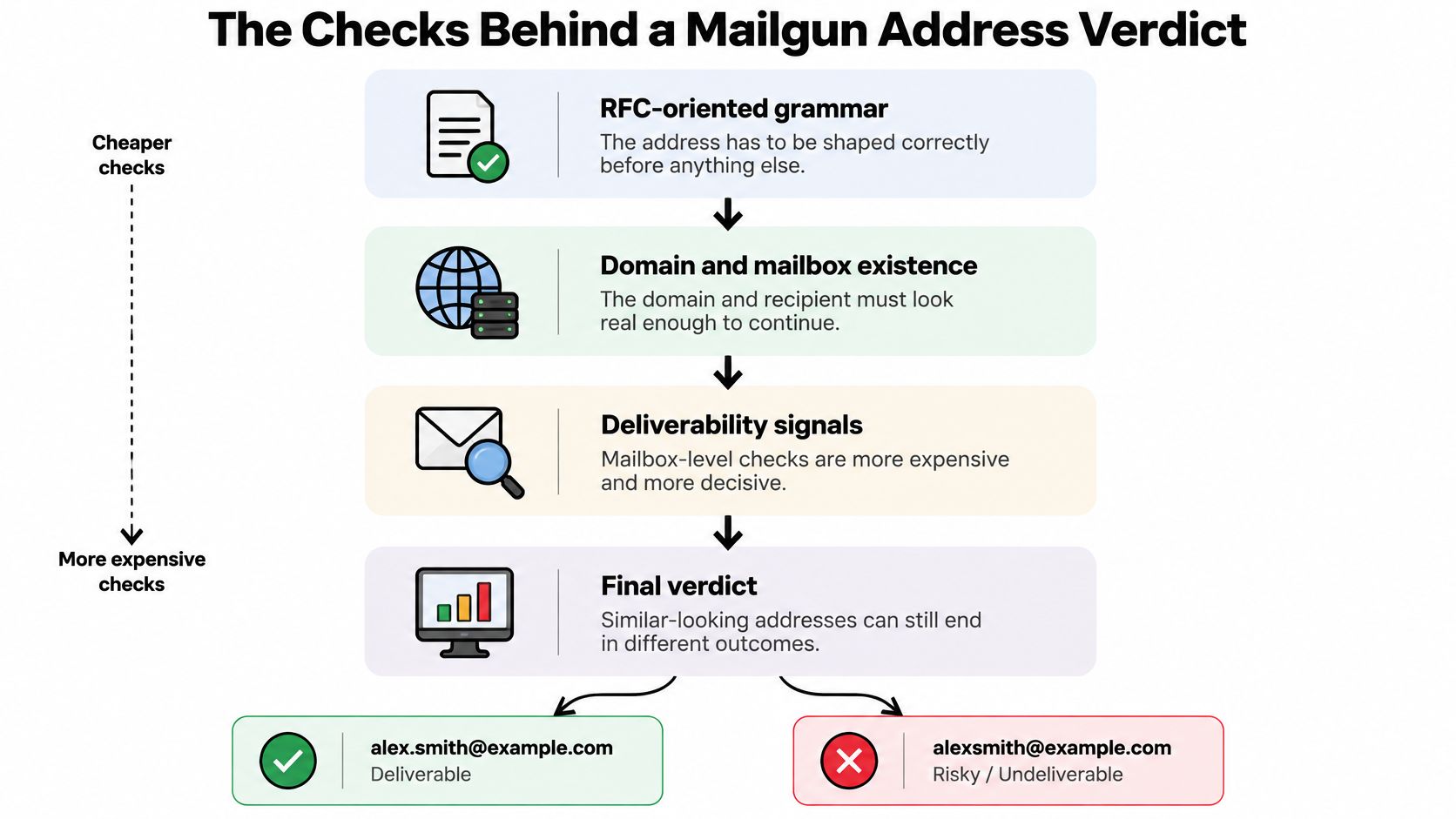
A regular expression can check an address's shape. It can't establish that a receiving domain is configured for mail or that the named recipient appears to exist. Mailgun combines different checks because each answers a different question.
Mailgun's Email Validation API reference documents RFC-oriented grammar, DNS verification, mailbox detection, spelling checks, and provider-specific local-part grammar where available; its single-address endpoint is GET or POST /v4/address/validate and accepts addresses up to 512 characters.
Start with shape, then investigate existence
Grammar validation asks whether the address follows an acceptable email structure. It's comparable to checking the format of an identity document, not verifying its owner.
DNS verification asks whether the domain has the infrastructure needed to receive mail. In the building analogy, this establishes whether there's a plausible destination, rather than merely a correctly written street name.
Mailbox detection goes further by investigating the recipient. Catch-all handling limits certainty: a receiving system that accepts arbitrary recipient names doesn't establish that the requested person has a mailbox.
Spelling checks and provider-specific grammar add another layer. A generic pattern may accept a local part that a particular provider wouldn't allow. Provider-aware rules can identify problems a simple format check misses.
Consider a signup containing alex@gmial.com. Treat the apparent domain typo as a correction opportunity, not proof that Mailgun will always reject that exact string. Ask the user to confirm the intended address rather than rewriting it without asking.
Now consider an address at a hypothetical catch-all company. The domain may look healthy while the recipient remains unconfirmed. Similar-looking inputs can therefore deserve very different handling.
Branch on the response, not a green badge
The response fields support distinct application decisions:
-
resultsupplies the main routing category. -
reasonexplains the evidence behind the assessment. -
riskadds a separate risk classification. -
is_role_addressidentifies a functional or shared-address signal. -
is_disposable_addressidentifies a disposable-address signal.
Use provider_lookup deliberately. It controls mailbox-provider lookup, letting developers balance deeper investigation against latency and provider-contact volume. Don't describe a shallower check in the interface as equivalent to a deeper assessment.
Keep API credentials on your server, set a request timeout, and distinguish a service failure from an address verdict. If your request times out, your application hasn't established that the submitted address is bad.
Finally, don't confuse this check stack with campaign analytics. Validation doesn't measure whether the recipient will open, complain, or encounter later filtering. Those outcomes require separate monitoring after an authorized send.
Bulk Jobs File Limits and List Previews
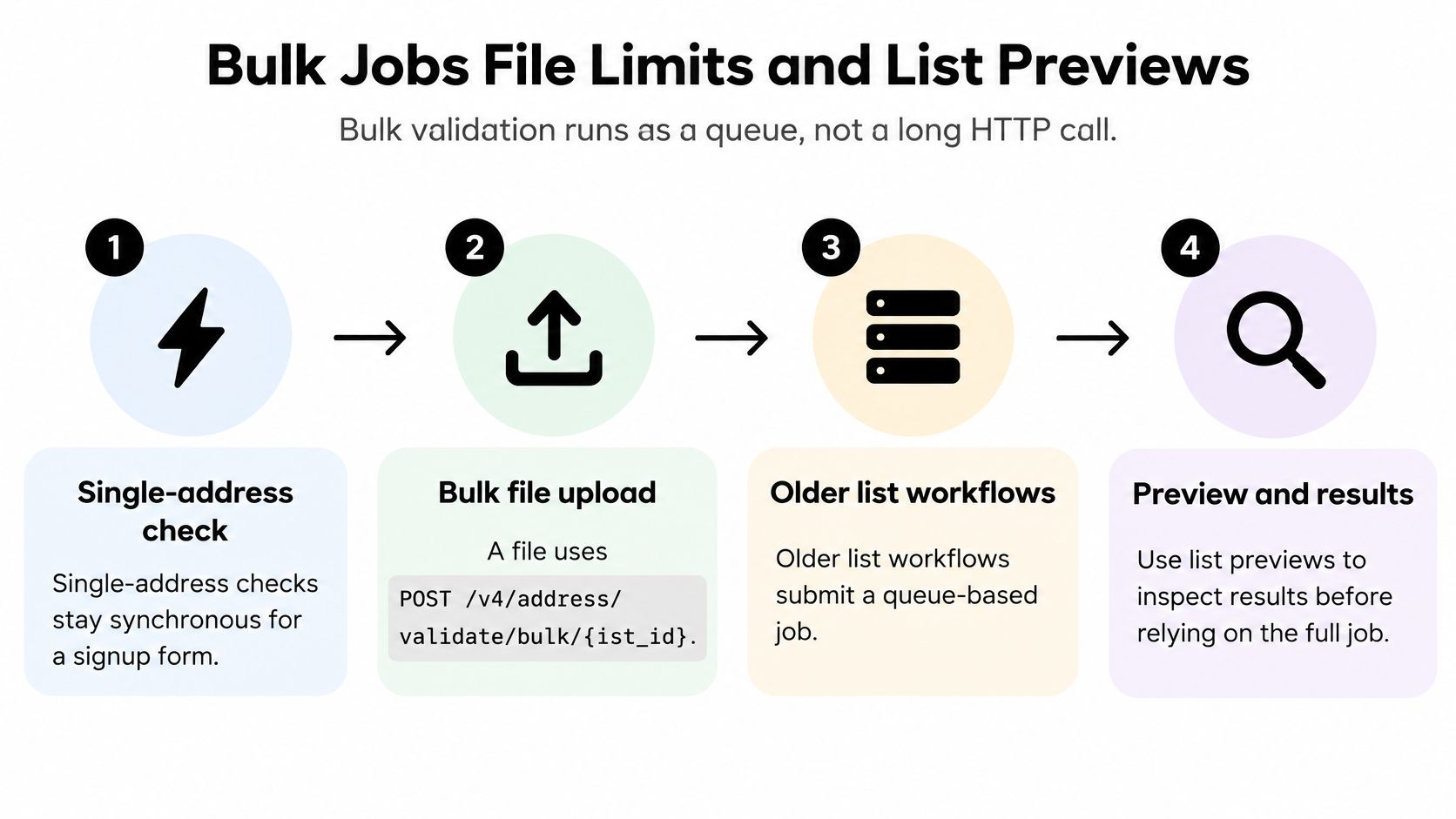
A signup form needs an immediate response about an address. A campaign export needs a recoverable processing workflow. Treating both as the same long-running HTTP request makes bulk integrations fragile.
The Mailgun validation API specification documents bulk submission through POST /v4/address/validate/bulk/{list_id}, asynchronous processing, and list-health previews that can be promoted to full validation jobs. Legacy list workflows likewise submit a job and later retrieve downloadable CSV or JSON results.
Build a resumable queue
Persist the list or job identifier as soon as submission succeeds. Your worker should be able to restart, find that identifier, and continue checking status without uploading the same list again.
Poll with backoff instead of repeatedly requesting status in a tight loop. Download results only after processing has completed, then record whether the import into your own system succeeded. A finished vendor job and a successfully updated CRM aren't the same event.
Use this sequence for an aged export:
- Preserve the source. Keep the original file unchanged and assign a stable row identifier. Maintain a local mapping if the validation workflow doesn't return your custom identifier.
- Inspect a preview. Review the mix of undeliverable, do-not-send, catch-all, and unknown classifications before committing the entire file.
- Authorize full processing. Have the campaign owner decide whether the list's condition justifies further work. A preview doesn't establish permission to mail a purchased list.
- Wait for completion. Persist status, handle temporary failures, and retrieve the result file when it's ready.
- Join and retain evidence. Map results back to source rows and preserve classifications, reason arrays, and check timestamps.
Separate file acceptance from campaign approval
Check accepted formats and upload limits before exporting from your CRM. A file-types and limits guide is useful when preparing files for a separate cleaning workflow, but don't assume different services use identical limits.
Split oversized exports into traceable files before submission. Compression can reduce transfer size, but it shouldn't replace checking the receiving endpoint's rules. Keep a manifest identifying which source rows belong to each upload so a failed job doesn't leave gaps.
Cost control: Use a preview to decide whether a stale list deserves full processing, not merely to estimate how many addresses you might send to.
Sampling is a gate, not certification. A promising preview still needs complete validation and campaign eligibility checks before you schedule the audience. If the preview is poor, investigate the source and age of the records before spending more effort cleaning them.
Privacy Risks When You Upload a List
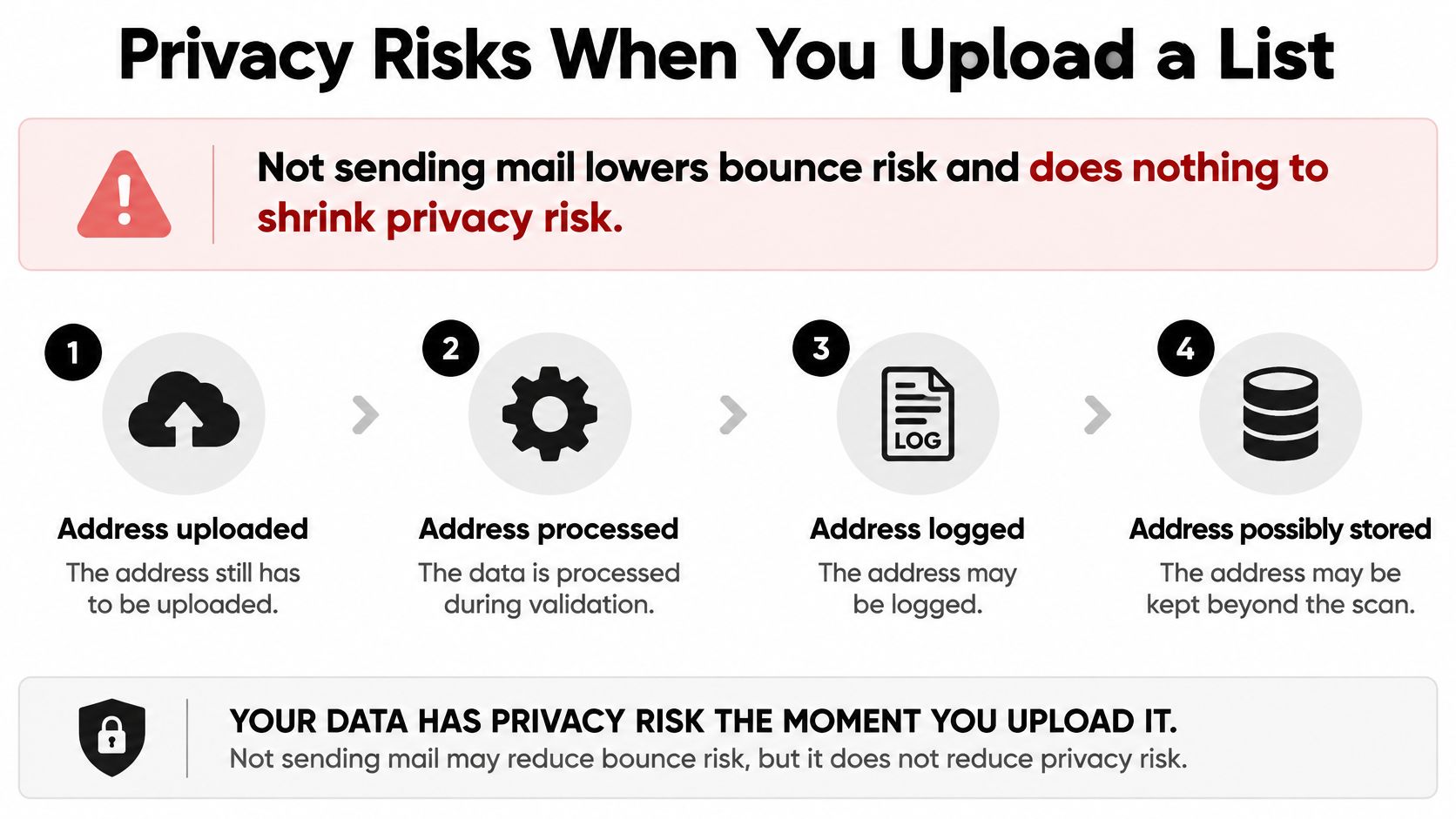
A check that sends no email can still expose personal data. The addresses leave your environment for processing, and the workflow may create logs, temporary files, and downloadable results. Avoiding a campaign send doesn't remove those handling questions.
Mailgun's bulk-validation documentation describes raw CSV or gzip uploads up to 25 MB, up to five parallel validation jobs, and downloadable results, but doesn't clearly settle buyer questions about processing location, retention, or model-improvement use. Those are questions to resolve through applicable privacy documentation, agreements, and vendor confirmation, not assumptions drawn from an API example.
Minimize the file before it leaves
Email addresses can be personal data. Treat a customer or prospect export as a data-processing decision, not just a file-format task, and involve your privacy owner when contractual or regulatory requirements apply.
Use a practical pre-upload checklist:
- Reduce the columns. Send the email address and an opaque row identifier, not names, order histories, account notes, or abandoned-cart contents.
- Restrict credentials. Keep API keys out of browser code and repositories, and limit access to people and systems that need them.
- Protect local copies. Use encrypted transport and encrypted storage for exports and downloaded results under your control.
- Confirm the agreement. Review the processor terms, applicable processing region, subprocessors, and deletion commitments.
- Assign deletion ownership. Name the person or automated process responsible for removing source exports and result files.
Ask who can download results from the account and whether that access is logged. For EU and UK customer lists, have the responsible privacy reviewer assess regional processing and transfer arrangements rather than treating an endpoint selection as complete compliance.
Hash the identifier, not the address being checked
Hashing an entire email address prevents the validator from reading its domain or local part. That defeats methods that need the actual address to inspect DNS, provider rules, or mailbox existence. A token is useful as your row identifier, but it can't replace the address the vendor needs to assess.
Retention also includes copies your own team creates. Deleting an upload won't remove an analyst's downloaded spreadsheet or a file attached to an internal ticket.
For any alternative provider, review its data-retention explanation and verify that it covers source files, results, and deletion handling. If you can't establish where the file lives and when it's deleted, don't upload the full customer export yet.
When a Dedicated Validator Fits Better
Choose the tool around the work your team performs. An application developer evaluating incoming signups has a different problem from a marketing manager preparing an occasional CRM export.
Mailgun is a natural fit when your application already uses its infrastructure and your developers want direct control over routing. A dedicated list cleaner becomes attractive when the operator needs a reviewable file, understandable recommendations, and an export that another email tool can use.
| Job | Mailgun email validation | Dedicated list cleaner |
|---|---|---|
| Signup check inside an app that already sends with Mailgun | Integrate the single-address API into existing application logic | Consider a signup widget when you need a simpler form-level workflow |
| Bulk CSV before a campaign | Build around asynchronous jobs, previews, and result retrieval | Look for upload or paste, visible progress, and preservation of the original file |
| Catch-all or unknown B2B rows | Interpret codes and reasons through your own policy | Require clear review recommendations while retaining the underlying evidence |
| Occasional lists and cost shape | Confirm current account validation rates before a large job | Compare pay-as-needed credits, expiry rules, and minimum purchase requirements |
| How long the uploaded list remains | Obtain explicit retention and data-use answers beyond API mechanics | Require documented deletion, encryption, and access controls |
Compare the work after validation
The overlooked cost is often interpretation. An API can return useful evidence while leaving your team to build the review screen, explain the categories, maintain suppression logic, and export a campaign-ready audience.
A dedicated cleaner should reduce that operational burden. Ask to see how an uncertain row appears to a nontechnical user. A plain-English recommendation is useful only if the operator can also inspect why it was made.
Look for these capabilities during evaluation:
- Separate evidence and action. The tool should preserve the raw assessment rather than replacing it with an unexplained send label.
- Protect source records. Cleaning should create a usable output without rewriting the original CRM export.
- Support repeat checks. Your team should be able to reassess aged records and distinguish an old result from a fresh one.
- Make exceptions reviewable. Valuable uncertain contacts should enter a manageable review queue, not disappear in a discarded file.
Stay, supplement, or replace the workflow
Staying with Mailgun makes sense when your engineers already own the integration and the response fields meet your needs. Adding another vendor solely to avoid interpreting a result may create more work than it saves.
Supplementing makes sense when application validation works well but campaign preparation remains manual. You don't need to replace your sending infrastructure to improve how a marketing team reviews an export.
Replacing the validation workflow is reasonable when maintaining custom jobs, review screens, and exports costs more effort than the team wants to own. Compare that total effort with the cleaner's purchasing model and privacy commitments, not just its landing-page feature list.
Neither option should be judged by a promise of guaranteed inbox placement. Judge the tool by whether your team can make a defensible, repeatable decision about each address.
Choose Mailgun Supplement or Switch
Start with the address source, then choose the smallest workflow that handles it responsibly.
For live product signups, keep validation close to the form and enforce the policy in server-side code. Give users useful correction messages, preserve uncertain submissions for an appropriate recovery path, and make sure an API outage doesn't masquerade as a bad-address result.
For campaign files, assign an owner to audience approval before running the job. That person should review uncertain records, apply existing suppression and subscription rules, and confirm that the exported audience matches the intended campaign. Don't let downloading a cleaned CSV become automatic authorization to send it.
Make the next move concrete
- Stay with Mailgun when your application already has the integration and your team can maintain its routing rules.
- Supplement or switch when file review, explanations, and campaign exports are the actual bottleneck.
- Pause the upload when processing location, access, or deletion terms remain unresolved.
Aged records deserve reassessment before reuse, particularly when the contact's relationship with your business has changed. Preserve historical results for audit purposes, but don't treat an old classification as a permanent property of the address.
The aim is a controlled sending process: fewer avoidable failed deliveries, fewer unjustified exclusions, and a clear explanation for the decisions your team makes. You're managing uncertainty, not buying a prediction of who will open.
CleanMyList offers CSV uploads or pasted-address verification, plain-English reasons, and cleaned exports while keeping your original list untouched. If Mailgun's verdict codes leave your campaign team with a manual review backlog, visit CleanMyList and assess a campaign file before scheduling the send.