
Nearly 70% of senders in a 2025 survey of more than 1,100 senders said they didn't use free mailbox-provider reputation tools, according to Mailjet's deliverability survey summary. That's the measurement problem behind email database cleaning: teams can remove questionable addresses without knowing whether they've improved delivery or reduced their audience.
A useful clean does more than produce a file with fewer rows. It separates unreachable addresses from reachable customers who've gone quiet, preserves consent and suppression history, and gives your team a defensible way to measure the result.
Table of Contents
- Audit Your List and Record a Baseline
- Deduplicate and Segment Records Before You Verify
- How to Run Verification Checks in the Right Order
- Decide What to Suppress, Re-engage, or Delete
- Build a Re-engagement Campaign That Protects Reputation
- Monitor Sender Reputation After the Clean
- Prove the Clean Worked and Set Your Next Cleaning Date
Audit Your List and Record a Baseline
Email-list decay reached at least 28% in 2024, according to a 2025 report summarized by MediaPost. Treat that as a reason to inspect your database, not as a forecast for your own list. Acquisition source, audience, and time since collection all affect what you'll find.
Start with a snapshot, not a verification purchase. Export your contacts and preserve the original file as read-only so you can reconcile every change.
Capture the evidence behind each address
Include the fields that let you make a decision later:
- Identity and origin: Email address, contact ID, acquisition source, signup date, and original campaign or import.
- Permission: Consent status, how it was collected, and any unsubscribe or complaint history.
- Activity: Last send, click, reply, purchase, and open, keeping opens separate from stronger engagement.
- Delivery history: Hard bounces, temporary failures, receiving-server responses, and existing suppressions.
Count records by source before combining anything. A checkout signup and an event badge scan don't establish the same expectation of receiving marketing. A purchased file doesn't become permission-based because its addresses pass verification.
Baseline metrics to record before cleaning
Use a consistent set of recent, comparable campaigns. Keep denominators explicit so your team doesn't compare complaints per delivered message with complaints per attempted send.
| Metric | What It Signals | Reference Point |
|---|---|---|
| Hard bounce rate | Permanent delivery failures, including invalid destinations | Your recent comparable sends and your email platform's enforcement rules |
| Complaint rate | Recipients marking mail as spam | Your provider-specific baseline and mailbox-provider guidance |
| Unknown-user rate | Addresses the receiving server says don't exist | Your recent sends, with no universal benchmark assumed |
| Dormant share | Contacts without meaningful activity during your chosen observation window | Track by source, with no universal target |
| Catch-all share | Domains accepting arbitrary recipients, leaving mailbox validity uncertain | Track by source and flag for review |
Don't assign every permanent rejection to a dead mailbox. Policy blocks can also produce permanent failures, so preserve the response text rather than relying only on an email platform's summary label.
Finish the audit with a written success condition. For example: reduce unknown-user failures without losing purchasing subscribers. Assign an owner and record the intended comparison before anyone changes the audience.
Deduplicate and Segment Records Before You Verify
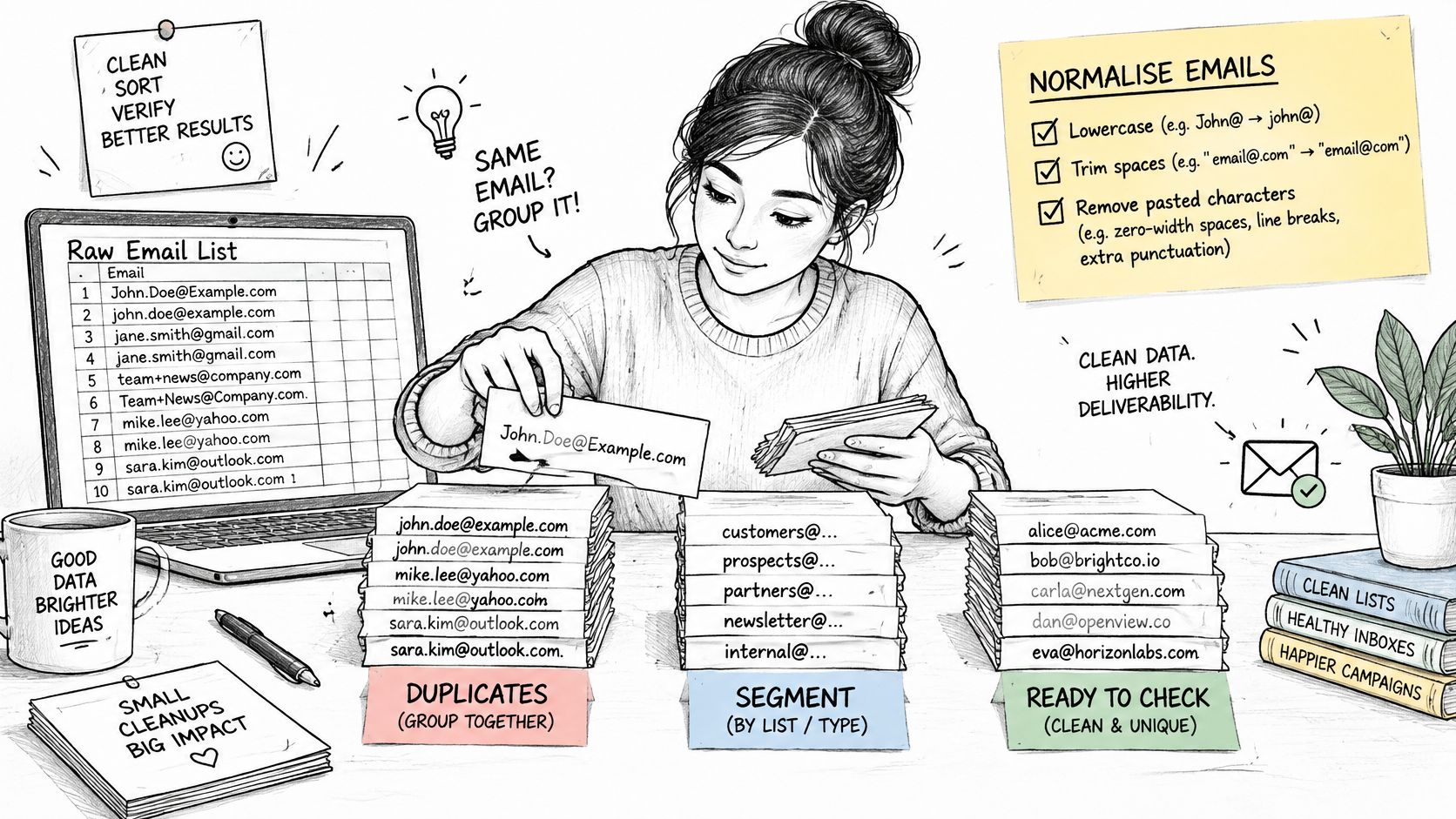
Duplicate records waste verification credits and can obscure which signup source created a problem. Prepare the working file before uploading it, while retaining a reversible mapping to your original contact IDs.
Keep the preparation workflow separate from the eventual send decision.
Normalize without inventing addresses
Trim surrounding whitespace and remove obvious export debris, such as a comma pasted after an address. Lowercase domains, but preserve the original address alongside your normalized comparison field. Don't rewrite a misspelled domain into a different destination.
Be cautious with alias consolidation. Removing dots or plus-tags indiscriminately can merge distinct addresses at providers that handle them differently. Even when aliases reach the same inbox, separate tags may explain which subscription or customer relationship the person intended.
For file preparation, use this CSV email list guide to organize the upload rather than repeatedly editing exports by hand.
Merge history, not just rows
When duplicate records disagree, the newest record shouldn't automatically win. Preserve the strongest restriction: a recent purchase doesn't cancel an earlier unsubscribe.
- Keep activity history: Retain the latest genuine engagement and purchase information.
- Preserve provenance: Combine source tags without overwriting the original acquisition source.
- Protect exclusions: Carry forward complaints, unsubscribes, and permanent-failure suppressions.
- Retain identifiers: Store the original CRM IDs so verdicts update the correct records.
If exports and imports keep undoing those decisions, use workflow automation to reduce manual CRM updates. Define field ownership first, especially for consent and suppression, so an integration can't accidentally reactivate excluded contacts.
The accompanying video provides another format for reviewing the workflow.
Segment the prepared file by acquisition source, engagement recency, and mailbox provider. Use recency bands that reflect your buying or publishing cycle rather than copying another company's cutoff.
Verify a representative segment first. If an event import produces most of the questionable results, investigate its collection process before spending credits on the whole database.
How to Run Verification Checks in the Right Order
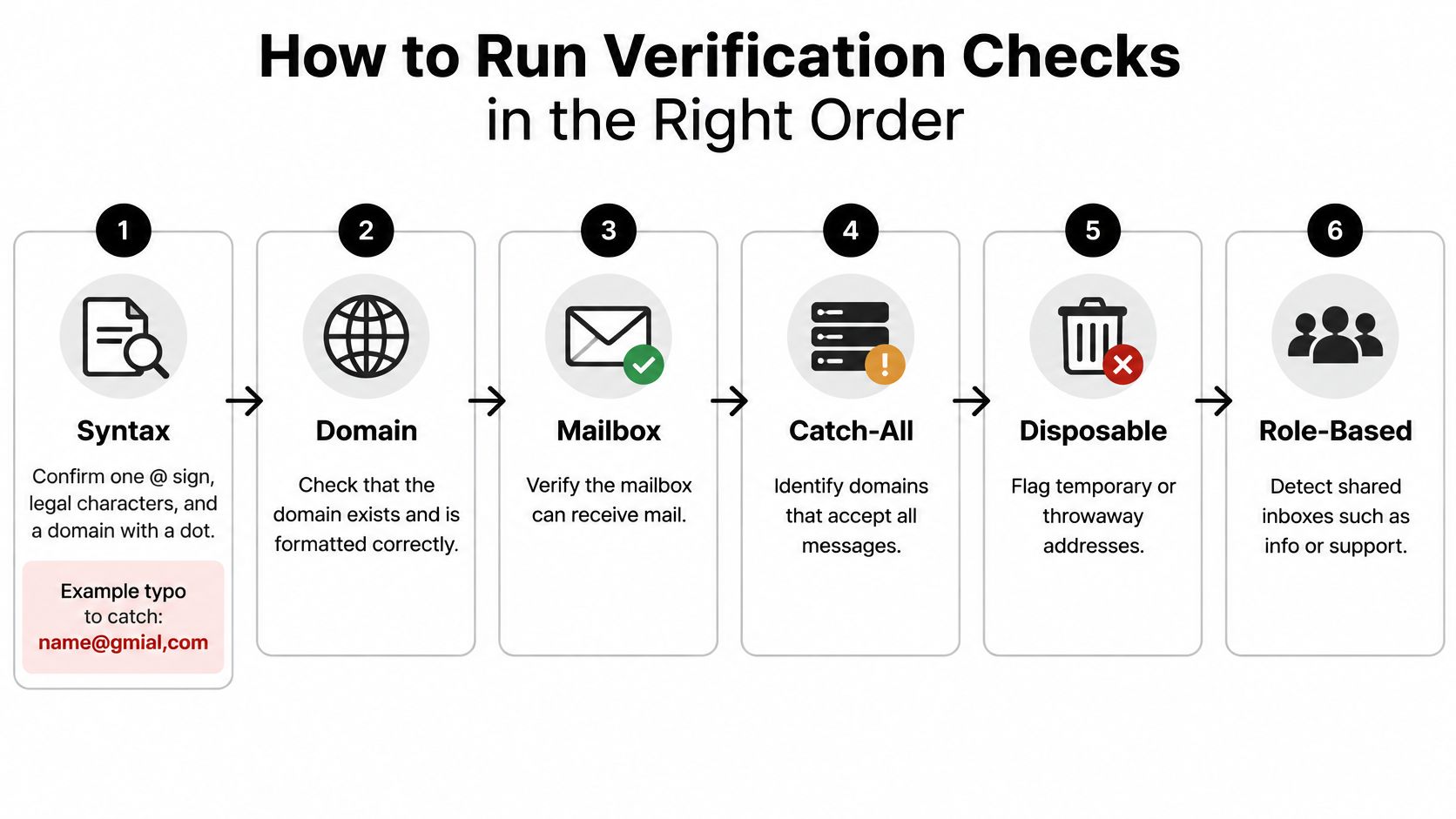
Run inexpensive, decisive checks before ambiguous network checks. A verification result should explain what the tool observed, not merely assign a reassuring color.
The sequence below separates basic address defects from mailbox uncertainty.
Move from format to receiving-server evidence
-
Check syntax. Validate the address with an email-aware parser, not a homemade rule that rejects legitimate characters. Catch missing separators, spaces introduced by imports, and malformed domains such as
name@gmial,com. Quarantine suspected typos instead of guessing the intended recipient. -
Check the domain and mail routing. Confirm that the domain resolves and inspect whether it can receive email. An absent mail-exchanger record needs careful interpretation because fallback routing can exist; an explicit declaration that a domain doesn't accept mail is a different result from a temporary lookup failure.
-
Evaluate mailbox responses. An SMTP check can ask a receiving server about a recipient without sending a message. However, servers may conceal mailbox status, defer responses, block probes, or accept a recipient before rejecting a later delivery. Acceptance isn't proof of inbox placement.
-
Test catch-all behavior. Determine whether the server also accepts arbitrary recipient names. If it does, a positive response for your contact provides weaker evidence. Mark the uncertainty explicitly rather than counting the address as a confirmed mailbox.
-
Flag disposable providers and role accounts. Temporary-address services need a different policy from personal mailboxes. Shared addresses such as
support@need review, not automatic condemnation: a legitimate business subscriber may intentionally use a team inbox. -
Apply historical evidence. Compare the result with your own complaints, unsubscribes, bounce responses, and previous verification dates. A newly positive technical check must never override a recorded opt-out.
-
Assign an actionable verdict. Use send-eligible, review, or remove from active sending, with a plain-English reason. Keep technical validity separate from marketing permission.
Interpret uncertainty honestly
When evaluating a tool to clean up your lead lists, inspect its handling of timeouts and unknown responses. A tool that labels every inconclusive result invalid may discard reachable contacts; one that labels them valid transfers the uncertainty into your next campaign.
Rate-limit network checks and retry temporary failures under a controlled policy. Repeatedly probing an uncooperative server won't necessarily produce better evidence.
Practical rule: A verifier can assess technical reachability. It can't certify consent, prove a person still wants your newsletter, or guarantee that a message will reach the inbox.
A send-eligible result therefore means the address passed your technical checks and still needs permission and audience checks. Review means hold it outside routine campaigns until a decision is documented. Remove means exclude it from active sending, not erase every historical record associated with the customer.
Decide What to Suppress, Re-engage, or Delete
An invalid address and a valid but disengaged subscriber need different treatment. One can't receive your message; the other may still buy, renew, or return when the timing is right.
The stakes extend beyond bounces: Validity's 2025 global deliverability benchmark found that one in six legitimate marketing emails failed to reach the inbox and reported that Gmail and Yahoo were deleting dormant accounts. Age alone doesn't settle the decision, but old addresses deserve scrutiny before reactivation.
Action by contact type
| Contact Type | Action | Reasoning |
|---|---|---|
| Hard bounce or invalid syntax | Delete from the active send list now; retain necessary suppression history | A confirmed invalid destination shouldn't receive repeated attempts |
| Disposable or known spam-trap pattern | Delete from active campaigns after reviewing the evidence | Temporary destinations and credible trap intelligence warrant exclusion; a suspicious pattern alone isn't proof |
| Role address with no consent on file | Suppress | A shared inbox doesn't establish permission to receive marketing |
| Catch-all with recent meaningful engagement | Keep if consent is established and watch subsequent delivery | Genuine recent activity supports keeping it despite an inconclusive mailbox check |
| Valid, dormant subscriber with documented consent | Consider a restricted re-engagement campaign | Technical reachability and business value justify evaluation, not automatic deletion |
| Valuable customer with an uncertain address | Hold email and seek confirmation through an appropriate existing channel | Customer value justifies recovery work, not bypassing delivery or consent controls |
Review these outcomes against your bounce handling rules. A temporary mailbox problem shouldn't trigger the same action as a confirmed nonexistent user, and a policy rejection needs investigation rather than a guessed address correction.
Use business evidence without overriding permission
Make the decision using engagement, bounce history, provider signals, acquisition source, consent evidence, and business value. Clicks, replies, and purchases generally give you more useful context than an isolated open.
Say a publisher has a dormant subscriber who still renews a paid membership. Removing that person from promotional sends may be sensible, but deleting the customer record would discard useful account history. Conversely, an address that has never engaged and has no documented acquisition context offers little basis for a recovery campaign.
A cleaner database isn't necessarily a smaller customer database. It's a database with explicit rules about who can receive which messages.
Suppression is often the right reversible action. Permanent deletion should follow your retention and privacy policies, while preserving whatever minimal exclusion information you need to prevent accidental re-import.
Build a Re-engagement Campaign That Protects Reputation
A re-engagement campaign should answer a narrow question: does this reachable, permissioned subscriber still want this relationship? It shouldn't be an excuse to send a promotion to every address you've accumulated.
Don't include previous complainers, unsubscribed contacts, or confirmed invalid addresses. For the remaining audience, start with subscribers whose recent history gives you a credible reason to expect recognition.
Run a deliberately limited sequence
-
Choose the most recoverable audience. Prioritize documented consent, recognizable signup context, and evidence of past interest. Separate long-term customers from people who signed up but never participated, because they need different messages.
-
Release a small pilot. Choose a batch your team can inspect before expanding. Wait for delivery failures, complaints, and unsubscribe activity to become visible rather than scheduling the entire audience in advance.
-
Make the request obvious. Use a recognizable sender and explain why the person is receiving the message. Ask them to confirm continued interest with a clear action, without making them complete an unnecessary profile form.
-
Limit follow-ups in advance. Decide when the sequence ends before launching it. Only continue where the recipient's activity supports another message, and don't treat a machine-generated open as sufficient evidence of interest.
-
Suppress nonresponders from routine marketing. Keep the decision and reason in the customer record. Someone can later resubscribe through an appropriate permission flow without your team reconstructing what happened.
-
Provide an easy exit. Make unsubscribe visible and functional. Don't force a login, a sales conversation, or a reply to stop marketing.
Match the message to the relationship
A newsletter reader may need a reminder of the subjects they chose. A lapsed subscription customer may need help understanding what's changed or whether their previous subscription still suits them.
For the latter, RecurX's guide to win-back marketing for Shopify subscription brands provides context for designing the commercial offer. Keep that offer separate from the permission decision: a discount doesn't establish that an address is safe or that someone wants continuing marketing.
Judge recovery by permission and outcomes, not opens alone. A smaller group of confirmed subscribers is more useful than a large group whose activity you can't interpret.
Read complaints and unsubscribes before celebrating recovered sales. If recipients don't recognize the sender, stop expansion and investigate the original collection promise, signup confirmation, and delay before the first message.
The useful output is a defensible audience for future campaigns, plus a suppressed group your automation won't reactivate.
Monitor Sender Reputation After the Clean
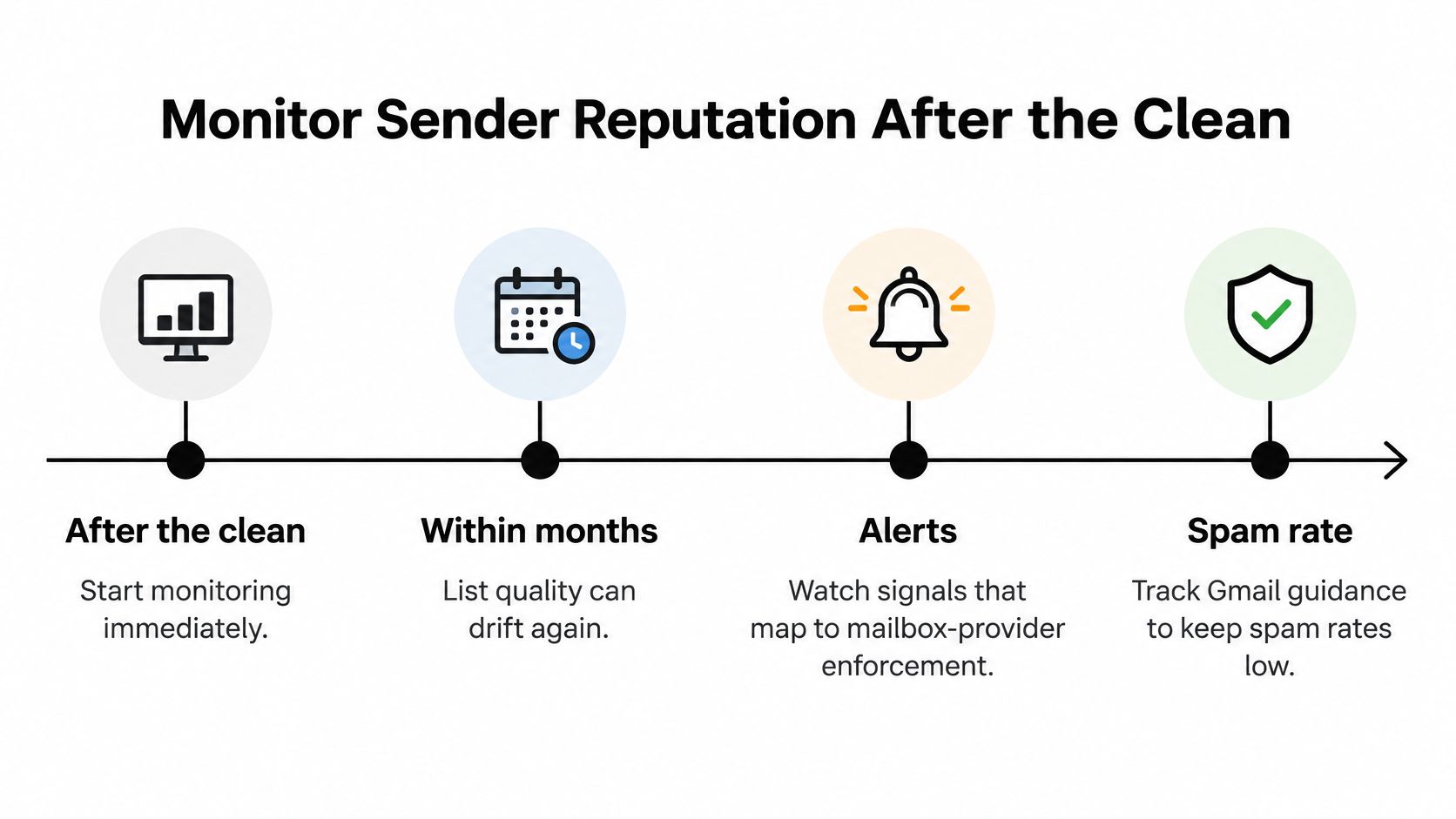
Start monitoring with the first post-clean send. Don't wait for a monthly report to discover that a questionable source is still feeding addresses into your marketing platform.
Gmail's sender guidelines say to keep spam rates below 0.10% and avoid reaching 0.30% or higher; for senders sending 5,000 or more messages per day to Gmail accounts, requirements include authentication, avoiding unwanted messages, and an easy unsubscribe mechanism. These are Gmail-specific requirements, not interchangeable thresholds for every complaint report in your email platform.
Use a monitoring schedule that pairs each warning with an action.
Post-clean monitoring checkpoints
| Checkpoint | What to Compare | Stop or Investigate If |
|---|---|---|
| First send after cleaning | Hard bounces against comparable baseline sends | Permanent failures rise or confirmed invalid recipients remain |
| After complaint reporting becomes available | Complaint rate by mailbox provider | Provider warnings appear or complaints increase materially against baseline |
| At the next scheduled hygiene review | Dormant share and unknown-user rate | Newly collected contacts become dormant quickly or unknown-user failures return |
| Each new signup source | Verification results by source | A source produces substantially more invalid or uncertain records than comparable sources |
A rising failure rate should trigger a source-level pause, not necessarily a shutdown of every campaign. Isolate the affected import, form, or integration and inspect the records before widening the response.
Combine platform reports with provider signals
Use Google Postmaster Tools to inspect Gmail spam and reputation signals, Microsoft SNDS for available sending-IP information, and Yahoo's available sender and complaint-feedback resources. Access and reporting coverage differ, so verify what each dashboard measures before comparing figures.
Your email platform's accepted-delivery count doesn't prove inbox placement. Pair it with provider feedback, available placement testing, and business outcomes. Keep these views together in an email sender reputation monitoring process with a named owner.
Authentication failures, changes in message content, and sudden volume shifts can undermine delivery even when addresses are technically sound. Cleaning addresses the data-quality layer; your team must maintain the rest of the sending system separately.
Finally, inspect the entry points. Add signup validation for malformed and obviously unusable addresses, let legitimate users correct mistakes, and avoid replacing their input without notice. Review imports before they enter automations, and ensure every integration respects existing exclusions.
Prove the Clean Worked and Set Your Next Cleaning Date
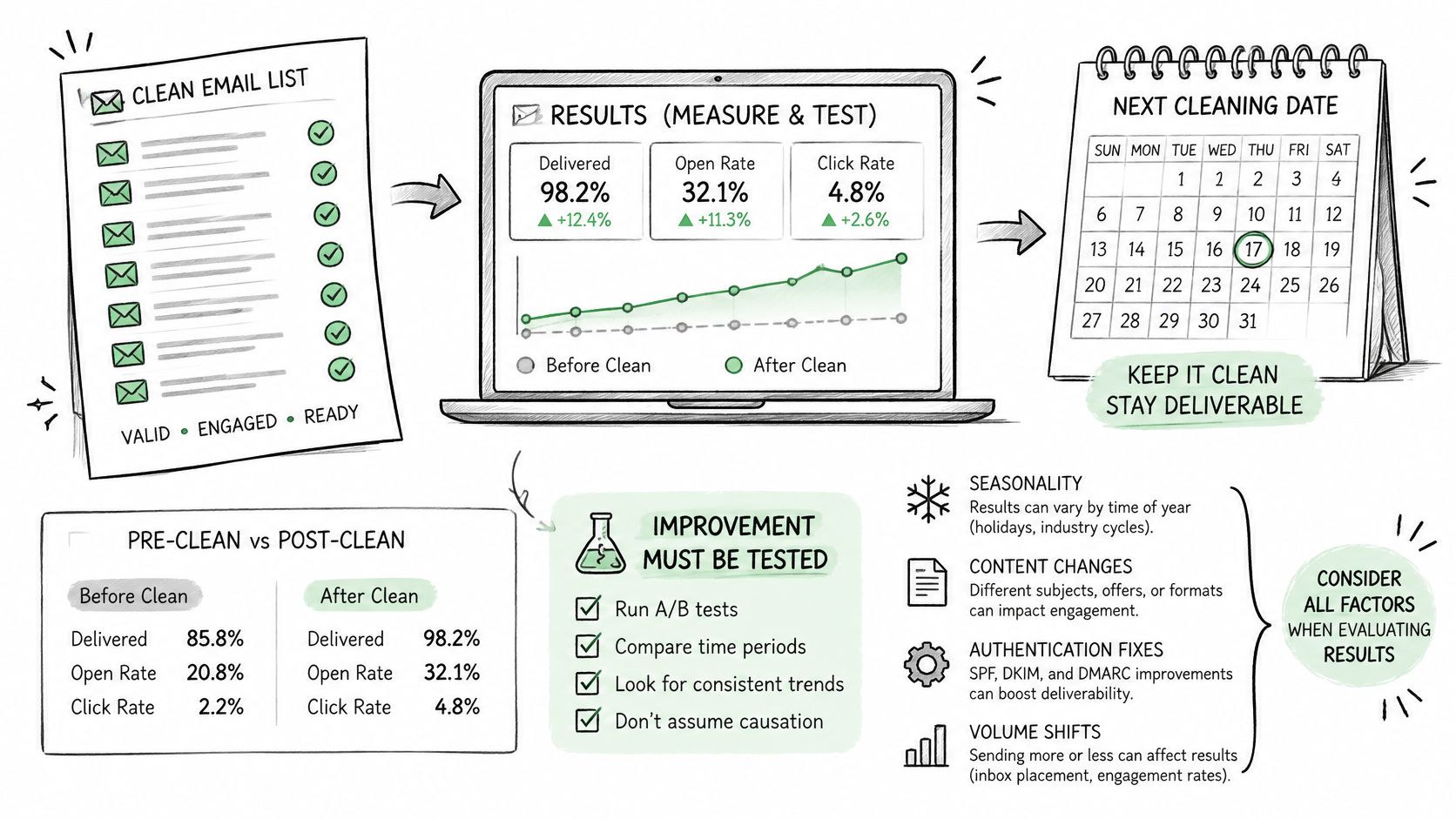
A lower bounce rate after removing known failures is useful, but it doesn't prove improved inbox placement or incremental revenue. Changing the audience also changes the denominator, so record attempted messages, delivered messages, total revenue, and revenue per delivered message together.
Design a comparison you can defend
Randomly splitting an already-cleaned list into identical campaigns tests audience consistency, not the effect of cleaning. To estimate the incremental benefit, define comparable, permissioned cohorts before applying the intervention.
- Exclude known hazards everywhere: Never keep confirmed invalid addresses, complaints, or opt-outs in a control group.
- Test only acceptable uncertainty: Where both treatments are safe, compare your existing eligible-audience policy with the additional review policy.
- Hold other variables steady: Match content, timing, authentication, provider mix, and acquisition source.
- State the limitation: If a safe control isn't possible, use matched historical campaigns and describe the result as observational, not causal proof.
Keep the evidence alongside the cleaning decisions.
Make maintenance an owned task
Schedule the next review according to acquisition quality, sending frequency, and how quickly failures return. Recheck dormant audiences before reactivation and inspect aged segments before major campaigns.
Start with a representative sample, reconcile its verdicts against your bounce history, and document disagreements before processing the full file. Assign the next cleaning date and its owner while the findings are still actionable.
CleanMyList offers no-subscription bulk email verification through CSV uploads or pasted addresses, with plain-English reasons and exportable results while keeping your original list untouched. Try a representative segment first, compare the verdicts with your delivery history, and use the results to build your send, review, and suppression rules.