The usual advice for a Gmail account name check is to type a name into a signup form and see whether Google accepts it. That answers a narrow account-creation question. It doesn't establish who controls an address, whether someone consented to contact, or whether a familiar sender name is genuine.
For email operations, the useful approach is to separate format validation, account availability, ownership confirmation, and impersonation risk. Each check supports a different decision. Treating them as interchangeable is how a clean-looking spreadsheet becomes a sending problem.
Table of Contents
- Gmail Username Rules Behind Every Name Check
- Choosing a Gmail Name That Passes the Check
- What a Name Match Can and Cannot Prove
- Spotting Impersonation Behind a Familiar Name
- Comparing Manual Checks, Scripts, and Validation Tools
- Validating Lists Without Sending Mail
- Next Steps for Cleaner Gmail Lists
Gmail Username Rules Behind Every Name Check
Start with the username, the part before @gmail.com, rather than the contact's name field. A record can contain a convincing full name while failing the basic requirements for a personal Gmail username.
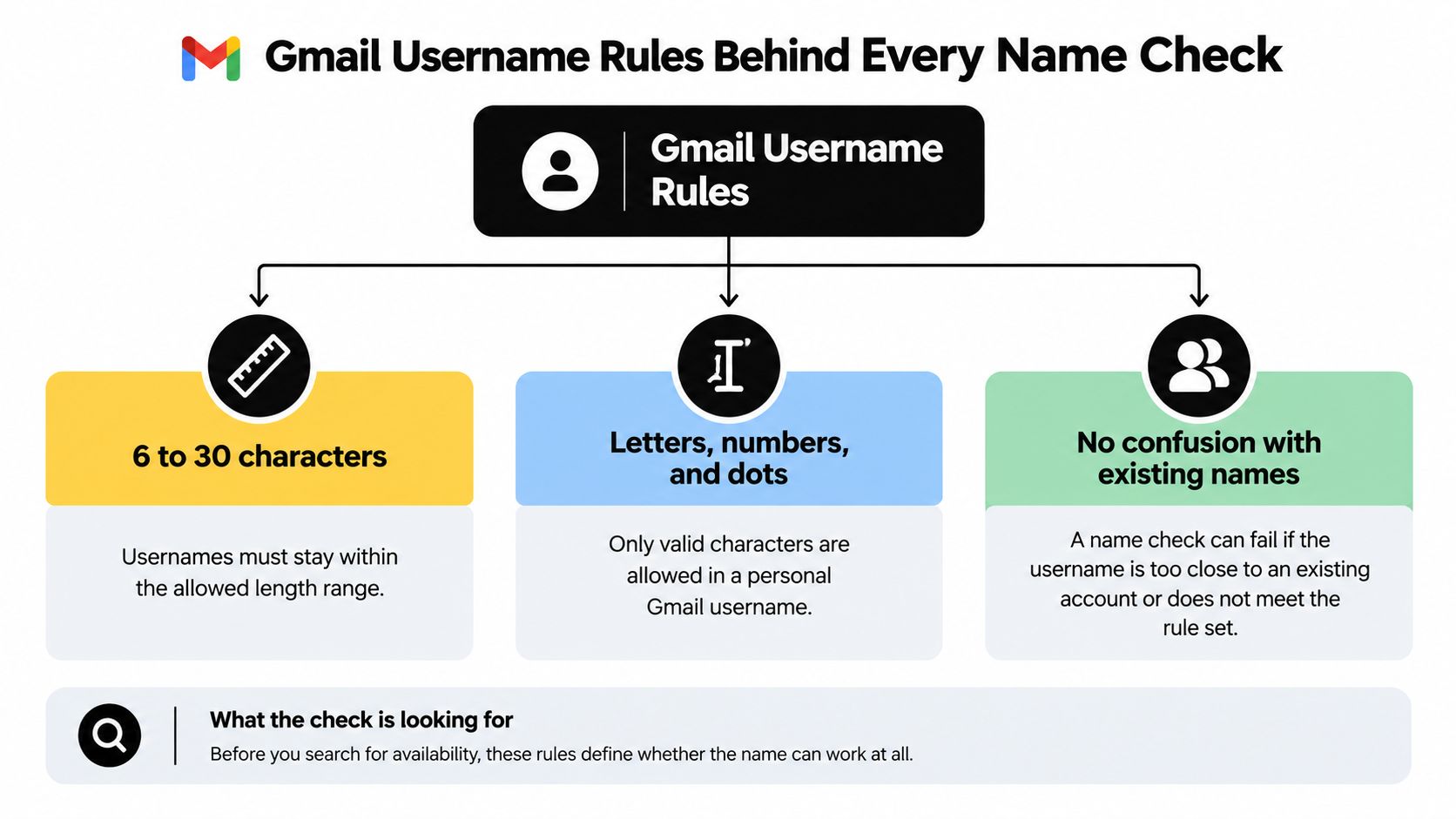
Google's personal Gmail username rules specify 6 to 30 characters, allow letters, numbers, and periods, and reject ampersands, equals signs, underscores, apostrophes, dashes, plus signs, commas, brackets, and consecutive periods. The same guidance explains that periods don't distinguish account ownership and that availability can depend on existing names, close similarities, deleted names, and anti-abuse reservations.
Apply the rules before drawing conclusions
Use a clear screening checklist:
- Check the username length. Evaluate the local part, not the full address or the person's display name.
- Inspect the characters. A name copied from another platform might contain punctuation that doesn't belong in a personal Gmail username.
- Reject consecutive periods. Don't assume that punctuation is acceptable just because periods are generally allowed.
- Separate syntax from availability. Passing these checks means the name meets the format requirements. It doesn't mean Google will let someone register it.
The distinction between choosing a username and processing an existing address matters. A username-creation rule shouldn't become an unexplained instruction to rewrite every address in an imported file.
The diagram summarizes the checks to keep separate.
Normalize for comparison without losing the original
For personal Gmail, john.smith@gmail.com and johnsmith@gmail.com are equivalent for account ownership under the rules above. Treating those spellings as unrelated mailboxes can leave duplicates in a campaign export.
Keep the submitted address in its original field and create a separate comparison key for deduplication. That lets an operator explain why records were grouped without destroying the evidence of what each subscriber entered.
Practical rule: Normalize a comparison field, not your only copy of the address.
Don't extend personal Gmail rules to every email provider. If your workflow also processes alternate address forms, document how you handle alias email addresses separately. A normalization rule should have a defined scope, not change every address that resembles its intended input.
Choosing a Gmail Name That Passes the Check
Adding punctuation to an unavailable name is a poor naming strategy. Under the period rule above, inserting another dot doesn't create a distinct account name.
A better starting point is to develop different candidates before testing them. Write down readable combinations that someone could recognize, remember, and repeat without a lengthy explanation.

Change the name meaningfully
Consider a hypothetical person choosing between mayapatel, maya.patel, and mayapatelceramics. The dotted spelling doesn't solve an ownership conflict with the undotted spelling. Adding a meaningful word creates a different candidate, although availability still requires Google's decision.
Prefer a recognizable addition over a confusing substitution:
- Use relevant context. A craft, project, or other durable identifier can make the address easier to distinguish.
- Avoid visual tricks. Replacing a letter with a similar-looking digit can make the name harder to communicate and may create a near-match conflict.
- Keep future use in mind. Don't choose an address that only makes sense for a temporary campaign if you expect to use it broadly.
Google's scale helps explain why familiar combinations require alternatives. Gmail launched on April 1, 2004, and Google reported 425 million active users in June 2012, more than 1 billion in February 2016, and 1.5 billion daily users in 2019, according to the documented Gmail history and user milestones.
Those are historical milestones, not a current availability estimate. They provide context, not a way to predict whether a particular name is free.
Interpret rejection narrowly
The availability restrictions described earlier mean an unavailable result doesn't tell you which condition caused the rejection. Don't interpret it as proof that a particular person has an active mailbox.
For someone creating an account, the practical response is to try a substantively different candidate. For someone reviewing a mailing list, the response is different: don't use registration attempts as a substitute for validation.
If you're working through your own account options, this video offers an additional visual reference.
Keep the naming task separate from the contact-review task. Choosing an address you can register and deciding whether an existing subscriber record is usable require different evidence.
What a Name Match Can and Cannot Prove
A spreadsheet row containing a full name and a matching Gmail username can look complete. That appearance shouldn't determine whether your team marks the person as verified.
Google distinguishes a legal name from a display name and explains that the user chooses the display name, which isn't necessarily their legal name. Its guidance on account names and account lookup also distinguishes finding an account match from confirming ownership through additional information.
Ask what was actually matched
These checks answer different questions:
| Check | Question it addresses | Conclusion to avoid |
|---|---|---|
| Identifier match | Does the identifier correspond to an account match? | The person submitting it controls that account |
| Ownership confirmation | Can the requester complete the required confirmation? | Their legal identity or employment is verified |
| Display-name review | What name has the user chosen to present? | The name is an authenticated identity record |
A confirmation message can support a mailbox-control decision when the recipient completes the requested action. It shouldn't automatically become a legal-identity check or an employment credential.
Likewise, a mismatch between a name field and an address isn't enough to reject a subscriber. Names may be abbreviated, reordered, transliterated, or shared. An address might reflect an older naming choice rather than the name someone currently uses.
A plausible name is context. It isn't an identity document.
Store the evidence instead of a vague badge
Avoid a single database field called verified unless everyone understands exactly what it means. That label invites downstream teams to assume more than the original check established.
Use separate fields for address-format status, confirmation status, consent source, and any identity checks your application requires. A support agent should be able to distinguish a submitted name from an authenticated action without reconstructing the signup journey.
For example, a newsletter subscriber might have a syntactically acceptable address and an unconfirmed subscription request. The useful status is needs confirmation, not verified person and not automatically invalid.
Treat name matches as weak enrichment signals. Collect identity information only when the purpose requires it, explain that purpose, and obtain consent. If the business decision depends on mailbox control, request an appropriate authenticated confirmation rather than inferring ownership from spelling.
Spotting Impersonation Behind a Familiar Name
A correct-looking name can deserve more scrutiny, not less, when the rest of a message conflicts with it. In a hypothetical payment request, the name of a known supplier doesn't resolve a mismatch in the actual sender address or an unexpected destination for replies.
Google's Gmail display-name and sender guidance says display names must accurately represent senders and must not deceive recipients. It warns against bulk-mail display names that use a recipient's name, thread-like text such as User (2), or an @gmail.com address, and recommends SPF, DKIM, and DMARC to help prevent domain impersonation.
Review the message as a whole
Build the decision around observable inconsistencies rather than whether the name feels familiar:
- Actual From address. Compare the complete address with the sender relationship you expected.
- Reply-to destination. Investigate a different destination instead of assuming the visible name explains it.
- Authentication evidence. Review it alongside the claimed sender, not as an isolated pass-or-fail badge.
- Message context. Treat unexpected payment changes, credential requests, or unusual instructions as reasons for independent confirmation.
A different reply-to address isn't automatically malicious. It is a reason to ask whether the arrangement makes sense for that sender and message.
Keep authentication and identity distinct
When reviewing your own sending domain, you can check DMARC alignment with mailX as part of that investigation. Use the result to examine domain authentication, not to certify the human named in an inbox.
Security distinction: A deliverable address and an authentic person are different findings.
For a suspicious request, pause the requested action and confirm through an established channel. Don't rely on replying to the questionable message to settle the question it created.
Document that escalation path alongside your broader best practices for email security. Staff need an operational response to a mismatch, not merely a list of warning signs.
Comparing Manual Checks, Scripts, and Validation Tools
Choose a checking method based on the decision you need to make. A person selecting an account name, a developer screening form inputs, and an operator preparing a campaign export shouldn't use the same test.
The comparison below separates the methods by their useful scope.
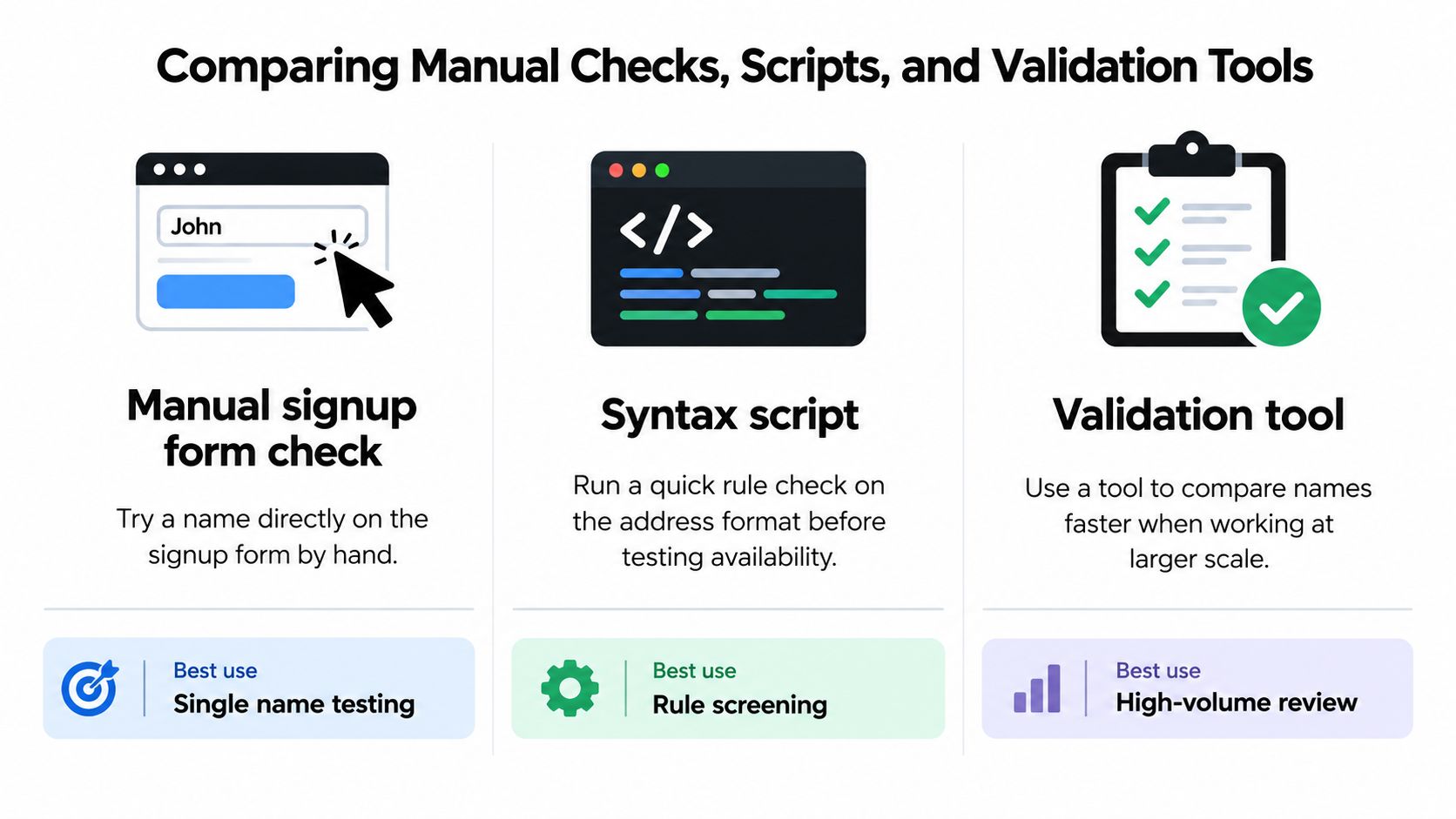
Gmail Name and Address Check Approaches
| Approach | What It Establishes | Main Limitation |
|---|---|---|
| Manual signup form check | Whether Google accepts a proposed name for registration in that interaction | Doesn't establish the status or owner of an existing list record |
| Syntax script | Whether an address passes the rules implemented in the script | Can't turn formatting success into ownership or availability evidence |
| Multi-signal validation tool | A review outcome based on the signals the service evaluates | Its recommendation still needs interpretation and doesn't grant consent |
Manual checking fits the narrow task of choosing your own username. It doesn't fit bulk contact review. Copying list entries into a registration form also creates results that are difficult to interpret consistently.
A syntax script is useful when you control the rules and need repeatable screening. The trade-off is maintenance: someone must document the provider-specific behavior, test changes, and prevent a generic rule from rejecting legitimate address forms outside its scope.
For scripts, return a reason such as unsupported character under personal Gmail username rules. A bare false value tells the next operator too little.
Evaluate tools by their explanations
A validation service is more useful when it distinguishes uncertainty from failure. Before adopting one, inspect how it handles ambiguous results and whether operators can understand the recommendation.
Use a practical selection checklist:
- Signal transparency. Ask which checks support each verdict rather than accepting an unexplained confidence label.
- No unsolicited verification messages. Confirm whether the service sends email during its checks.
- Reversible exports. Keep the original input and export recommendations separately.
- Readable reasons. Require enough detail to distinguish format errors, risk flags, and unresolved outcomes.
- Explicit limitations. Reject claims that address validation proves the recipient's identity or permission to receive marketing.
The strongest test isn't whether a tool returns a neat green status. It's whether your team can explain the resulting send, skip, or review decision.
Keep human review for ambiguous cases. Automate repeatable screening, but don't automate away uncertainty by relabeling every unresolved record as invalid.
Validating Lists Without Sending Mail
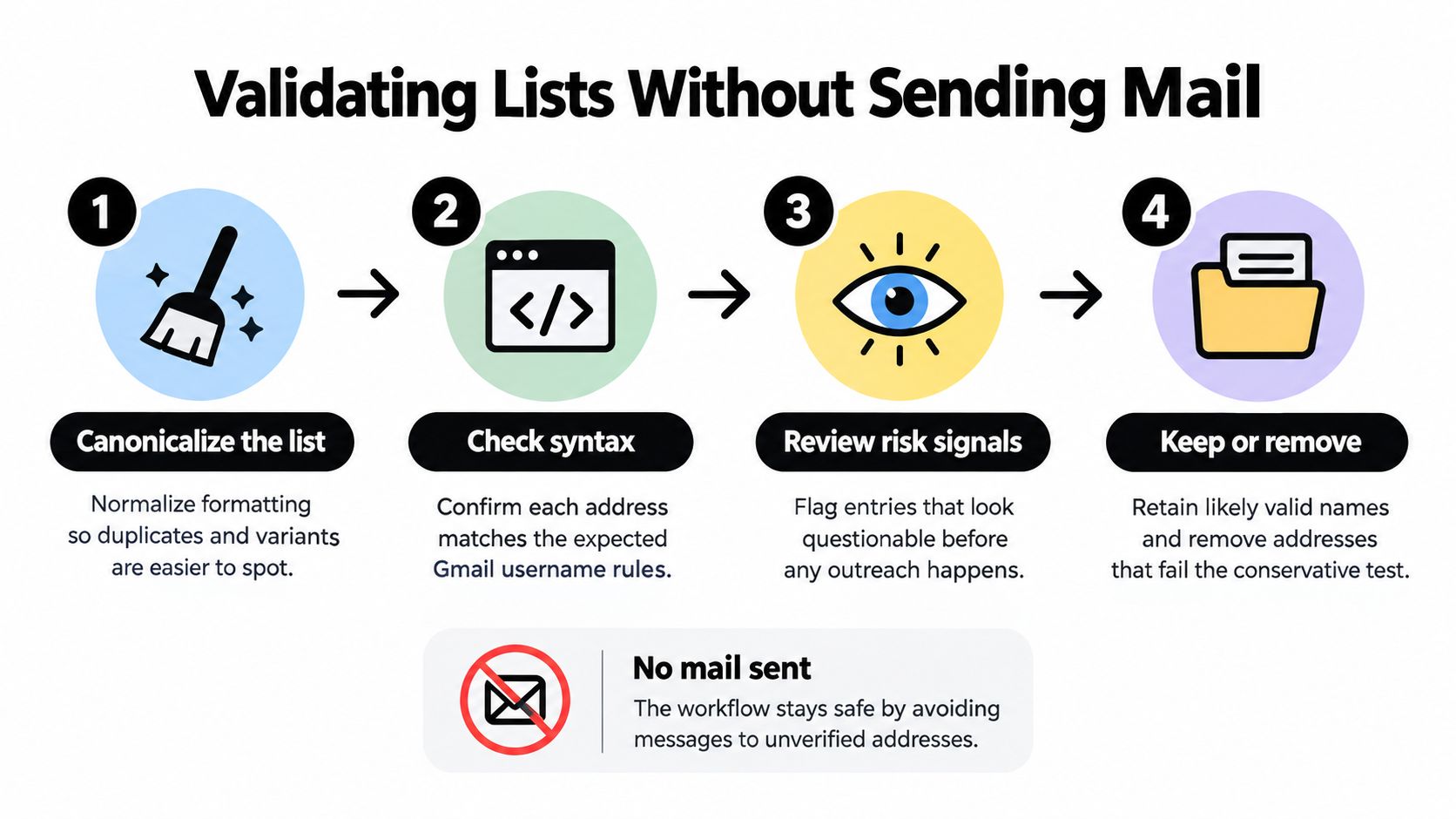
A useful list-hygiene pass doesn't need to send a message to every address. Start with the file, its collection history, and non-message checks. Keep any later ownership-confirmation step separate from that assessment.
Google's account recovery guidance requires multiple identity signals, such as recovery information and the account's full name, followed by ownership confirmation. That process isn't a public list-validation interface. Repeated automated signup or recovery probes add little diagnostic value and create unnecessary privacy risk.
Preserve, normalize, and classify
Begin with an untouched source file. Work in a copy that includes the submitted address, a comparison value, the assessment result, and the reason for that result.
Apply the Gmail-specific format rules established earlier, then review suspicious entries. Flag likely typing mistakes and look-alike substitutions without replacing them. A proposed correction should remain a proposal until you have a sound basis to accept it.
The workflow below describes a non-sending review pass. Interpret removal as exclusion from the working send file, not destruction of the original record.
Use operational statuses that preserve the distinction between evidence and uncertainty:
- Eligible for the intended workflow. The address passes the relevant checks, and the contact has the required consent for that use.
- Skip pending correction. A clear format problem prevents the record from proceeding as submitted.
- Review required. A suspicious pattern or conflicting result needs a decision.
- Needs confirmation. The record lacks the required ownership confirmation but hasn't been shown to be invalid.
Measure decisions against consented outcomes
Only send a confirmation message when the recipient has explicitly requested the relevant contact. That is a separate, consented action, not a reason to send exploratory mail to an unrequested list.
Assess your decisions using confirmation completion, hard-bounce rate, and complaint rate on an opted-in test cohort. Define the cohort and measurement rules before comparing outcomes. Otherwise, a change in audience can look like a change in validation quality.
Reassess aged files before reuse rather than carrying an old verdict forward indefinitely. Preserve the previous result so operators can review what changed and why.
When documenting how to check if an email address exists, make the decision boundaries explicit. An unresolved record belongs in a holding state. It shouldn't become invalid just because your process couldn't confirm it.
Next Steps for Cleaner Gmail Lists
Start with a manageable slice of a real Gmail-heavy list, not an immediate rewrite of your entire audience. Choose records from a known collection source so you can interpret the results alongside the signup process that produced them.
Keep the input unchanged and run the assessment in a separate working file. Review verdicts and reasons before changing suppression rules or connecting the output to a sending platform.
Make the pilot answer an operational question
The pilot should help you decide what to do with records, not merely produce a count of acceptable addresses. Include examples your team finds difficult to classify, such as punctuation variants, suspected typos, and incomplete confirmation histories.
Use a short review checklist:
- Trace the reason. Can an operator explain why each record received its recommendation?
- Check the action. Does the recommendation support sending, skipping, correcting, or holding?
- Preserve consent evidence. Can you still identify how and why the person requested contact?
- Review disagreements. When a result conflicts with an existing status, investigate before overwriting either.
Compare the pilot with your current handling process. If reviewers can't tell why a record moved into or out of the send file, improve the explanation before expanding the workflow.
Fix collection problems at the form
List review is also an opportunity to improve signup handling. If your pilot exposes a recurring input problem, address that problem where people enter their details instead of repeatedly cleaning it downstream.
Use real-time validation to flag obvious mistakes while the user can correct them. Keep the response specific and allow a review path for uncertain results. An opaque rejection can block a legitimate subscriber just as easily as an overly permissive form can admit bad data.
Document what each status means and who can override it. That makes the process usable for marketing, support, and development teams without giving a name match more authority than it deserves.
The next action is straightforward: test the workflow on a real file, review the explanations, and approve the resulting handling rules before scaling. Judge the check by the decisions it supports, not by how confidently it labels an address.
CleanMyList offers no-subscription bulk email verification with plain-English reasons for each result, without sending verification emails or changing your original list. Visit CleanMyList to test a Gmail-heavy sample, review the recommendations, and decide which records to send, skip, or hold for confirmation.