You've exported a list of 2,000 addresses, the campaign is scheduled, and the sending platform labels most of the records as valid. It's tempting to treat that as a green light. But a technically accepted address isn't automatically a good campaign recipient, and verification can't promise that a message will reach the inbox.
A safer approach treats 2K email verification as a campaign-specific decision system. Each result should lead to a practical next step: send, review, re-run, or suppress. That way, the team doesn't confuse a technical verdict with permission, engagement, or inbox placement.
Table of Contents
- Why 2K Email Verification Needs a Decision Plan
- Prepare and Clean the CSV Before Verification
- Choose a Practical Batching Strategy
- Run Bulk Verification and Preserve the Evidence
- Interpret Verdicts and Choose the Right Action
- Control Costs While Protecting Reputation
- Run a Final Pre-Send Verification Check
Why 2K Email Verification Needs a Decision Plan
A marketer preparing a 2,000-address campaign might assume that if the verification tool says an address is valid, it's safe to send to. That's too simple. Some risky addresses can still appear technically valid, and a verification result doesn't tell you whether a recipient is engaged, whether a message will land in spam, or whether the person should receive this particular campaign.
The scale matters. In a 2,000-address file, a 2% bounce rate means 40 failed deliveries, while 5% means 100. Industry guidance treats below 2% as a safer operating range, 2–5% as a warning zone that calls for list hygiene, and above 5% as critical because repeated rejection can signal poor list quality to mailbox providers (email bounce-rate benchmarks). Hard bounces are more than a reporting nuisance: they can weaken sender reputation and put later campaigns at greater risk of filtering or throttling.
The wider deliverability picture helps explain why verification matters, but it also shows what verification can't do. A 2024 summary reported that roughly one in six marketing emails failed to reach the inbox, including messages that may have landed in spam rather than bounced. In the same summary, 28.4% of email professionals identified reducing bounces as an ongoing challenge (inbox placement and deliverability statistics). Verification can address the preventable risk of bad addresses. It can't guarantee inbox placement or engagement.
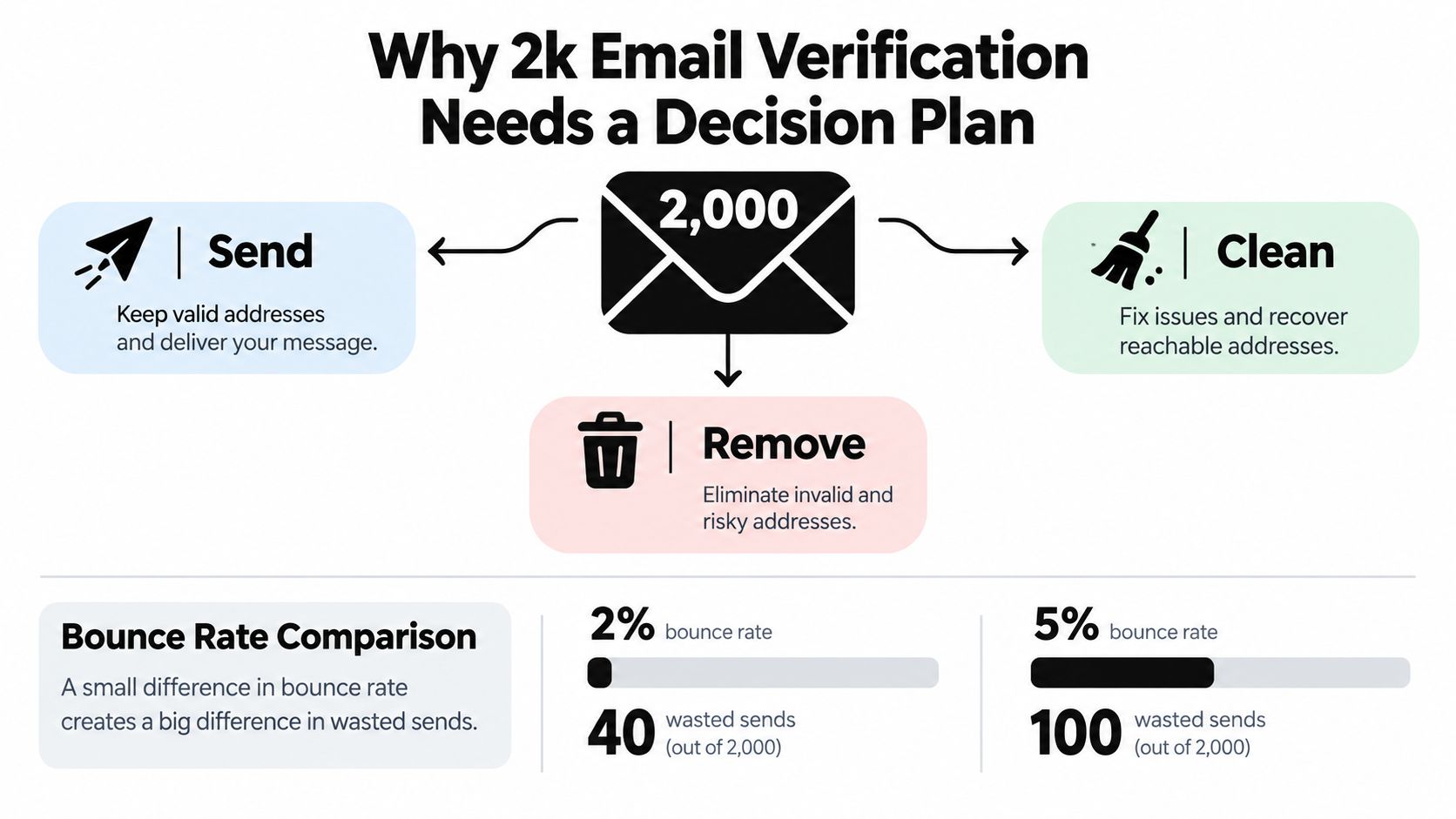
Working rule: Decide what each verdict means for this campaign before you upload the list. A good verification workflow doesn't just label addresses. It gives your team a defensible action for each result.
Prepare and Clean the CSV Before Verification
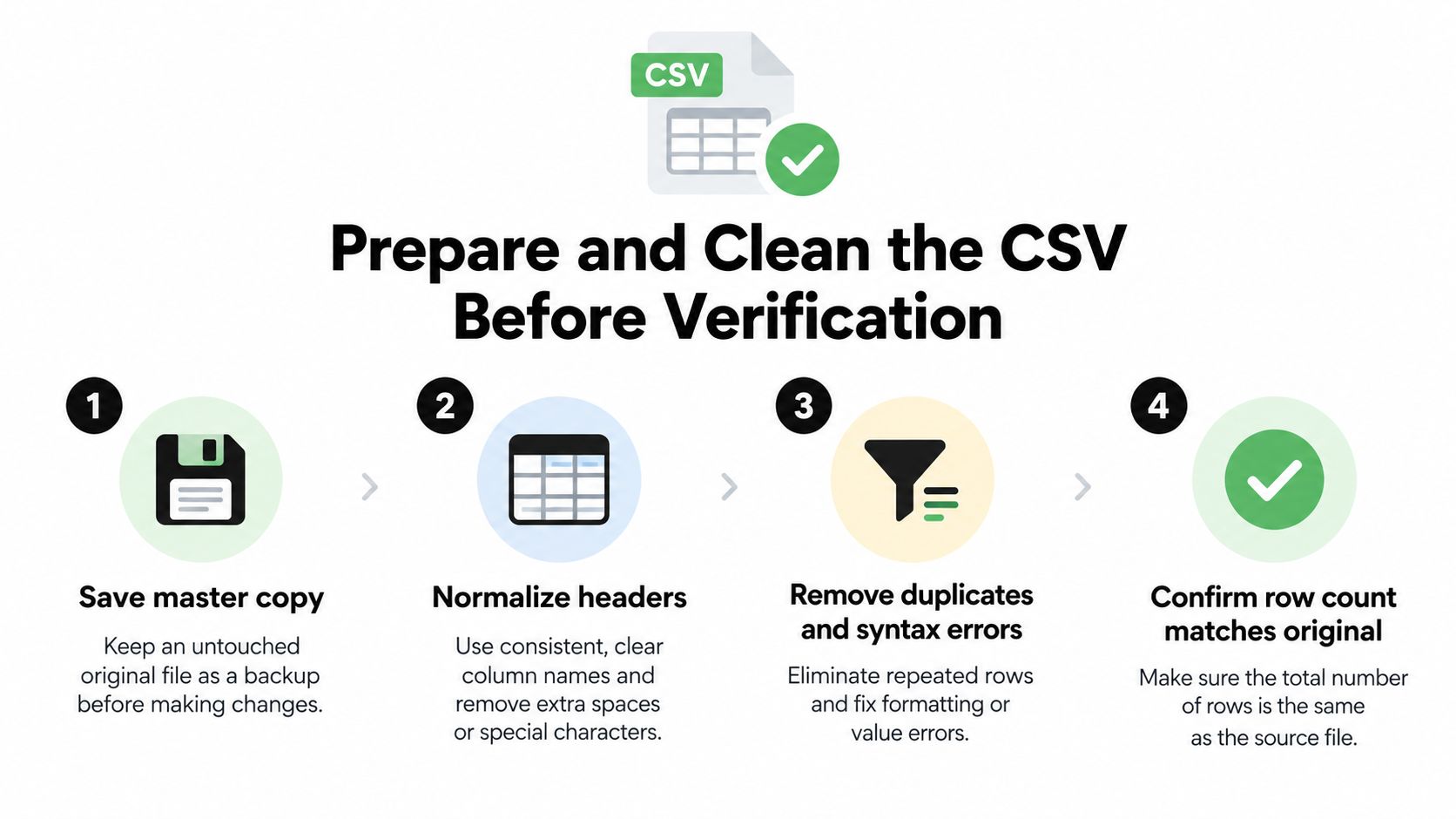
Start by protecting the source of truth. Save an unchanged master copy of the export, then create a separate working file for cleanup and verification. This gives you an audit trail and a way to recover if an import, deduplication step, or sync changes the data unexpectedly.
Next, standardize the CSV so the verification tool and your sending platform interpret it consistently. Use clear headers, keep one intended recipient per row, and remove blank lines and obvious formatting errors. Deduplicate email addresses, but don't discard useful context without recording why. A signup source or engagement field may matter later when you decide whether a risky address belongs in a newsletter or should be suppressed from outreach.
Make changes that are visible and reversible
A raw export might contain an address with stray spaces, a duplicate row, and an incomplete entry. In the working copy, trim the extra spaces, retain one instance of the duplicate, and isolate the incomplete record for correction or suppression. Use clearly fictional examples, such as reader@example.test and editor@example.test, when documenting your process. The point is to record what changed, not to make the data look cleaner by hiding the edits.
Keep fields that help explain why someone is on the list, but avoid carrying unnecessary personal details into a verification job. If you plan to re-run a segment later, preserve the earlier verdict and the date of that check in separate fields or a separate report. That makes it possible to compare results without overwriting the original evidence.
A useful cleanup checklist:
- Save the master: Lock the original export so cleanup doesn't alter it.
- Normalize fields: Use consistent headers and one email address per row.
- Inspect duplicates and syntax: Remove duplicate records and separate obvious errors for correction.
- Reconcile the file: Confirm that each remaining row still represents the intended recipient and compare the working file with the master.
For a more detailed guide to getting an email list into a consistent format, see this guide to preparing a CSV email list. Keep the cleaned file auditable: every removal or correction should have a reason your team can understand later.
Choose a Practical Batching Strategy
For a single campaign, one upload is often the clearest option if the verification service can accept the full file. You get one consistent result set and fewer opportunities to lose track of which rows belong to which job. But a file's size isn't the only reason to batch. If your list combines contacts with different sources, signup histories, or campaign roles, separate segments can make follow-up decisions easier.
The trade-off is operational. Each extra batch needs a reliable identifier and a reconciliation step so results don't get attached to the wrong segment. Before splitting the file, decide what the split is meant to reveal or change. Batching only to create smaller uploads can add administration without improving the decision.
| Approach | Best fit | Operational advantage | Trade-off |
|---|---|---|---|
| One complete file | A unified list for one campaign | One upload and one result set to reconcile | Different sources and recipient types stay together |
| Separate source segments | Lists with distinct acquisition or freshness histories | Makes source-level review easier | Requires consistent labels and merging rules |
| Separate campaign-role segments | Different use cases, such as newsletter and outreach | Supports campaign-specific treatment of risky results | Adds follow-up and suppression checks |
If you're comparing verification platforms, a roundup of email verification tools discussed on Reddit can help you identify options to evaluate. Treat any list of tools as a starting point, then check whether a service fits your file format, privacy requirements, and verdict workflow.
Whichever approach you choose, keep the batching logic stable and record which file segment produced each result. A batch label in the filename or a source field in the CSV can make a later review much less error-prone.
Run Bulk Verification and Preserve the Evidence
Take a representative 2,000-address file from export to final report without replacing the master copy. With CleanMyList, a team can upload a CSV or paste addresses, watch verdicts stream back in real time, and export a cleaned list. The verification process checks each address across eight signals: syntax, DNS, SMTP mailbox existence, catch-all behavior, disposable providers, role accounts, historical bounce reputation, and a final send-or-skip recommendation.
The useful part of that workflow isn't just the result label. CleanMyList provides a plain-English reason for each result, so an operator can distinguish an obvious formatting problem from an address that appears technically valid but carries risk. The service doesn't send email during verification; it encrypts data and deletes lists after 30 days. Keep the original CSV untouched while the job runs, and save the report with a batch identifier so the findings stay traceable.
Export for review, not just for upload
When results arrive, don't immediately send every address that looks acceptable. Export the results alongside the fields needed for a decision, such as source and campaign role. Then compare the report with your working file and inspect records whose verdicts are uncertain, especially where the campaign has strict rules about who may receive it.
Preserve the evidence in a form another operator can follow. Keep the original file, the verification output, and the final selected export as separate artifacts. Note which batch produced the report and what campaign it was prepared for. If you sync results to an email platform, confirm that the sync preserves the fields used for your decisions rather than just transferring a bare address and a generic status.
That traceability matters when a list is revisited. A future operator should be able to tell which records were checked, what the tool returned, and why the team sent, re-ran, reviewed, or suppressed each address. The verification job is one input to a campaign decision, not a substitute for one.

Interpret Verdicts and Choose the Right Action
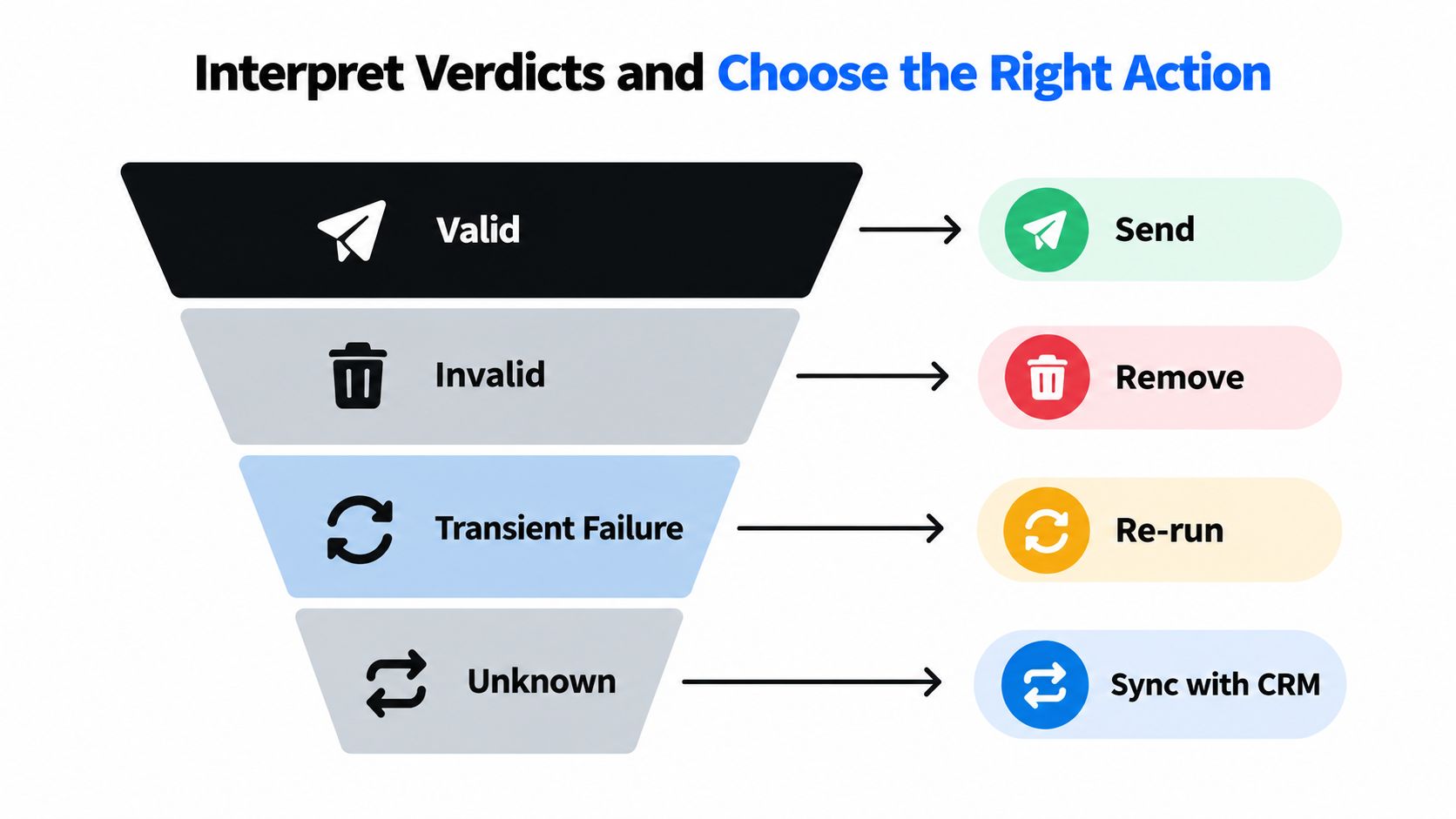
A binary valid-or-invalid list hides the distinctions that matter to a campaign. Some results are clear enough to act on immediately; others need another check or a decision based on the recipient's role and how the address entered your database. Make the action explicit in your report, not just in an operator's memory.
| Verdict class | Practical action | What to consider |
|---|---|---|
| Valid and appropriate | Send | Check that the address fits the campaign and is not on a suppression list. |
| Clearly invalid | Suppress | Don't send to an address the check identifies as nonexistent or malformed. |
| Transient failure | Re-run | A temporary check failure isn't the same as a confirmed invalid result. |
| Risky but technically valid | Review | Consider address type, campaign purpose, and history before deciding. |
| Unknown or unresolved | Hold or review | Don't turn uncertainty into an automatic send decision. |
Catch-all domains deserve particular care because a server can accept mail without confirming that a particular mailbox exists. A role address may be appropriate for a shared business newsletter but unsuitable for individual cold outreach. Disposable addresses and records with historical bounce concerns also call for context, not a reflexive send.
Consider a fictional contact at a law firm who uses a shared office inbox. The address might be reasonable for a newsletter the firm explicitly requested, but a cold-outreach sequence aimed at an individual may call for suppression or manual review. For teams working in regulated or professional settings, SimpleLab Digital's guide to lawyer email marketing offers campaign-specific context to consider alongside technical results.
The core distinction is important: an address can be accepted by a receiving server and still be dormant, undesirable for a campaign, or prone to spam placement. A hard bounce means delivery failed at the address or server level. Even a non-bouncing message may not reach the inbox or earn an engagement. Read the guide to what email verification verdicts mean before assigning actions, and retain a review category for results that don't support a confident send decision.
Control Costs While Protecting Reputation
Plan verification around the addresses you intend to use. CleanMyList uses credits rather than a subscription, and credits don't expire. Bundles begin at $6, and a new account receives 50 free credits without requiring a card. Since verification uses one credit per address, estimate the job by comparing the campaign's intended address count with the credits available. The job cost estimator can help you plan before you upload.
Don't pad a job with records outside the campaign just because they're in the same database. A large, unrelated export makes the result harder to interpret and can consume credits without helping the send decision. Likewise, repeatedly checking an unchanged file doesn't make it fresher. Re-run a segment when something has changed or when the list's age makes another check reasonable, and record the date and purpose.
Treat speed as fewer unresolved decisions
The fastest useful workflow isn't the one that rushes every result into the sending platform. It's the one that gets the team to a defensible action without unnecessary repetition. If a result remains uncertain and another attempt won't answer the campaign question, suppression may be safer than continuing to test it.
That choice is a trade-off. Suppressing a potentially deliverable address can mean reaching fewer people, but sending to a record with unresolved risk may put the rest of the campaign at a disadvantage. Weigh the value of the recipient against the evidence you have, and apply the same rule consistently within each campaign segment. A clear policy for review and suppression helps teams avoid changing their standards under launch pressure.
Run a Final Pre-Send Verification Check
Before launch, reconcile the original CSV, the verification report, the final export, and the destination email platform. Check that the records selected for sending match the decisions in the report. Pay close attention to syncs and imports: duplicates or suppressed contacts can reappear if the destination list has its own existing records or rules.
Then inspect a small sample from each verdict class. Confirm that a valid record is intended for this campaign, an invalid one isn't present in the final export, a transient failure hasn't been treated as a clean result, and a risky or unknown address has a documented disposition. Record the verification date so the team can tell when a later re-run is warranted.
If CleanMyList is part of your workflow, use its available sync instead of copying results manually, and preserve the original file as your audit trail. Keep a note of the campaign purpose and the final selection rules with the report. Teams that need a wider operational handoff can also use a client kickoff checklist for remote work as a model for assigning owners and recording decisions across collaborators.
Final test: Send only when the technical result, campaign context, list history, and final export agree. Verification reduces risk, but it can't guarantee inbox placement, opens, or revenue.
CleanMyList lets teams verify addresses in bulk, review plain-English verdicts, and export or sync a campaign-ready list without sending test emails. Prepare your 2,000-address file, choose the action for each verdict, and visit CleanMyList to start with its available verification credits.