You've imported the list, built the campaign, and your finger's hovering over send. Then you remember where those addresses came from. Some are from last year's event, some sat untouched in the CRM, and some haven't opened anything in months. That pause is the right instinct. A bulk email address verifier exists for exactly that moment, before questionable records turn into bounces you have to explain afterward.
Table of Contents
- Why Bulk Email Verification Comes Before the Send
- Understanding What a Bulk Email Address Verifier Does
- Signals Behind Every Email Address Verdict
- Prepare and Clean a List Without Losing Context
- How to Choose a Verification Service You Can Trust
- Choose the Right Workflow for Each Email Use Case
- Separate Deliverability From Permission and List Safety
- Build a Repeatable Verification Routine
Why Bulk Email Verification Comes Before the Send
A marketer preparing a reactivation campaign often starts with confidence because the spreadsheet looks orderly. Names are spelled correctly, companies are familiar, and every row has something in the email column. The problem is that a list can look complete while many destinations have changed.
People move jobs, companies change domains, providers shut down, and inboxes get abandoned. Industry research cited in analysis of B2B data decay at approximately 2.1% per month, compounding to about 22.5% over a year explains why an accurate list doesn't stay accurate on its own. A separate large verification dataset in that same discussion found a substantial share of checked addresses were invalid, though risky or older lists may be overrepresented in such data.
What changes when you check first
Verification before sending lets you remove or quarantine records that are likely to produce hard bounces. You protect three things at once.
- Sender reputation: Mailbox providers notice patterns of failed delivery, not just individual mistakes.
- Campaign data: Opens and clicks mean more when they're not diluted by addresses that never had a chance.
- Budget and effort: You don't spend sends, automation steps, or sales follow up on destinations that can't receive mail.
Checking afterward is different. By then, the bounces have already been recorded by receiving systems, and you're doing repair work instead of prevention.
Verification is list maintenance, not a repair button you press after a campaign performs badly.
It also has limits you should keep in view from the start. Verification can't guarantee inbox placement, fix weak authentication, make irrelevant content welcome, or create permission to contact someone. It reduces one avoidable source of risk. Consent, engagement, relevance, and sending practices still shape the outcome.
Understanding What a Bulk Email Address Verifier Does
Think of a verifier as a sorting room between your raw data and your sending platform. Addresses arrive in bulk, staff check several clues on each envelope, and each one leaves with a routing decision. No single clue tells the whole story, which is why credible tools combine signals instead of relying on format alone.
The workflow below shows that sorting process from submission to decision.
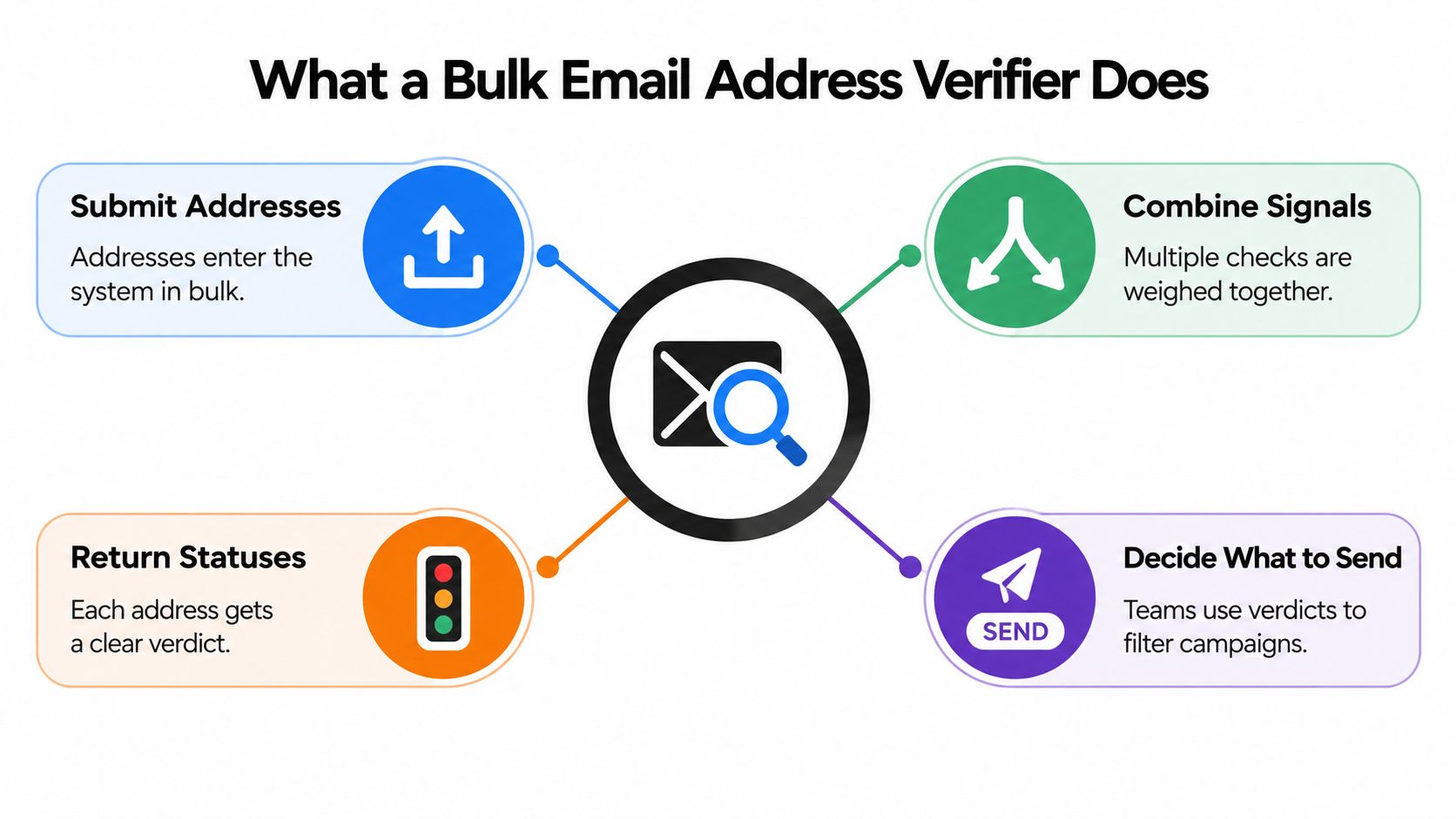
Following one address through the system
You upload a CSV or paste a list. The verifier first separates malformed entries that can't be addresses at all, such as missing symbols or broken domains. Next it asks whether the domain can receive mail and whether there's evidence the specific mailbox exists.
Then it weighs risk signals that sit between those extremes. An address may be reachable but belong to a disposable provider, a shared role inbox, or a domain that accepts everything without confirming individual mailboxes. Those aren't the same problem, so they shouldn't get the same label.
What you should get back
A useful result file gives you decisions, not just scores. Look for clear categories that help you act.
- Send: Available evidence supports including the address.
- Suppress: There's a confirmed reason not to send.
- Review: The address is uncertain or risky in a way that depends on context.
- Correct: A likely typo or formatting issue needs human attention, not an automatic rewrite.
The original list should remain untouched so you can compare input and output. A plain English reason for each verdict matters too, because your team needs to explain why a contact was kept or removed.
The goal isn't a promise that every accepted address reaches an inbox. It's a decision ready list where each record has been sorted with evidence you can inspect.
Signals Behind Every Email Address Verdict
A verdict is only as trustworthy as the signals behind it. When a tool says valid or invalid without showing its work, you can't tell whether it checked thoroughly or guessed quickly.
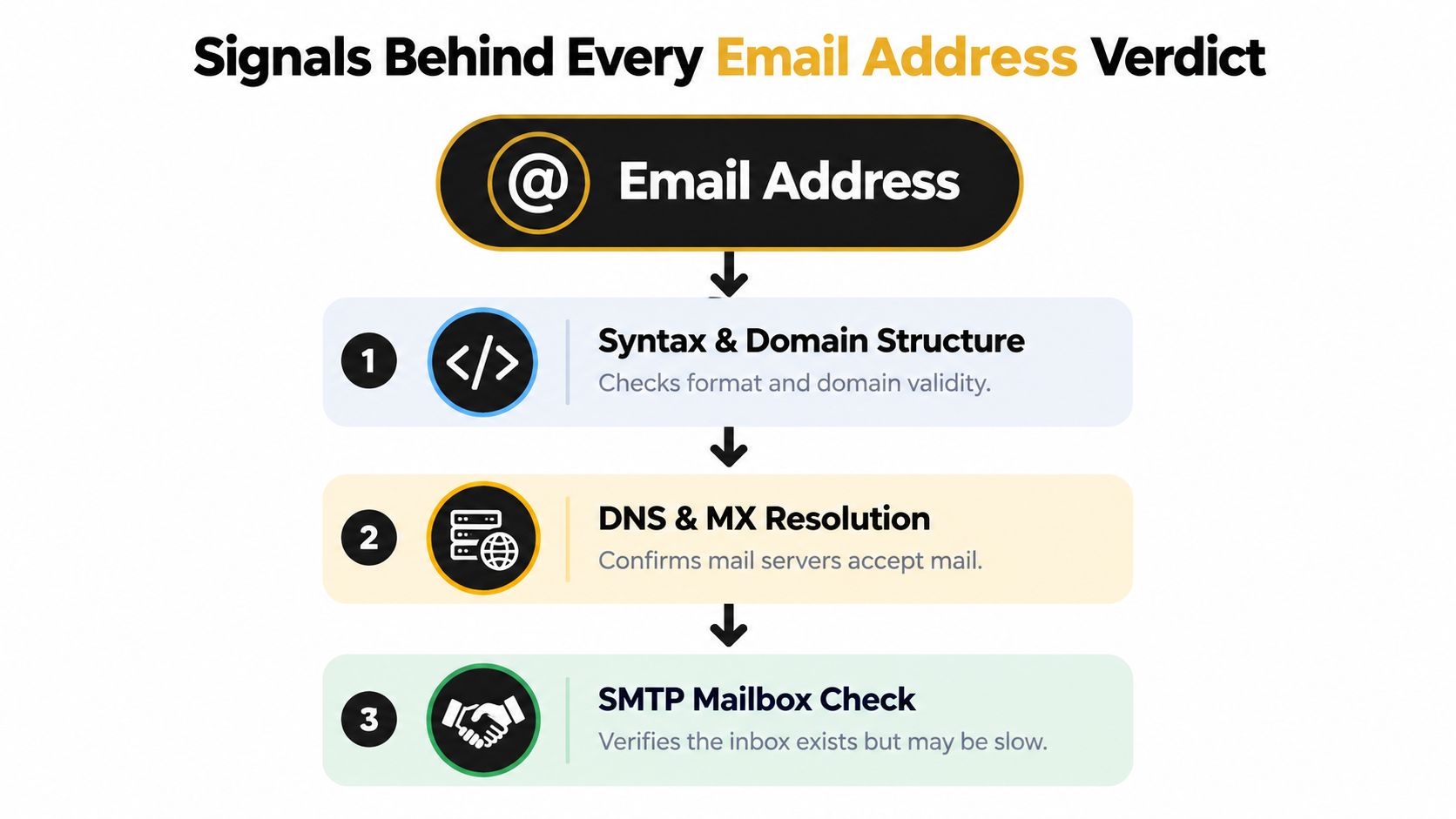
The diagram below breaks the process into its core layers, from format to mailbox level checks.
Starting with structure and destination
Syntax checks confirm the address is built correctly, with a plausible local part, symbol, and domain. That catches typos and placeholder text, but almost any invented string can pass format rules.
DNS and MX resolution goes further. It asks whether the domain exists and publishes mail servers that can accept messages. If there's no route for mail, there's no point probing for a mailbox.
Treating SMTP as evidence rather than proof
An SMTP check connects to the receiving server and tests the recipient stage without sending message content. That sounds definitive, but it isn't. The SMTP specification and its treatment of mailbox transactions doesn't require servers to reveal whether a mailbox exists. Providers may disable recipient verification, accept all recipients and bounce later, or hide real answers behind policy.
That's why strong verifiers classify responses carefully. Temporary failures deserve retry logic instead of an instant invalid label. Blocked or policy limited responses should stay visible as their own state.
The short video below walks through how these checks fit together in practice.
Where context changes the verdict
A catch-all domain accepts mail for any address, so a successful response doesn't confirm your specific person exists. Treat those results as uncertain, especially for cold lists.
Consider support@example.com. It's a role account that may be perfectly deliverable, yet it's shared, monitored differently, and rarely the named decision maker you intended to reach. Deliverable and appropriate aren't synonyms.
Disposable providers create a different concern. The mailbox may work today and vanish tomorrow, which matters for accounts and long term subscribers. Historical bounce reputation adds another layer by flagging addresses or patterns associated with prior failures.
Practical rule: Ask what each verdict means, why it was assigned, and what would change it on a recheck.
None of these signals repairs authentication failures, spam complaints, or irrelevant messaging. Verification filters addresses. It doesn't make a campaign welcome.
Prepare and Clean a List Without Losing Context
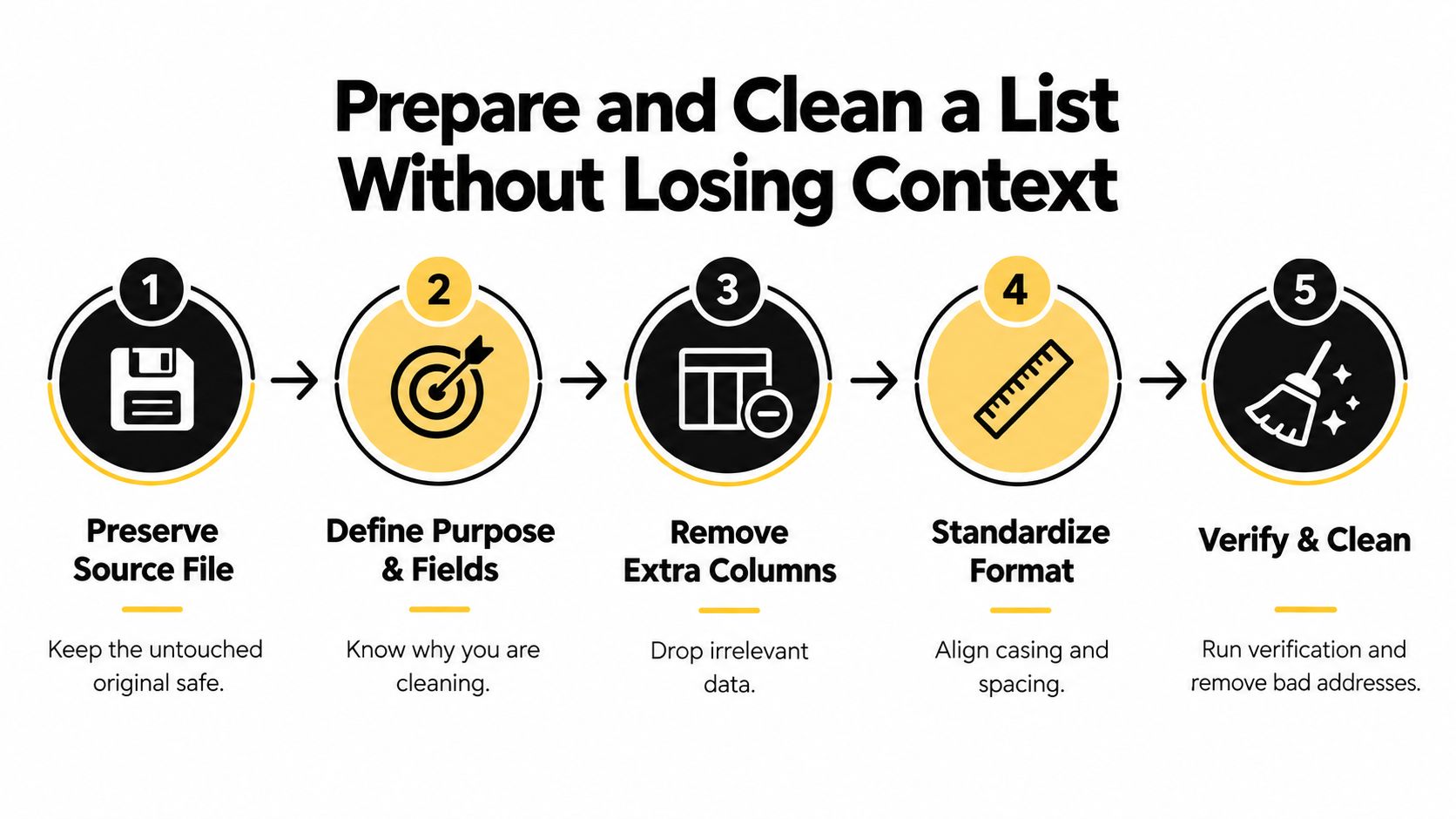
Good cleaning starts before you upload anything. If you overwrite your source file or strip away the context that explains where contacts came from, you can't audit your decisions later.
The five steps below give you a repeatable preparation routine.
Protecting the source before you change anything
Save an untouched copy with a clear date and source name. Work from a duplicate, and keep a record of why you're cleaning this list now. A reactivation campaign, a CRM migration, and an event import don't carry the same risk.
Send only the fields the verifier needs when the service allows it. Extra columns with names, notes, or purchase history increase exposure without improving the email check. If you're reviewing how verification fits alongside enrichment and other data work, the looot data tools checklist offers a useful way to compare what each tool needs from your file.
Standardize cautiously. Trim stray spaces and fix obvious formatting, but don't guess at corrected addresses or change them without review. A suspected typo belongs in a review queue, and the guidance on preparing a CSV email list for verification covers file structure in more detail.
Turning verdicts into routing rules
Picture four rows. One customer address checks out cleanly and stays. One has a transposed domain and goes to correction review. An abandoned role address gets suppressed for this campaign. A catch-all result sits in quarantine until someone weighs its source and value.
- Confirmed invalid: Suppress it and fix the source system if you can.
- Likely valid: Keep it, provided consent and engagement rules also pass.
- Catch-all or risky: Segment it separately rather than mixing it with confirmed contacts.
- Temporary or unknown: Retry later instead of forcing a final answer.
- Blocked by policy: Review manually, since the check itself was limited.
Don't export a single pass or fail list and delete everything else. Uncertain records carry information about your collection process, and silent deletion destroys that trail.
How to Choose a Verification Service You Can Trust
Accuracy claims are easy to print and hard to compare. Two tools can report similar headline numbers while handling uncertainty, privacy, and exports in completely different ways. Your evaluation should look at the whole workflow you'll live with after the trial ends.
| Evaluation area | Questions to ask | Why it matters |
|---|---|---|
| Signal depth | Does it combine syntax, DNS, SMTP, catch-all, disposable, role, and reputation signals? | One check alone produces confident mistakes |
| Transparency | Does every result include a specific reason a reviewer can act on? | Your team must justify keeps and removals |
| Uncertain states | Are catch-all, unknown, and temporary results shown separately? | Collapsing uncertainty into valid hides risk |
| File handling | Does it support CSV and paste, large files, and preserve your original? | Cleaning shouldn't destroy source context |
| Privacy controls | Does checking send an email, how long are files kept, and can you delete them? | Retained lists create compliance and breach exposure |
| Workflow fit | Are there exports, integrations, and real time options for signup forms? | Results must reach the systems that send |
| Total cost | How do credits, repeat runs, and support affect the real price? | Manual cleanup time is part of the cost |
Questions vendors should answer directly
Ask whether verification sends a message. It shouldn't need to. Ask what's encrypted, who can access uploaded files, whether submitted addresses are ever reused, and how deletion works in practice rather than in marketing copy.
Separate three kinds of data in the conversation. The uploaded file is transient input, the verdict file is a verification result, and addresses you must never mail again form a suppression record. Each deserves different retention.
The overview of what makes a good email verifier in day to day operations is a helpful companion when you're comparing those answers side by side.
One concrete example to benchmark against
CleanMyList is one no subscription option that checks addresses across eight signal groups, gives a plain English reason for every result, and leaves the original list untouched. It offers 50 free credits to start, credits that don't expire, bundles starting at $6, and a stated 30 day deletion policy for uploaded lists.
Use those specifics as prompts, not conclusions. Whatever you shortlist should state its equivalent terms just as plainly.
Choose the Right Workflow for Each Email Use Case
The same verifier serves different teams, but the right first list and follow up action change with the job. Treating every file identically wastes effort on low risk contacts and underchecks the segments that can hurt you.
Newsletters and publishers
A newsletter team collects addresses continuously, so problems arrive at the form before any campaign exists. A 2025 benchmark reporting that 7.6% of signup form submissions were already invalid and 4.57% were risky, alongside Gmail and Yahoo guidance citing a 0.3% spam complaint threshold shows why waiting for a quarterly cleanup leaves gaps.
Publishers with large subscriber files should revalidate aged segments on a schedule, especially readers who haven't engaged recently. Inline checks at signup block obvious typos and fake entries, while periodic bulk runs catch decay that happens after collection.
Ecommerce and growth teams
Separate purchasers from event registrants, giveaway entries, and abandoned cart records before you verify. A recent buyer with a typo may be worth a correction workflow through account or checkout channels. A contest entry from a disposable provider usually isn't.
Engagement history should travel with the verdict. A deliverable address that hasn't responded in a long time still needs a reactivation decision, not automatic inclusion in every promotional send.
Sales, outbound, and developers
Outbound teams face the sharpest distinction in this guide. A cold prospect can be technically deliverable while your team still lacks an appropriate basis to contact them. Verification answers the mailbox question only, so route risky and catch-all prospects to stricter review rather than blending them into high volume sequences.
Developers sit at the prevention end. A one line signup widget or form level validation stops malformed and fake addresses before they create accounts, trigger automations, or pollute reporting. That complements bulk cleaning. It doesn't replace rechecking stored data before major sends.
Ask each team the same closing questions. Which list carries the most age or source risk, which statuses need human review, and does suppression connect back to the sending system? If suppression lives only in a downloaded spreadsheet, it won't protect the next import.
Separate Deliverability From Permission and List Safety
Many teams get into trouble here. A green checkmark feels like permission, and it isn't. Keep three judgments separate and you'll make better decisions even when a campaign deadline is pressing.
Three questions instead of one
Deliverable means the address may accept mail based on technical signals. Safe to send means it doesn't present an obvious verification or reputation risk for this specific campaign, considering its source, age, and engagement. Permitted to contact means you have a lawful and appropriate basis to message that person for this purpose.
Purchased, scraped, or repurposed addresses can pass the first test and fail the third. So can an old customer address reused for an unrelated product line. The explanation of permission based email marketing and consent records goes deeper on documenting that basis.
A technically valid address is not automatically a welcome or lawful one.
Protecting the list while you check it
Privacy aware verification asks what happens to your file after upload. Guidance on GDPR oriented email verification covering data minimization, purpose limitation, processor agreements, and retention points buyers toward sending only necessary fields, defining the purpose, and confirming deletion terms.
That applies whether you operate in the EU, UK, California, Brazil, or elsewhere with processor obligations. A cheaper checker that retains full lists indefinitely or reuses submitted addresses can cost more in compliance and breach exposure than it saves in credits.
Before anyone receives the campaign, combine the verdict with consent records, suppression status, engagement history, authentication health, and message relevance. If any layer fails, the address shouldn't be rescued by a passing technical check.
Build a Repeatable Verification Routine
You don't need a complicated program. You need the same sensible steps every time a list enters, ages, or prepares to send.
A routine your team can actually follow
- Validate at entry: Block obvious typos and fake addresses inline at signup or checkout.
- Clean before major sends: Run bulk checks on imported, dormant, or reactivated segments.
- Review exceptions: Route catch-all, unknown, and risky records to retry, quarantine, or manual review.
- Export with rules: Send only records that pass deliverability, safety, and permission checks.
- Recheck aged data: Re-run older files because a clean result has a shelf life.
Scale makes small percentages concrete. Twilio's benchmark in its 2023 Email Marketing Benchmark Report showing a 1.06% average bounce rate and a 0.21% median, with 0.07% and 0.61% at the 25th and 75th percentiles means a large campaign can generate many failed deliveries even at average performance. Historical guidance treats rates below 2% as normal, 2% to 5% as a warning range, and above 5% as critical.
Monitor outcomes after sending and feed bounces and complaints back into suppression. Then look for patterns by source, since one form or import may be creating most of your bad data.
Verification can reduce avoidable hard bounces and protect list quality. It can't guarantee inbox placement or compensate for weak authentication, irrelevant messaging, poor consent, or rising complaints. Keep that boundary clear and the tool will do its job well.
Start your next cleanup before the campaign goes out by uploading a CSV or pasting your list into CleanMyList, where each address returns a clear verdict with a plain English reason so you can send, review, or suppress with confidence. Your first credits are free, your original file stays untouched, and you can recheck aged lists whenever they need attention.