
The most popular email-validation advice is usually wrong in production: make the regex stricter until every address looks familiar. That can reject real customers while still letting through addresses that can't receive mail. An email pattern regex is useful, but only as an early formatting filter. Treating it as a deliverability verdict is a category mistake.
A practical pipeline separates syntax, domain checks, mailbox verification, and reputation signals. The regex should catch obvious mistakes quickly, then hand off uncertain cases to checks that can answer questions a pattern can't. The right pattern isn't the one that accepts the fewest strings. It's the one that fits its job without lowering the quality of your list.
Table of Contents
- Why Email Pattern Regex Is Only the First Filter You Need
- Anatomy of an Email Pattern You Can Actually Read
- Permissive vs Strict Patterns and What Each Rejects
- Components and Building Blocks Worth Knowing
- The Cost of Over-Strict Email Patterns
- Frontend vs Backend Validation and the Pattern That Fits Each
- Internationalized Email and Unicode-Aware Patterns
- Recommended Patterns for Common Stacks
- Beyond Regex DNS SMTP and the Eight-Signal Pipeline
- Testing Patterns and Re-Checking Stored Lists
- Choosing the Right Pattern for Your Validation Goal
Why Email Pattern Regex Is Only the First Filter You Need
A regex can reject an address with no @, illegal whitespace, or a missing domain. It can't prove that the domain exists, that the mailbox accepts messages, or that the address hasn't bounced before. Those are separate checks, and collapsing them into one yes-or-no result gives teams confidence the pattern hasn't earned.
The standard itself helps explain the limits. RFC 5322 defines an address-only addr-spec as a local-part, an @, and a domain, but permits several forms for both parts, including quoted local parts and domain literals. It also distinguishes an addr-spec from a name-addr with a display name, such as Alice Smith <alice@example.com>. A short pattern for common signup addresses isn't a full implementation of that grammar, and it shouldn't be presented as one.
Practical rule: Make the regex responsible for obvious formatting errors. Don't ask it to prove deliverability.
A layered pipeline works better: check syntax first, then domain and DNS, mailbox acceptance where appropriate, and reputation signals before sending. Each step answers a different question. A syntactically clean address can still point to a dead domain or a mailbox that won't accept mail.
That distinction matters for list quality. A 2023 analysis reported by MediaPost using Email List Decay Report data said 10 million email typos were observed over one year. Among addresses submitted by clients in 2022, 57.21% were classified as valid, while the report estimated that at least 22.71% of a list degrades each year. Regex can help with malformed structure, but it can't catch every typo or tell you whether a mailbox is usable. Use it as the cheap first gate, then apply checks suited to the risk and context.
Anatomy of an Email Pattern You Can Actually Read
A common screening pattern is:
^[^\s@]+@[^\s@]+\.[^\s@]+$
Read it from left to right. The ^ and $ anchors require the entire input to match, rather than allowing a valid-looking substring inside a longer string. [^\s@]+ accepts one or more characters that aren't whitespace or @, first for the local part and then for the domain portion before a required dot.
The @ separates those two portions. The \. is a literal dot, and the final [^\s@]+ requires characters after it. In sam.lee@example.com, the left character class matches sam.lee, the separator is @, the domain class matches example, the escaped dot matches ., and the final class matches com.
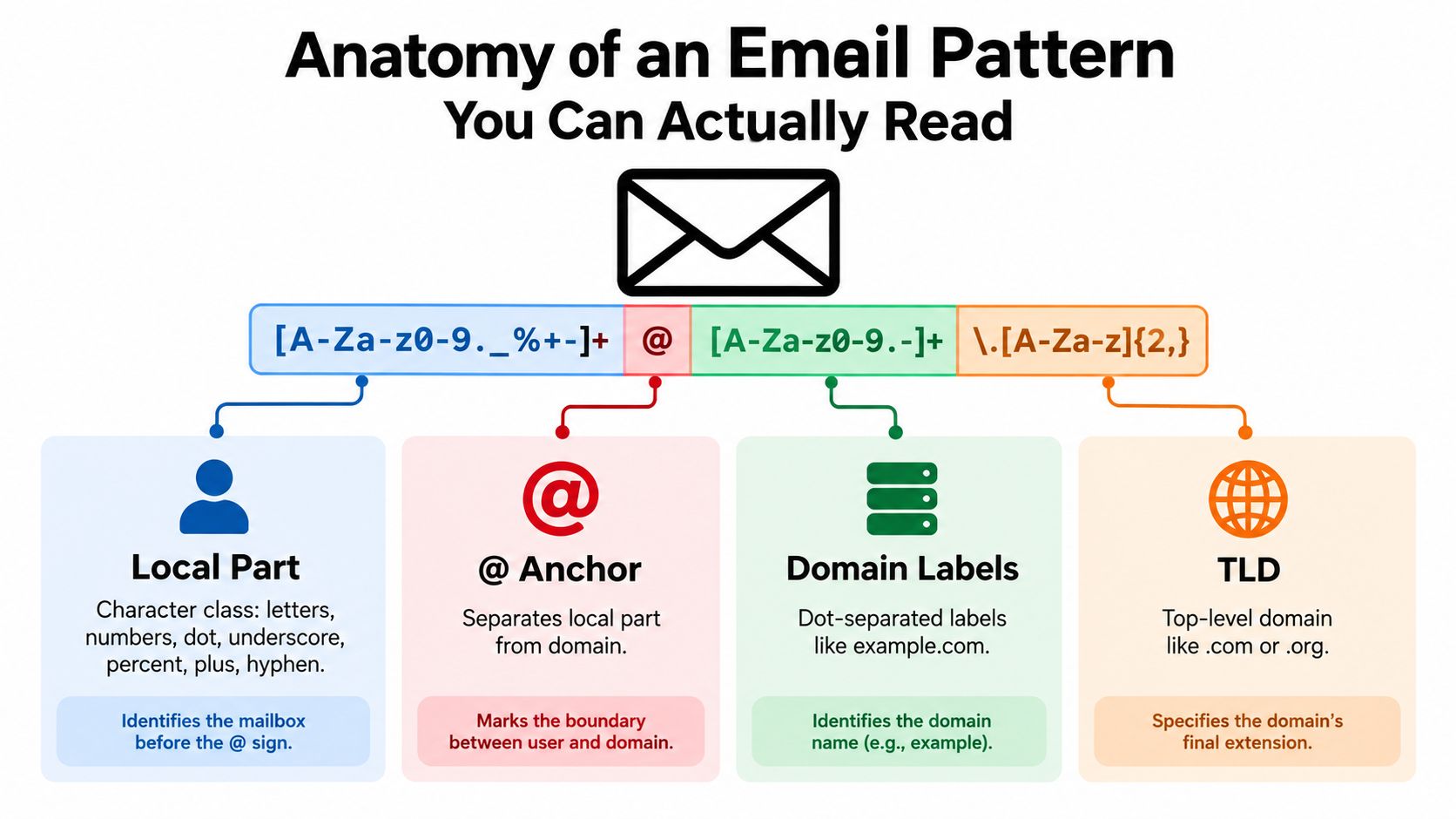
This pattern is deliberately readable, not exacting. It rejects missing pieces and spaces, but it can also accept malformed dot placement, such as sam..lee@example..com. It doesn't enforce DNS-label rules, restrict the local-part character set, or establish that the domain is real.
Two choices determine the behavior of almost any email pattern regex. Anchoring decides whether the whole input must match. TLD strictness decides what the pattern requires after the final dot. Requiring a familiar-looking suffix can catch some mistakes, but hard-coding a short list of TLDs ages poorly and may reject legitimate addresses. A minimum-length rule is a screening decision, not a guarantee of existence.
The practical takeaway is to read each component for its actual job. Character classes define what can appear; anchors define the match boundary; dots and label rules shape the domain. Once those are explicit, it's easier to spot whether a pattern is a useful filter or an overconfident imitation of a parser.
Permissive vs Strict Patterns and What Each Rejects
More rejection does not automatically mean better validation. Regex is the cheapest, earliest filter in a layered pipeline: a client-side hint catches obvious typing errors, a server-side syntax check applies the product's address policy, and DNS, SMTP, or reputation checks handle questions syntax cannot answer.
| Pattern posture | What it accepts | What it rejects | Best use case |
|---|---|---|---|
| Permissive | Non-whitespace text on both sides of one @, with a dot in the domain |
Missing separators, whitespace, or a missing domain suffix | Client-side hint |
| Balanced | Common ASCII dot-atom addresses with one @ and sensible domain labels |
Malformed dots, empty labels, and illegal label characters | Server-side syntax gate |
| Strict | The balanced subset plus explicit length caps and a defined input policy | Addresses outside the product's declared compatibility rules | Bulk-import screening, with review paths |
A permissive pattern such as ^[^\s@]+@[^\s@]+\.[^\s@]+$ rejects sam@ and sam example.com, but accepts the plausible typo sam@exampel.com. That makes it useful for immediate feedback, not proof that an address exists or can receive mail. Keep the message clear: the field looks malformed, rather than claiming the address is invalid.
A balanced pattern can restrict local-part characters and enforce domain-label structure. It should reject leading or trailing dots and consecutive dots in the local part. Choose its allowed characters to match the product's supported address formats. A conventional ASCII pattern is suitable only when internationalized email is outside that policy.
Strictness belongs at a layer with a defined reason to reject an address. A bulk-import workflow may need a downstream provider's compatibility limits, while signup should usually accept syntax the product can parse and support. Over-strict filtering at the first touchpoint can block legitimate addresses, reduce signups, and exclude usable contacts from a list. For imports, provide a review path instead of discarding uncertain records.
Syntax checks still cannot establish that a domain has working mail service or that an address is safe to send to. Use DNS or SMTP checks when deliverability is the question, and reputation signals when deciding whether to send. Apply each check where it adds useful evidence, rather than making one regex carry the whole validation pipeline.
Components and Building Blocks Worth Knowing
A character class defines which characters a pattern accepts, not where they may appear. The local-part class [a-zA-Z0-9._%+-]+ allows common ASCII letters, digits, dots, underscores, percent signs, plus signs, and hyphens. It accepts an address such as alex+news@example.com, but also permits alex..news. Add structural checks when the application needs to enforce dot placement.

A negative lookahead such as (?!.*\.\.) rejects consecutive dots in the input. It does not reject a local part that begins or ends with a dot, so add checks for those positions too. Anchor the pattern with ^ and $ to test the whole address rather than accepting a matching fragment.
Domain rules need their own structure. A DNS-label-oriented pattern allows letters, digits, and hyphens within dot-separated labels, while disallowing a hyphen at either end of a label. A loose class such as [^@\s]+ lacks those constraints. Treating the entire domain as one unrestricted run can accept malformed labels, even when the regex appears readable.
Length limits require separate consideration. RFC 5322 specifies limits of 64 octets for the local part, 255 for the domain, and 254 characters for the complete address. These are syntax boundaries, not evidence that an address can receive mail. The RFC 5322 text describes those limits and distinguishes common dot-atom forms from other permitted forms.
Quoted local parts and domain literals are valid grammar forms, but many signup patterns deliberately leave them out. A quoted local part can contain characters a simple class rejects; a domain literal uses brackets rather than a conventional domain name. Support these formats only if the application's parser and sending path handle them consistently. Otherwise, state the accepted format clearly, without suggesting the pattern covers every address permitted by the RFC.
The Cost of Over-Strict Email Patterns
An over-strict regex can reject a genuine customer address, while a permissive one can accept an address that cannot receive mail. These are different failure modes, and adding syntax rules does not solve both. Rejected addresses cost signups; accepted but unusable ones can harm list quality and sending outcomes.
The list-decay figures cited earlier show why a well-formed string is not necessarily a usable recipient. Regex can catch some malformed addresses, but it cannot reliably identify every correctly spelled-looking domain typo or distinguish addresses that are catch-all, abusive, or otherwise unsuitable for mail. Those checks belong in later layers: syntax validation first, then DNS or SMTP checks where appropriate, followed by reputation signals before sending.
Internationalization creates another false-rejection risk. An ASCII-only character class can reject legitimate non-ASCII local parts; an unrestricted Unicode class can admit malformed or confusing identifiers. Products used across regions need a defined Unicode policy and a parser that follows it, rather than an ever more tangled ASCII expression.
The maintenance cost appears when a pattern blocks a real customer. A support escalation may lead an engineer to add an emergency exception for one address, without identifying which rule caused the rejection. That exception can leave the policy inconsistent. If unusable addresses get through, adding more syntax rules may also miss the actual cause, which could require DNS, SMTP, or reputation checks instead.
A green syntax check means only that the input passed the syntax policy you wrote.
Keep the regex as the cheapest, earliest filter. Accept ordinary addresses that fit the product's documented syntax policy, and route uncertain compatibility cases to a suitable parser or review. Verify addresses and assess reputation before sending. A stricter regex hurts list quality when it blocks legitimate customers without catching the delivery or reputation problems that produce bounces.
Frontend vs Backend Validation and the Pattern That Fits Each
A browser regex is the cheapest, earliest filter, not the authority on whether an address is valid. Client-side checks can be bypassed, so use a simple pattern to flag obvious typos and let the server enforce the application's syntax policy.
const emailHint = /^[^\s@]+@[^\s@]+\.[^\s@]+$/;
This catches missing separators and whitespace. Pair it with an accessible message that explains what to correct, rather than rejecting unfamiliar input without guidance. For mobile signup flows, React Native login page design provides context for placing form feedback in the interface.
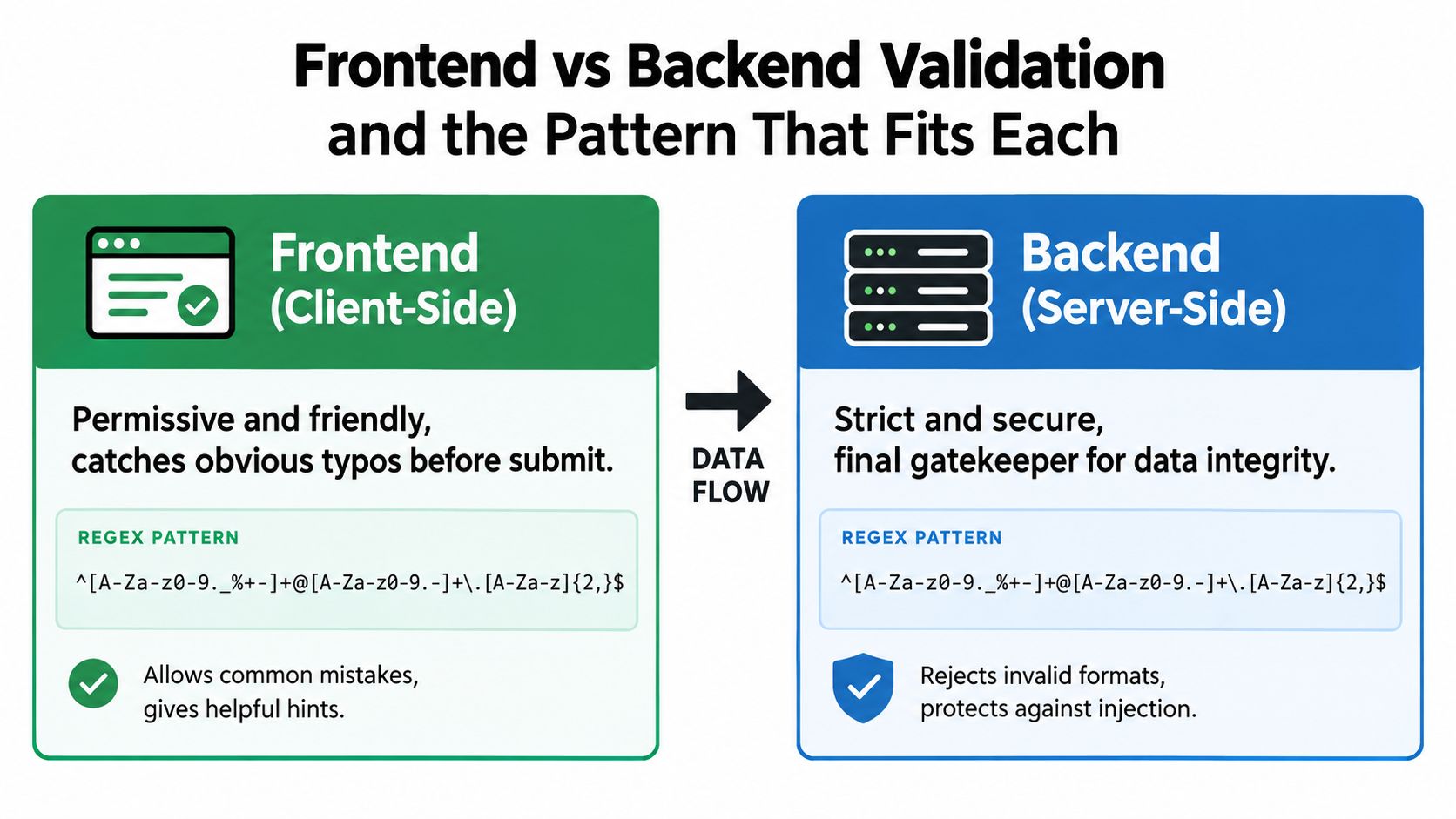
At the API boundary, validate syntax before storing an address or proceeding to delivery checks. Apply your whitespace policy, lowercase the domain, preserve the original address for display or audit where appropriate, and enforce RFC length limits. Avoid lowercasing the local part automatically, since that assumes a case-handling policy your application may not support.
An ASCII-only server pattern can enforce common dot-atom structure and domain-label rules, but it cannot establish that a mailbox exists. Use a parser for more complex or internationalized forms. Then choose the next check based on the risk: DNS or SMTP checks can help assess delivery, while reputation checks address whether an address is suitable to mail. The email validation best practices guide outlines how syntax checks fit into later validation steps.
Keep the browser and server messages consistent, but don't require identical implementations. The client should give a low-friction hint; the server should apply the documented policy and decide whether to accept, review, or reject the address. Overly strict syntax rules can reject legitimate customers without improving deliverability, so tighten them only when a clear product requirement justifies the added false rejections.
Internationalized Email and Unicode-Aware Patterns
An ASCII-only pattern can reject a legitimate internationalized address. At the other extreme, allowing arbitrary Unicode without parsing or normalization can admit malformed input or visually confusing identifiers. Neither “ASCII only forever” nor “accept every character” is a complete policy.
RFC 6531 extends SMTP for internationalized email. A receiving server must advertise the SMTPUTF8 capability for transport of non-ASCII mailbox characters; the RFC extends SMTP mailbox syntax without replacing RFC 5322. A regex can recognize characters, but it can't negotiate that transport capability or establish that a particular provider supports the address.
Separate local-part and domain handling. Preserve the local part as supplied, validate it using Unicode-aware parsing, and apply consistent Unicode normalization where your system requires it. Process the domain through IDNA rather than changing the local part. Never transliterate the local part without the customer's explicit direction, because it can change the address and the person it identifies.
Use two explicit modes:
- ASCII compatibility mode for systems and email providers that don't support SMTPUTF8.
- Unicode-aware mode for products that can validate UTF-8 input, normalize consistently, process domains through IDNA, and assess downstream compatibility.
A useful test suite should include examples from scripts your product serves, such as a Japanese local part with a Unicode domain, an Arabic local part, and a Cyrillic domain. Test parsing separately from transport compatibility, and don't reject an address solely because it contains non-ASCII characters. Python's standard email tooling likewise uses parsed address structures for RFC-conforming handling, which is a better fit for complex input than stretching a basic regex beyond its design.
Recommended Patterns for Common Stacks
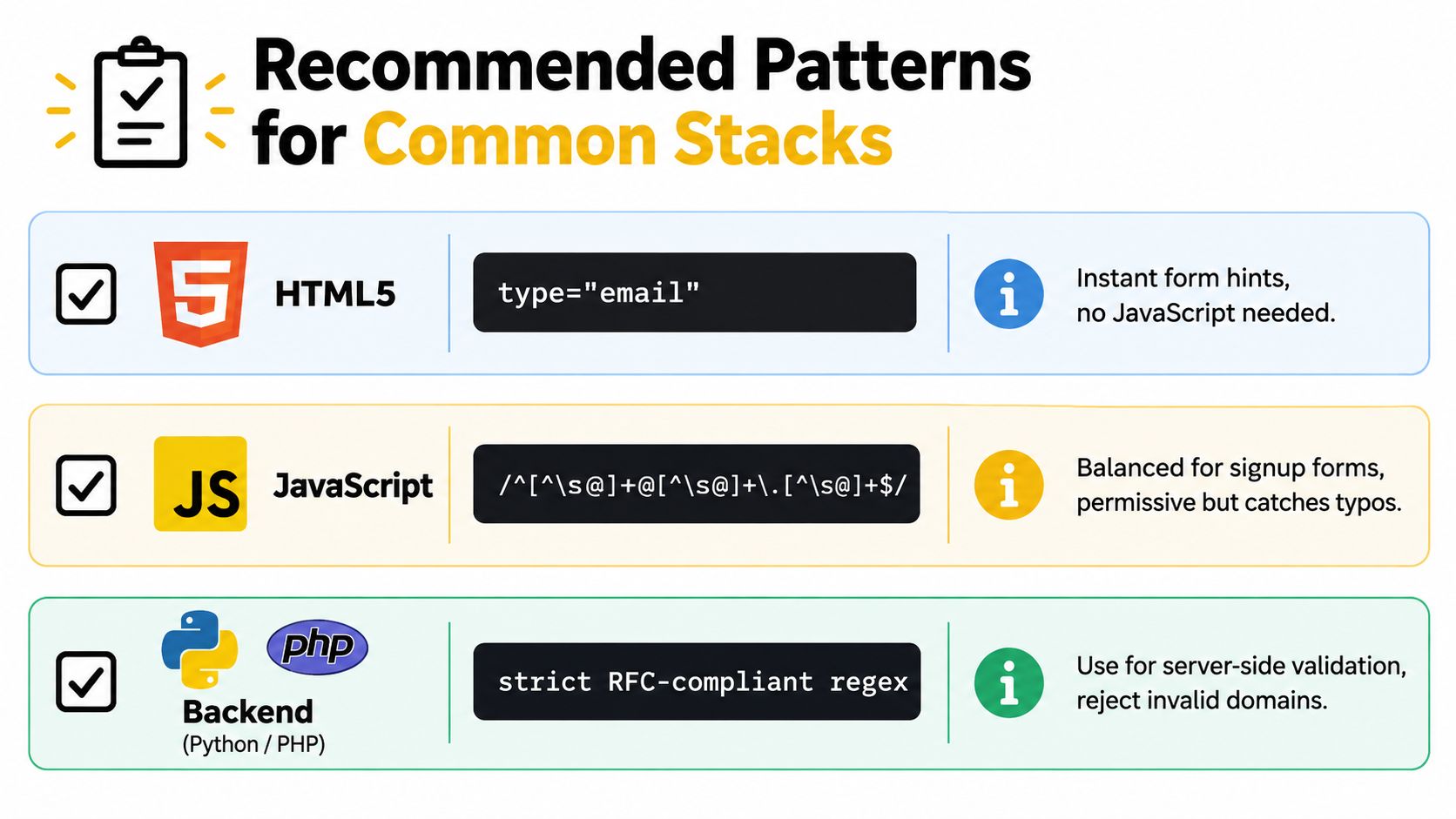
Choose a pattern or validator based on the environment and the policy it can enforce. These examples are syntax filters, not deliverability tests. For server-side production use, a maintained parser is often safer than treating a handwritten regex as an RFC implementation.
-
HTML5 form: Use
<input type="email">for built-in browser feedback. Browser checks are convenient but aren't a substitute for server validation. -
JavaScript signup hint:
const emailRegex = /^[^\s@]+@[^\s@]+\.[^\s@]+$/;This catches common formatting mistakes, but it permits some malformed dot placement and doesn't verify the domain. -
Python server: Prefer
email.utils.parseaddr()or a dedicated RFC-aware library over a regex-only check for complex input. A parsed result is still syntax validation, not proof of delivery. -
Java server: Use a parser such as Jakarta Mail's
InternetAddresswith an explicit policy and confirm that the parsed address is the address your application will store and send. Parser behavior depends on how you invoke it, so test the exact constructor and code path. -
SQL ingest: Use a conservative screening expression such as
^[^@\s]+@[^@\s]+\.[^@\s]+$to flag obvious formatting failures during import. Don't make it the final send decision, and retain rejected rows for review rather than discarding them automatically.
For a small signup flow, a concise regex may be enough for the first screen, provided the server repeats the check and the send pipeline verifies recipients. For a bulk import, keep the original rows, record why an address failed, and run stronger checks on candidates before sending. If you need a parser, choose one that matches your supported syntax and test it with the addresses your product expects to accept.
Beyond Regex DNS SMTP and the Eight-Signal Pipeline
Each layer answers a question the regex can't. In a typical signup or import flow, the sequence is syntax regex → DNS → SMTP mailbox → catch-all → disposable → role → reputation → send/skip decision.
- Syntax: Does the string fit the format policy?
- DNS: Does the domain resolve in a way that supports mail routing?
- SMTP mailbox: Does the receiving system indicate that the address can accept mail? Responses can vary, so treat the result as a signal rather than a universal guarantee.
- Catch-all: Does the domain accept messages for addresses whether or not a specific mailbox exists?
- Disposable: Is the address associated with a throwaway inbox?
-
Role account: Is it a functional address such as
info@orpostmaster@rather than a named individual? - Reputation: Has the address or related sending history produced bounce or abuse concerns?
- Decision: Combine the available signals into a send, review, or suppress recommendation.
A good pipeline doesn't force every address into an immediate pass or fail when the evidence is uncertain. Catch-all behavior, for example, can make direct mailbox confirmation inconclusive; the decision should reflect that rather than pretending the regex settled it. For a practical explanation of the mailbox-verification layer, see this guide on how to check whether an email address exists.
CleanMyList is one option for bulk verification. It checks addresses across syntax, DNS, SMTP mailbox existence, catch-all behavior, disposable providers, role accounts, historical bounce reputation, and a final send-or-skip recommendation, with a plain-English reason for each result. It doesn't send email during verification.
Testing Patterns and Re-Checking Stored Lists
Don't test an email pattern regex only against name@example.com. Build cases that target its boundaries and test the exact engine and input-normalization path you use in production.
- Anchors: Confirm that extra text before or after the address fails.
- Whitespace: Check leading, trailing, and embedded whitespace, with a deliberate policy for trimming.
- Dots: Test a leading or trailing dot in the local part, consecutive dots in the local part, and empty domain labels.
-
Separators: Reject a missing
@and an address with two unquoted@symbols. - Grammar edge cases: Decide explicitly whether comments, quoted local parts, and IP-literal domains are supported.
- Unicode and IDNs: Test non-ASCII local parts separately from Unicode domains and IDNA processing.
Then test end to end: confirm that the value your server stores is the same address your mail system will parse and send. Avoid validating one representation and later extracting a domain or local part with a different, naive split. If you support only conventional dot-atom input, document that product policy and make the rejection message useful.
Recheck stored lists based on campaign risk and data age rather than assuming signup-time validation lasts forever. Active marketing lists and higher-volume sending programs may warrant more frequent review than low-use transactional records, especially when bounces or engagement changes raise concerns. This guide to protecting sender reputation provides additional context for list hygiene, while this practical walkthrough of how to validate your email covers the verification workflow.
Choosing the Right Pattern for Your Validation Goal
Choose the lightest pattern that does the assigned job, then pass the address to the next layer. A signup hint should reduce obvious typing errors without acting as a hard deliverability gate. A signup gate should enforce the server's declared syntax and length policy while preserving a clear path for supported Unicode addresses.
| Goal | Pattern choice | Next pipeline step |
|---|---|---|
| Signup hint | Permissive whole-input check for common formatting mistakes | Server-side syntax validation |
| Signup gate | Balanced dot-atom policy, length checks, and an explicit Unicode mode | Domain and compatibility checks |
| Bulk import | Server-side parser or scoped regex with reviewable failure reasons | Multi-signal verification before campaign use |
| Transactional mail | Strict syntax policy for the system's supported formats | Recheck domain and mailbox signals near send time |
Bulk imports deserve a review path because a regex-only reject can hide valid but unusual addresses among genuine formatting errors. Transactional mail deserves checks close to the moment of sending because stored data can become stale. In both cases, retain enough detail to understand why an address was accepted, flagged, or suppressed.
A stricter pattern helps when it encodes a real product or provider constraint. It hurts when it merely rejects unfamiliar syntax, disguises a missing verification layer, or gives teams a false sense that every match can receive mail. Build the pipeline around those distinctions, then test it with ordinary, malformed, and internationalized inputs before deploying the policy.
CleanMyList verifies bulk email lists across syntax, DNS, SMTP mailbox existence, catch-all behavior, disposable providers, role accounts, and bounce reputation, then returns a send-or-skip recommendation with a plain-English reason. Upload a CSV or paste addresses to review and clean a list before your next campaign using CleanMyList.