
Your campaign is ready, the list looks clean, and the newsletter platform says it generated the messages successfully. Yet test recipients see nothing, or a delivered message shows authentication failures in its headers. Before rewriting the subject line or blaming the list, check whether your email services and DNS records still describe the same system.
Table of Contents
- Why DNS for Email Determines Deliverability
- Follow an Email Through DNS and SMTP
- Compare the Essential DNS for Email Records
- See How Authentication Records Work Together
- Configure Email DNS Without Breaking Sending
- Troubleshoot DNS and Email Verification Failures
- Manage DMARC Reports and Sender Changes
- Build a DNS for Email Maintenance Routine
Why DNS for Email Determines Deliverability
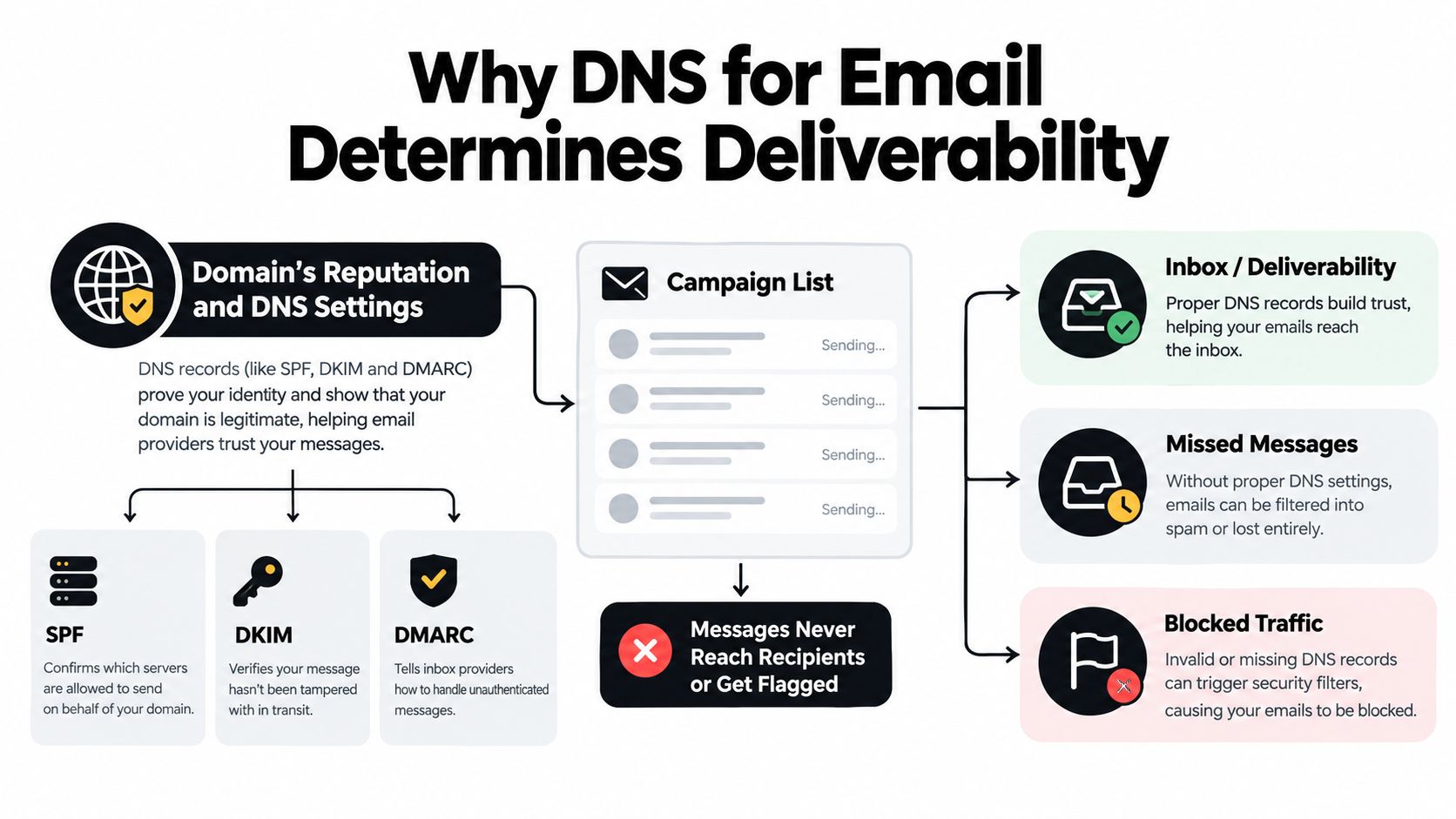
A successful submission to your newsletter platform isn't the same as successful delivery to a recipient. Between those events, sending and receiving systems use DNS for email to answer different questions: where should this message go, and what evidence supports the sender's identity?
Consider a hypothetical team that replaces its marketing platform but keeps its familiar From address. The marketer sees the right branding and a successful send status. The developer inspects a test message and discovers that the new provider is authenticating its own identity rather than the business's intended identity. The dashboard and the headers describe different parts of the process.
Separate destination from identity
On the receiving side, the recipient domain publishes routing information. On the sending side, your organization publishes authentication information and configures its providers to use it. Changing your own receiving records won't repair an unrelated sender-authentication problem.
The diagram separates these connected responsibilities.
Email DNS at a Glance
| Record | Primary job | Main concern |
|---|---|---|
| MX | Direct incoming mail | Destination routing |
| SPF | Describe authorized sending infrastructure | Sending authorization |
| DKIM | Publish information for signature validation | Message signing |
| DMARC | Connect authentication to the visible sender | Alignment and policy |
| PTR | Associate an address with a hostname | Server identity |
| BIMI | Publish brand-indicator information | Visual branding |
Treat these as separate diagnostic categories, not interchangeable switches. A message can reach the destination server and still encounter an authentication problem. Conversely, a properly authenticated sender can't deliver to receiving infrastructure that isn't usable.
Interpret the campaign evidence
Keep recipient quality, sender configuration, and delivery results in the same investigation, but don't collapse them into a single conclusion. An email deliverability score can help organize that investigation, provided you inspect the underlying signals.
The operational goal is to make a DNS checker display green results. It's to keep published records, active vendors, and actual messages consistent as your email stack changes.
Follow an Email Through DNS and SMTP
Suppose your newsletter platform needs to deliver a message to a subscriber at a customer's business domain. Before it can discuss that subscriber's mailbox with a receiving server, it needs to discover where the domain receives mail.
Discover the receiving infrastructure
The sending system queries the destination domain's Mail Exchange records, usually called MX records. Each record names a receiving server and includes a preference value. The sender prefers lower numeric values, then resolves the selected hostname through an A or AAAA record to obtain a network address, as described in the MX routing and SMTP delivery overview.
The path looks like this before any mailbox-level conclusion is possible.
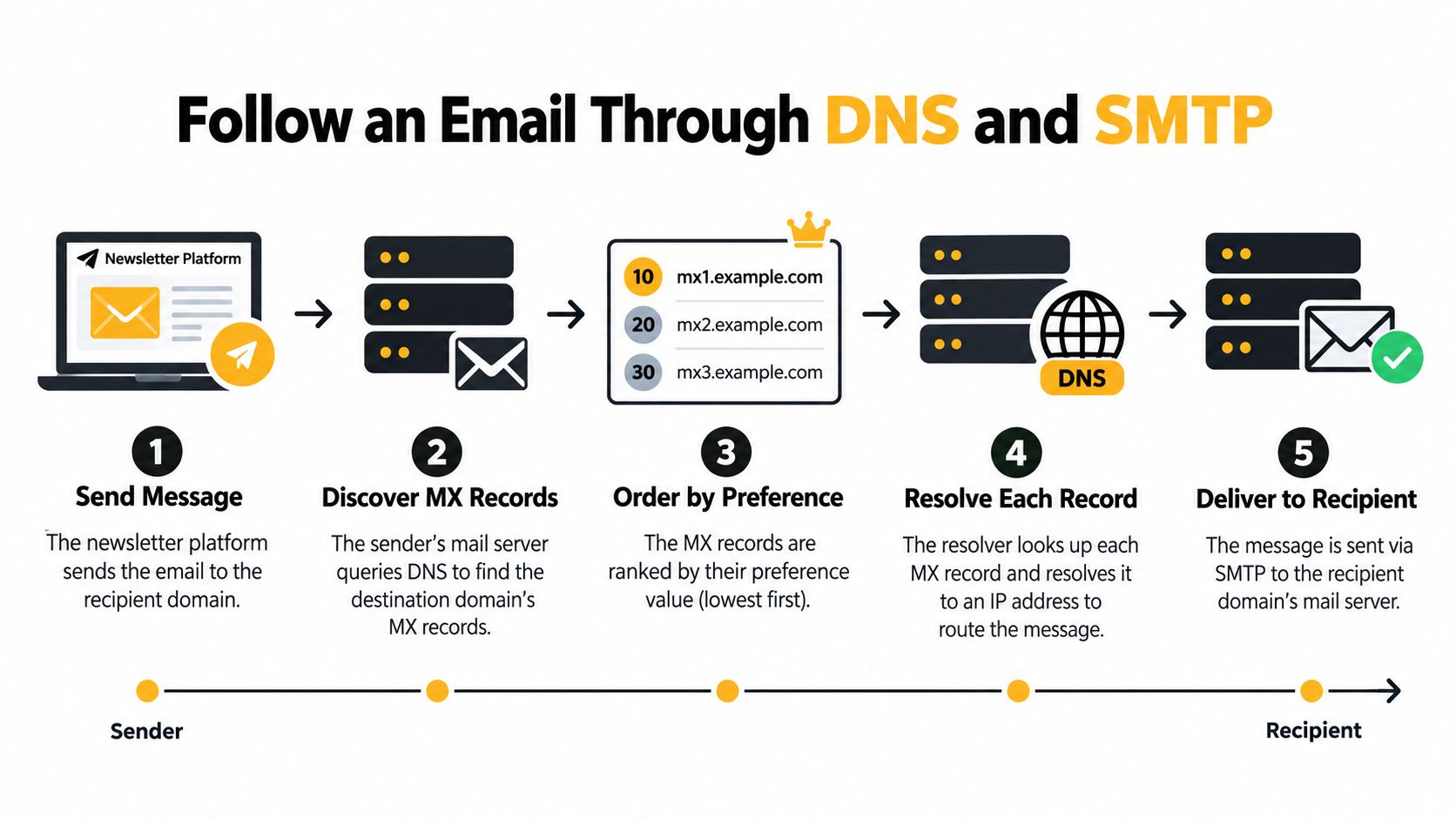
A practical way to follow the process is:
- Find the destination: Query the domain after the recipient address's at-sign, not the sender's domain.
- Evaluate preferences: Identify which receiving hosts should be attempted first.
- Resolve the hosts: Check that the advertised mail-server names lead to usable address records.
- Attempt SMTP: Connect to receiving infrastructure and continue the delivery conversation.
- Handle failures: Distinguish an unavailable connection from a definitive rejection.
If equally preferred servers are available, senders may randomize their order. Reliable SMTP clients must also be capable of trying alternatives and retrying after connection failures. Redundant MX entries therefore matter only when their targets are usable, not merely present in DNS.
Understand what a successful lookup proves
An MX result answers a domain-level routing question. It doesn't establish that the subscriber's particular mailbox exists, accepts messages, or belongs to the person who submitted it.
Practical rule: Record a successful MX check as evidence of discoverable receiving infrastructure, not as confirmation of a valid recipient.
There's another subtlety: missing MX records don't automatically mean no email. SMTP defines an address-record fallback in that situation. A sender may attempt delivery to the domain itself, which can unintentionally direct an SMTP attempt toward infrastructure intended for a website.
An explicit declaration that a domain doesn't receive mail means something different. Keep that outcome separate from missing records, unresolved targets, and temporary lookup trouble. Those distinctions determine whether an email-verification system should skip an address, investigate further, or defer a decision rather than label every outcome invalid.
Compare the Essential DNS for Email Records
When someone says the email DNS is wrong, ask which responsibility they're discussing. The fix depends on whether the problem concerns the recipient's receiving service, your sending provider, or the infrastructure owner responsible for an address.
Match each record to its owner
Your organization may control its domain's DNS zone without controlling every related setting. In particular, reverse DNS belongs with the party managing the relevant address space, which may be your hosting or email provider.
| Record | Typical placement or control | What to investigate |
|---|---|---|
| MX | Recipient domain's DNS | Receiving-service destination |
| SPF | Sending envelope domain's DNS | Authorized sending sources |
| DKIM | Selector-specific location under the signing domain | Published verification key |
| DMARC | Policy location under the visible sender domain | Alignment requirements and handling policy |
| PTR | Reverse DNS managed by the address-space operator | Sending server's reverse identity |
| BIMI | Brand-indicator location under the sender's domain | Branding configuration and dependencies |
The ownership distinction matters during support escalations. If your newsletter provider operates the sending server, ask that provider about its PTR configuration. Don't assume the administrator managing your business's incoming mail can change reverse DNS for an unrelated sending service.
Likewise, a receiving-domain MX check tells you nothing about whether your marketing vendor has permission to send for your organization. An MX record verification workflow belongs in recipient-domain assessment, not as a substitute for testing your outbound authentication.
Treat non-receiving domains deliberately
A Null MX is an explicit declaration that a domain doesn't accept email. Its exchange value is the DNS root label, which distinguishes it from omitting MX records; the SMTP delivery specification provides the surrounding routing and fallback behavior.
This can be useful when a domain has no receiving role. The important operational question is whether the declaration matches the domain's intended use, including replies and other incoming workflows.
A record can be correctly published and still describe the wrong operational intention.
Avoid using branding as a troubleshooting shortcut, too. BIMI belongs to a different layer than message authentication, and neither belongs to mailbox-existence verification. Work backward from the failed operation: receiving route, sending authorization, signature, identity alignment, reverse identity, or branding. That gives the responsible person a specific question instead of a request to fix everything in DNS.
See How Authentication Records Work Together
A newsletter has more than one sender identity. The address a reader sees isn't necessarily the domain used during the SMTP transaction or the domain responsible for signing the message.
The authentication diagram is useful when comparing those identities.
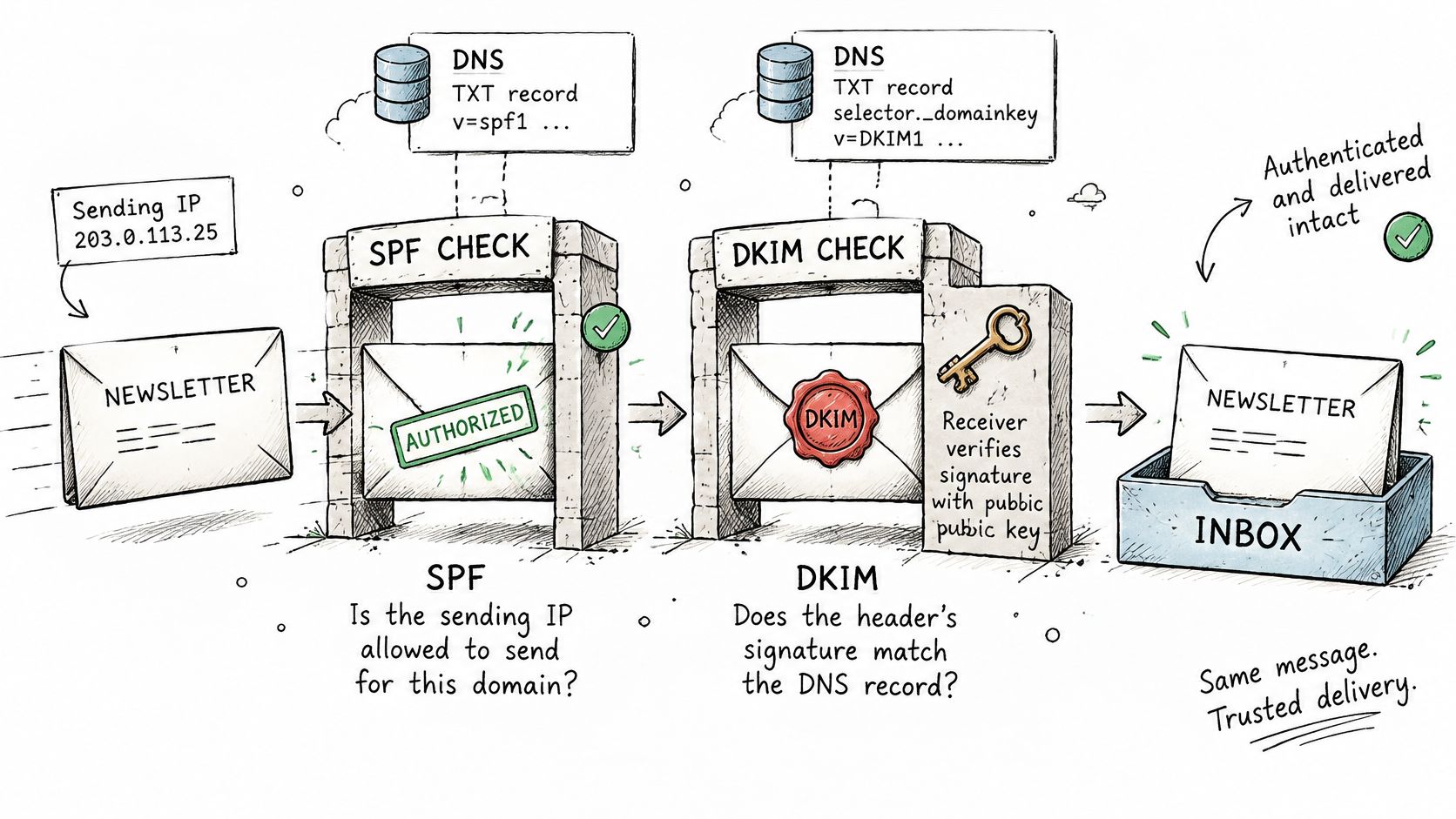
Read the envelope and the signature separately
Think of a physical letter. Its delivery envelope, printed letterhead, and signature can identify different parties. Email has corresponding technical fields, but the metaphor stops short of proving whether any of those parties should be trusted.
SPF evaluates whether the connecting sending address is authorized for the envelope sender's domain. It doesn't validate the address displayed in the message's From field. DKIM lets the receiver validate a cryptographic signature associated with a signing domain and selector, using verification information published in DNS.
DMARC connects authentication to the visible From domain. A message needs an authenticated SPF or DKIM identity that aligns appropriately with that visible identity. Passing an authentication check for an unrelated provider domain doesn't, by itself, establish that connection.
For a hypothetical newsletter, inspect these fields together:
- Visible From: The identity presented to the reader.
- Envelope sender: The domain used for the SPF evaluation.
- DKIM signing domain: The identity associated with the signature.
- DKIM selector: The identifier used to locate the relevant verification information.
- Receiver results: The authentication and alignment outcomes recorded for the actual message.
This explains a common surprise: SPF and DKIM can pass for provider-controlled identities while DMARC still fails for the business identity shown to the recipient.
Check the working message, not just the record
SPF also has an operational constraint: its 10-DNS-lookup limit can be exceeded as vendors accumulate, while omitting an authorized service can cause legitimate mail to fail, as explained in this guide to email DNS requirements.
PTR adds a reverse-identity check for the sending server, not another DMARC alignment path. BIMI comes later as a branding layer, not as an alternative to SPF, DKIM, or DMARC.
Use the accompanying video alongside a test message's headers.
A syntactically valid DNS record is only the published instruction. The delivered message shows whether the intended provider, signing configuration, and sender identities used that instruction successfully.
Configure Email DNS Without Breaking Sending
Start with an inventory, not a DNS editor. A marketing manager may know the newsletter platform while a developer knows the password-reset service, and neither may remember the support tool that sends customer notifications.
Map services before making changes
Create a shared worksheet covering marketing, transactional, support, CRM, ecommerce, and custom applications. For each service, record its business owner, message type, visible sender identity, envelope identity, signing domain, active selector, and a representative test message.
Use the checklist to organize the change process.
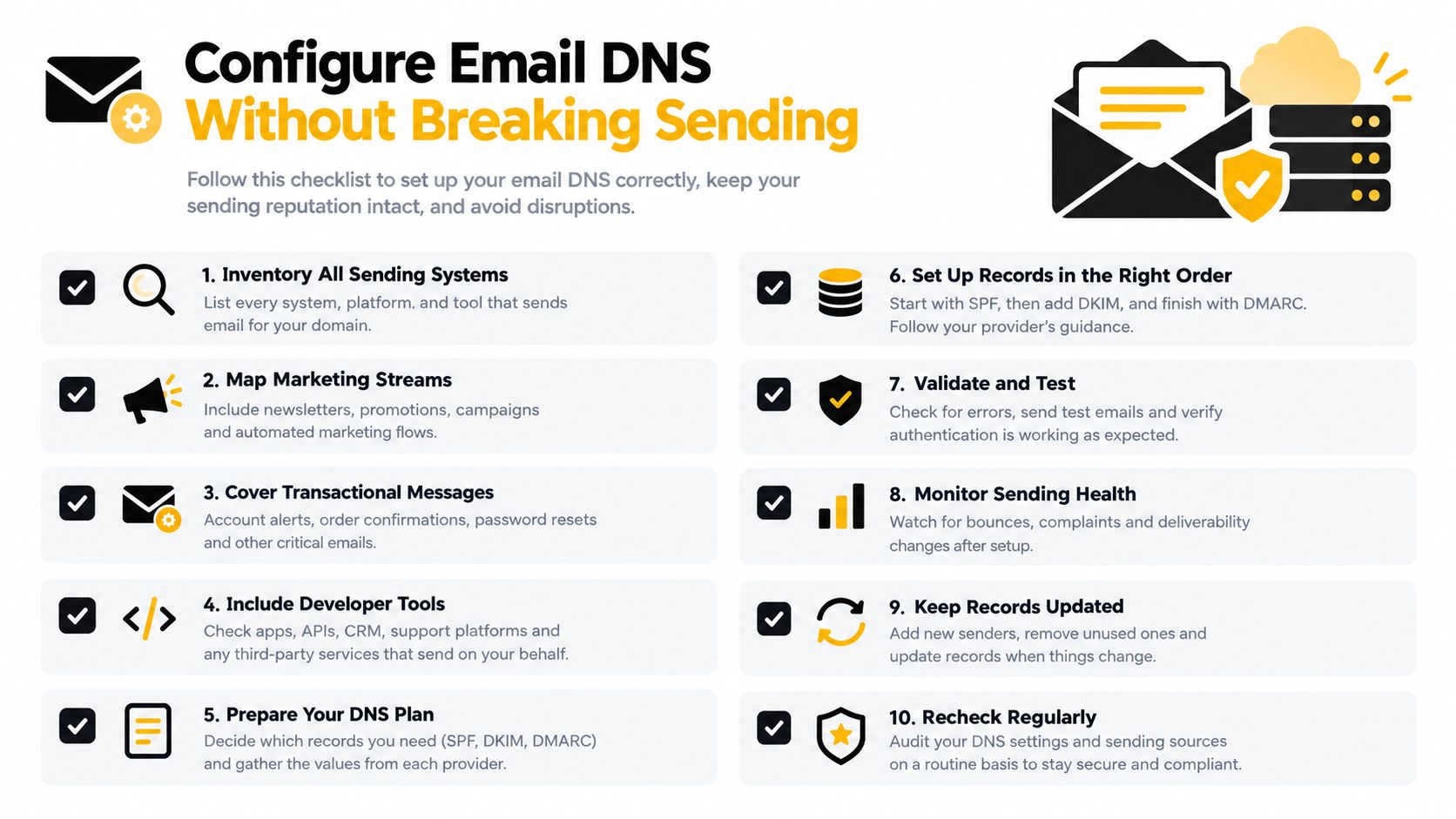
Separate receiving changes from sending changes in your implementation plan. Moving incoming mail to another provider is a different operation from authorizing a new newsletter service, even when both require edits in the same DNS interface.
- Preserve the baseline: Save existing settings and representative message results before editing.
- Assign ownership: Give every vendor and record an accountable person.
- Confirm dependencies: Identify which live applications still rely on the current configuration.
- Plan recovery: Document which change to reverse if legitimate messages begin failing.
Don't paste each vendor's instructions into DNS independently. Reconcile their requirements against the existing setup and the identities each service will use.
Make authorization and key changes deliberately
Maintain a coherent SPF policy for each relevant envelope domain, accounting for the lookup constraint described earlier. Treat SPF flattening as a maintenance trade-off: replacing indirect references with explicit sending addresses requires a reliable way to track provider infrastructure changes.
Choose DKIM selectors intentionally so vendors and key changes remain distinguishable. For rotation, plan publication, provider activation, test-message validation, and retirement as separate actions. Don't remove old verification material merely because a replacement has been entered in the DNS interface.
Consider separating newsletter and transactional streams onto intentional subdomains. This can make ownership, policy decisions, and troubleshooting clearer, but only if each application is configured to use the planned identities. A new subdomain label alone doesn't establish authentication.
Base enforcement on observed traffic
Begin DMARC deployment with reporting and a defined review process. Reconcile observed sources with the inventory, investigate unknown infrastructure, and repair legitimate alignment problems before increasing enforcement.
Use a staged change plan rather than a leap from record publication to rejection. Select a traffic segment or subdomain, test the intended handling, and agree on rollback criteria with the people responsible for receipts, account access, and customer support.
Keep evidence from each change: the prior settings, the new settings, the responsible owner, and the resulting message headers. That record makes a later vendor migration much easier to diagnose than a DNS zone full of unexplained entries.
Troubleshoot DNS and Email Verification Failures
Start with the symptom and keep the receiving and sending investigations separate. A destination lookup failure calls for a different response than a message that arrives with a failed signature.
Diagnose destination problems first
Check whether the destination domain resolves, whether its receiving records are usable, and whether the advertised targets resolve. Then apply the routing distinctions established earlier rather than treating every missing answer as a permanent recipient failure.
A Null-MX domain must publish no other MX records under RFC 7505's Null MX requirements. That explicit declaration lets senders stop instead of retrying for hours or days, making it a much stronger skip signal than an ambiguous lookup problem.
| Symptom | Next investigation | Appropriate interpretation |
|---|---|---|
| Advertised mail host doesn't resolve | Target hostname and address records | Receiving-infrastructure problem |
| Explicit non-receiving declaration | Confirm the Null MX result | Do not attempt ordinary delivery |
| Lookup times out | Resolver and repeat lookup | Unresolved condition, not confirmed mailbox failure |
| Destination route is usable | Continue recipient-level assessment | Routing evidence only |
Temporary uncertainty deserves its own status. If verification tooling turns every timeout into invalid, the team loses the distinction between unavailable evidence and affirmative evidence against sending.
Inspect sender-side evidence separately
When routing works but your messages fail authentication, inspect a real message and the provider's configuration together. Start with the identities in its headers, then check the corresponding DNS locations.
- SPF problems: Look for competing policies, missing authorized vendors, syntax problems, and excessive lookup usage.
- DKIM problems: Compare the message's selector and signing domain with the published verification material and provider settings.
- DMARC problems: Determine whether a passing authentication result also aligns with the visible sender.
- Reverse identity problems: Ask the sending infrastructure owner to review PTR consistency.
Diagnostic boundary: A sender-configuration defect shouldn't become an invalid-recipient verdict.
Keep the SMTP response, DNS result, and authentication outcome as separate evidence. A specific permanent mailbox rejection is different from a connection failure, and neither should be replaced for a sender-policy problem.
A structured email deliverability testing process helps connect those observations. Test the same workflow that will send production mail, including its provider and sender identity, rather than relying on an unrelated successful message from a personal inbox.
Manage DMARC Reports and Sender Changes
Publishing DMARC monitoring policy isn't the same as completing anti-spoofing enforcement. Monitoring creates an opportunity to learn about traffic; someone still needs to review the evidence and act on it.
A 2025 analysis of 1.8 million domains found that 7.7% used the strictest DMARC policy, while more than 70% of DMARC-enabled domains lacked RUA reporting tags, according to this analysis of DMARC enforcement and reporting gaps. Record presence alone therefore makes a poor completion criterion.
Turn reports into operational decisions
Use aggregate reports to compare observed sources with your vendor inventory. XML parsing or a managed analysis service can help organize the information, but a dashboard doesn't remove the need to identify the business purpose behind each legitimate sender.
| Observed pattern | Decision to investigate |
|---|---|
| Known service with inconsistent results | Repair its identity or signing configuration |
| Unrecognized sending infrastructure | Identify the owner before authorizing it |
| Retired vendor still appearing | Check for forgotten workflows or incomplete retirement |
| Failures associated with forwarding | Examine the message path before classifying abuse |
Don't authorize an unknown sender just to improve a pass-rate chart. First establish whether someone in the organization owns the workflow and expects that service to send.
Increase enforcement with a recovery plan
Treat report access as sensitive operational access. Review who can view sender information, how reports are retained, and what an external processor receives. Avoid collecting message content when aggregate evidence is sufficient for the task.
Before increasing enforcement, define what would trigger a pause or rollback. Examples include a newly failing legitimate receipt stream, an unexplained authentication change after a provider update, or evidence that an important application was missing from the inventory.
Percentage-based rollout and subdomain isolation can support gradual changes, but they don't replace source classification. Advance when legitimate senders are understood and working, not merely when a monitoring period has elapsed.
Retire stale authorization only after confirming the associated workflows have ended. Keep the decision and its owner in the change log so the next person doesn't restore an obsolete entry during troubleshooting.
Build a DNS for Email Maintenance Routine
Review DNS whenever you add a platform, change a transactional provider, rotate a signing key, alter a sending identity, or investigate a new bounce pattern. Keep receiving-domain checks and sender-authentication checks under distinct owners.
Keep a shared operating checklist
- Receiving owner: Review MX destinations and target resolution.
- Sending owner: Reconcile vendors, SPF usage, active selectors, reverse identity, and branding dependencies.
- Policy owner: Review report trends, enforcement decisions, and unresolved sources.
Transport security deserves a separate status. DNSSEC-validated MX data and signed TLSA records can authenticate SMTP transport policy and destination certificates or keys, but failures belong in the transport-security category, not the invalid-mailbox category, as explained in Microsoft's DANE security guidance.
Keep published settings, test-message results, and verification decisions connected. DNS for email remains dependable when someone checks that the organization's current mail flows still match its configuration.
For recipient-list checks alongside your sender-DNS reviews, CleanMyList offers bulk email verification with DNS and mailbox-related signals and plain-English send-or-skip recommendations. Upload a CSV or paste your addresses before your next campaign, then review the results separately from your sending-domain authentication tests.