You sent a campaign you were sure would work. The subject line was clean. The copy was tighter than last week's version. Then the open rate limped in, and you checked a Gmail seed account only to find the message buried in Promotions again.
That's the point where the wrong question gets asked. They ask, “How do I force Gmail to put this in Primary?” You usually can't force it. You can influence it. And if you want to know how to move email from Promotions to Primary, you need to handle two separate jobs: help subscribers rescue the message they care about right now, and fix the sender behavior that keeps teaching Gmail your mail belongs with ads.
I get this question constantly, and the answer is less magical than people want. There is no permanent switch. There's a UI shortcut, there are sender-side habits, and there's a testing loop. If you skip any of those, you'll get one lucky send and then slide right back.
Table of Contents
- The Moment Your Newsletter Disappears Into Promotions
- Why Gmail Sorts Messages Into the Promotions Tab
- Subscriber-Side Fixes to Move Email From Promotions to Primary
- Sender-Side Moves That Earn Primary Placement
- Testing Inbox Placement Before You Scale the Send
- Why Primary Placement Is Rented, Not Owned
- Your One-Week Primary Placement Action Plan
The Moment Your Newsletter Disappears Into Promotions
The pattern is usually obvious once you look for it. You send a newsletter. Gmail deliveries appear fine. Nothing is bouncing in a dramatic way. But the campaign underperforms, and your seed inbox tells the story: delivered, yes. Seen, not really.
That distinction matters. A lot of teams still treat Promotions like a near-spam event. It isn't. It's an inbox placement problem. Gmail accepted the message. Gmail categorized the message. Those are not the same thing, and confusing them leads to bad fixes.
What's actually happening
Gmail is trying to organize intent. If your message looks like bulk marketing, sounds like bulk marketing, and goes to a list that behaves like a bulk list, Gmail classifies it accordingly. That's not Gmail being unfair. That's Gmail doing exactly what it was built to do.
The practical response is simple:
- Subscribers need a rescue move: drag, move, filter, add to contacts, reply.
- Senders need a reputation move: authenticate, trim the list, simplify the creative, and earn interaction.
- Deliverability leads need a feedback loop: test placement before scaling volume.
Practical rule: If a message is reaching Gmail but underperforming, stop asking only “Did it deliver?” and start asking “Where did it land, and what did people do with it?”
The two-track fix
One track is immediate and user-controlled. A subscriber can move a message from Promotions to Primary in seconds. That helps, but only at the individual inbox level.
The other track is the one that matters if you send at scale. Gmail watches patterns. If your next campaign gets ignored, Gmail won't care that one subscriber once dragged an earlier message into Primary. You have to re-earn the better placement with every send, or close to it.
That's the uncomfortable part. It's also the useful part, because once you accept that this is a repeatable inbox-placement problem, you can stop hunting hacks and start fixing causes.
Why Gmail Sorts Messages Into the Promotions Tab
Gmail doesn't sort messages into tabs at random. It classifies them using a pile of signals that are accidentally reinforced every week. Commercial phrasing, heavy image use, lots of links, obvious bulk-mail fingerprints, newsletter formatting, and list-management hints all make a message look like what it is: marketing email.
That doesn't mean the message is bad. It means Gmail thinks the Promotions tab is the right home for it.
Promotions isn't spam
The numbers help reset expectations. In a widely cited Validity report, the Promotions tab had a read rate of 19.2% versus 22.0% for the Primary tab, while inbox placement in that study's tab classifications was 84.5 for Promotions and 55.5 for Primary. The engagement gap was only 2.8 percentage points, or about 12.7% relative to Primary's read rate according to the Validity Gmail Tabs Report.
That's why serious deliverability people don't frame this as “inbox or death.” They frame it as a visibility optimization problem.
| Metric | Promotions Tab | Primary Tab |
|---|---|---|
| Read rate | 19.2% | 22.0% |
| Inbox placement in tab classifications | 84.5 | 55.5 |
The older benchmark was even harsher about how rarely bulk-style mail reached Primary. Campaign Monitor's summary of Return Path reporting said about 90% of email messages landed in Gmail's Promotions tab and only 0.3% reached the Primary tab in that historical view, which is why this has been a stubborn problem for years according to Campaign Monitor's write-up on Gmail tab placement.
Gmail is classifying intent
Primary usually wins when the message feels personal, expected, and directly relevant. Promotions usually wins when the message looks templated, scaled, and transactional in a marketing sense.
Gmail also leans on behavior. If recipients open, click, reply, star, move, or search for your messages, that helps. If they ignore, archive, or complain, that hurts. The key point is that tab placement is not just a folder label. It's a verdict based on content cues plus user response.
Gmail is sorting for likely user intent, not rewarding your opinion of your own campaign.
Why this frustrates marketers
Marketers want deterministic rules. Gmail gives probabilities. You can have clean authentication and still land in Promotions. You can send a solid newsletter and still look too promotional. And because Gmail's model is behavior-sensitive, yesterday's good result doesn't lock in tomorrow's.
That's why “how to move email from Promotions to Primary” has never been solved by one trick. The drag-and-drop advice is real, but it only touches the surface.
Subscriber-Side Fixes to Move Email From Promotions to Primary
If you're the recipient and you want one sender's messages in Primary, you can act immediately. If you're the sender, these are the actions you should ask subscribers to take. Keep the request short, clear, and tied to a benefit they care about.
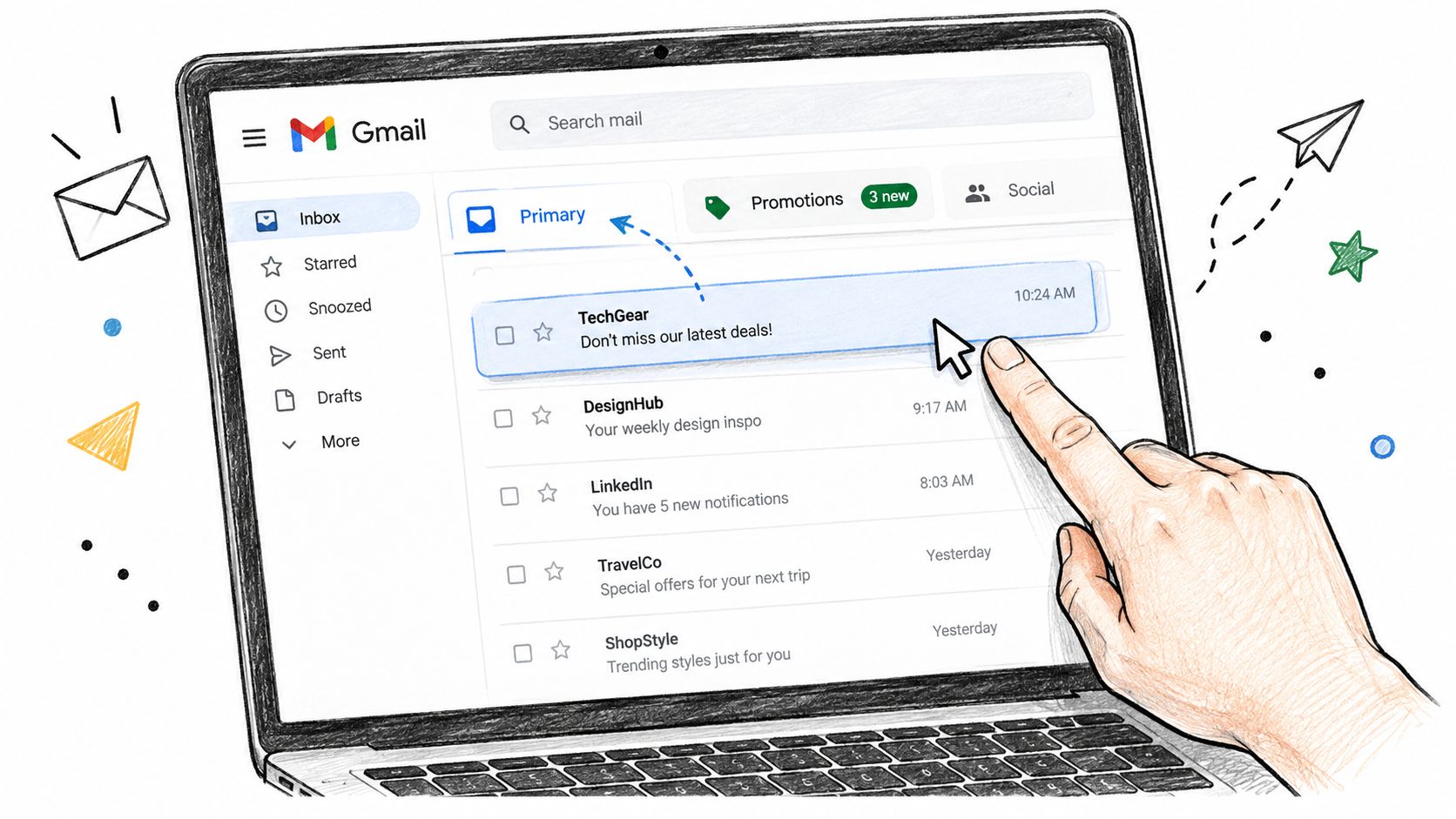
Here's the Gmail interface they are dealing with:
The fast fix inside Gmail
The easiest move is still the old one. Open the Promotions tab, drag the message into Primary, and when Gmail asks whether future messages from that sender should go there too, confirm it.
That works because it gives Gmail an explicit user preference signal. It's useful. It's not permanent law.
A recipient can also:
- Right-click the message and use Gmail's move option to place it in Primary.
- Add the sender to Contacts so Gmail sees a stronger relationship.
- Mark it as not spam if it was ever misclassified more aggressively.
- Reply once with anything human, even a quick thank-you.
What each action really does
These actions are not equal.
- Drag-and-drop helps the visible thread: good for immediate rescue, not a universal sender override.
- A filter is more persistent: stronger for one sender, but still limited to that inbox.
- Adding to Contacts builds trust: useful, especially for newsletters people want.
- Replying is the strongest signal: it tells Gmail this isn't passive promotional clutter.
Useful habit: If a subscriber values your newsletter, ask them to reply once. Replies carry more weight than polite wishful thinking from the sender.
The filter option people forget
For subscribers who really don't want to miss a sender, a Gmail filter is better than repeated dragging. They can create a rule for that sender or domain and route matching messages to the main inbox view. That's the closest thing a user has to a durable preference.
Still, be honest when you ask for this. Most subscribers won't build filters for an ordinary brand newsletter. They'll do it for tax reminders, client updates, course access, or a creator they actively follow. Act accordingly.
What senders should say to subscribers
Don't send a long tutorial. Put one short note near the welcome email or onboarding message:
- Ask for one action only: “If you use Gmail, drag this email into Primary.”
- Add a reason: “That helps you see future issues and updates on time.”
- Follow with a reply prompt: “Hit reply and tell us what you want more of.”
That combination is practical because it creates both a tab signal and an engagement signal. Many ask for the first part and forget the second, which is why the fix doesn't stick.
Sender-Side Moves That Earn Primary Placement
If you send bulk email, your real job isn't to outsmart Gmail. Your job is to stop looking like the exact kind of mail Gmail built Promotions to manage.
Start with the boring stuff. The boring stuff matters most.
Clean up authentication first
Gmail should see proper SPF, DKIM, and DMARC on every sending domain. That won't guarantee Primary placement, but weak or inconsistent authentication makes everything else harder.
Industry guidance on inbox placement consistently points to the same sequence: authenticate first, then improve engagement. One benchmark-driven summary also notes that inbox placement and tab placement are separate concerns, and that even authenticated mail can still miss the ideal inbox path in some datasets. It also recommends segmenting high-intent subscribers and testing before scaling, as described in Mailmend's global email deliverability statistics overview.
Use one stable From name. Use a newsletter subdomain if you send different email types. Keep your reply-to aligned with the sender identity people recognize. Don't hide behind no-reply unless you want fewer replies and weaker relationship signals.
Trim the list before you touch the template
A lot of “Promotions problems” are really list-quality problems. If you keep mailing people who never engage, Gmail learns from that silence.
Your suppression rules should get stricter over time:
- Recent non-engagers: stop blasting them with the same cadence.
- Aged inactives: remove or pause them instead of hoping volume will save the campaign.
- Bad addresses: verify before the send, not after the damage.
If you need a primer on reputation mechanics, this guide on how to improve email reputation is worth a read because it connects list quality, complaint risk, and placement in a practical way.
This is also where one verification pass helps. Tools such as ZeroBounce, NeverBounce, and CleanMyList all fit the same operational job: checking a list before send so you suppress risky or stale addresses instead of feeding bad engagement back into Gmail's model.
Write like a person, not a flyer
Most brands sabotage themselves with templates that scream “campaign.” If your email opens with a giant banner, stacks multiple offers, and pushes five links above the fold, don't act surprised when Gmail agrees it belongs in Promotions.
Try this instead:
- Open with plain text or light HTML.
- Lead with one idea, not six.
- Ask a real question near the top.
- Use a short P.S. that invites a direct reply.
- Keep image density low unless the email needs visuals.
A direct reply prompt works because it changes the posture of the email. “What are you struggling with right now?” gets treated differently by humans than “Shop now.” That doesn't mean you should fake intimacy. It means you should earn it.
The quickest way to look promotional is to behave like a weekly brochure with a sender name attached.
Give people topic control
Preference centers are underrated. If subscribers can choose topics, cadence, or content type, they self-sort into streams they're more likely to open. That gives Gmail cleaner behavioral data and gives your team fewer excuses for over-mailing the wrong people.
If you only change one campaign this week, make it the one that goes to your most engaged segment. Send the lighter, more personal version there first. If that cohort won't interact, the broader list definitely won't.
Testing Inbox Placement Before You Scale the Send
If you aren't testing placement before a large send, you're guessing. Open rate reports after the fact are slow, messy feedback. Seed inboxes give you an earlier read on whether Gmail sees your message as welcome, tolerated, or disposable.
A simple seed setup is enough. You don't need theatrics. You need consistency.
A workable test loop
Build a small panel of seed accounts across Gmail, Outlook, and Yahoo. For Gmail, use more than one seed and let them behave differently over time. One should engage regularly. One should engage occasionally. One should stay cold.
Then send the same creative to those seeds before the full rollout and log where each copy lands after short checks across the send window. If you want a practical framework, this guide on how to test email deliverability walks through the mechanics of placement checks and inbox monitoring.
| Seed Type | Opens Needed in First 15 min | Reply or Star Required | Decision Rule |
|---|---|---|---|
| Fresh seed | Strong early activity | Preferred | If it lands in Promotions, don't scale unchanged |
| Warm engaged seed | Visible early opens | Yes, ideally | If it reaches Primary and gets interaction, keep testing segment-first |
| Cold seed | Not expected | No | Use as a warning signal, not a success metric |
What to look for
You're not hunting for one vanity outcome. You're comparing patterns.
Check:
- Where the email lands first: Primary, Promotions, or worse.
- How fast engaged seeds react: early activity matters more than delayed passive opens.
- Whether a reply or star appears: stronger signal than an empty open.
- Whether placement shifts later: Gmail can re-sort based on ongoing behavior.
One benchmark summary reports that Gmail can still deliver a high percentage of mail overall while only part of it reaches Primary, and some senders see far lower Primary placement than they expect. The same source argues for engagement-led testing over volume-first sending in its inbox placement statistics summary.
Don't scale broken creative
If your seed panel shows Promotions across Gmail and weak interaction from your best segment, fix the campaign before you increase volume. Change the copy, reduce the design load, tighten the audience, or delay the send.
That discipline overlaps with broader work on fixing broken email campaigns, especially when a campaign underperforms because the offer, list, and format are all misaligned. Placement isn't separate from campaign quality. It exposes campaign quality.
Why Primary Placement Is Rented, Not Owned
A lot of teams treat one successful send like they've cracked the code. They haven't. They've rented a better result for a moment.
That matters because Gmail's handling of promotional mail has shifted toward relevance-based ranking, not just static categorization. A recent industry analysis says Gmail's Promotions tab now ranks promotional mail by relevance by default, which means moving one message does not guarantee future messages stay in Primary, according to Movable Ink's analysis of Gmail promotion tab behavior.
Why one win doesn't stick
Mailbox providers care about current behavior. If your next send goes to a broader, colder audience and gets ignored, you've just supplied new evidence that the earlier Primary result was the exception.
That's why I push back on “set it and forget it” advice. Gmail remembers patterns, but it also updates them. You don't own Primary the way you own a list. You rent it by sending mail that enough recipients consistently treat as wanted.
What actually keeps you there
The reliable levers are not glamorous:
- Healthy sender reputation
- Engaged recent audience segments
- Human-looking, relevant copy
- Reasonable frequency
- A list that doesn't drag dead weight into every send
If you want a practical overview of the reputation side, this breakdown of email sender reputation is useful because it ties behavior, complaints, and list quality back to inbox outcomes.
Primary placement is a recurring vote from Gmail, not a trophy you win once.
This is also why lazy re-engagement blasts can backfire. Sending one big “we miss you” push to a pile of silent subscribers may feel proactive. Gmail often reads it as proof that your audience has gone cold.
Your One-Week Primary Placement Action Plan
If you want movement by next send day, keep it tight. Don't redesign your entire program. Fix the highest inputs.
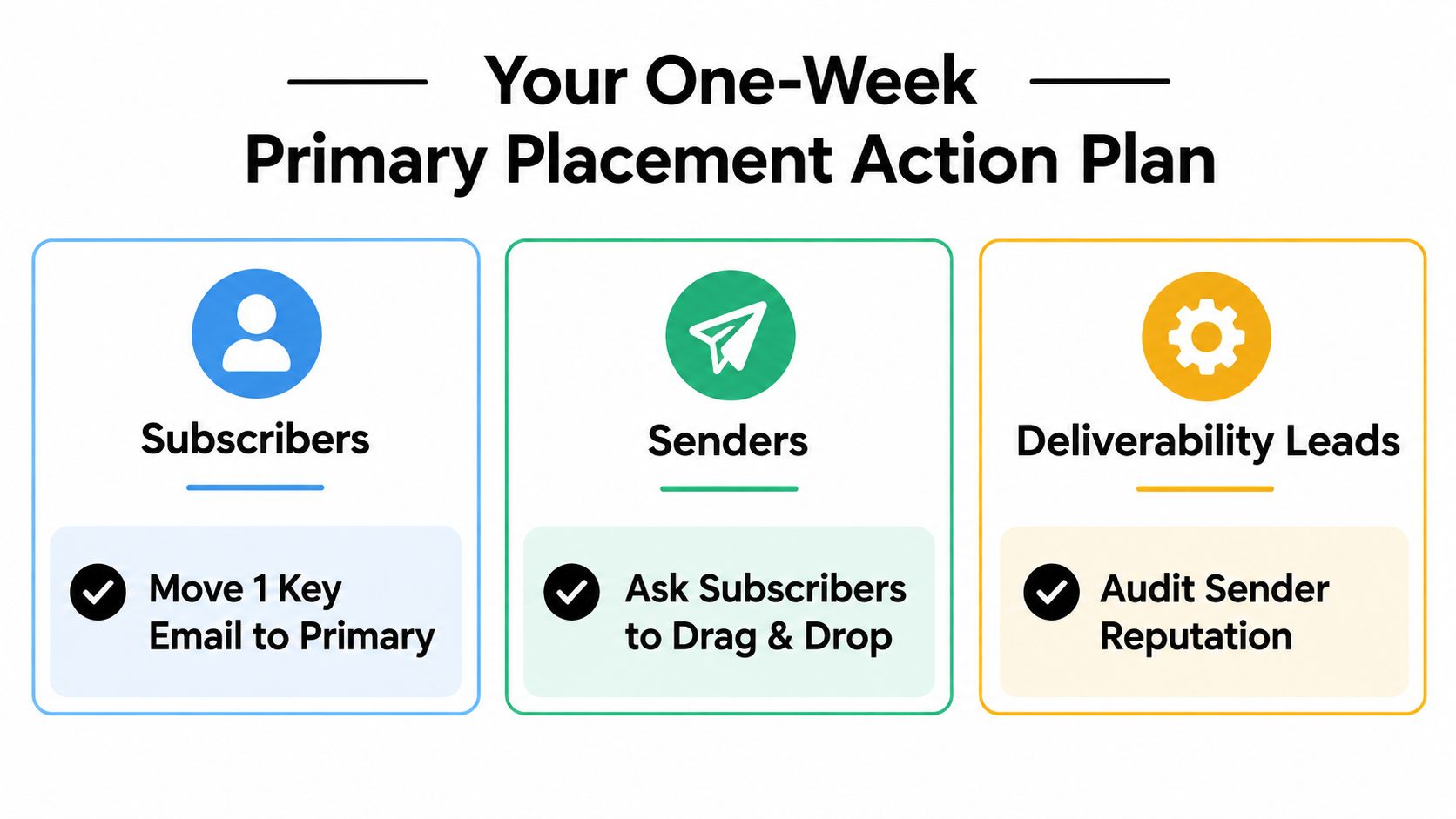
For subscribers
- Take five minutes. Find the last message from the sender you care about and drag it from Promotions into Primary.
- Do it again for recent messages. Moving the last few messages gives Gmail a clearer pattern than a one-off action.
- Reply once. A short human reply is more useful than silent good intentions.
For senders
- Spend one hour on list cleanup. Verify the list, suppress risky addresses, and stop mailing obvious non-engagers.
- Check authentication today. SPF, DKIM, and DMARC need to be present and stable before you try to improve classification.
- Rewrite one campaign. Cut image weight, reduce links, and ask for a reply near the top.
For deliverability leads
- Create seed coverage. Use several Gmail seeds across web and mobile, plus a few other providers.
- Run a controlled test send. Send first to your strongest segment before scaling.
- Log placement results in a shared sheet. Watch where mail lands and whether engagement appears early enough to justify the full send.
Inbox placement compounds. Good habits stack. So do bad ones. If you remember one thing, remember this: learning how to move email from Promotions to Primary is not about one trick inside Gmail. It's about repeated evidence that your messages belong in front of people, not off to the side.
Clean lists and stronger sender signals make this job easier. CleanMyList helps you verify addresses before you send so bounces, stale records, and risky contacts don't drag down reputation and placement. If you want to tighten list quality before your next campaign, visit CleanMyList.