
A soft bounce is a temporary 4xx SMTP failure to retry briefly, while a hard bounce is a permanent 5xx failure to stop mailing unless the address or message problem is fixed. But the familiar advice to remove hard bounces and keep retrying soft ones misses the most important distinction: temporary describes the failure class, not a promise that delivery will succeed later.
A low hard-bounce count can also hide a sending problem. If soft failures concentrate at a particular mailbox provider or among contacts from the same acquisition source, you need to investigate that pattern before changing the whole list.
Table of Contents
- Why Soft and Hard Bounces Need Different Actions
- Soft Bounce vs Hard Bounce Side by Side
- SMTP Codes That Confirm Each Bounce
- How Bounce Patterns Hit Sender Reputation
- Diagnose, Handle and Decide the Next List
- What to Do for Each Sending Situation
Why Soft and Hard Bounces Need Different Actions
Retry temporary failures inside a bounded window. Stop repeating permanent failures until something relevant changes. That's the working rule, whether you're sending a newsletter, an abandoned-cart reminder, or a sales introduction.
Say a publisher sends an edition and sees failed deliveries. Some recipients have full mailboxes; another receiving server is busy; other addresses no longer exist. Treating those failures alike creates opposite mistakes: deleting subscribers who could receive a later attempt, or repeatedly contacting mailboxes that won't accept the message.
For scale, the average email bounce rate in 2024 was 2.33%, according to GetResponse's Email Marketing Benchmarks report. That's context, not permission to accept a similar result without investigation. A single unusual campaign and a rate that remains high require different diagnoses.
The action should match the obstacle
A soft failure can come from a full mailbox, a temporarily unavailable server, greylisting, or a sender delivering faster than the receiver permits. Some obstacles clear without changing the address. Others require you to slow down or correct your sending setup.
A hard failure often means the recipient doesn't exist, but it can also reflect authentication, policy, or message rejection. Permanent doesn't always mean the person's address is permanently invalid. It means an unchanged delivery request shouldn't be repeated.
Practical rule: Keep the bounce record even when you suppress the address. You'll need the response text and history to distinguish bad contact data from a sending problem.
Suppression means excluding an address from future sends, not erasing its history. Keep the reason attached so an import or integration doesn't restore it.
Before deleting anyone, use the comparison below to separate the delivery decision from the longer-term list decision.
Soft Bounce vs Hard Bounce Side by Side
| Trait | Soft bounce | Hard bounce |
|---|---|---|
| SMTP class | 4xx transient negative completion | 5xx permanent negative completion |
| Typical codes | 421, 450, 451, 452 | 550, 551, 553, 554 |
| Meaning | Failed now but may succeed on a later try | Not expected to succeed if the same request is retried |
| Common causes | Full mailbox, server down, rate limit, greylisting, transient processing error | Address doesn't exist, invalid recipient, domain cannot accept mail |
| Default action | Queue and retry inside a set window | Suppress and don't retry the same address unchanged |
| Reputation signal | Watch repeats and domain-wide clusters | Treat as an immediate list-quality warning, then confirm the cause |
| List action | Keep during the retry window, then suppress persistent failures | Remove from future campaign sends unless the underlying problem is corrected |
The technical distinction comes from the Internet Engineering Task Force's RFC 5321, which defines replies beginning with 4 as “transient negative completion” and replies beginning with 5 as “permanent negative completion.” For a transient reply, the requested action failed but may be attempted again. For a permanent reply, the client shouldn't repeat the exact request unchanged.
Those protocol classes explain the soft bounce vs hard bounce email distinction more accurately than the labels alone. The receiving server is reporting the outcome of a delivery attempt, not issuing a lifetime certificate about the recipient.
Read the table as a delivery decision
On the soft side, queueing gives the receiving system time to recover. A mailbox owner might clear storage, or an administrator might restore service. The sender should allow that opportunity without turning a temporary failure into an uncontrolled resend loop.
On the hard side, stopping prevents pointless repetition. An invalid recipient needs a corrected address. An authentication rejection needs a sender-side correction. A message rejected under a receiving policy needs investigation before another attempt.
The corrective action can differ even when the bounce class is the same. Don't replace the original response text with a generic hard-bounce label and discard the evidence.
Separate recipient validity from request validity
Consider a legitimate subscriber whose server rejects your message because of a sender authentication problem. Suppressing the failed campaign attempt is appropriate. Concluding that the subscriber's mailbox doesn't exist isn't.
Likewise, a soft response doesn't establish that an address is healthy. A receiving system can keep returning temporary failures long after waiting has stopped being useful. Your list policy can suppress that address without changing the protocol classification.
A recurring soft bounce doesn't have to become a hard SMTP reply before you decide to stop sending.
Finally, a bounce isn't the same as a message landing in spam. A bounced delivery failed; an accepted message can still be filtered away from the inbox. Confirm the class from the raw SMTP response, then use the accompanying explanation to decide what needs fixing.
SMTP Codes That Confirm Each Bounce
Start with the three-digit reply, then read the receiver's explanation. An email service provider, or ESP, may simplify the result in its dashboard, but the original response gives you a better starting point.
Use this chart to recognize the common code groups before reviewing the detailed response.
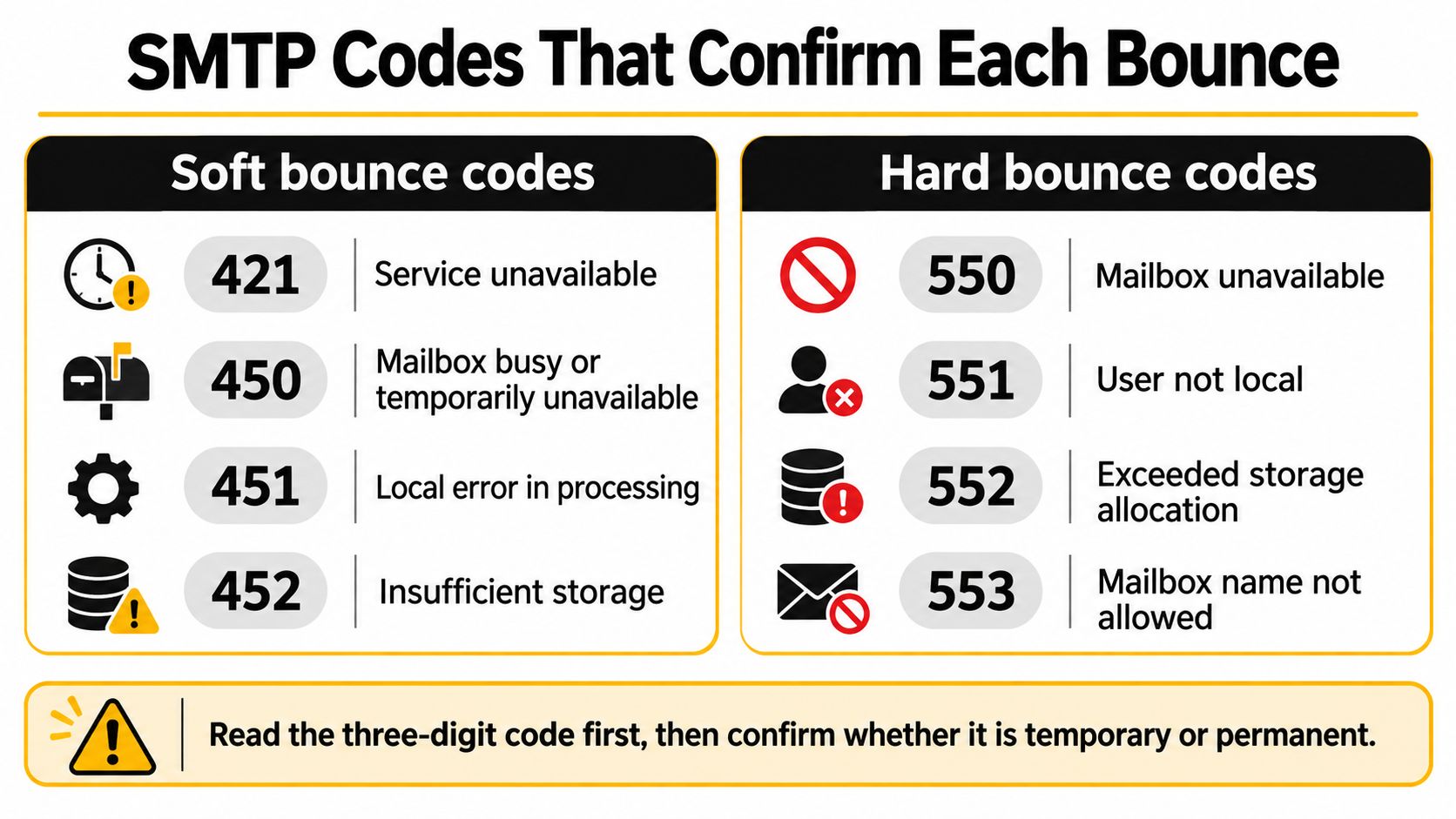
Common SMTP bounce codes and the first action
| Code | Class | Typical meaning | First action |
|---|---|---|---|
| 421 | Soft | Service unavailable or temporarily not accepting mail | Pause that destination and retry later |
| 450 | Soft | Mailbox busy or temporarily unavailable | Queue and retry inside the window |
| 451 | Soft | Local processing error on the receiving server | Retry and watch that domain |
| 452 | Soft | Insufficient storage or too many recipients | Retry later or reduce recipients per message |
| 550 | Hard | Mailbox unavailable or no such user | Suppress the address; inspect the explanation for policy rejection |
| 551 | Hard | User not local to this server | Suppress unless a corrected address is known |
| 552 | Hard | Storage allocation exceeded, sometimes used for an over-quota mailbox | Follow the permanent reply and suppress unchanged sends |
| 553 | Hard | Mailbox name not allowed or invalid | Suppress the address |
| 554 | Hard | Transaction failed, often policy or rejection | Suppress that recipient and review the message if widespread |
The soft replies call for spaced attempts, not immediate deletion. However, a burst of service-unavailable or mailbox-unavailable replies across the same provider should prompt a sending review before more attempts.
Gmail's sender guidance documents rate-limit responses and recommends pausing delivery when sending quotas are exceeded. Lowering concurrency, reducing volume acceleration, and checking authentication may be more useful than removing recipients.
Why the explanation still matters
Quota is an awkward example. A receiver can describe storage trouble with a temporary reply or use a permanent storage-allocation response. Don't classify the result from the word quota alone; respect the reply class and inspect the full message before deciding whether a corrected attempt is justified.
Similarly, mailbox unavailable doesn't always establish that the mailbox is nonexistent. A policy explanation changes the investigation, even though you still stop the unchanged request. If the notification is difficult to interpret, use this guide to an undeliverable mail message to identify the useful diagnostic details.
Group your bounce export by SMTP code and recipient domain before changing suppression settings. That separates an isolated recipient failure from a provider refusing a whole sending stream.
For another walkthrough of bounce handling, watch the explanation below.
The final check is straightforward: a temporary reply permits a limited retry; a permanent reply stops the unchanged attempt. Neither instruction replaces reading the reason.
How Bounce Patterns Hit Sender Reputation
Hard-bounce-only monitoring leaves a blind spot. Mailbox providers consider multiple signals, including complaints, engagement, and delivery failures. Track unsubscribes alongside those signals as evidence of whether your audience still wants the messages, rather than assuming every provider uses an identical reputation formula.
For comparison, Mailgun's email benchmarks describe many top-performing sectors with total bounce rates below 0.5%, with exceptionally well-managed lists reaching approximately 0.01%. These are performance benchmarks, not universal provider enforcement thresholds.
Review delivery failures beside the other audience and sending signals shown below.
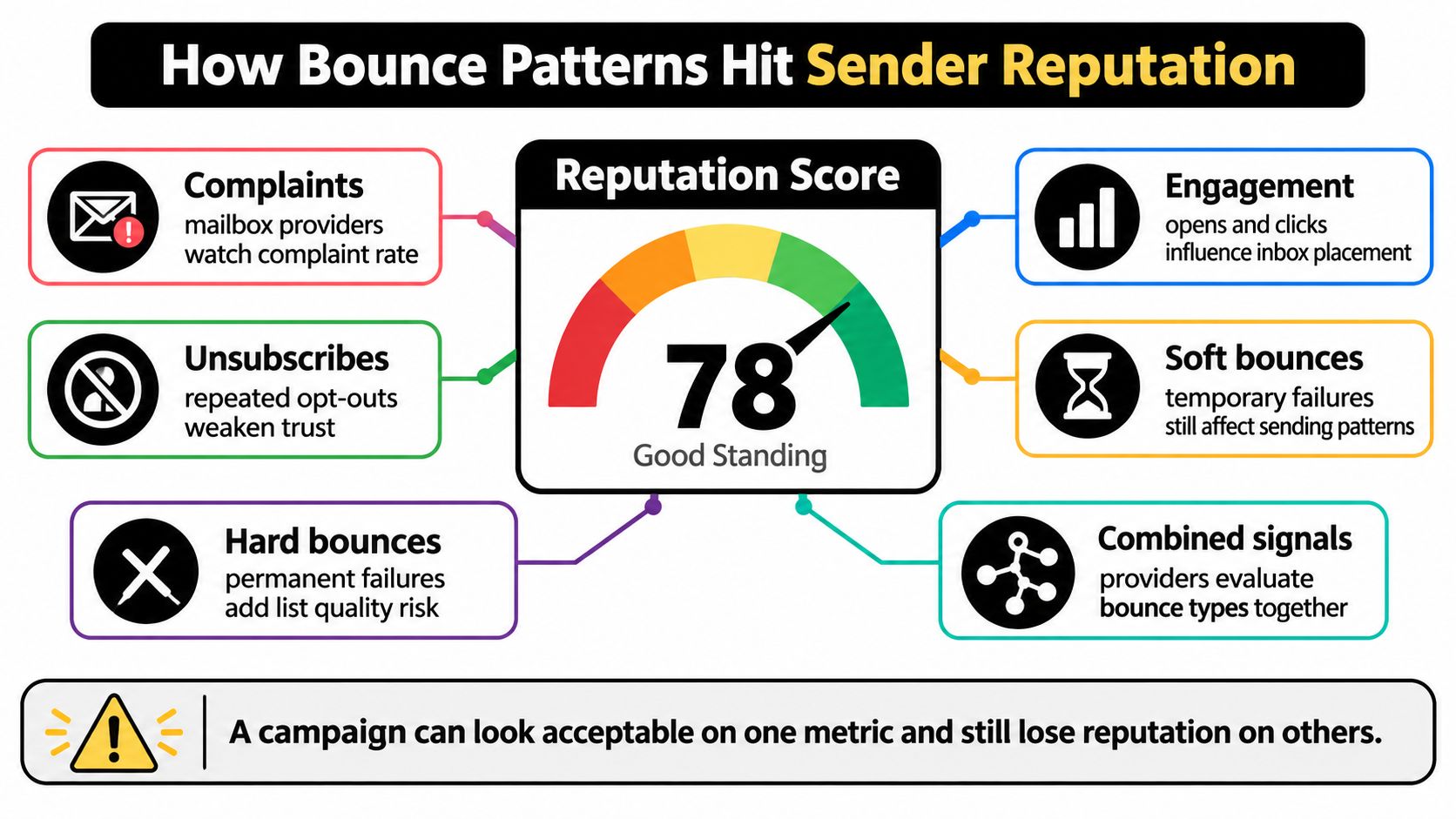
Compare groups before pausing everything
An overall campaign rate can hide where the failures originate. Break the result into groups that lead to different corrective actions:
- Acquisition source: A jump among newly collected addresses suggests signup typos, fake submissions, or a poor-quality import. Pause the affected source while checking how addresses enter your system.
- Address age: A gradual increase among older contacts suggests list decay. Review that cohort rather than assuming your newest form is broken.
- Recipient domain: Failures concentrated at a mailbox provider suggest throttling, authentication trouble, or provider policy. Investigate the destination-specific stream.
- Sending stream: Separate promotional, transactional, and outbound traffic. A problem in a prospecting campaign shouldn't disappear inside a combined account report.
Say your hard-bounce count barely changes, but temporary failures rise sharply among recipients at the same provider. Calling the list healthy because permanent failures remain low would overlook the receiving provider's resistance.
The opposite mistake is deleting that provider's entire segment. You'd remove reachable subscribers without correcting the sending behavior that caused the refusal.
Check reputation alongside delivery results
Where a mailbox provider offers a postmaster dashboard, track its reported domain reputation beside your bounce trends. Align the reporting periods and annotate campaign launches, source changes, and sending-volume adjustments. That gives you a more useful comparison than looking at an isolated campaign screenshot.
For a broader operational checklist, use the guide to improving email reputation alongside your delivery logs.
Pause the affected source, destination, or stream when the pattern points there. Don't treat a single subscriber's temporary failure as evidence that the whole program is unhealthy.
The pause decision should identify what changed and where. Without that diagnosis, you can spend time cleaning valid recipients while leaving the actual sending problem untouched.
Diagnose, Handle and Decide the Next List
Build a workflow that preserves enough history to make the next decision. A campaign's final bounce total isn't sufficient; you need the recipient, response, and previous outcomes together.
The process below keeps the initial classification simple while leaving room for investigation.
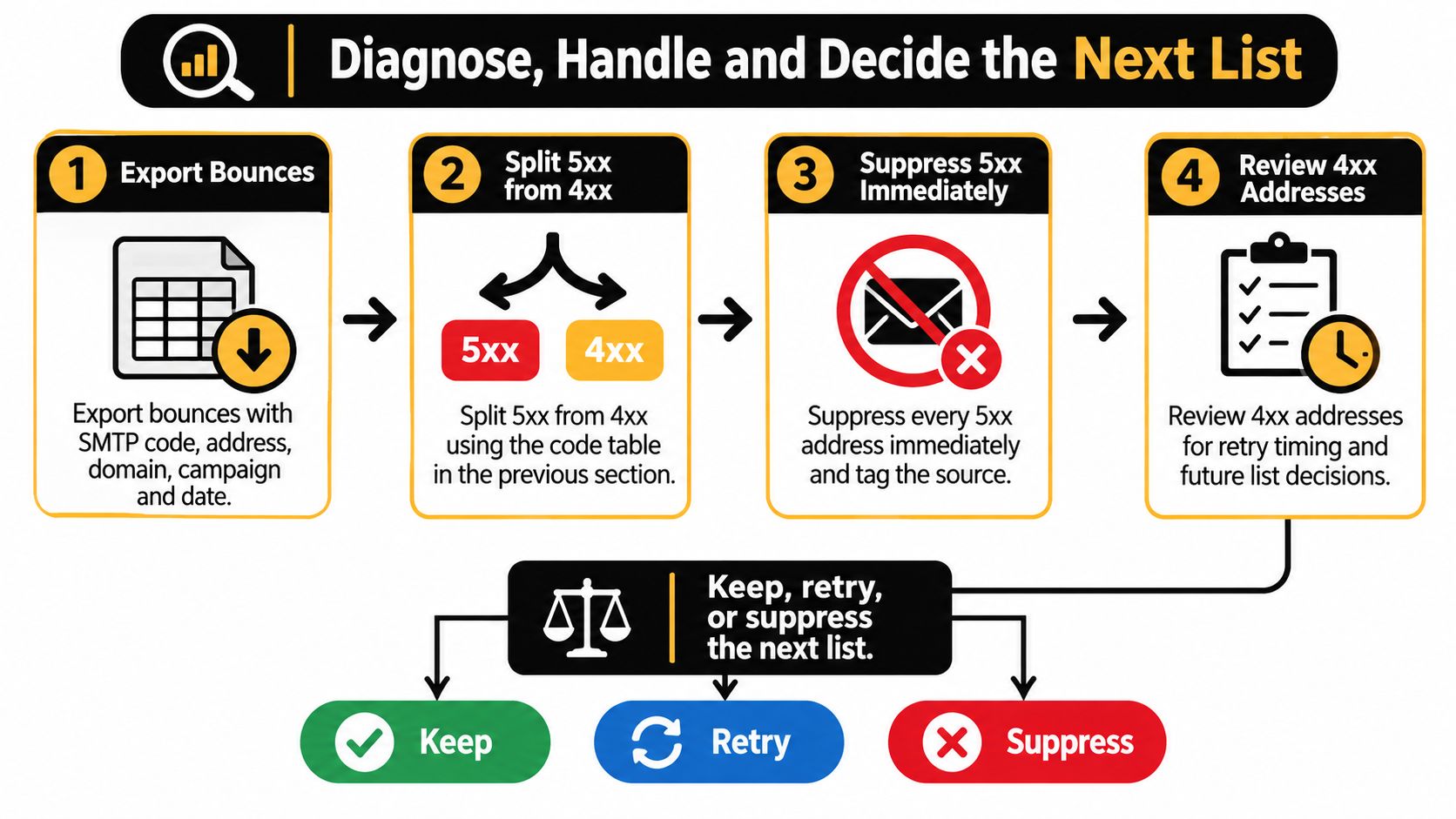
Turn the export into decisions
-
Export the original evidence. Include the SMTP code, full response text, address, recipient domain, campaign, date, and acquisition source. Preserve earlier results so a fresh import doesn't make a repeatedly failing address appear new.
-
Split permanent responses from temporary ones. Suppress permanent failures from campaign sends immediately and tag the source that produced them. When the response identifies a sender-side policy problem, record what must be corrected before reconsidering delivery.
-
Set a bounded retry policy in your sending tool. Define the spacing, expiry, and conditions that halt attempts. Confirm whether the tool automatically retries queued deliveries or whether its soft-bounce report represents a final outcome. Don't create a manual resend while an automatic attempt is still pending.
-
Review recurrence across campaigns, not just within the current queue. Omnisend's hard-versus-soft bounce guide supports treating persistent address-level failures separately from domain-wide patterns. Once an address exhausts your retry policy or repeatedly fails in later campaigns, suppress it rather than resetting its history.
-
Investigate clustered failures separately. Slow the affected destination, review concurrency, and check sender authentication. For outbound teams investigating broader placement trouble after bounce handling, H2's guide to fix cold email inbox placement provides additional troubleshooting context.
A useful retry window has both a time limit and a reason to end sooner. Stop when the message becomes stale, the recipient fails persistently, or the receiver's explanation requires a correction instead of more waiting. A password-reset message and a newsletter shouldn't inherit the same usefulness window.
Verify the next audience before sending
Check syntax, receiving-domain availability, mailbox existence, catch-all behavior, disposable providers, and shared role accounts. Use an email database cleaning workflow that keeps your existing suppression history intact.
At CleanMyList, every email gets eight checks, combined into one label, one score, and one plain-English reason. We check whether the receiving mail server would accept an address without sending any email to it, so verification doesn't affect sender reputation.
Each checked address receives one of four labels: safe to send, risky, do not send, or unknown. Uncertain server responses remain uncertain rather than being presented as a guarantee. Process only lists you're allowed to handle through a legitimate sender relationship.
Use this final decision gate:
- Retry: The response is temporary, the address hasn't failed persistently, and no provider-wide issue requires a pause.
- Suppress: The response is permanent or the recipient has exhausted your failure policy.
- Investigate: Failures cluster by provider, source, or sending stream.
Export today's bounces, apply those decisions, then verify the eligible audience before the next campaign. Don't use a successful verification result to override an unsubscribe, complaint, or unresolved delivery rejection.
What to Do for Each Sending Situation
The same bounce class can require different operational priorities. Choose the situation that resembles your latest campaign, then adjust the affected workflow rather than rewriting every suppression rule.
Infrequent newsletters and publishers
A newsletter sent every few weeks needs a fresh audience review. Addresses can become unreachable between editions, and a long gap makes yesterday's successful delivery a weaker guide to the next send. Re-check the eligible list, allow a limited retry for an isolated temporary failure, and suppress contacts that fail persistently; don't treat each edition as a clean slate.
For a startup with a small audience, it's tempting to preserve every subscriber. Keep the record, but separate keeping a contact in your database from continuing to include that contact in sends.
Ecommerce and checkout collection
A sudden permanent-failure increase among new accounts should send the growth team to the signup and checkout forms. Inspect the collection path for mistakes and fake submissions before spending the next campaign fixing its output.
We offer a real-time check through an API call in a signup form to catch typos and fake emails before they reach the list. Fix the intake process and suppress failed addresses; don't keep mailing them while the form continues adding more. Verification helps screen addresses, but it doesn't replace consent or confirmation of ownership.
Sales and cold outreach
A cluster of invalid recipients from the same prospect source is a reason to stop that source and review its remaining records. Repeated attempts won't repair nonexistent mailboxes, and switching sending accounts won't improve the underlying contact data.
Separate data-quality troubleshooting from inbox-placement troubleshooting. Pause the suspect source and review whether you're entitled to process and contact those recipients; don't move the same failed list into another sequence.
A newsletter refused by one provider
When other destinations accept a newsletter but a particular provider temporarily refuses it, isolate that destination's queue. Review delivery speed, recent volume changes, and authentication before resuming.
Keep the subscribers separate from the incident diagnosis. Slow or pause that stream; don't interpret a provider-wide throttle as proof that every individual contact is bad.
Mixed lists with shared inboxes
Shared addresses such as info@ and support@ can be real, working mailboxes. Their usefulness depends on why you're contacting them: an operational notification and a promotional sequence aren't interchangeable.
We flag shared inbox addresses so you can decide whether they belong in a campaign. Separate necessary transactional communication from promotional targeting; don't mark a role account invalid merely because it's shared.
Match your last campaign to the closest situation before changing suppression settings. The right correction may belong in the form, the data source, the sending queue, or the audience selection, not in a blanket deletion rule.
CleanMyList checks addresses before you send and returns a clear label, score, and plain-English reason so you can separate usable contacts from risky or undeliverable ones. Visit CleanMyList to check your next eligible list, export the results, and keep failed addresses out of the next campaign without discarding recoverable subscribers.