The most popular advice on this topic fits in one line. Run your list through a checker, delete everything marked invalid, and send to the rest. That advice is tidy, and it's wrong in the places that matter most. Some servers won't confirm whether a mailbox exists. Some domains accept every address you invent. Some checks time out for reasons that have nothing to do with your subscriber. Email list validation is useful precisely because it surfaces that uncertainty, not because it erases it. Your job isn't to force every address into valid or invalid. It's to match each result to the right action.
Table of Contents
- What Each Validation Check Tests
- Why Email Lists Decay Every Year
- Reading DNS and Mailbox Results Correctly
- Handling Catch-All, Disposable, Role and Unknown Addresses
- How to Run an Email List Validation Workflow
- Choose a Validation Setup Before Your Next Send
What Each Validation Check Tests
Email list validation checks each address for format, domain routing, mailbox acceptance and risk before you send. It's a stack of separate tests, not one verdict. Each layer answers a narrower question than the one you care about, which is whether a real person will receive and want your message.
Think of a physical letter moving through checks. First, someone reads the envelope to see if the address is written in a readable format. Next, they confirm the street exists and mail can be routed there. Then they knock to see if anyone answers. Each stage removes a different kind of failure, and passing one stage doesn't prove the next one will succeed.
The Eight Signals and Their Limits
The early checks are mechanical. Syntax catches missing symbols and common typing errors. We catch typos such as 'gmial.com' and 'yhaoo.com', check that the domain exists, and handle international email addresses. A clean format tells you the address could exist. It doesn't tell you it does.
The middle checks depend on other systems answering accurately. A domain may publish a valid mail route while the specific mailbox is closed. A server may accept a probe for every address, including invented ones, which makes the individual result nearly useless. That's why catch-all detection matters as a separate signal rather than a pass.
The later checks are about risk, not existence. A disposable inbox may work today and vanish tomorrow. A role account such as support@ may reach a busy team and still be a poor fit for personalised outreach. Historical bounce data adds memory, but a past bounce can't prove nothing has changed since.
If you want a practical walkthrough of the detection side, these ways to identify invalid emails cover the checks from the sender's side. Read any such guide for the limits column, not just the catches column.
Validation checks, what they test and their limits
| Check | What It Tests | What It Catches | What It Cannot Prove |
|---|---|---|---|
| Syntax | Address format and allowed characters | Missing @, spaces, malformed parts and typos such as gmial.com | Whether the mailbox exists |
| DNS and domain | Domain exists and has a mail route (MX or address record) | Nonexistent or dead domains | That a person reads the mailbox |
| SMTP mailbox check | Whether the receiving server accepts the address without sending mail | Closed or nonexistent mailboxes on servers that answer | Anything on servers that hide their answers |
| Catch-all detection | Whether the domain accepts any address | Domains that say yes to everything | Whether this specific mailbox exists |
| Disposable provider | Whether the domain belongs to a throwaway service | Temporary inboxes and fake signups | Whether the address is wanted |
| Role account | Whether the address is shared, such as info@ or support@ | Team inboxes that rarely belong in one-to-one campaigns | Whether a real person reads it |
| Historical bounce reputation | Past bounce or complaint history for the address | Addresses that bounced before | Changes since the last bounce |
| Send or skip recommendation | Combines all signals into one verdict | One action per address with a stated reason | Consent, relevance or engagement |
Analyst's rule: a passed check removes one reason for failure. It never adds up to proof that a person reads the mail.
The final recommendation is only as honest as its inputs. A good one states a plain reason for every address, so you can see whether you're looking at a dead domain, a throwaway provider, or a server that refused to answer. Those are three different problems, and you'll treat them differently.
Why Email Lists Decay Every Year
Your list is getting worse while you do nothing. People change jobs and lose their work addresses. They abandon personal inboxes, let domains lapse, and move providers without telling you. The ZeroBounce email list decay report identified a 23% annual list-decay rate for 2025, and its historical series showed decay of 23% in 2021, 22% in 2022, 25% in 2023, 28% in 2024, and 23% in 2025.
The chart below sets out that yearly pattern and the main reasons behind it.
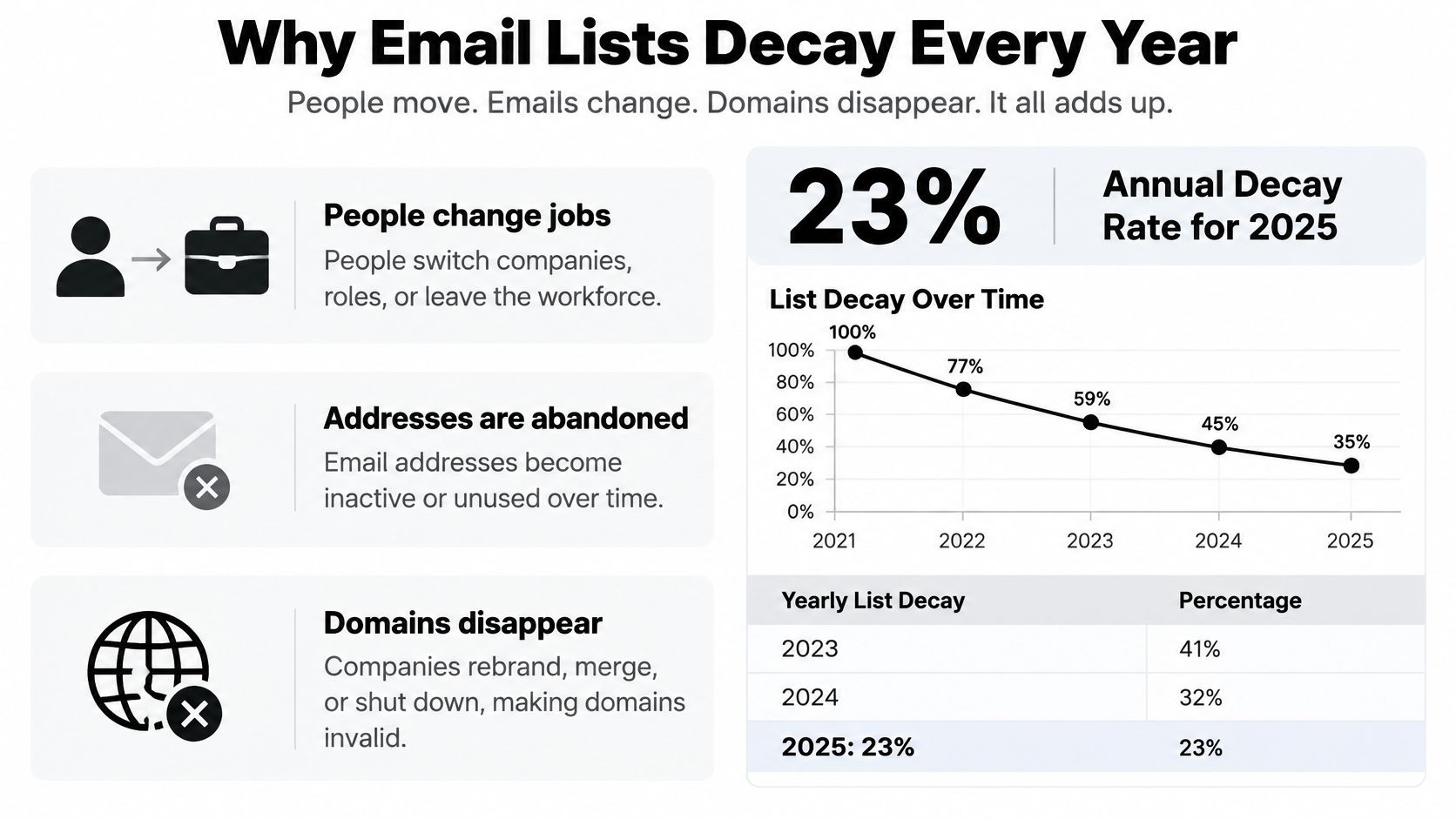
Treat those figures as reported by one large-scale analysis, not as a universal constant for your audience. A B2B list tied to job titles will usually rot faster than a consumer list built on personal addresses. The direction, though, is the same for everyone.
Reported list decay by year
| Year | Reported Annual Decay | Addresses Lost From 100,000 |
|---|---|---|
| 2021 | 23% | About 23,000 |
| 2022 | 22% | About 22,000 |
| 2023 | 25% | About 25,000 |
| 2024 | 28% | About 28,000 |
| 2025 | 23% | About 23,000 |
At a 23% annual rate, a company that collects 100,000 addresses could expect roughly 23,000 to become invalid or otherwise unusable over a year if the list isn't maintained. That's the cost of treating a validation result as permanent. A pass from eight months ago describes a mailbox as it was then, and the person behind it may have changed employers twice since.
This is why aged lists need rechecking before you rely on them. Our guide to cleaning an existing email database walks through preparing an older file for that recheck. Teams in other sectors face the same maintenance problem with their own contact records, whether they're handling subscriber files or managing channel bookings with Premierely. The records differ. The decay doesn't wait.
The video below explains how that gradual decay shows up in campaign results.
Publishers, e-commerce companies, sales teams, and global marketers feel this most because they retain large lists across multiple markets for years. For them, validation isn't a one-time cleanup before a big send. It's a recurring data-quality process, closer to reconciling accounts than to spring cleaning.
Reading DNS and Mailbox Results Correctly
An inconclusive answer is not a rejection. That single distinction is where most list cleaning goes wrong, because it's tempting to treat every non-pass as a bad address and delete it. You'll remove real subscribers whose mail infrastructure had a bad five minutes.
How the Lookup Actually Works
Under the delivery rules in RFC 5321, the SMTP specification, a sender first resolves the recipient domain through DNS, normally looking for MX records, and if no MX exists, SMTP can fall back to an implicit MX using the domain's address record. A nonexistent domain is an error. Temporary DNS failures should generally be retried rather than treated as permanent invalidity.
An MX record on its own isn't enough either. Each MX target should resolve to an A or AAAA address, rather than the checker accepting the mere presence of an MX record. A domain can advertise a mail route that leads nowhere. Our notes on verifying MX records before you send explain how that route check fits into a full validation run.
Classifying DNS and SMTP results
| Result | Classification | Action |
|---|---|---|
| Domain does not exist (NXDOMAIN) | Hard failure | Suppress |
| No MX and no usable address record | Hard failure | Suppress |
| MX target with no A or AAAA address, confirmed on retry | Hard failure | Suppress |
| DNS timeout or SERVFAIL | Unknown, retryable | Retry later, do not suppress |
| SMTP 5xx rejection (mailbox does not exist) | Hard failure | Suppress |
| SMTP 4xx response or no answer | Unknown, retryable | Retry later |
| Server accepts the address | Passes probe | Send, then confirm with engagement |
Notice the pattern. Hard failures are statements about the address or domain itself. Unknowns are statements about the check. A timeout tells you the lookup didn't finish. It says nothing reliable about the person you're trying to reach.
Suppress only confirmed hard failures. Rerun unknowns after a delay, so temporary DNS trouble doesn't remove real subscribers from your list.
Why Bounce Reports Cannot Do This Job
The mailbox probe itself is quiet. Verification checks whether the receiving mail server would accept an address without sending any email to it, so sender reputation is not affected and the recipient never sees a message. You're asking a question, not delivering anything.
You also can't skip the probe and rely on bounces from real sends. An MIT-led study of Internet email domains found that only 25% of domains ever returned a bounce for a message sent to an invalid recipient. Servers may avoid confirming whether an address exists for anti-spam reasons, or accept the message and suppress it later.
That finding should change how you read your own reports. A campaign with few bounces hasn't proven its list is clean. It may have mailed a lot of servers that don't answer accurately. Because that study covered a broad sample of servers rather than one provider or country, the lesson applies widely, and it's why pre-send screening shouldn't depend on bounce reports alone.
Handling Catch-All, Disposable, Role and Unknown Addresses
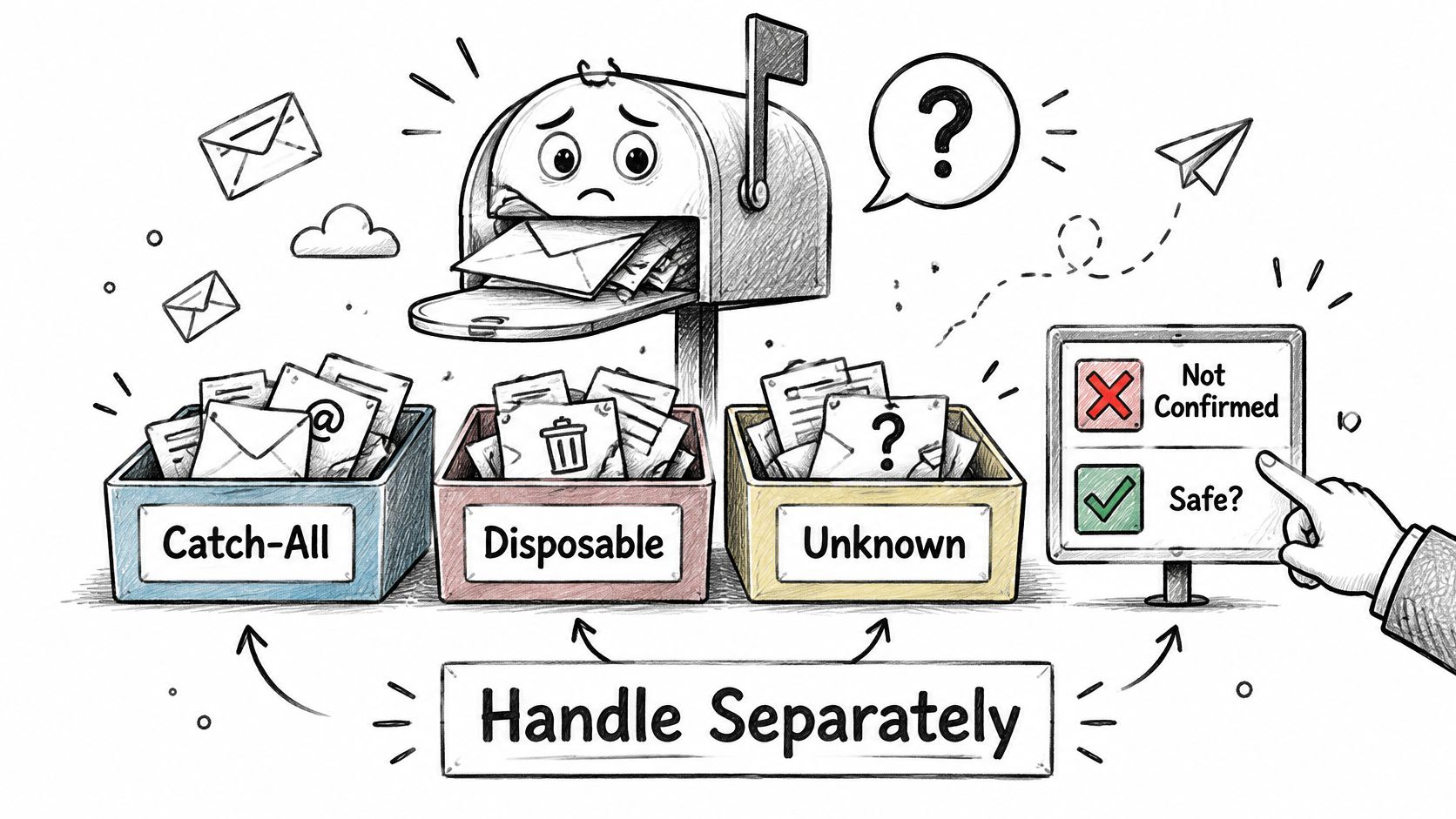
Most guidance forces every result into send or skip. That's the mistake. Catch-all domains, blocked probes, and unknown results can't reliably confirm an individual mailbox, so labelling them invalid wastes real contacts and labelling them safe invites bounces. They need a third path, with its own rules.
The Unspam Email 2025 deliverability benchmark reported that only 60% of messages reached a visible mailbox location, while 36% went to spam and 4% were blocked. Even technically deliverable mail doesn't guarantee visibility, which is exactly why uncertain addresses deserve a cautious, monitored route instead of being dumped into your main send.
The image below shows the sorting mindset you need, with each category kept apart.
Six Categories, Six Actions
Confirmed invalid addresses are the easy ones. Suppress them and don't revisit the decision. Confirmed valid addresses can be sent to normally, though you should still watch engagement, because existence and interest are different things.
Catch-all domains accept any address, real or invented, so the probe can't separate your subscriber from a typo. Send to these cautiously, in smaller batches, and watch bounces and opens closely. Our guide to handling catch-all email addresses covers how to segment them without discarding legitimate B2B contacts on privacy-protective systems.
Disposable addresses come from temporary inbox providers built for one-off signups. Known throwaway email providers are flagged, and the list of them is refreshed every day, because new ones appear constantly. Suppress them. They rarely represent a person you can reach next month.
Role-based addresses need a judgement call, not a rule. Shared inbox addresses such as info@ and support@ are spotted so you can decide whether they belong in a campaign. A product update for account administrators might fit. A personalised sales sequence almost certainly doesn't.
Unknown results, such as timeouts or blocked probes, go back for a retry first. If they stay unknown, either send cautiously with tight monitoring or ask the contact to confirm through another channel.
Actions for each address category
| Category | Typical Example | Recommended Action |
|---|---|---|
| Confirmed invalid | Nonexistent mailbox or domain | Suppress |
| Confirmed valid | Mailbox accepted, no risk flags | Send normally and monitor engagement |
| Catch-all | Domain accepts any address | Send cautiously and watch bounces and opens |
| Disposable | Temporary inbox provider | Suppress |
| Role-based | info@ or support@ | Decide per campaign; skip one-to-one sends |
| Unknown | Timeout or blocked probe | Retry, then send cautiously or request confirmation |
The question isn't only "Is this address valid?" It's "What should be done with an address whose validity cannot be proven?"
Startups, publishers, and B2B teams lose the most from binary thinking, because their best contacts often sit behind shared or guarded mail systems. A validation result sets a plan for sending. It isn't a verdict on the person behind the address, and it can't repair weak consent, poor targeting, authentication failures, or low engagement.
How to Run an Email List Validation Workflow
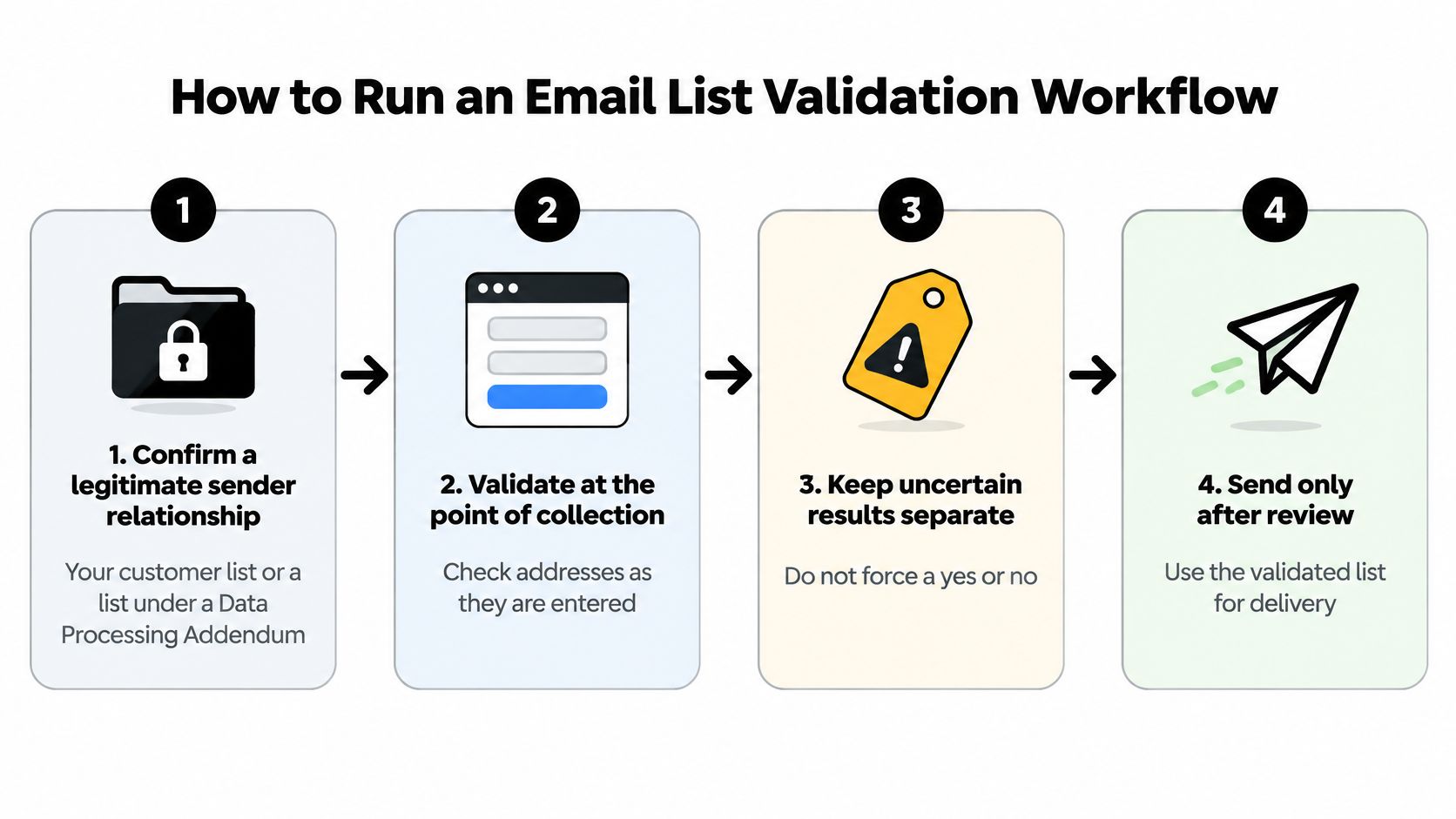
A workflow beats a cleanup because it stops bad data arriving, not just removes it later. The steps below run in order. Each one exists to prevent a specific failure that the others can't catch.
-
Confirm you have a legitimate sender relationship. Verification requires a legitimate sender relationship, such as your own list, a customer list, or a list processed under a Data Processing Addendum. Do this before uploading anything. It protects the people on the list and keeps you from processing data you have no right to hold.
-
Validate at the point of collection. Put a check on your signup and checkout forms so typos and fake addresses never enter the list. Catching gmial.com while the person is still on the page lets them fix it. Catching it six months later just gives you a bounce.
-
Run a batch check on your existing list. Export what you have, validate it, and split the output into confirmed valid, confirmed invalid, catch-all, disposable, role-based, and unknown. Don't collapse those groups back into two. The split is the value.
-
Suppress confirmed hard failures and repeated hard bounces. Remove malformed addresses, nonexistent domains, disposable or risky addresses, and recipients who keep bouncing. Every send to a known dead address is evidence against your sending practices, and mailbox providers keep score.
-
Apply the uncertain-category actions. Send catch-all addresses cautiously in smaller batches. Decide role accounts per campaign. Retry unknowns before you judge them. This step is where you keep legitimate contacts that a binary cleanup would have thrown away.
-
Recheck aged lists immediately before major campaigns. A segment you haven't mailed in a year isn't the segment you validated last year. Rechecking right before the send is what turns validation from a snapshot into a current statement about deliverability.
-
Monitor complaints by campaign and mailbox provider. Gmail's sender guidance recommends keeping the user-reported spam rate below 0.1% and avoiding 0.3% or higher, and at or above 0.3%, delivery support or mitigation options may become unavailable. For 100,000 recipients, that's 100 complaints versus 300. Watching the rate per provider tells you which audience is objecting, not just that someone is.
What This Workflow Cannot Fix
Validation removes addresses that can't receive mail. It can't manufacture permission. If people didn't agree to hear from you, a technically perfect list will still draw complaints, and complaints are what providers weigh most heavily.
It also can't substitute for authentication. Gmail requires sender domains to use SPF or DKIM and requires valid forward and reverse DNS for sending infrastructure. Set those up separately, keep your content relevant to the people who asked for it, and treat validation as one layer in a wider sending discipline rather than the whole of it.
Practical rule: validate at collection, recheck before big sends, and let complaint rates tell you whether your targeting is as healthy as your data.
Choose a Validation Setup Before Your Next Send
Don't buy on speed or price first. Score every option against the same criteria, because the differences that matter show up in how results are labelled and explained, not in how fast a file uploads.
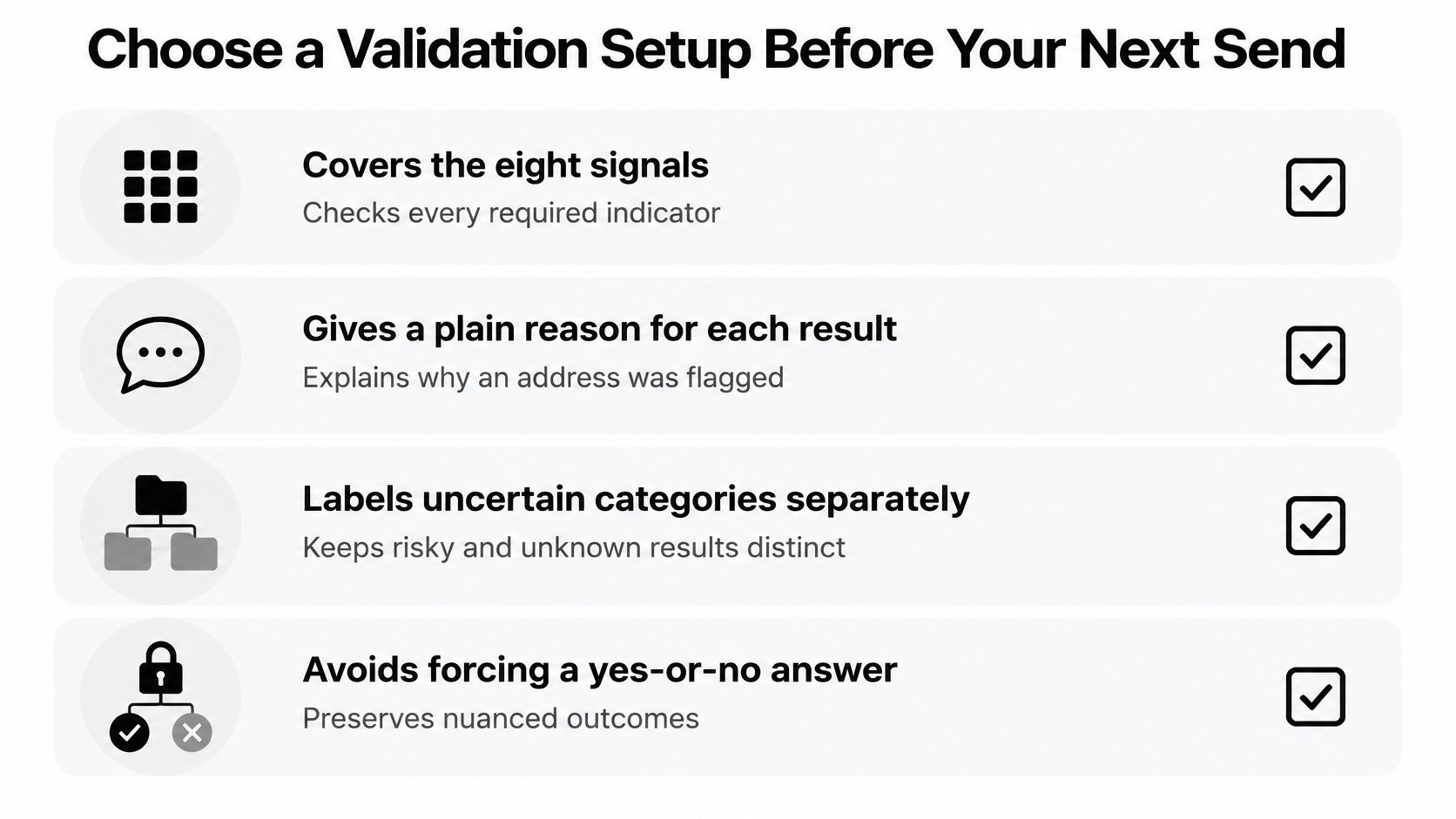
- Covers all eight signals: syntax, DNS and domain, SMTP acceptance, catch-all behaviour, disposable providers, role accounts, historical bounce reputation, and a final recommendation, with a plain reason for each result.
- Labels uncertainty separately: catch-all, role-based, and unknown results stay distinct instead of being forced into a valid or invalid flag you can't act on sensibly.
- Catches bad data at signup: adding one line of code to a signup or checkout form catches fake or mistyped emails before they enter the list, which is cheaper than cleaning them out later.
- Fits your sending stack: a clean list can be downloaded or pushed straight back into your email tool, and bad addresses are tagged so they stay out of your next send.
- States how uploaded lists are handled: you should know how long your file is kept and what happens to it, before you hand over customer data.
The process itself should be short. Email list cleaning takes three steps. Drop your list in, watch it clean, then send to real people. If a provider makes that feel complicated, the complexity is probably theirs, not the task's.
CleanMyList is one option to test against this checklist. Confirm each criterion on its site before deciding, and give the same scrutiny to anything else you're considering. A tool that can't explain why it flagged an address is asking you to trust it blindly.
Then take one concrete step. Run one aged list, ideally a segment you haven't mailed in months, through validation before your next campaign. Send to the confirmed valid group, handle the uncertain groups separately, and compare the bounce rate with your previous send to that audience. That single before and after comparison will tell you more about your list health than any vendor claim.
CleanMyList checks every address across eight signals and gives you a plain reason for each result, so catch-all, disposable, role-based and unknown addresses stay separate instead of being forced into a yes or no. Drop in an aged list before your next campaign, suppress the confirmed failures, and send the uncertain groups cautiously rather than guessing. Visit CleanMyList to run that first list and compare the bounce rate against your last send.