You've cleaned obvious typos from your mailing list, checked a few addresses manually, and sent a campaign that looked safe. Then the bounce notifications arrive. Some domains no longer exist, some inboxes were temporary, and several addresses accepted your form even though they could never become useful subscribers or customers.
That's why how to verify email addresses isn't a question of finding a green “valid” label. Reliable verification is a sequence of checks that separates deliverable addresses from risky, disposable, role-based, catch-all, and incorrectly formatted data. The practical objective is clear: stop bad addresses before they damage your sender reputation, and stop accepting them into your CRM in the first place.
Table of Contents
- Why Email Verification Is Now a Pre-Send Necessity
- The Layered Decision Tree of Email Validation
- Interpreting Verdicts and Handling Ambiguous Addresses
- Executing a Bulk Clean with CleanMyList
- Stopping Bad Data at the Source with Signup Widgets
- Building a Sustainable List Hygiene Routine
Why Email Verification Is Now a Pre-Send Necessity
Email verification used to sit near the end of a campaign workflow. A team exported an old list, ran a cleaner, removed the worst addresses, and moved on. That approach fails because lists decay continuously. People change jobs, domains expire, inboxes become abandoned, and signup forms collect deliberate fakes alongside genuine addresses.
The scale of the problem has changed too. A 2026 industry analysis estimated the global bulk email verification and validation market at about $1.2–1.4 billion in 2025, with projected growth to roughly $1.96–2.67 billion by 2030. The same analysis estimated that 15–20 billion email addresses are verified annually, which shows how verification has moved from a niche hygiene task to a normal part of email operations. See the bulk email verification market analysis for the underlying estimates.
That scale matters most for teams sending at volume. A startup may have a small list but limited room for reputation damage. An outbound team may depend on consistent inbox access for prospecting. A newsletter publisher may have no practical way to recover quickly after mailbox providers begin filtering its messages.
Practical rule: Treat verification as a pre-send control, not a rescue operation after a bounce spike.
The thresholds that change the risk
Healthy bounce-rate benchmarks commonly sit around 0.5%–2%, while unverified or poorly maintained lists can rise far above that range. In a 2025 B2B cold-email dataset covering 7.5 million emails, researchers recorded 128,605 bounces, producing a 1.71% bounce rate and 98.29% deliverability. The dataset also showed a seasonal difference, with H1 averaging 1.93% bounce and H2 averaging 1.45%, while monthly results ranged from 2.26% in May to 1.26% in October. These figures are reported in Belkins' email deliverability benchmarks.
A separate benchmark summary describes bounce rates below 2% as excellent, 2%–5% as needing improvement, and anything above 5% as high risk. Those ranges aren't a promise that every provider will apply the same threshold, but they provide a useful operating signal. A list that repeatedly generates hard bounces tells providers that the sender isn't controlling its data.
Why raw send volume isn't the objective
More sends don't compensate for poor list quality. They can amplify it. A campaign that reaches more invalid recipients creates more hard bounces, and those failures can affect later campaigns sent to valid contacts.
For that reason, teams should verify before importing purchased, scraped, old, or partner-supplied data into an active sending system. If your workflow also involves investigating an unknown contact or checking whether an address is associated with a person, a practical resource on how to find someone by email address can help distinguish research from permission to send. Verification confirms mailbox risk. It doesn't create consent.
The Layered Decision Tree of Email Validation
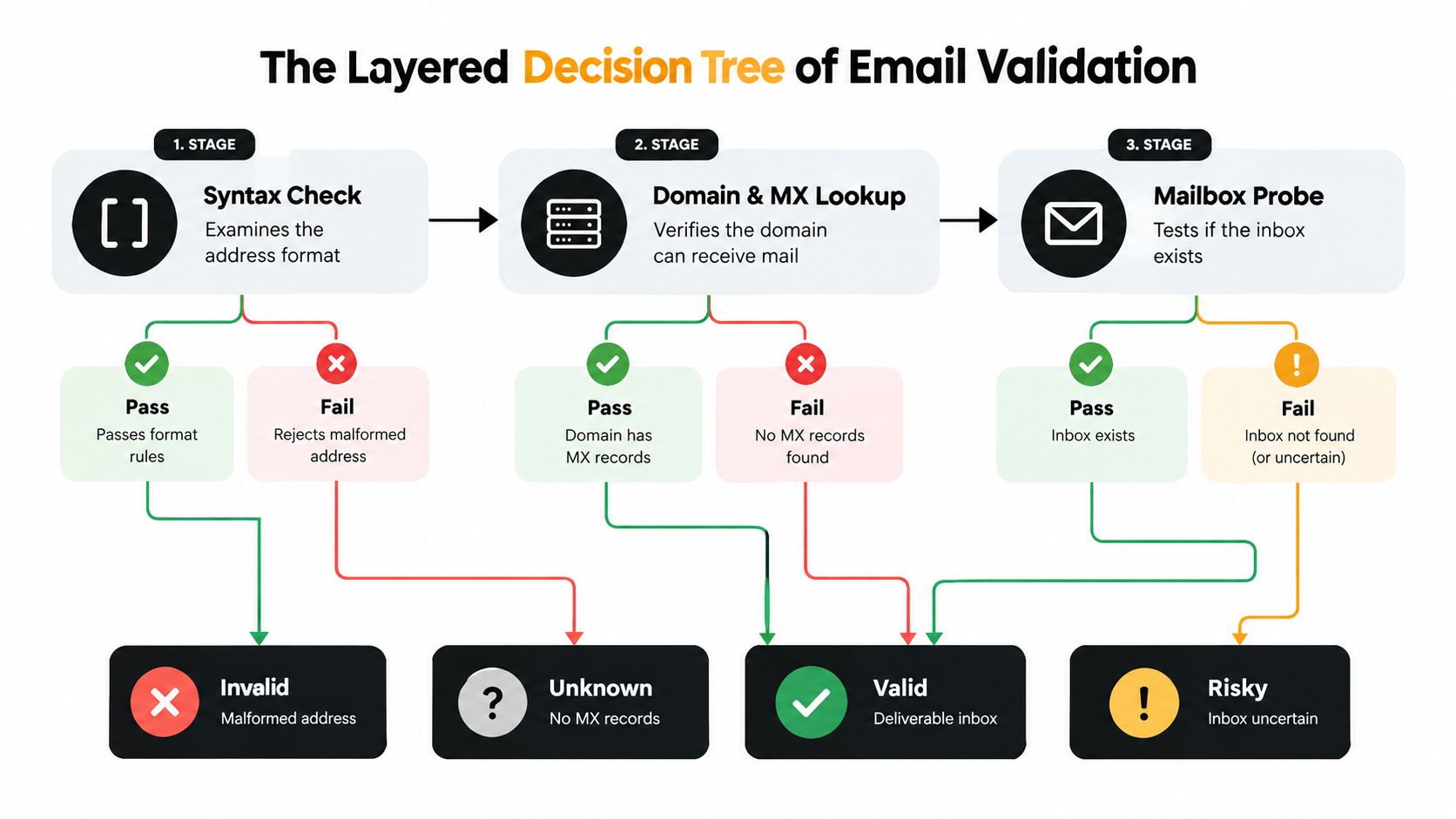
A dependable validator doesn't ask one question. It moves through a sequence, and each layer eliminates a different class of failure.
Start with normalization and syntax
The first pass cleans the input without changing its meaning. Trim leading and trailing spaces, normalize obvious formatting inconsistencies, and preserve the original value separately for audit purposes. Then parse the address according to email syntax rules.
This catches missing local parts, malformed domain names, accidental spaces, repeated punctuation, and other errors that no mail server could process. It also prevents your CRM from storing multiple representations of what may be the same user, although provider-specific rules mean you should avoid making aggressive assumptions about dots, plus-tags, or aliases.
Syntax validation is necessary, but it proves very little about delivery. An address can look perfectly correct and still point to a nonexistent domain or an unavailable mailbox. A technical explanation of how email validation works provides useful context for evaluating what a verification provider actually checks.
Confirm that the domain can receive mail
Next, query the domain's mail-routing information. The validator checks whether the domain exists and whether it publishes valid records indicating where incoming email should go.
This step separates a well-formed address from a reachable mail domain. It catches expired domains, misspelled company domains, and domains that exist for websites but aren't configured to accept email. A passing domain check still doesn't prove that person@domain.example exists. It only establishes that the domain appears capable of receiving mail.
Probe the mailbox through SMTP
The final technical layer asks the receiving server whether it will accept mail for the specific address. A validator performs an SMTP conversation without sending a message. The server's response, connection behavior, policy responses, and consistency help classify the mailbox.
Verification gets less binary here. Some servers disclose mailbox existence clearly. Others defer, throttle, block probes, or accept every address at the SMTP stage. A catch-all domain may accept mail for nonexistent users, so a successful SMTP response doesn't always equal a deliverable individual inbox.
The workflow should therefore preserve uncertainty instead of forcing every address into “valid” or “invalid.”
- Syntax pass: The address follows expected formatting rules.
- Domain pass: The domain exists and appears able to receive mail.
- Mailbox result: SMTP behavior supports a more specific verdict.
- Policy classification: The system identifies catch-all, disposable, role-based, or otherwise risky conditions.
A useful output might be valid, invalid, risky, disposable, catch-all, or unknown. That richer result is more actionable than a binary label because your sending policy can differ by audience, acquisition source, and campaign type.
Interpreting Verdicts and Handling Ambiguous Addresses
A verification result becomes valuable only when it changes what your system does next. “Risky” shouldn't disappear into a spreadsheet. It should trigger a defined action.
Independent benchmark guidance reports that unverified lists commonly contain 20%–30% invalid addresses, 5%–15% disposable addresses in B2C, 2%–5% in B2B, and 10%–20% catch-all addresses in enterprise-heavy lists. The same guidance connects invalid addresses with hard bounces, which are the primary reputation hazard. The methodology and classifications are discussed in Clearout's email data quality benchmarks.
Catch-all domains need a controlled policy
A catch-all server accepts mail for addresses it may not provision. That makes the address impossible to confirm with confidence through SMTP alone.
For a permission-based newsletter, a catch-all address can remain eligible if the person completed a confirmation flow and the address shows real engagement. For cold outreach, the same verdict deserves more caution because you don't have a user-initiated confirmation signal. Keep it in a separate segment, reduce sending pressure, and remove it if the recipient never engages.
Don't treat catch-all as invalid by default. Don't treat it as fully valid either. It belongs in a review or monitored category.
Role accounts depend on the audience
Addresses such as info@, admin@, sales@, and support@ may reach a real team, but they don't represent an individual decision-maker. Suppressing every role address can remove legitimate business contacts. Sending to them as if they were personal inboxes can distort engagement and create poor targeting.
For B2B prospecting, retain role accounts in a separate segment when the offer is relevant to a department. For consumer newsletters and lifecycle messaging, suppress them unless the user explicitly supplied the address for that purpose.
Disposable addresses are usually a policy decision
Temporary inboxes can pass syntax, domain, and even mailbox checks. Their defining problem is not always immediate non-delivery. It's the likelihood that the address exists only long enough to obtain a download, trial, coupon, or other gated benefit.
At signup, block disposable addresses when the account needs a durable identity. If your use case permits low-commitment access, allow them only with restrictions, such as limited promotional communication and no high-value account recovery. The important point is to make the decision before the address enters every downstream system.
| Verdict | Recommended action |
|---|---|
| Valid | Send according to consent and normal segmentation |
| Catch-all | Review or monitor separately |
| Role-based | Segment by audience and purpose |
| Disposable | Suppress or restrict at signup |
| Invalid | Reject and remove from sending |
| Unknown | Hold for review rather than forcing a send decision |
Executing a Bulk Clean with CleanMyList
Bulk cleaning works best when you protect the original file and make the output operationally useful. Don't overwrite your source CSV. Keep the original row identifier, acquisition source, consent status, and any segmentation fields so you can reconcile results without losing context.
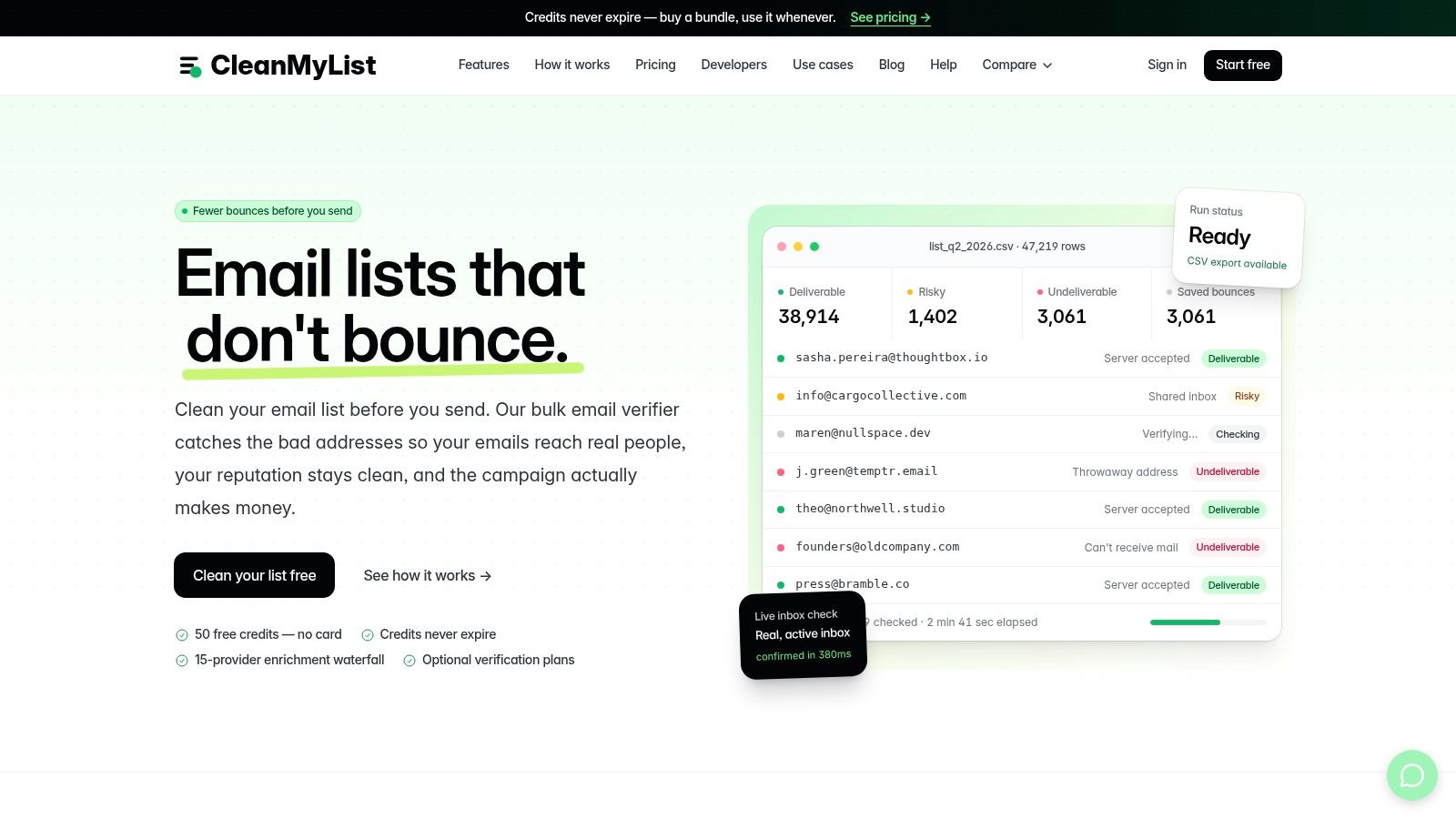
CleanMyList is one pay-as-you-go option for this workflow. It accepts a CSV or pasted addresses, streams verification verdicts while the check runs, and returns a segmented result that can be exported for campaign use. Its checks consider syntax, DNS, SMTP mailbox behavior, catch-all status, disposable providers, role accounts, bounce reputation, and a send-or-skip recommendation.
A safe operating sequence
-
Prepare a working copy. Export the list from your CRM or email platform, then retain the original untouched. Remove columns containing unnecessary sensitive information before uploading.
-
Upload or paste the addresses. Map the email field carefully. If the file contains duplicate contacts, keep them visible until verification is complete so you can decide whether deduplication belongs in the CRM or campaign platform.
-
Watch the verdict stream. Real-time results let you spot unusual patterns early. A sudden cluster of invalid domains may indicate a bad import, while a large catch-all segment may reflect an enterprise-heavy source rather than a technical failure.
-
Use the reasons, not only the labels. A “skip” recommendation caused by a disposable provider should lead to a different decision than an “unknown” result caused by a server refusing probes.
-
Export segmented outputs. Keep valid contacts separate from risky, catch-all, role-based, disposable, and invalid records. Suppress invalid addresses in the sending platform, and preserve ambiguous records for a policy review rather than mixing them back into the clean segment.
The CleanMyList guide to running a list check covers the product workflow. From a data-governance perspective, check how the service handles encryption, retention, and deletion before uploading customer or prospect data. A verifier should never send a test email during the checking process, because that creates an unwanted message and can itself affect your sending controls.
The output is only as good as the policy that follows it. If your team exports a clean file but later reimports the original list, the same addresses will return to your campaign audience.
Stopping Bad Data at the Source with Signup Widgets
A clean bulk list doesn't stay clean if your signup form accepts every string that resembles an email address. A typo reaches the CRM, triggers a welcome message, enters an automation sequence, and may be copied into several systems before anyone notices.
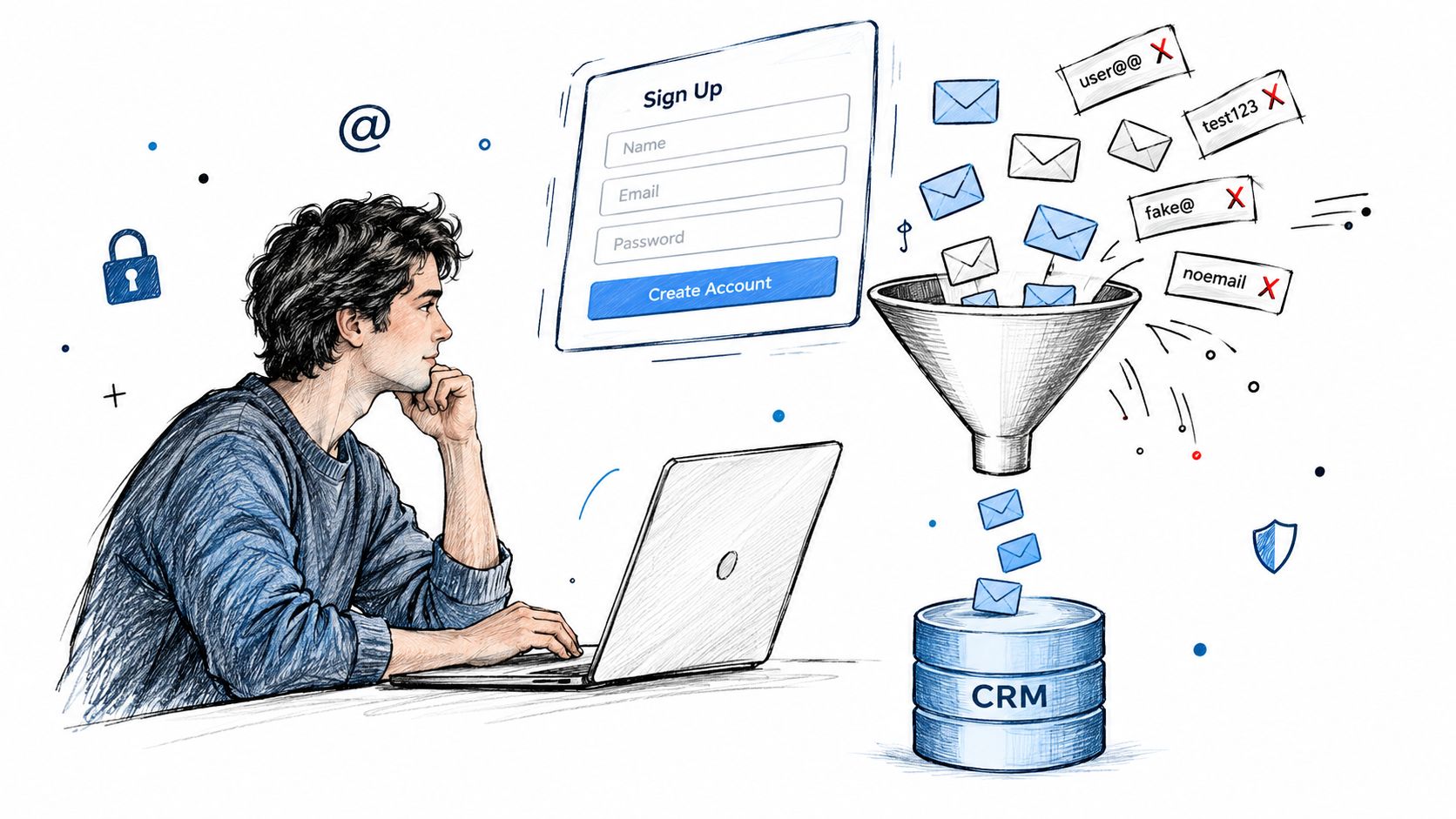
A signup-time widget should run after the user finishes entering the address and before your application creates the contact. It can catch malformed syntax, common domain typos, disposable providers, role accounts, and other policy conditions. Show a useful correction message rather than rejecting the form without explanation. For example, flagging a likely misspelling gives a genuine subscriber a chance to fix the address without creating friction.
Validate before the CRM write
The right sequence is:
- Capture temporarily: Hold the submitted address until validation returns.
- Apply policy: Decide whether the result is acceptable for this form, product, or audience.
- Create the record: Write only approved data to the CRM.
- Record the reason: Store the validation status and timestamp for later support and auditing.
An API can support both individual checks and synchronous validation for small batches, while a frontend integration handles the immediate signup decision. The CleanMyList email API integration describes this type of connection.
Verification isn't authentication
A verified mailbox can still receive mail from a poorly configured sender. Inbox placement continues to deteriorate even as senders adopt verification and authentication. One 2025 benchmark reported global inbox placement at 84.6% in 2024–2025, down from 87.3% the previous year, while noting that Microsoft, Gmail, and Yahoo had tightened sender requirements. The figures appear in the 2025 email deliverability report.
Configure and monitor SPF, DKIM, and DMARC alongside list hygiene. Verification reduces the chance that you send to bad recipients. Authentication helps mailbox providers assess whether your messages are authorized and trustworthy. Neither replaces the other.
Building a Sustainable List Hygiene Routine
A list-cleaning project creates a baseline. It doesn't create a permanent result. Sales teams working through cold data need a tighter review rhythm than an ecommerce brand that emails active purchasers, while a publisher may focus on aged and unengaged subscribers before a major send.
Use behavior and source to set your routine:
- Outbound teams: Verify prospect files before they enter sequences, and quarantine addresses that produce uncertain results.
- Marketing teams: Recheck aged or unengaged segments before major campaigns, especially when the list includes older imports.
- Newsletter creators: Keep confirmed subscribers separate from unconfirmed signups, and suppress hard bounces immediately.
- Developers: Put validation at the form boundary, log verdict reasons, and prevent rejected addresses from flowing into downstream tools.
Monitor bounce behavior after every meaningful list change. A low overall rate can hide a problematic acquisition source, a damaged segment, or a seasonal shift. The operational target is to keep hard bounces as close to zero as possible and investigate any movement toward the 2% threshold described in email verification and deliverability guidance.
A practical checklist is short:
- Preserve the source list.
- Normalize and syntax-check every address.
- Confirm domain and mailbox behavior.
- Separate catch-all, role, disposable, unknown, and invalid results.
- Block bad data at signup.
- Keep SPF, DKIM, and DMARC aligned.
- Reverify aged data before important sends.
- Review bounces by source, segment, and campaign.
CleanMyList provides no-subscription bulk verification, CSV and paste-in list checks, streamed verdicts, segmented exports, and API-based signup validation for teams that need to control email data before sending. Upload a working copy of your list or connect validation to your signup flow, then visit CleanMyList to create a campaign-ready process.