Only 62% of more than 11 billion email addresses in a large-scale verification analysis were valid. That left roughly 38% unsafe to mail, while about 28% of an average database could become invalid or risky within a year, according to ZeroBounce's email list decay analysis. The practical lesson is uncomfortable but useful: even a carefully collected list doesn't stay healthy on its own.
An invalid email address is more than a typo waiting to be corrected. It can waste a send, create a hard bounce, distort campaign reporting, and contribute to weaker inbox placement for messages sent to contacts who are perfectly reachable. The hardest problems are often hidden because an address can look correct, pass a basic format check, and still be a poor or uncertain destination.
Table of Contents
- What Invalid Addresses Cost Your Deliverability and Budget
- What Makes an Email Address Invalid at All
- The Gray Zone Between Valid and Deliverable
- How Invalid Addresses Damage Sender Reputation
- How Email Verification Actually Works
- Cleaning an Existing List and Blocking Bad Addresses at Signup
- When Validators Create the Problem They Claim to Solve
- A Practical Checklist for Cleaner Lists Starting Today
What Invalid Addresses Cost Your Deliverability and Budget
About 23% of an email list can decay in a year, according to the ZeroBounce analysis. That change happens even when the list began with genuine subscribers and correctly formed domains. A list is less like a sealed container and more like a water line with a slow leak. Without checks, some addresses gradually stop being useful.
The cost appears in three connected places. First, your campaign tries to deliver messages to people who cannot receive them. Those failed deliveries create bounces and consume sending activity without producing engagement, revenue, or customer communication. Then campaign reports become less reliable because the audience count includes contacts who were never realistic delivery opportunities.
Where the waste begins
A failed delivery still passes through your email workflow. Depending on the email service provider, it can use part of your sending allowance, processing capacity, and campaign volume. One bad address may seem minor. A collection of them changes the campaign's performance picture.
Well-maintained lists commonly report bounce rates around 1% to 2%, with estimates ranging from 1.01% to 2.33%, as summarized by Sender's email marketing statistics. When stale or malformed addresses accumulate, a list that began near those levels can become risky quickly. The expense is therefore both operational and strategic: you spend resources on failed deliveries while making useful contacts harder to evaluate.
Practical rule: Treat every hard bounce as both a failed delivery and a warning about the data that produced it.
How repeated bounces weaken sender reputation
Mailbox providers assess delivery outcomes when deciding how much trust to place in a sender. Repeated attempts to reach nonexistent recipients can signal weak list maintenance. Over time, that pattern may contribute to throttling, suppression, blocklisting, or weaker inbox placement, as described in Adobe's email deliverability best-practice guide.
The stronger defense begins before the first campaign. Signup-time validation can catch obvious errors and suspicious destinations as an address enters the list. Pre-send verification then checks the remaining audience. Together, these controls prevent questionable addresses from becoming an avoidable cost.
What Makes an Email Address Invalid at All
Think of an email address as a postal destination with several checkpoints. The part before the @ identifies the recipient, the domain after the @ identifies the destination, DNS and MX records indicate whether that destination can accept mail, and the mailbox is the actual recipient location.
A failure at any checkpoint can make an address undeliverable. Amazon SES documentation separates the main technical problems into syntax, domain, and mailbox checks.
Syntax failures
Syntax is the address's visible structure. A missing @, an illegal character, an unclosed space, or malformed punctuation can stop the message before a receiving server knows where to route it.
Examples include:
-
johndoe.gmail.com, which has no separator between the recipient and domain. -
john doe@example.com, which contains an unapproved space in an ordinary signup field. -
user@@example.com, which contains two@symbols. -
john..doe@example.com, where consecutive dots may violate the rules enforced by receiving systems.
A correctly structured alternative might be john.doe@example.com. That doesn't prove the mailbox exists, but it gives the next validation layer something technically meaningful to inspect.
Domain failures
The domain is the destination's neighborhood. It may be misspelled, expired, nonexistent, or configured without a mail server capable of receiving messages.
| Failure Category | Invalid Example | Why It Fails |
|---|---|---|
| Syntax error | johndoe.gmail.com |
The address lacks the @ separator required to divide the mailbox from the domain. |
| Domain typo | jane@gmial.com |
The domain may not be the intended provider and might not exist or accept mail. |
| Missing mail service | user@example-domain.test |
The domain may not resolve to a destination configured to receive email. |
| Mailbox failure | former.employee@company.com |
The domain works, but the individual mailbox may have been deleted or disabled. |
A domain can look plausible while still being wrong. jane@gmial.com resembles a familiar address, but a single transposed character changes the destination entirely. Signup-time correction tools can catch these mistakes before they become permanent records.
Mailbox failures
Mailbox checks concern the recipient itself. The domain can be live, and the format can be correct, while the specific account no longer exists, has been disabled, or repeatedly rejects delivery. An address can also become risky later because people change jobs, abandon accounts, or let domains expire.
That's why visual inspection only catches the easiest failures. A useful verification process moves from syntax to domain configuration and then toward mailbox acceptance, while treating the result as a deliverability decision rather than a simple spelling judgment.
The Gray Zone Between Valid and Deliverable
A basic validator answers one narrow question: does this string look like an email address? A deliverability check asks a harder question: is this address a sensible destination for this type of sending?
That difference creates a gray zone. Role accounts, disposable addresses, and catch-all domains can pass syntax and domain tests while remaining unsuitable, temporary, or uncertain for marketing communication.
Role accounts
Addresses such as info@company.com, support@company.com, and abuse@company.com are usually formatted correctly and attached to real domains. They may route successfully, but they often represent a team or function rather than one person who requested your content.
The right treatment depends on context. A support workflow may need support@company.com, while a newsletter may want an individual subscriber who can provide clear consent and engagement. Don't automatically call every role account invalid. Label it as a different risk category and decide whether that category belongs in the campaign.
Disposable domains
Temporary services can provide a functioning inbox for a short period, then disappear or stop being useful. An address at mailinator.com or guerrillamail.com may accept an initial confirmation message, but it isn't a dependable long-term relationship.
A signup form should generally block known disposable providers when the account requires ongoing communication. If the user has a legitimate reason to use one, a separate review path is safer than automatically treating the address as equivalent to a stable personal or business mailbox.
Catch-all domains
A catch-all domain accepts mail for addresses that may not correspond to active people. A typo such as contcat@company.com can appear accepted because the domain is configured to receive mail for almost any mailbox name.
That makes catch-all results uncertain rather than automatically invalid. You can isolate them, request confirmation, or suppress them from higher-risk campaigns. For a deeper explanation of the issue, see this guide to catch-all email addresses.
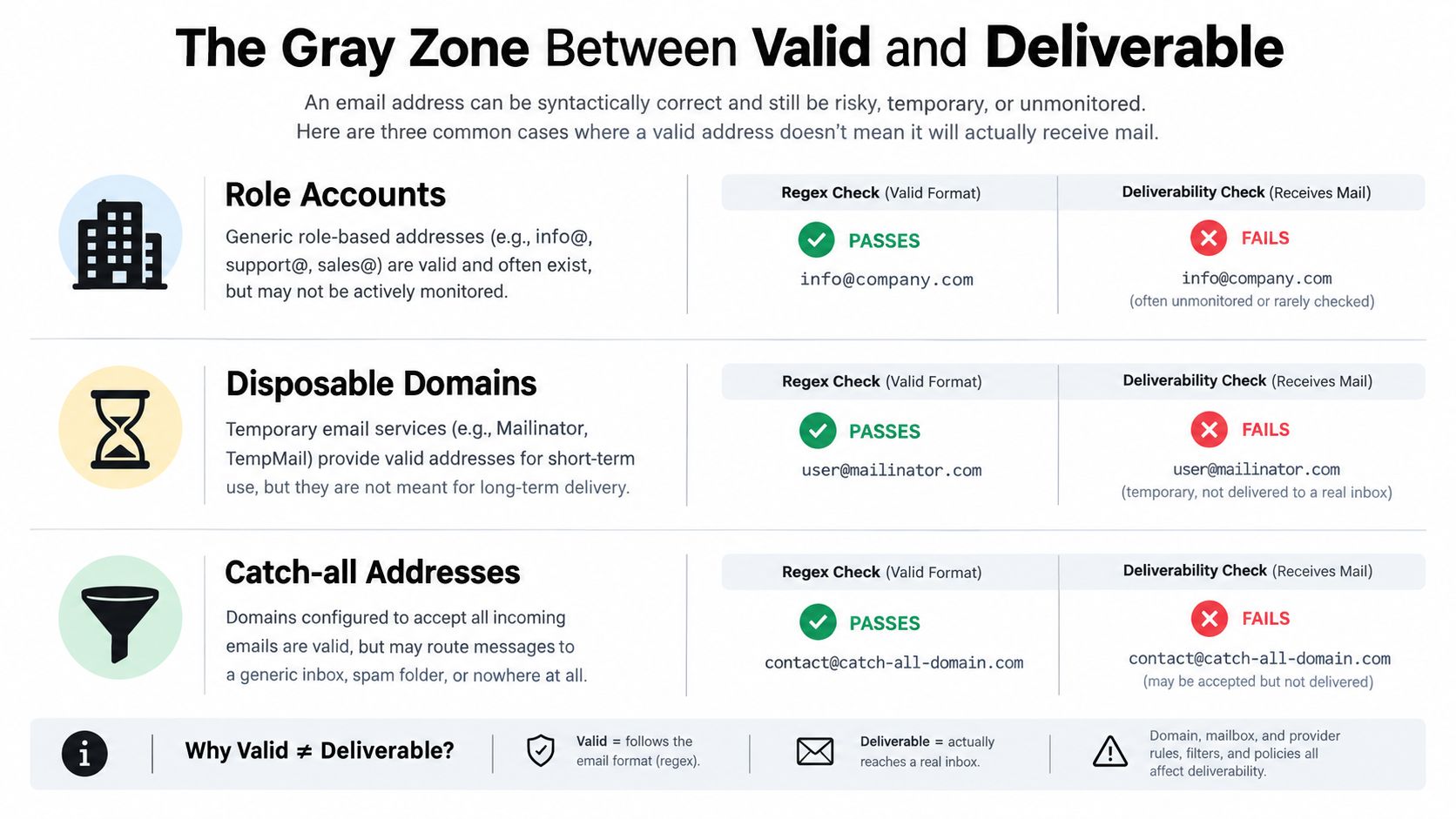
The safest operating model isn't “accept everything” or “reject everything.” It's to give each address a verdict and a reason. Valid syntax is a starting point, not proof of durable deliverability.
How Invalid Addresses Damage Sender Reputation
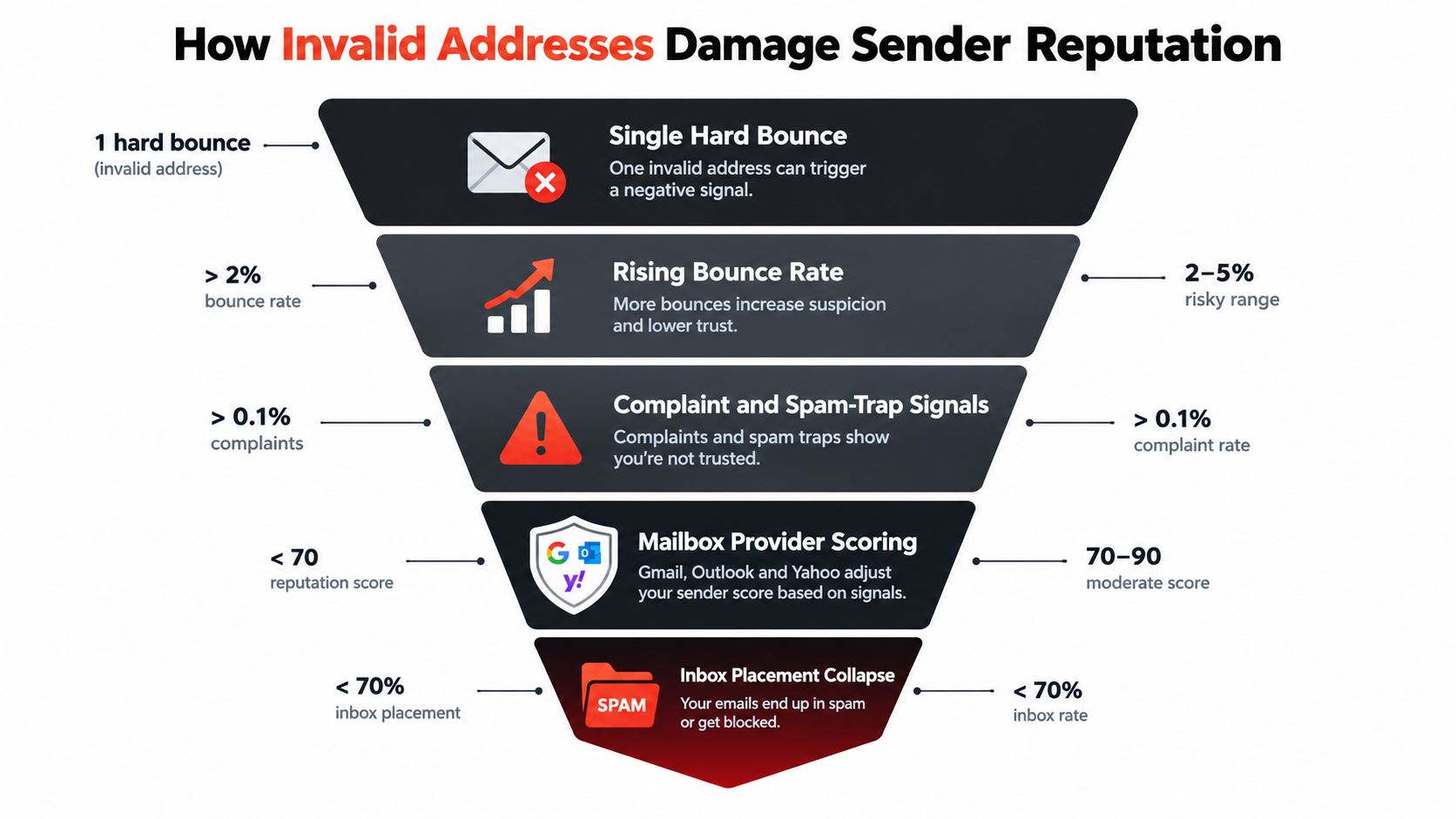
One invalid address does not define a sender. A repeated pattern does. Mailbox providers watch how often your infrastructure attempts delivery to nonexistent, deleted, or unreachable recipients, then use that pattern to judge list quality.
The causal chain is simple:
- A typo, stale record, or deleted mailbox enters a campaign.
- The receiving server rejects the message.
- Your email service records a hard bounce.
- A concentration of hard bounces signals weak acquisition or list-cleaning controls.
- Providers may slow, filter, or restrict later messages.
Hard and soft failures are different
A hard bounce means the failure is permanent, such as a nonexistent mailbox or dead domain. Repeated attempts waste sending capacity and can reinforce the poor-quality signal.
A soft bounce usually reflects a temporary condition, such as a full inbox or short-lived server problem. One failure does not prove that the address should be removed. Repeated soft bounces suggest that the mailbox may be abandoned or unable to receive reliably, so the address deserves review before the next campaign.
Benchmarks for healthy bounce rates typically sit near 1% to 2%. As noted earlier, rates above 4% to 5% can trigger throttling, although each provider applies its own thresholds. The practical lesson is to treat rising bounces as an early warning, not wait for a suspension or blocklisting event. Sender's benchmark summary
Reputation reaches beyond one campaign
Mailbox providers evaluate signals over time across your sending domain, IP infrastructure, and message activity. Bounces can appear alongside low engagement, complaints, and spam-trap exposure. Together, these signals can reduce inbox placement even for addresses that have never bounced.
The consequences can follow a clear progression: delivery slows, messages move to spam, and providers may suppress or block future traffic. Adobe's deliverability guidance connects repeated invalid-address sending with bounce spikes, suppression, blocklisting, and weaker inbox placement. Adobe's deliverability guidance
Deleting hard bounces after a campaign limits further failures, but it cannot erase the earlier signal. Signup-time validation acts as the first line of defense by stopping obvious risks before they enter the sending system.
How Email Verification Actually Works
Professional verification is a sequence of checks, not a single regex. Each layer answers a different question, and the final decision should explain whether an address is safe, risky, or undeliverable.
A practical eight-signal workflow looks like this:
- Syntax validation checks whether the address follows accepted email structure rather than merely matching a simplistic pattern.
- MX lookup checks whether the domain has a mail destination configured.
- SMTP handshake asks the receiving system whether the mailbox is accepted, without sending a message.
-
Role-account detection identifies functional addresses such as
info@orsupport@. - Disposable-domain matching compares the domain with known temporary email providers.
- Catch-all probing tests whether the domain accepts almost any mailbox name.
- Spam-trap and honeypot screening identifies addresses associated with heightened sending risk.
- Reputation scoring combines the signals into a reasoned verdict instead of hiding uncertainty behind “valid” or “invalid.”
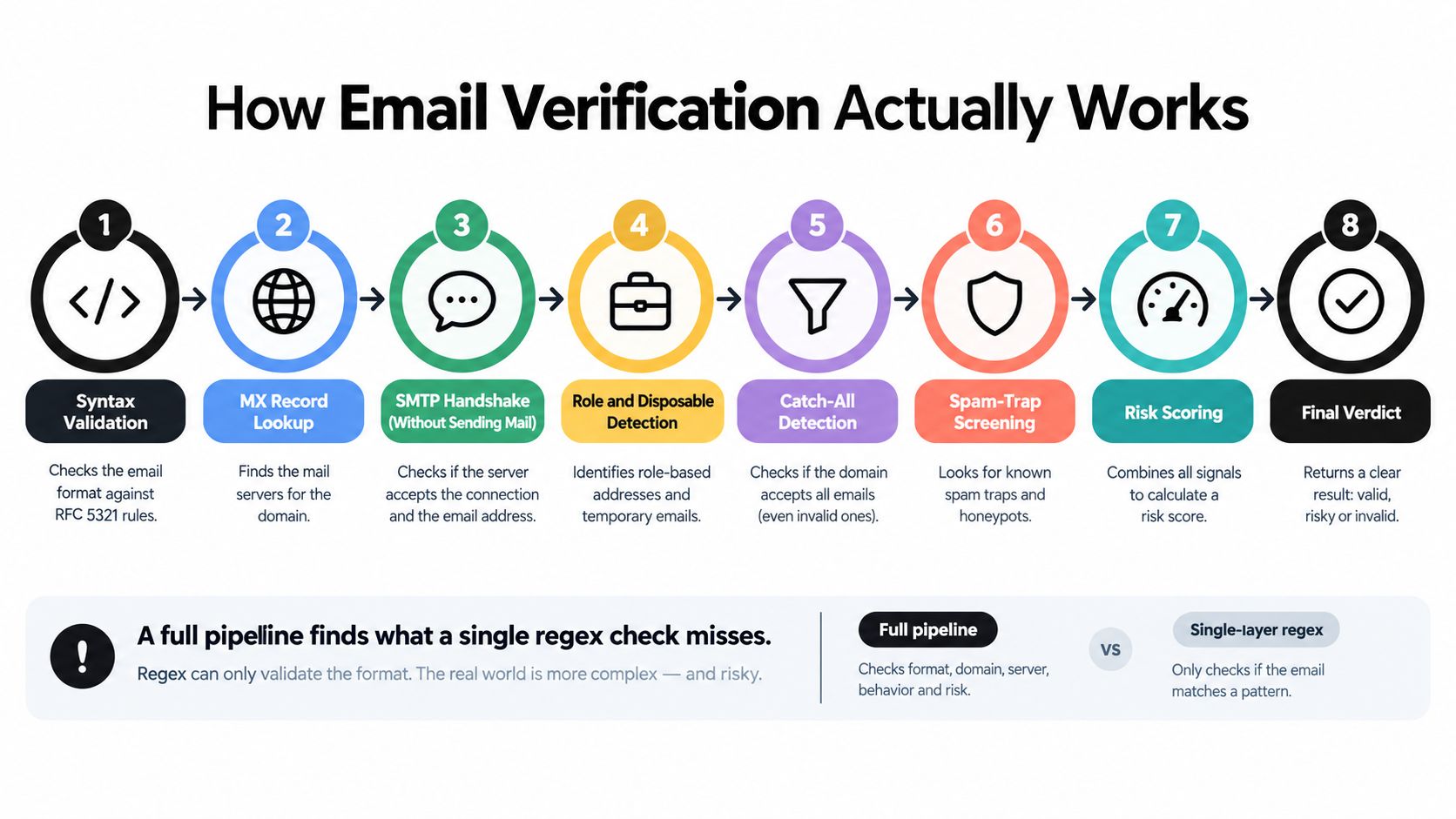
A regex alone might approve abc@xyz.com because the structure is legal. It can't establish that the domain receives mail, that the mailbox exists, or that the address is suitable for marketing. Multi-signal verification narrows that uncertainty without sending a test email.
For broader context on the factors that determine inbox placement, consult this complete email deliverability guide. You can also review this explanation of how email validation works before choosing a verification workflow.
The important distinction is operational. Verification doesn't guarantee that a person will open or reply. It determines whether the address appears technically reachable and whether known risk signals should change the way you send to it.
Cleaning an Existing List and Blocking Bad Addresses at Signup
Start with the list you already have, then improve the collection process so the same problems don't return. Treat those as two separate phases with different objectives.
Phase one cleans the current database
Export the complete list before making changes. Keep the original file untouched, then run a copy through a verification service and divide the results into valid, risky, and invalid groups.
Suppress the invalid group before the next campaign. Review risky records separately, especially catch-all, role-based, and disposable addresses. Correct obvious typos only when you have enough evidence to avoid changing a real subscriber's address by guesswork.
| Dimension | List Cleanup | Signup Validation |
|---|---|---|
| Timing | Runs against existing records before a campaign. | Runs as the person enters an address. |
| Main purpose | Finds stale, malformed, and risky contacts already stored. | Stops preventable errors from entering the database. |
| Typical action | Suppress, segment, correct, or re-confirm. | Suggest a correction, reject obvious errors, or request confirmation. |
| Best evidence | Verification verdicts and prior bounce history. | Real-time checks plus confirmation by the mailbox owner. |
A practical list-scrubbing workflow should preserve source data, record each verdict, and make suppression reversible. Don't delete records without retaining the reason for the decision.
Phase two blocks new bad data
Add real-time validation to every important form, including newsletter, checkout, lead magnet, and account creation forms. The form can flag user@gnnail.com, suggest a likely correction, block known disposable domains, and send a confirmation email before activating the subscription.
Double opt-in is especially useful because it tests control of the mailbox. It can catch a typo that passed technical checks, a role account entered by mistake, or a fake address submitted to receive an offer. Verification reduces risk before sending, while confirmation establishes that someone can complete the signup.
When Validators Create the Problem They Claim to Solve
An address isn't automatically bad because a basic validator rejects it. Overly strict patterns can block legitimate subscribers, especially when they assume that every mailbox follows a narrow, outdated format.
Consider three common cases:
-
jane+news@gmail.commay use plus-addressing to identify a newsletter segment. A simplistic pattern that rejects+can discard a real subscriber. -
josé@example.eumay contain an internationalized local part. A validator that supports only a limited character set can reject a legitimate address. -
founder@startup.examplemay use a custom domain hosted alongside other businesses. A shared hosting arrangement doesn't make the address invalid.
The right question isn't “did the regex like it?” It's “what evidence supports the rejection?”
| Address Pattern | Why Marketers Use It | Naive Validator Verdict | Correct Behavior Under RFC 6531 / 5321 |
|---|---|---|---|
jane+news@gmail.com |
Segments subscriptions and identifies signup sources. | Rejects the plus sign. | Accept the valid tag format and continue with domain and mailbox checks. |
josé@example.eu |
Represents a real user with an internationalized mailbox. | Rejects accented characters. | Support internationalized addresses where the receiving system supports them. |
founder@startup.example |
Uses a custom business domain. | Treats an unfamiliar domain as suspicious. | Check domain resolution and mailbox acceptance instead of judging familiarity. |
user.name@example.com |
Uses a normal dotted local part. | Rejects punctuation broadly. | Allow permitted characters, then apply deeper validation. |
A four-question triage test
- Does the address parse under modern internationalized-email rules?
- Does the domain resolve and advertise a mail destination?
- Does the syntax check allow permitted
+,., and other supported local-part characters? - Can the user confirm the address through double opt-in?
A useful verifier should return a confidence or risk level with a reason code. Borderline addresses can then receive a confirmation request or manual review instead of disappearing without notice. Selzy's overview of invalid email addresses highlights the role of plus-addressing, invisible whitespace, and overly strict regex rules in creating false errors.
A Practical Checklist for Cleaner Lists Starting Today
Cleaner lists come from a repeating loop: catch bad addresses at signup, verify the rest, and re-engage contacts whose status is uncertain. Treat list hygiene like maintaining a filter. Fix the entry point, remove debris already inside, then check that the system stays clean.
Day one audit
- Pull delivery reports: Export recent bounce and complaint data from your email service provider.
- Separate failure types: Keep permanent hard bounces apart from temporary soft bounces.
- Preserve the source list: Work from a copy so each suppression or correction has a traceable record.
- Inspect acquisition points: Find the forms, imports, and integrations creating malformed records.
Days two and three, verify
- Run multi-signal checks: Review syntax, domain mail routing, mailbox acceptance, disposable status, role-account status, catch-all behavior, and reputation risk.
- Suppress clear failures: Remove confirmed invalid addresses before the next campaign.
- Segment uncertain records: Keep catch-all and role accounts separate from confirmed individual subscribers.
- Document reasons: Save each verdict and reason code so another operator can understand the decision.
A technically valid address can still fail at delivery. Verification should therefore produce a risk level, not only a yes or no. Signup-time API checks provide the first barrier, while later review catches addresses that become inactive or risky.
Days four and five, prevent recurrence
- Add API validation: Check every signup and lead form in real time.
- Suggest corrections: Flag familiar domain typos while letting users correct the address easily.
- Use confirmation selectively: Apply double opt-in to new subscribers and higher-risk acquisition sources.
- Protect suppression rules: Stop old integrations from returning cleaned addresses to active segments.
- Monitor bounce rate: Review it weekly and trigger re-verification if it exceeds your 2% threshold. For wider benchmark context, consult Sender's email marketing statistics.
After launch, re-verify active subscribers on a recurring schedule, review repeated soft bounces, and sunset contacts that stay unresponsive after re-engagement. The goal is a smaller set of records you can trust, not a smaller list.
CleanMyList checks syntax, DNS, SMTP mailbox existence, catch-all behavior, disposable providers, role accounts, historical bounce reputation, and send-or-skip recommendations without sending messages. Upload a CSV, paste addresses, review plain-English reasons, and export the result or connect signup forms through CleanMyList.