Most guides on this topic tell you to run your list through a verifier and delete everything that comes back invalid. That advice fails in both directions. It throws away real buyers on corporate domains, and it still hands you a clean file you can't safely mail.
A check can't tell you whether a person exists. It tells you what a receiving mail server said during a short conversation that ends before any message content leaves your side. A 250 response means the server would accept that recipient right now. It says nothing about whether a human reads the inbox, and nothing about whether the same server accepts the address next month.
So the useful output isn't a verdict. It's four labels, each with a different decision attached, plus a clear-eyed view of what a clean file does and doesn't buy you with Gmail, Yahoo, and Microsoft.
I'd start by separating two questions that get merged constantly. Does this mailbox plausibly exist, and do I have any business mailing it. The first is a protocol question. The second is a permission and reputation question, and no verifier answers it.
Table of Contents
- What You Can Confirm Before Any Message Leaves
- Seven Signals That Replace a Test Email
- How to Check an Address Without Sending Mail
- Build the Check or Use a Service
- Labels for Results That Are Not Certain
- Privacy Limits and Reputation Rules
- Choose Send, Skip or Recheck
What You Can Confirm Before Any Message Leaves
The whole method fits in one move. Open the SMTP session, ask the receiving server about the recipient, and close the connection before the DATA command. No message content leaves your side, nobody waits for a bounce, and the contact never receives a verification email they didn't ask for.
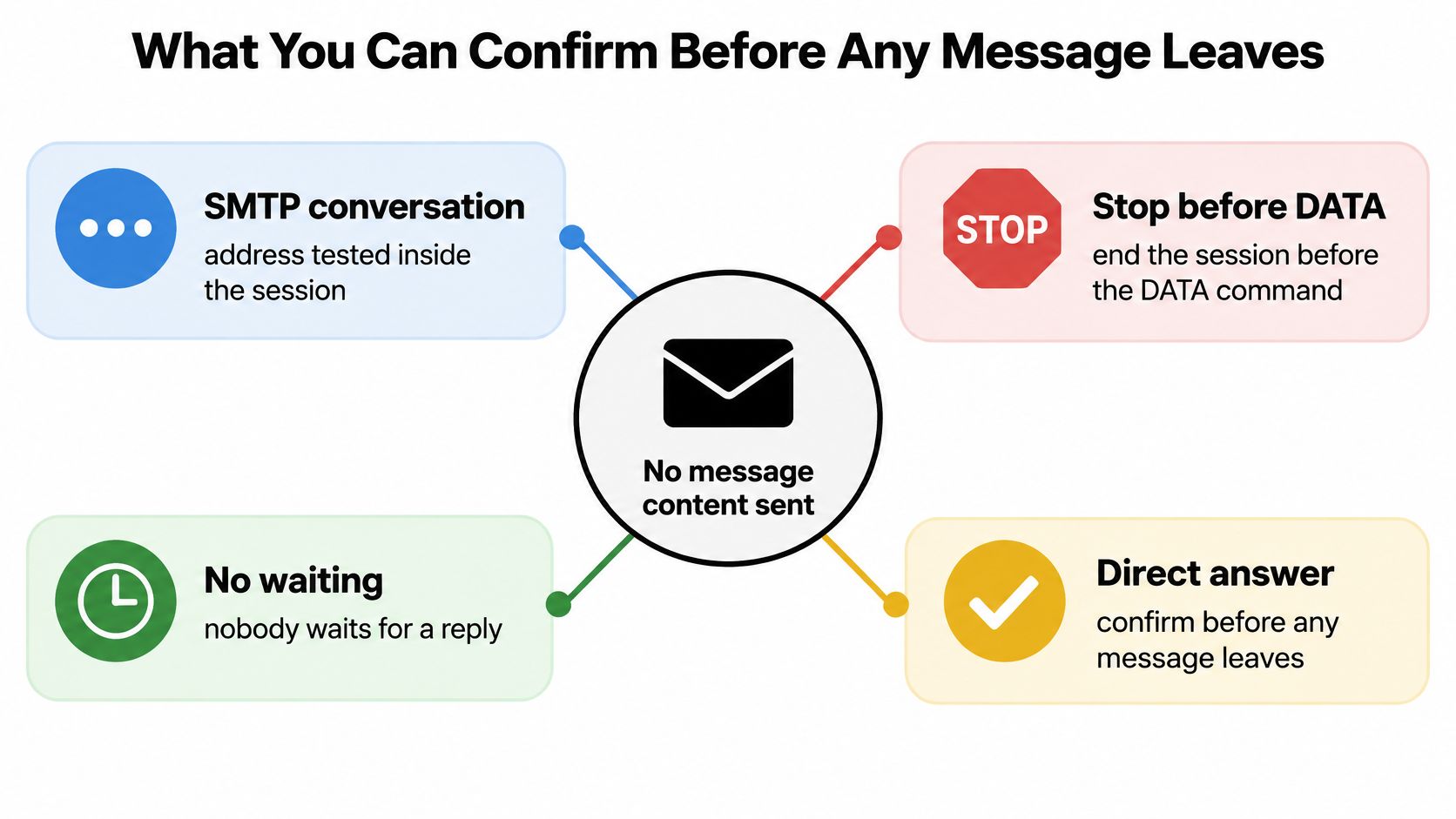
That isn't a marketing invention. The SMTP standard published as RFC 5321 defines VRFY, a command that asks a receiving mail system to confirm whether a supplied username identifies a user or mailbox. It carries no message content and doesn't alter the SMTP message buffers. The same document defines EXPN for expanding a mailing-list address, and the architecture has supported checking a mailbox inside the mail conversation since RFC 821 in 1982.
The standard is honest about the ceiling. Servers are encouraged to support VRFY and EXPN, but they may disable or restrict both for security, privacy, and anti-abuse reasons, and most large providers do. A working check therefore leans on syntax, DNS and MX records, SMTP recipient responses, catch-all behavior, and provider policy together rather than treating one command as proof.
Two addresses that fail in different ways
Say a signup form collects alex@gmial.com. The local part looks fine, the domain is a typo, and a syntax and DNS pass kills it before a welcome email is ever generated.
info@acme.com is the harder case. The domain resolves, the server answers, the mailbox is real, and somebody probably reads it. It's also a shared inbox that nobody opted into a newsletter from, which is why a role-account flag lives beside the mailbox result instead of inside it.
Every check in this article ends in one of four labels: valid, invalid, catch-all, or unknown. None of them proves a person will open anything, and none of them is a promise about placement.
The practical rule: a pass means the server would accept the address during this session. Treat it as a routing fact, not a readership fact.
The timing is the other advantage. A bounce can take minutes or days to arrive, and it lands after you've already spent the send. A check inside the SMTP session answers in seconds, before the campaign exists.
Seven Signals That Replace a Test Email
Skip the test email. It costs a send, it can land in spam, and it tells you what one mailbox did once. These seven signals cover more ground with no delivery attempt at all.
| Signal | A pass proves | It cannot prove | Label to store |
|---|---|---|---|
| Syntax | Local part and domain match email format | A mailbox or a person exists | Invalid if broken, otherwise continue |
| DNS and MX | Domain resolves and publishes a mail exchanger | That the specific mailbox exists | Undeliverable if no MX |
| SMTP recipient check before DATA | Server would accept that recipient now | Inbox placement or later acceptance | Valid, risk noted |
| Catch-all probe | A fake local part is accepted too | Which people on that domain are real | Catch-all or unknown, never hard valid |
| Disposable provider | Address is on a known throwaway service | That every other address on the domain is fake | Flag and usually skip |
| Role account | Inbox is shared, such as info@ or support@ | Whether a team will read a campaign | Flag for a human decision |
| Historical bounce reputation | Address or domain has failed delivery before | That a future campaign will bounce | Risk flag and recheck |
The catch-all row is the one people read past, and it's the row that decides how much of your list you can mail. When a domain answers the same way for a real address and for a local part you invented, mailbox-level confirmation is gone and retrying doesn't bring it back. Store catch-all instead of promoting those rows to valid because you want a bigger send set.
The domain row has its own subtleties around lookup order and fallback, and a closer look at MX record verification covers them properly. The short version is that the domain check confirms the part after the @ has a working mail server, and a domain with no exchanger is undeliverable even when the website loads fine.
Catch-all domains get spotted by trying a made-up address on the domain to see whether every mailbox appears valid. That's the cheapest test in the stack and the one that saves you from a confident yes. Throwaway inboxes need the same skepticism in the other direction, because those domains rotate weekly, and Portreeve's guide to temp-mail signups is a useful read on how fast that churn moves.
How to Check an Address Without Sending Mail
You need three things before you start: the address, a DNS lookup, and permission to end the SMTP session before content goes out. If the list isn't yours and isn't covered by a relationship or a processing agreement, stop here, because the permission is the prerequisite and not the footnote.
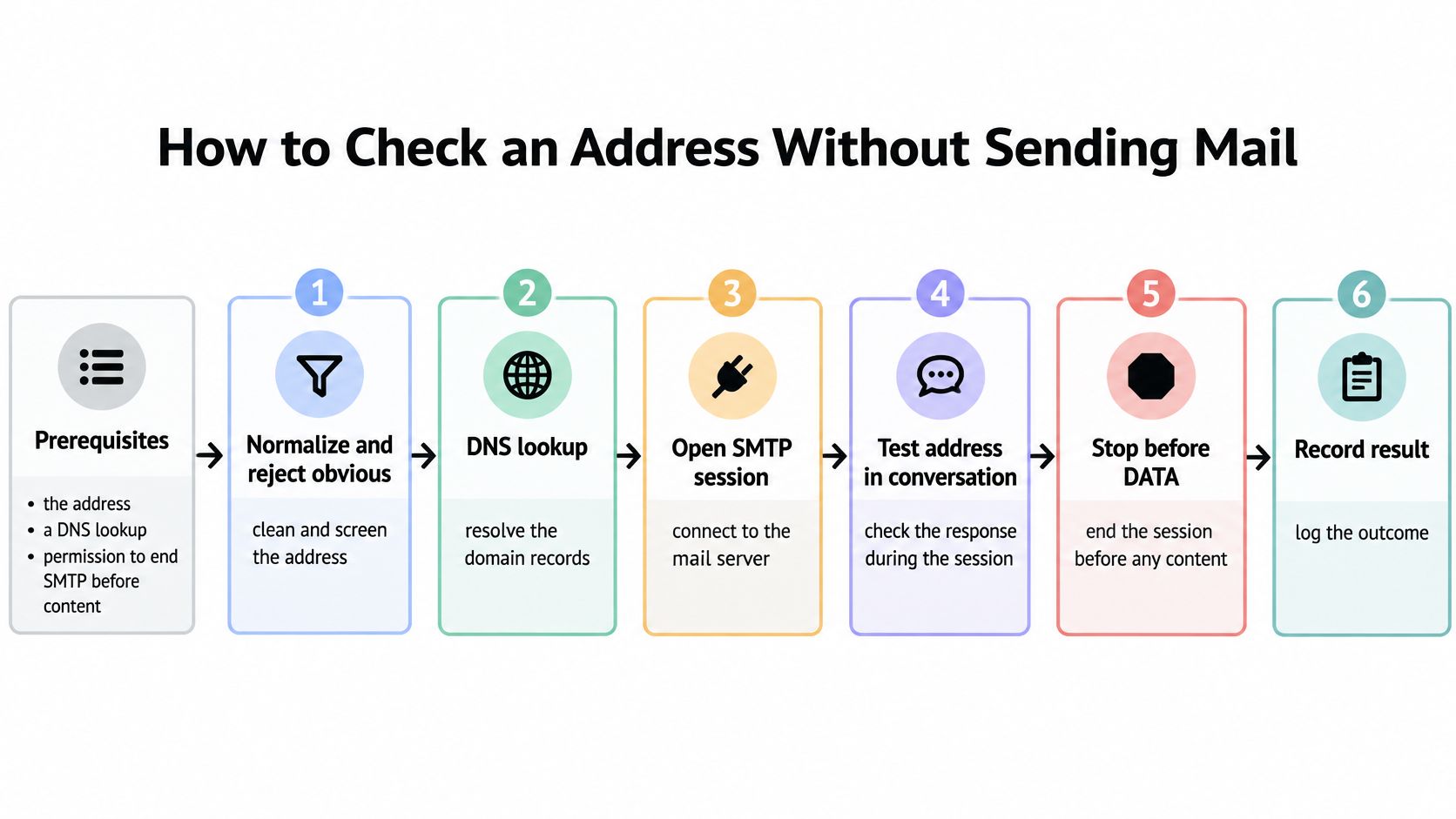
- Normalize, then reject the obvious. Strip whitespace, require a single @, and reject empty local parts and known typos like gmial.com and yhaoo.com before they cost you a DNS query. This is the step that catches the typo domain a customer typed at 11pm.
- Validate an internationalized domain with IDNA. A Unicode domain that fails IDNA validation isn't a valid address, however clean it looks in the spreadsheet. Fail closed here rather than guessing.
- Look up MX records and stop when there's no mail server. Our domain check confirms the part after the @ has a working mail server, and a parked domain that still serves a web page is the classic false positive at this stage.
- Connect with a bounded timeout and issue the recipient command for the actual address. You're asking whether the server would accept this mailbox now, then closing before DATA. A 550 is a rejection. A 4xx is temporary and belongs in a retry queue, not the bin.
- Probe a guaranteed-nonexistent local part on the same domain. If a made-up address gets the same answer as the actual one, the domain is catch-all and the honest result is unknown. Corporate domains do this constantly, which is why binary tools overstate their accuracy on B2B files.
- Check the domain against a disposable list and flag role accounts. Temporary services built to disappear get flagged, and info@, sales@ and support@ go to a human decision instead of an automatic pass.
- Store one outcome and keep the original row. Valid, invalid, catch-all, or unknown, with the source data intact. You'll need it when a domain changes configuration and you re-run the file.
The receiving server is asked whether it will accept an address, and nothing else happens. Verification stops before any message is sent, so the contacts on the list never receive an email from us. That distinction matters when you're checking an aged list and every additional send costs you reputation you can't buy back.
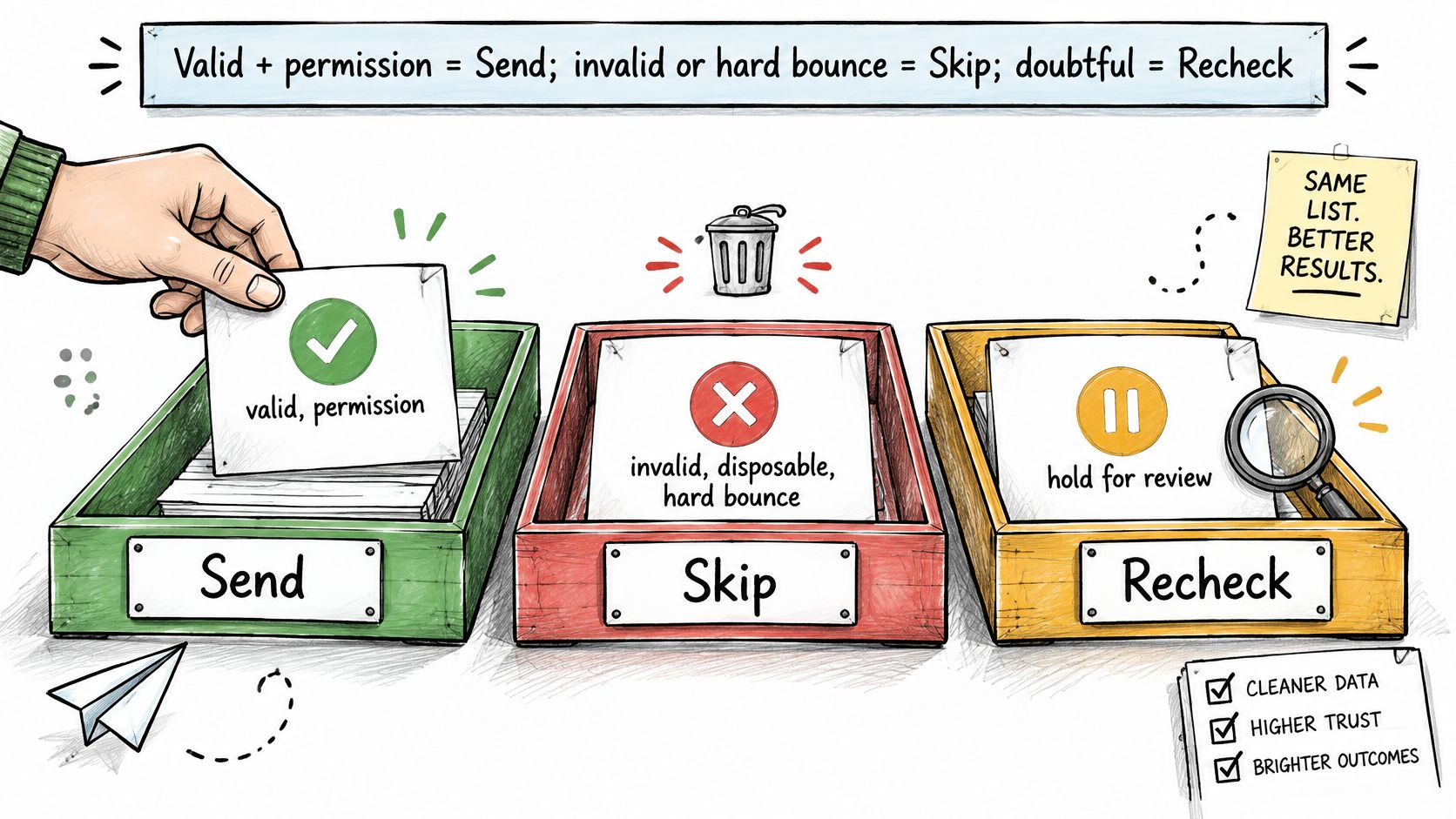
Export three sets, not one file. A send set, a skip set, and an uncertain set. The uncertain set is the one that earns its keep later.
The send set carries the rows you're confident in and that match the audience. The skip set holds invalid, disposable, and hard-bounced rows you should never mail again. The uncertain set holds catch-all and unknown rows, and it gets a second look before any large campaign rather than a permanent home on the suppression list.
Build the Check or Use a Service
Both DIY checks and managed services should return useful labels, not a bare yes or no. The choice is who maintains the process and carries its operational risks.
A DIY pipeline needs a DNS resolver, an SMTP client with bounded timeouts, a stored list of disposable domains, and rules for role accounts. Building it takes development time, and keeping it accurate requires ongoing maintenance. The benefit is that results stay in-house, which may matter when the list is sensitive.
The main risks are operational:
- Probe reputation. Repeated probes from one IP can be rate limited, greylisted, or blocked. That can make later checks less reliable.
- Provider throttling. Large providers may slow or refuse probe traffic. Treat a timeout as unknown, not as proof that an address is invalid.
- List drift. Disposable domains appear and catch-all configurations change. Domain and mailbox responses can become outdated, so a pipeline needs regular upkeep.
A managed service can reduce the work of maintaining probe infrastructure, checking catch-all behavior, refreshing throwaway-domain lists, and rechecking older files. Before using one, test a sample that includes known good and bad addresses. Confirm that probing stops before DATA, that catch-all results are not labeled valid, and that the original rows remain available for review.
The point of entry matters as well. Validating an address at signup can catch a typo or fake address before it becomes a bad row in the list. One line of code in a signup or checkout form can send addresses to a real-time verification API, where the check asks the receiving server whether it would accept the address without sending email. The Kiwiform form building platform is not evidence of email verification; the practical choice is to put an appropriate check in the form itself.
Choose a DIY approach when volume is small, the list is sensitive, and someone on the team can own the code and its upkeep. Choose a service when list size, recheck frequency, or limited engineering time makes that maintenance burdensome. A clean result still cannot prove inbox placement or override mailbox-provider reputation rules.
Labels for Results That Are Not Certain
A 250 response is not proof that a mailbox exists. On a catch-all domain, the server can return the same positive response for a real address and an invented local part. That result confirms only that the domain accepts mail. It cannot distinguish the mailbox from a made-up address.
That limit is why a useful verification result is not a simple yes or no. When a real address and a random local part receive the same positive response, mailbox-level verification cannot separate them. Label the result catch-all or unknown, and use the explanation of what a catch-all email address means for a send to weigh the decision.
| What you see | Why it misleads | Store this | Next action |
|---|---|---|---|
| 250 for the real address and for a fake local part | Domain accepts everyone | Catch-all | Do not treat as confirmed valid |
| 250 now, bounce or drop after the real send | Acceptance is not final delivery | Valid with risk note | Do not promise inbox placement |
| 4xx or greylisting | Temporary, not a missing mailbox | Unknown until retry | Retry inside a bounded window |
| Timeout on a large provider | Probing may be slowed on purpose | Unknown | Do not mark invalid from silence |
| Internationalized domain fails IDNA | Unicode domain is not deliverable as typed | Invalid | Do not send |
| Accept, but address is info@ or support@ | Mailbox can be real and still wrong for a campaign | Role flag | Human keep-or-drop decision |
A receiving server can accept a recipient and later reject or discard the message. A positive SMTP response therefore does not guarantee delivery, much less inbox placement. Treat the response as evidence about the server's acceptance at the time of the check, not a promise about what happens after sending.
Use four practical labels: valid, invalid, catch-all, and unknown. A transient 4xx response or greylisting belongs in unknown until a bounded retry can clarify it. A timeout is also unknown, not proof of an invalid mailbox. An internationalized domain that fails IDNA validation is invalid as typed and should not be sent. Keeping these outcomes separate prevents uncertainty from becoming a false confirmation or an unnecessary rejection.
Outcomes stay valid, invalid, catch-all, and unknown. Forcing a binary is where a clean list turns into reputation damage.
The catch-all trap in practice
Suppose an outbound list has 10,000 rows, with 1,800 on company domains that accept every local part. Suppress every one of those rows and the list may lose buyers at well-matched accounts. Send to all of them and the campaign takes on avoidable bounce risk. A practical compromise is to start with a small, engaged slice from those domains, hold the rest out of the first send, and recheck aged rows later.
Keep the checking process bounded. Set a connection timeout so one unresponsive server cannot stall a batch. Retry transient responses rather than treating them as permanent failures, and use a short DNS cache lifetime so changes to a mail exchanger are not missed for an extended period. Rate-limit probes as well. The goal is a careful classification, not a guarantee that every accepted address will receive or display a message.
Privacy Limits and Reputation Rules
Servers turn VRFY off for a reason that has nothing to do with you. Confirming whether a person exists is itself a disclosure, and open probing gets used for list scraping. A legitimate check belongs on a list you already have a relationship with: your own signup list, a customer list, or a list processed under a data processing agreement. Probing harvested addresses to see who's real is a different activity with different legal footing.
Say that plainly to the people who sign off on campaigns. Verification reduces invalid-recipient attempts. It doesn't create consent, prove engagement, or authorize a cold email to a stranger.
When every row passed and the campaign still hit spam
This is the question that gets missed most often. For senders reaching roughly 5,000 consumer addresses a day, Gmail and Yahoo expect SPF, DKIM, and DMARC, one-click unsubscribe, and low spam-complaint rates, as the deliverability rules marketers now have to meet set out. Google recommends keeping reported spam below 0.1% and avoiding 0.3% or higher, while Yahoo's stated threshold is below 0.3%. A file where every row passed says nothing about any of those three.
A clean file can still hold uninterested recipients, role accounts, recycled addresses, and people who never asked to hear from you. Those are the rows that generate complaints, and complaints are what mailbox providers measure.
Whether a check is safe for your reputation is a separate question with a short answer: the session stops before any message is sent, so nobody on the list hears from the checker. Is checking safe for my reputation covers the mechanics if a client or a compliance reviewer asks.
Pair the check with domain authentication, suppression of unsubscribes and complainers, and segments built on engagement. A high clean-file percentage is one input to a mailbox provider's decision, not a guarantee of placement.
The privacy side is mostly discipline:
- Encrypt the file in transit and at rest. Don't route a full customer list through a shared spreadsheet as the intermediate step.
- Limit who can export. Every export is a copy that outlives the campaign that justified it.
- Delete aged uploads on a stated schedule. Uploaded lists on our platform are deleted after 30 days, and a written retention rule beats a folder nobody audits.
Choose Send, Skip or Recheck
One rule covers every row. Send the valid rows that match the audience and have a permission or engagement basis. Skip invalid, disposable, and hard-bounced rows. Hold catch-all and unknown out of the first large send, or mail a slice small enough to learn from. Keep role accounts only when the shared inbox is the intended recipient, such as a vendor billing alias.
The decision expires, which is the part many senders skip. A 2026 industry report using 2025 measurements found lists decayed by about 23% in 2025, after 28% in 2024, 25% in 2023, 22% in 2022, and 23% in 2021, as ZeroBounce's analysis of email list decay records. On a 100,000-row list, that's roughly 23,000 changed, abandoned, or risky records in a year if nobody rechecks.
Compare your own bounce rate with published figures before deciding the file is fine.
| Source | Scope | Bounce rate |
|---|---|---|
| Belkins | 7,530,489 B2B cold emails sent in 2025 | 1.71% |
| Sinch Mailgun | 2025 benchmark of more than 400 billion emails, by list type | 0.01% to 0.22% |
| NeverBounce | 2025 report across Mailchimp, Constant Contact, Brevo and MailerLite | 3.25% average |
| HubSpot | 2025 study of more than 80,000 email marketing accounts | 2.48% all-industry average |
A bounce rate above the relevant benchmark is a signal to recheck before the next send, not after it. If you'd rather see the labels on your own data first, our free trial cleans 50 emails with no card and no sales call, and the flow stays three steps: drop your list in, watch it clean, then send to real people. Verification asks the receiving server whether it would accept an address and sends nothing, so the check itself doesn't touch your sending reputation. It only removes the attempts that would have.
If your list starts life as website enquiries, the front half of this problem is intake, and handling website enquiries is a good place to fix it before bad rows reach a database. Label the file, mail only the send set, and put the recheck date on the calendar.
CleanMyList runs the check this article describes without sending a single message: drop a CSV in, watch verdicts come back for syntax, DNS, mailbox existence, catch-all behavior, disposable domains, role accounts, and bounce history, then export a send set and a skip set with your original list untouched. Every account starts with 50 free credits, no card required, credits never expire, and bundles start at $6, so you can test the four labels on your own data before committing a full campaign. Start at CleanMyList and put the recheck date on the calendar before the next big send.