You've scheduled a large campaign, clicked Send, and watched the dashboard change to “queued.” An hour later, a substantial part of the audience is still marked “pending.” The natural reaction is to assume the platform has failed, but a queued message usually hasn't disappeared. It's waiting for a delivery attempt, a recipient server to become available, or a retry window to open.
That distinction matters. An e mail queue is both an engineering mechanism and a deliverability signal. It tells you how messages move through SMTP, but it can also reveal throttling, connection problems, authentication failures, poor list quality, or damaged sender reputation. This guide follows one message from acceptance to delivery, explains why backlogs form, and maps each queue state to a practical sender action.
Table of Contents
- The Plain View
- What an E Mail Queue Actually Is
- Inside the Queue How Messages Move
- Why Messages Pile Up in the First Place
- Retry Timing Backoff Queues That Heal Themselves
- Monitoring and Troubleshooting the Queue
- Sender Habits That Keep Queues Healthy
- Quick Fixes and a Final Checklist
The Plain View
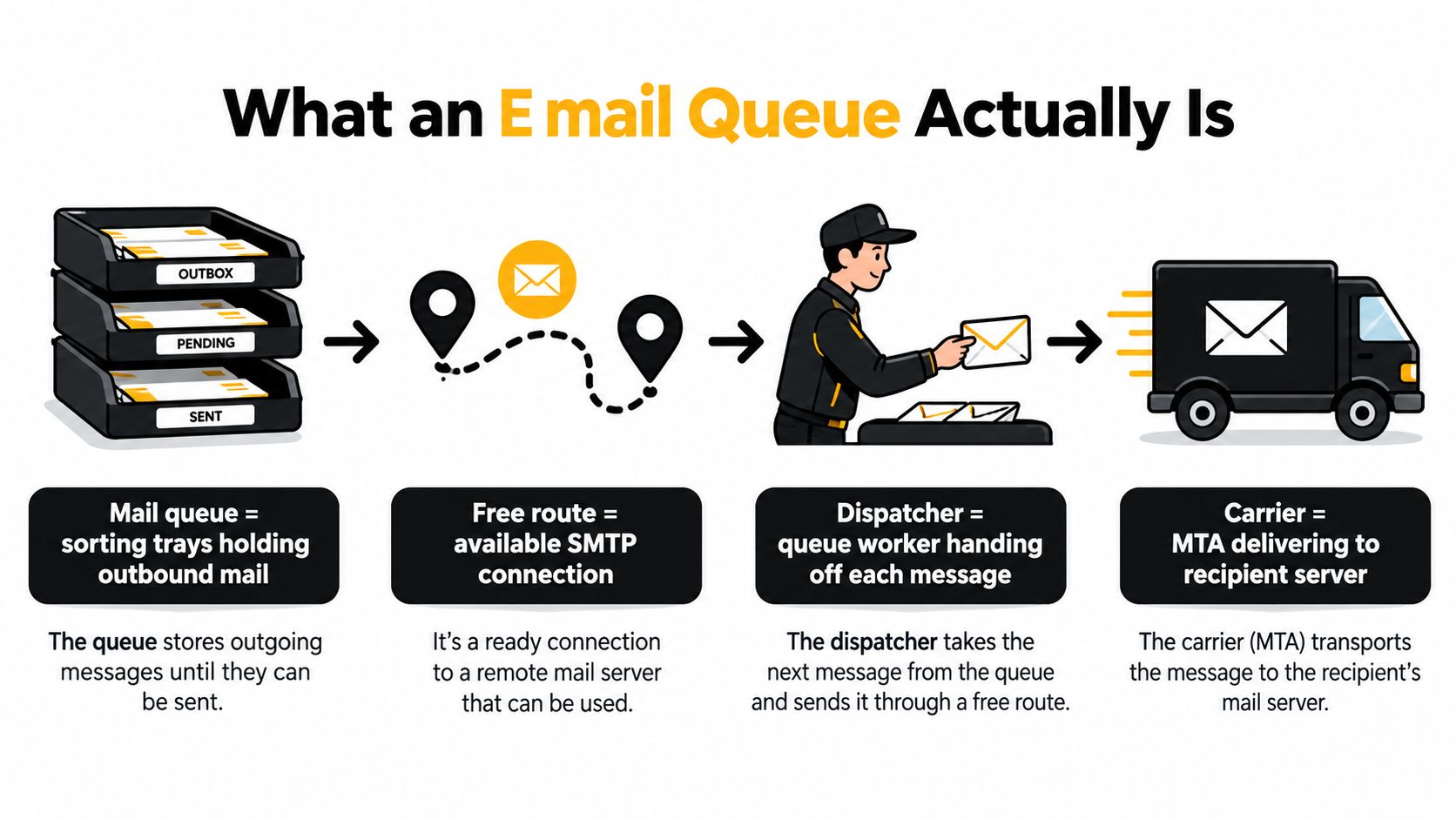
Think of the queue as a line of parcels at a busy post office. Your team has prepared the mail, but a carrier can't take every parcel at the same time. Some routes are open, some are temporarily closed, and some require a different carrier altogether. The parcels stay in sorting trays until the post office can send them through the right route.
Email works in much the same way. Your sending platform accepts a message, places it into a queue, and waits for an available connection to the recipient's mail server. If that server accepts the message, the queue entry can leave. If the server says “try again later,” the message remains pending and returns to the retry schedule.
A queue therefore isn't automatically a problem. Temporary delivery failures are expected in SMTP. RFC 5321 specifies that senders should delay retries after a failed attempt, and it distinguishes temporary failures from permanent failures. That design prevents one unavailable destination from causing the sender to discard messages immediately.
Practical rule: A message marked queued has a status, not a diagnosis.
The useful question is not “Why hasn't this email gone out?” Ask instead:
- Which recipient domains are affected?
- Are the responses temporary or permanent?
- How old is the oldest queued message?
- Is the queue growing because messages arrive faster than they leave?
- Could authentication, complaints, or list quality be influencing acceptance?
A growing queue can indicate unreachable destinations, connection failures, provider rate limits, or recipient-server deferrals. It can also expose a sender-side problem. When a list contains risky or invalid addresses, the system spends resources attempting delivery, processing failures, and scheduling retries that never had a realistic chance of success.
That's why queue management belongs in the deliverability workflow, not only in server operations. You'll learn how to identify the queue bucket involved, read the difference between a temporary and permanent response, adjust retry behavior, and prevent avoidable messages from entering the queue in the first place.
What an E Mail Queue Actually Is
Start with the post-office analogy. A message arrives at the sorting desk and goes into a tray because the carrier route isn't ready. The worker doesn't throw it away. The worker records where it needs to go, waits for an available route, and hands it to the carrier when the next transport window opens.
In SMTP, the sending mail transfer agent, or MTA, performs a similar job. It accepts the message from your application or sending platform, stores it in a queue, and later attempts to hand it to the recipient's mail server. The message might be stored on disk, held in memory, or managed by a provider's internal delivery system.
Two queues can be involved
People often speak about “the email queue” as though it were one universal waiting room. In practice, a message can encounter several queues during its journey.
The submission queue sits near the sender. It holds messages that your application has handed to the sending system but that haven't yet been attempted. A bulk platform may use this layer to control throughput, prioritize transactional mail, or prevent a sudden burst from overwhelming its delivery infrastructure.
The destination queue exists on the receiving side. A recipient server may accept a message for later processing, place it behind other inbound traffic, or temporarily defer the connection before accepting anything. From the sender's perspective, the message may remain in its own queue until the receiving system gives a clear acceptance response.
That's why “queued” doesn't necessarily mean “stuck on your server.” It means the delivery process hasn't reached a final outcome.
Temporary failure is part of the design
SMTP treats temporary failure differently from permanent failure. A temporary response tells the sender that another attempt may succeed. The sender should wait, retry according to its policy, and eventually deliver or abandon the message within the configured lifetime. RFC 5321 recommends delaying retries and describes a give-up period that should generally extend across several days, with configurable behavior for different message types and failure conditions.
A permanent failure requires a different decision. Repeating the same attempt won't repair a nonexistent mailbox or a rejected address. The sender should record the reason, stop retrying, and suppress the address when appropriate.
For marketers using automated campaigns, this distinction is important. A queue is not a substitute for delivery reporting, and a delivery report isn't complete until you know whether the message was accepted, deferred, or permanently rejected.
If you're building automated journeys, it's also useful to understand how sending workflows fit into wider marketing operations. A practical overview of SaaS marketing automation 2026 can help connect campaign triggers, audience data, and delivery processes without treating email as an isolated task.
Inside the Queue How Messages Move
A useful queue view separates messages into three operational buckets: incoming, active, and deferred. The names vary between platforms, but the underlying behavior is similar.
An incoming message has been accepted by the sending system and is waiting for a worker to process it. The system may still be checking routing information, assigning a destination, or waiting for capacity. At this point, no delivery conversation may have started.
An active message is currently being transmitted or is waiting on an open delivery worker. The sender is communicating with the recipient's mail server, negotiating the SMTP session, and waiting for a response. Active messages consume connection and processing capacity, so allowing too many to run at once can make the system less stable.
A deferred message has already encountered a temporary failure. Instead of being discarded, it leaves the active flow and waits until its next retry time. A later attempt may succeed, or another temporary response may extend its waiting period.
| Bucket | Message State | Sender Action |
|---|---|---|
| Incoming | Accepted but not yet attempted | Watch processing rate and available capacity |
| Active | Delivery attempt in progress | Track connection time and response outcome |
| Deferred | Temporary failure, awaiting retry | Group by domain and response pattern before changing policy |
Consider one message sent to a domain that is briefly unavailable. It begins in incoming, moves to active when a worker starts the SMTP connection, and then moves to deferred when the destination returns a temporary failure. If the next attempt succeeds, the message leaves the queue as delivered. If the destination continues to defer it, the sender applies its retry schedule until the message is delivered or the queue lifetime ends.
A successful recipient response removes the message from the sender's queue. A permanent rejection creates a bounce or failure record and should prevent pointless future attempts. A temporary response preserves the message for later processing.
Postfix describes this as a throughput problem. An active queue becomes congested when one or more destinations drain more slowly than messages arrive. The Postfix tuning guidance recommends addressing the imbalance by reducing input, increasing safe throughput, lowering delivery latency, or combining those approaches.
The important operational lesson is that queue depth alone is incomplete. A queue full of fresh incoming messages points to processing capacity. A queue dominated by old deferred messages points toward destination behavior, retry policy, reputation, or recipient data.
Why Messages Pile Up in the First Place
Most backlogs come from a small set of patterns, but the same visible symptom can have different causes. A destination may be throttling you, a connection may be failing, or your sender reputation may be causing providers to handle your traffic cautiously.
Recipient-side throttling
Mailbox providers control how much traffic they accept from a sender at a given time. When your sending rate exceeds their tolerance, they may return a temporary 4xx response. Your platform then places those messages into deferred status rather than treating them as invalid.
This often produces a domain-specific backlog. Messages for one provider age in the queue while messages for another provider continue moving. A global queue view can hide that difference, so inspect deferred volume and latency by recipient domain.
Temporary delivery failures
A temporary failure can come from a connection timeout, a destination that is unavailable, a full mailbox, or a greylisting decision. The sender has no reliable reason to discard the message immediately, so it schedules another attempt.
The queue becomes unhealthy when the retry process is too aggressive or when the same destination keeps generating failures. Repeated attempts consume workers and connections, which can slow delivery to healthy domains as well.
Reputation and policy enforcement
Queue behavior can also reflect a deliverability problem rather than a simple transport problem. Gmail and Yahoo require bulk senders to use SPF, DKIM, and DMARC. Larger senders must also support one-click unsubscribe and keep spam complaints below 0.3%, according to the Mailgun deliverability overview.
A sender that fails authentication or generates excessive complaints may encounter slower acceptance, filtering, or permanent rejection. A clean-looking list doesn't compensate for weak domain authentication or sending behavior that recipients consistently dislike.
Recipient data quality
Invalid addresses can create permanent failures, while risky addresses can contribute to repeated temporary problems, complaints, and poor reputation. Role accounts, stale contacts, catch-all environments, and addresses that no longer engage can all make a campaign harder to deliver predictably.
| Cause | Typical SMTP response | Queue Symptom |
|---|---|---|
| Provider throttling | Temporary 4xx response | Deferred volume concentrates at one domain |
| Connection or destination problem | Temporary 4xx response | Queue age rises while attempts repeat |
| Authentication or reputation issue | 4xx or 5xx response | Acceptance slows or rejections increase |
| Invalid recipient | Permanent 5xx response | Hard bounces appear and should be suppressed |
Don't treat a large deferred queue as proof that every address is invalid. Treat it as evidence that the delivery system needs investigation. Start with domain-level response patterns, then inspect authentication, complaint signals, and list quality. The practical background on common email bounce reasons is useful when separating address problems from transport problems.
Pre-send verification addresses the upstream cause. It can identify addresses that are syntactically incorrect, associated with disposable providers, configured as role accounts, or likely to produce an uncertain result before your SMTP system begins attempting delivery. Removing those records early reduces the number of messages that can enter a retry loop.
Retry Timing Backoff Queues That Heal Themselves
A healthy queue doesn't respond to every temporary failure with an immediate repeat attempt. It gives the recipient server room to recover. This pattern is called backoff, and it's one of the main differences between a queue that heals and one that creates a retry storm.
Suppose a destination temporarily refuses a connection. A responsible sender waits before trying again, then increases the waiting period if the same failure continues. The exact schedule depends on the platform, but the principle is consistent: repeated failure should reduce pressure, not increase it.
Why spacing matters
An aggressive system may keep opening connections to a destination that has already asked for a delay. That can worsen throttling and make the sender look less trustworthy. It can also consume capacity that should serve recipients at healthy domains.
Postfix uses a conservative cool-off approach for deferred messages. Its retry timing is influenced by queue age, with younger messages generally retried more frequently than older ones. The system also warns that repeatedly flushing a large deferred queue can consume processing and connection capacity on messages likely to fail slowly.
Use these controls when designing or reviewing a retry policy:
- Initial delay: Give the destination a short recovery window after the first temporary failure.
- Backoff growth: Increase the interval after repeated failures instead of retrying at a constant pace.
- Maximum retry frequency: Prevent one provider from consuming the entire delivery pool.
- Per-domain limits: Apply separate concurrency and pacing rules to destinations with different behavior.
- Jitter: Vary retry timing slightly so many messages don't return to the same server simultaneously.
- Final outcome: Convert an exhausted retry sequence into a clear failure record rather than leaving it in an endless loop.
A message that succeeds after a calm, delayed retry is a normal delivery event. A message that triggers repeated attempts in a short window can turn one temporary issue into a broader reputation and capacity problem.
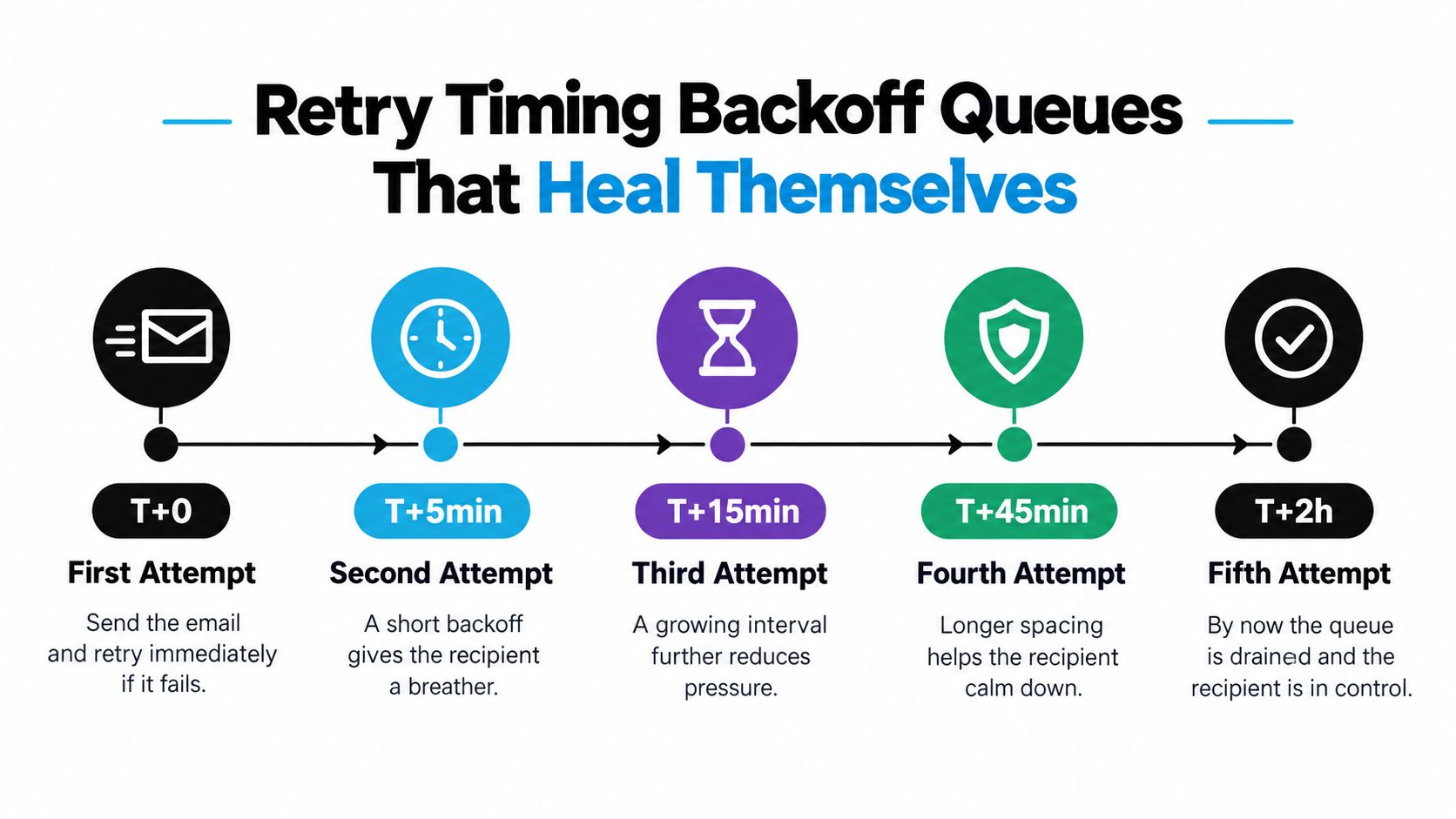
When you tune backoff, judge the result by more than total delivery speed. Look for a falling deferred-to-active ratio, stable queue age, fewer repeated responses from the same domain, and enough capacity for high-priority messages. A polite queue may appear slower during a temporary incident, but it protects the system from making the incident larger.
Monitoring and Troubleshooting the Queue
A queue dashboard becomes useful when it answers three questions: how old is the oldest message, which destinations are affected, and why are messages waiting?
Queue depth shows the amount of pending work, but it needs context. A large queue that drains steadily may be healthy. A smaller queue with steadily increasing age may indicate a serious bottleneck. Compare incoming, active, and deferred populations, then split deferred messages by recipient domain and response category.
Read the signals together
Start with queue age. The oldest message tells you whether the backlog is recent or persistent. Next, compare deferred volume with active volume. A rising deferred share means the system is spending more effort waiting for later opportunities rather than completing current deliveries.
Then examine per-domain latency. A wide difference between providers suggests that the receiving systems, rather than your entire sending infrastructure, are creating the delay. If every destination slows at the same time, investigate sender capacity, authentication, network connectivity, or a campaign-level change.
A log entry with a successful 2xx response indicates acceptance. A 4xx response indicates a temporary condition that requires controlled retry. A 5xx response indicates a permanent failure or policy rejection that should not be handled as an ordinary retry.
Log-reading habit: Pair every response code with the recipient domain, campaign timestamp, retry count, and authentication result.
Use this troubleshooting sequence:
- Deferred volume rises: Group the failures by destination first. Look for one provider or domain producing most of the temporary responses.
- Hard bounces rise: Inspect the audience source, recent imports, signup controls, and suppression process.
- Queue age climbs while send volume stays steady: Look for a receiving-side throttle, a new policy response, or a connection problem.
- All traffic slows: Review worker capacity, authentication alignment, and recent configuration changes.
- Retries repeat without progress: Reduce pressure, apply backoff, and stop treating the queue as something to flush blindly.
For broader sending hygiene, the avoid spam filters guide offers useful context on preparation and bulk-mail practices. If the logs point to an authentication problem, use this explanation of an SMTP authentication error to separate login and sender-identity issues from recipient-side deferrals.
Sender Habits That Keep Queues Healthy
Prevention starts before the first message enters the queue. A sender that validates recipients, controls pace, separates traffic, and maintains authentication gives the delivery system fewer reasons to retry.
Begin with pre-send validation. Check syntax, destination records, mailbox risk, role accounts, disposable providers, and historical bounce signals before injecting a campaign. This doesn't guarantee inbox placement, but it removes avoidable delivery attempts and makes the remaining queue easier to interpret.
List hygiene continues after validation. Suppress permanent bounces promptly, act on complaints, and review dormant or questionable records before they become a repeated source of failed delivery. Keep acquisition sources separate so a sudden quality problem doesn't contaminate every audience.
Build lanes instead of one traffic jam
Not every message has the same urgency. Password resets, account notices, and other time-sensitive messages shouldn't compete with a newsletter for the same workers and connections. Separate transactional and marketing traffic where your platform allows it, then give each lane an appropriate rate and priority.
Pacing should reflect the receiving provider's behavior. If one domain consistently returns temporary responses, reduce concurrency for that destination rather than slowing every recipient. If the same destination recovers, increase volume cautiously and continue watching queue age.
Authentication is part of queue health. Gmail and Yahoo's bulk-sender requirements make SPF, DKIM, and DMARC operational necessities for qualifying senders, not optional polish. One-click unsubscribe and complaint control also affect whether a provider treats your traffic as acceptable.
A pre-send verification service can act as a gate before enqueueing. CleanMyList checks uploaded or pasted addresses across syntax, DNS, SMTP mailbox existence, catch-all behavior, disposable providers, role accounts, historical bounce reputation, and a send-or-skip recommendation. It doesn't send messages during verification, and it can return a plain-English reason for each result. For broader sender hygiene, see this guide to improving email deliverability.
Quick Fixes and a Final Checklist
When a queue starts growing, don't begin by flushing everything. First preserve the evidence, identify the affected destinations, and reduce the activity that is adding pressure.
Use this order:
- Triage: Record queue depth, oldest-message age, active volume, deferred volume, and response patterns by domain.
- Stop the bleed: Pause or reduce large non-urgent campaigns. Protect transactional traffic and avoid creating more deferred work.
- Repair the cause: Remove permanent failures, investigate authentication, and review the audience behind the affected campaign.
- Harden delivery: Apply backoff, set provider-level pacing, and keep enough capacity for high-priority mail.
- Verify before restarting: Test with a controlled audience, watch the response mix, and increase volume only when the queue drains predictably.
| Queue Symptom | First Fix |
|---|---|
| Incoming messages accumulate | Reduce injection rate and inspect processing capacity |
| Deferred messages concentrate at one domain | Lower that domain's concurrency and review its responses |
| Queue age keeps increasing | Identify the slowest destination and stop repeated flushing |
| Permanent failures increase | Suppress invalid recipients and inspect list sources |
| Authentication-related rejections appear | Correct sender authentication before increasing volume |
| Retries repeat without delivery | Increase backoff and define a final failure outcome |
A simple policy can be expressed as a sequence of increasingly longer waits, followed by a defined end to retrying. The values should fit your infrastructure and provider relationships, but the operating principle is stable: temporary failures receive measured retries, permanent failures receive investigation and suppression.
The fastest long-term fix is usually upstream. Validate the audience before the send, keep authentication aligned, segment traffic by purpose and destination, and monitor queue age rather than waiting for recipients to report missing mail.
CleanMyList verifies bulk email lists before sending, checks risky recipient signals without sending test messages, and returns actionable results you can export or use in your email workflow. Visit CleanMyList to validate your next audience before questionable addresses turn into deferred messages, retries, and reputation problems.