
Your contact list came back almost entirely green. The checker you used promised to validate every address, and it did check something real: every domain in your file had a mail server answering for it. Then you sent. Three hundred messages hard bounced, a few spam complaints came back, and your sending domain picked up a reputation problem you'll be paying off for weeks.
Nothing in that tool was broken. It answered a narrower question than the one you thought you asked. An email address MX lookup confirms that the domain to the right of the @ sign is configured to receive mail. It says nothing about whether a mailbox exists for the person on the left of the @ sign.
That gap explains most of the frustration around address validation, so it helps to stop collapsing everything into "valid" or "invalid" and separate three outcomes instead:
- Domain routing exists. The domain publishes mail routing and names servers willing to receive mail for it.
- Recipient behavior is observable. A receiving server will tell you, during a conversation, whether it accepts that specific address, without an email being sent.
- Sending risk is acceptable. Given what you know about the address, your sender reputation, and your authentication setup, the send is worth making.
Each outcome needs different evidence. Mixing them is how good lists get rejected and bad ones get mailed.
Table of Contents
- Reading MX Lookup Results at a Glance
- What an MX Lookup Reveals and What It Cannot Prove
- How to Run an MX Lookup Step by Step
- Layering MX Checks with SMTP and Catch-All Tests
- When Sender Authentication Matters More Than MX
- Decide Which Addresses to Send To Today
Reading MX Lookup Results at a Glance
A lookup returns one of six shapes, and each one deserves a different response. Read the table left to right: what came back, what it tells you about the domain, what it leaves unproven about the mailbox, and what to do next.
| Lookup result | What it tells you | What it does not prove | Next step |
|---|---|---|---|
| Single MX host that resolves to an IP | The domain accepts mail at one designated server | That the mailbox before the @ exists | Run a mailbox-level check before sending |
| Several MX hosts with different preferences | Mail routes in priority order with backup servers | That any individual address is active | Treat the domain as routable and verify addresses separately |
| No MX record, only A or AAAA address | Fallback delivery to the host address may still work | That the domain is set up for dedicated mail | Check SMTP reachability before rejecting |
| NXDOMAIN | The domain name does not exist in DNS | Anything about other domains on the same provider | Reject or flag the address |
| SERVFAIL or timeout | The resolver could not answer | That the domain is broken | Retry with bounded attempts and another resolver, do not reject |
| NOERROR with empty answer | The name exists but publishes no MX record | That mail cannot be routed by MX | Check fallback A and AAAA records before deciding |
The two rules that prevent wrong rejections
Rule one: uncertainty is not a verdict. MX results are time dependent, because DNS resolvers cache answers according to TTL. Two lookups minutes apart can legitimately show different views while a provider migrates a domain, swaps a failing server, or waits for propagation. A checker worth trusting records the resolver response, the returned TTL, the response code and the lookup timestamp with every result, and it never treats a transient timeout or SERVFAIL as equivalent to NXDOMAIN. Answer quality depends on origin too: the Google Public DNS performance documentation notes that RFC 2181 ranks authoritative zone data above cached or additional-section data, which is why querying through resilient recursive resolvers with bounded retries gives you a cleaner answer than a single impatient request.
Rule two: ties need a second attempt. When several MX records share the same preference value, sending systems may pick among them freely. If your first connection to one equal-priority host fails, test another endpoint before you write the domain off. Many providers run two equally weighted hosts on purpose, and one of them going quiet for a minute isn't a dead domain.
Practical rule: Log the response code, the TTL and the timestamp every time. Without those three fields you can't tell a real change from a cached answer, and you'll chase ghosts during every provider migration.
The takeaway that matters more than any single row: a clean MX result means the domain can receive mail, not that the individual address will.
What an MX Lookup Reveals and What It Cannot Prove
Picture a reception desk with a numbered call list. A sending server arrives with a message for a domain and asks the front desk who handles incoming post. The desk reads out names in order, and the sending server starts at the top. That list is the MX record set, and it's the first thing that has to exist before anything else can happen.

The mechanism is older than most of the marketing software that depends on it, and it's still the standard. RFC 5321, the current SMTP specification published in October 2008, defines DNS Mail eXchanger records as the normal way to select the host responsible for receiving mail for a domain. When a sending server has a message, it looks up the recipient domain, reads the MX records, and connects to the destination those records name. That destination can be an intermediate relay rather than the machine holding the final mailbox.
Priority values in practice
Each record carries a preference value and a mail-server hostname. Lower numbers win. A retail brand might publish its primary mail host at priority 10 and a backup at priority 20. A sending server tries the 10 first; only if that host is unreachable does it fall back to the 20. That's how a provider can take a server down for maintenance without losing inbound mail, and it's why one healthy record out of three tells you the domain is routable even if two hosts are misbehaving.
If you'd rather watch the query happen and see how the routing follows from it, this walkthrough covers the mechanics end to end.
What the numbers say about coverage
Scale puts the limits in perspective. A 2023 APNIC analysis of roughly 205 million domains found that about 119 million domains, roughly 58%, had no explicit MX record, while around 81 million, about 40%, published at least one. Those mail-enabled domains held approximately 30 million distinct MX records across 21 million unique domains. Most domains had between one and five records. A handful went far beyond that, with 464 domains publishing more than 10, 28 publishing more than 20, and four publishing over 100.
Both readings are useful. A missing MX record is a strong signal that the domain isn't configured to receive ordinary email. Published records only confirm domain-level routing, nothing more.
Where the record stops and the mailbox begins
An MX-positive result cannot tell you:
- Whether the mailbox exists. Shared hosting puts thousands of unrelated mailboxes behind the same records.
- Whether the domain is a catch-all. Some servers accept every recipient name offered, so a positive answer means very little.
- Whether the address was disabled. Former employees and abandoned accounts sit on healthy domains all day.
- Whether the provider will accept your mail. Policy controls, greylisting and reputation checks all happen later.
- Whether the signup is genuine. Plenty of real domains belong to throwaway accounts, including those from email providers that skip phone verification, where a working domain and a reachable human are two different things.
The receiving server makes the acceptance decision during the SMTP conversation. It's asked whether it will accept an address, without any email being sent. That's a separate question from the one DNS answers, and it's the one that decides whether your bounce rate climbs.
How to Run an MX Lookup Step by Step
A marketer pastes orders@northwind-supply.example into a lookup box minutes before a send. Two hostnames come back, each with a preference number. That screen settles one outcome: domain routing exists. It does not show whether recipient behavior is observable, and it does not judge whether the sending risk is acceptable. Those stay open. Collapsing all three into one valid or invalid stamp hides the difference.
RFC 5321's datatracker entry states the routing rule. Delivery agents select the exchanger named by the MX record rather than sending straight to the domain's A or AAAA address. Run the query in that order, and keep the fields you will need when the answer changes.
-
Take the domain, not the address. Everything after the @ is the query target. Lowercase it and drop the local part. The mailbox name never enters DNS. Domain health and mailbox existence get mixed up because both sit inside the same address string.
-
Query the MX records for that domain. Use any resolver tool or lookup utility you trust. Collect the hostnames, the preference values, and the response code. An empty set and an error code are different answers.
-
Sort by preference, lowest first. Lower numbers mean higher priority. Routing works like a call list: try the preferred host, then each backup in order. Sorting any other way reaches a failover server before the primary.
-
Resolve every MX hostname to A or AAAA addresses before connecting. A hostname that does not resolve is a misconfiguration. Flag it instead of counting it as healthy routing. The MX line can look fine while the address behind it is broken.
-
If there's no MX record, check the address records. SMTP fallback allows delivery to a domain's address records when no MX exists. Rejecting on missing MX alone puts working business addresses on a suppression list.
-
Store the response code, TTL and timestamp with the result. You will need them when the same domain returns something different. Those three fields show whether the change is real or still cached.
-
Retry timeouts and SERVFAILs a bounded number of times. Two or three attempts, then a second resolver, then a conclusion. An unanswered query is not evidence of a dead domain. Record it as unknown.
-
Test more than one host when preferences tie. If two records share a priority and the first connection fails, try the other before you call the domain undeliverable.
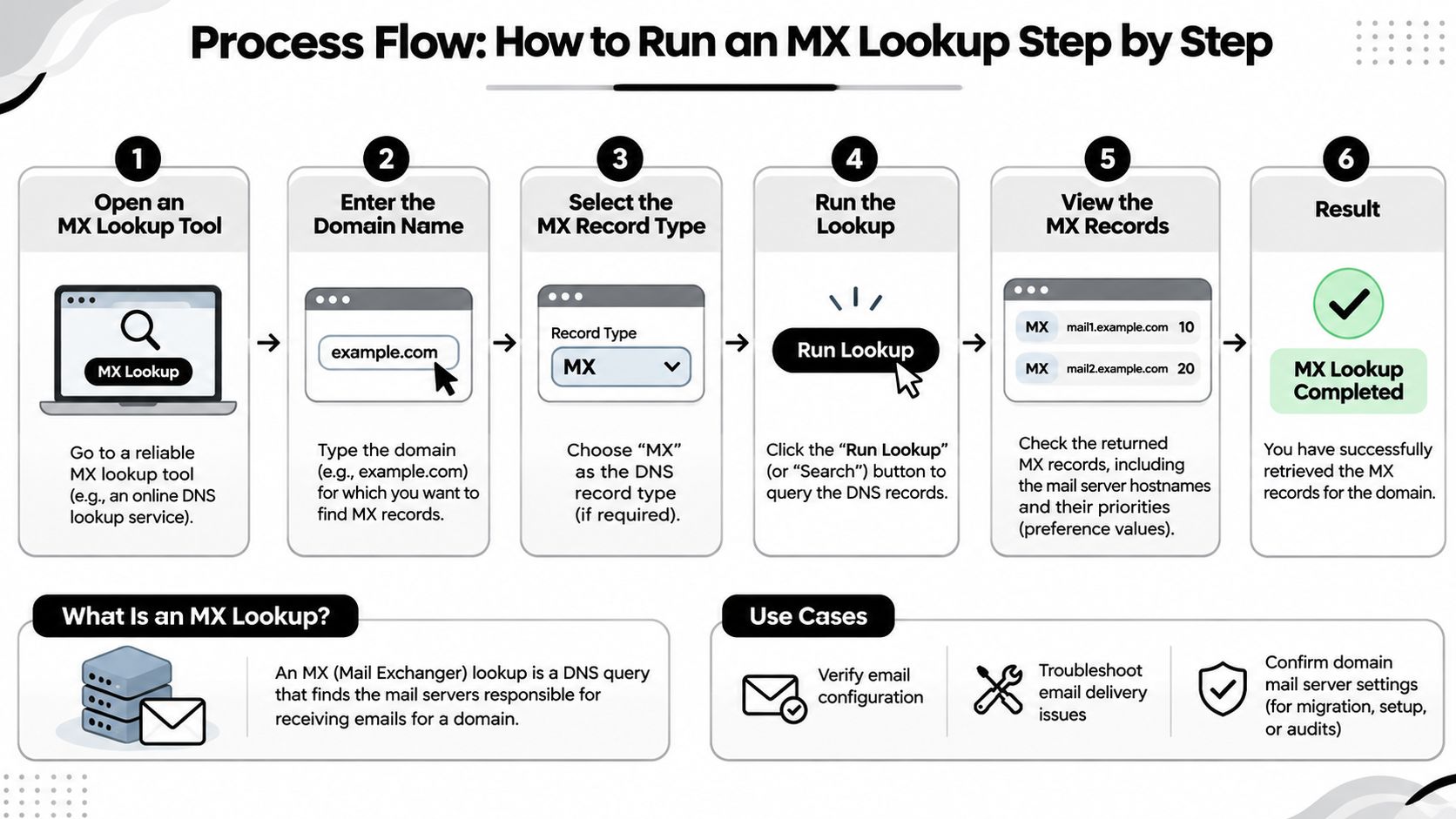
A result you can act on looks dull: a short host list, each name resolving, a clean response code, and a timestamp beside last week's run. That confirms routing. Behavior at the recipient server, and whether the risk of sending is acceptable, are still undecided. Query again before you suppress anyone when the answer is a timeout, a broken hostname, or a host list that changed overnight.
Layering MX Checks with SMTP and Catch-All Tests
MX is the cheapest gate in the sequence, which is why it runs first. It clears out nonexistent and misconfigured domains before you spend time on conversations with mail servers. What it can't do is finish the job, so the remaining checks each answer a different question.
| Check | Question it answers | Evidence it adds | Typical outcome |
|---|---|---|---|
| Syntax | Is the address well formed? | Catches broken formatting and common typos | Pass or fix |
| Domain MX and DNS | Does the domain receive mail? | Confirms a working mail server | Routable, no MX, or NXDOMAIN |
| SMTP mailbox check | Will the server accept this recipient without sending mail? | Mailbox-level evidence from the receiving server | Accepted, rejected or unknown |
| Catch-all test | Does the domain accept any made-up address? | Shows whether a positive result proves much | Catch-all or specific |
| Disposable and role check | Is it a throwaway or shared inbox? | Flags low-value addresses | Flag or keep |
| Bounce history | Has this address bounced before? | Adds past delivery evidence | Send or skip |
How the layers change the verdict
The domain check confirms that the part after the @ has a working mail server. It's a pass or fail on infrastructure, and it's the layer that clears the bulk of a dirty list quickly.
The SMTP check goes further. The receiving server is asked whether it will accept an address, without any email being sent, so your sender reputation isn't touched by the question. A rejection there is real evidence. So is acceptance, though it's weaker evidence, because plenty of servers accept first and decide later.
The catch-all test is the one that rewrites your results. If a domain accepts a made-up address, then a positive result for your real address proves almost nothing.
Catch-all domains are spotted by trying a made-up address on the domain to see whether every mailbox appears valid. That single probe reframes every green tick on that domain from "confirmed" to "unverifiable". You can dig into the mechanics in this guide to catch-all email addresses and how they distort verification scores.
Disposable and role checks address value rather than existence. Addresses from known temporary services built to disappear get flagged, and shared inboxes such as info@ and support@ get marked so you decide whether they belong in a campaign. Both are judgment calls, not errors.
When the server's answer is ambiguous, the honest output is risky or unknown, not a guess in either direction. Each address should come back with a one-line reason in plain English so you can see which layer produced the verdict. Those layers then combine into one recommendation: send, skip, or review.
When Sender Authentication Matters More Than MX
Here's the asymmetry that MX-focused guides skip. A list made entirely of MX-positive addresses can still land in spam, because mailbox providers increasingly judge how you send rather than how well your recipients' domains are configured. Google and Yahoo introduced requirements for bulk senders covering SPF, DKIM, DMARC, unsubscribe handling and spam-rate control, and Microsoft extended its requirements to large senders too, as Mailgun's email authentication requirements overview sets out. The same source cites one industry survey putting DMARC use at 53.8% of senders in 2024, meaningful adoption that is still barely half the field.
A checklist for when inbox placement drops
Run these before you touch the address list again:
- SPF passes. Your sending server is listed as authorized for the domain in the From line.
- DKIM passes. The signature validates against the public key published in DNS.
- DMARC is aligned. The domain that passed SPF or DKIM matches the domain recipients see, not just a lookalike subdomain.
- Reverse DNS is set. The sending IP resolves back to a hostname that matches how your server introduces itself.
- Complaint rate is low. Bulk sender thresholds punish complaint spikes faster than bounce spikes.
- Unsubscribe works in one click. A buried opt-out turns a mild annoyance into a spam report.
If bounces are low but inbox placement is falling, stop troubleshooting addresses. The list isn't the problem. Your sender identity is. That's the decision rule: address checks fix deliverability failures caused by bad recipients, and authentication fixes failures caused by a distrusted sender. They solve different problems, and no amount of verification rescues a domain with broken alignment.
The security posture of your own accounts matters here too, since a compromised sending account can do more damage than any list. These inbox protection tips from Digital Footprint Check cover the account-level side of keeping a sending identity trustworthy.
For the DNS half of this picture, including which records do what, our guide to DNS for email walks through the record types and their roles. Treat verification as pre-send risk reduction. It lowers the chance of a bad send. It doesn't guarantee delivery.
Decide Which Addresses to Send To Today
The rule is short. Send to addresses that pass the domain and mailbox layers. Skip the ones that fail. Review anything marked risky or unknown by reading its reason and score rather than guessing. Everything else is detail.
Grouping your list into send, skip and review
Work from a copy, never the original, so you can compare verdicts against the file you started with. Then sort into three buckets:
- Send. Domain routing confirmed and mailbox accepted. These are your campaign.
- Skip. Nonexistent domains, rejected recipients, disposable addresses past their useful life.
- Review. Catch-all results, uncertain server responses, shared inboxes, and anything with a warning score attached. Look at the reason line for each one and decide by hand.
Shared inboxes such as info@ and support@ deserve a deliberate call. They reach a team rather than a person, which is fine for a partnership note and wasteful for a product launch.
Aged lists need the same treatment again. Addresses that were real eighteen months ago have a habit of going stale, and a domain that has since dropped its mail records will hand you a bounce. Re-running the checks on an old list catches what changed. Our guide to running an email deliverability check covers the signals worth tracking between runs. One line of code on a signup form catches it earlier, at the point where a typo or a fake address would otherwise enter your system.
Here's the concrete action. Take five addresses from your current list, run an MX lookup on each, and compare every result against the outcomes table from earlier. Then decide which of the five you'd send to. If you'd send to all five based on MX alone, you've just found the gap between domain routing and mailbox existence in your own data.
CleanMyList exists to close that gap without guesswork. Drop in a CSV or paste addresses, and every address gets checked across eight signals, including domain and MX validation, SMTP mailbox existence, catch-all behavior, disposable providers and role accounts, with a plain-English reason attached to each verdict so you know exactly which layer produced it. You can try it on your own list at CleanMyList and see which addresses you should hold back before your next send.