You're about to send a campaign, and the list looks fine at first glance. The addresses contain an @, the domains look familiar, and your email platform accepts the upload. Then one question appears: will this list help your campaign reach real inboxes, or damage your sender reputation?
That's where an email address reputation check becomes useful, but only if you know what it's checking. A recipient address doesn't carry one universal trust score in the same way a sending domain or IP can have a reputation. Instead, you need to separate two related questions: can this address receive mail now, and is it wise to send to it based on its risk signals?
This distinction matters because a valid-looking address can still point to a domain without a working mail server, a catch-all system, a disposable provider, a role account, or a mailbox with a history that makes it a poor campaign target. Syntax alone only tells you that the text resembles an address. Technical guidance from BounceZero's email validation guide describes syntax as the first layer, followed by DNS/MX, SMTP, and risk checks.
The cost of waiting until after a campaign is higher than the effort of checking first. A 2025 dataset covering 7.5 million cold emails recorded 128,605 bounces, an overall bounce rate of 1.71%, and an implied deliverability rate of 98.29%. The same dataset found that May reached a 2.26% bounce rate, its weakest month for deliverability, as reported in Belkins' email deliverability analysis. Those figures don't create a universal safe threshold for every sender, but they show why even a healthy-looking list deserves attention.
By the end, you'll know what reputation means, why sender reputation differs from recipient risk, how to use eight verification signals, and how to make a plain send or skip decision without relying on a mystery score.
Table of Contents
- Introduction to Email Address Reputation Checks
- What Email Address Reputation Really Means
- Key Signals That Shape Reputation and Deliverability
- Why Sender Reputation and Recipient Risk Are Not the Same
- How to Check Email Address Reputation Step by Step
- What to Do After a Poor Reputation Score With Real Examples
- Keeping Your Sender Reputation Healthy Long Term
Introduction to Email Address Reputation Checks
A marketing manager named Priya is preparing a product announcement. Her team collected addresses through several forms, imported older contacts from a CRM, and added prospects from a sales workflow. Nothing looks obviously broken. Yet the oldest entries haven't been checked recently, and a few addresses use generic names such as info@ and support@.
Priya has two bad options if she skips verification. She can send to everyone and wait for bounces, or she can remove a large part of the list based on guesswork. Neither approach tells her which addresses are technically reachable, which carry high risk, or which should be reviewed by a human.
A useful email address reputation check works more like a pre-flight inspection than a verdict from a single judge. It looks for visible formatting errors, confirms whether the domain can receive mail, checks whether a server appears willing to accept the mailbox, and identifies patterns that can create problems over time. The process should also explain why an address is risky, because “bad” isn't an actionable diagnosis.
The practical question is not “What score does this address have?” It's “What evidence supports sending to it today?”
That framing prevents a common mistake. Providers primarily evaluate the reputation of the sender, including the sending domain and infrastructure, while verification services evaluate the likely condition and risk of the recipient address. CleanMyList's email address checker guide is useful background for understanding why those checks belong together but shouldn't be treated as identical.
The workflow in this article follows a simple progression. First, you'll build a mental model for reputation. Next, you'll identify the signals that shape deliverability and distinguish sender health from recipient risk. Then you'll walk through a practical checking process, compare methods, and apply the results to healthy, mixed, and poor lists. Finally, you'll turn those decisions into a recurring hygiene habit that protects future campaigns.
What Email Address Reputation Really Means
Think of sender reputation like a credit profile. A bank doesn't judge you from one detail alone. It considers your history, consistency, and whether your past behavior suggests that you'll meet future obligations. Inbox providers use a comparable logic when deciding how much trust to place in mail from a sender.
Sender reputation is a record of behavior, not a permanent label attached to every recipient address. Providers examine patterns such as recipient engagement, bounces, complaints, authentication, and sending consistency. Industry benchmarks published in 2026 commonly describe reputation on a 0 to 100 scale, with 80 or higher considered healthy and scores below 70 viewed as problematic. One benchmark reported 43% of commercial senders in the 90-plus elite tier, while 18% were below 70, according to Digital Applied's 2026 deliverability benchmarks.
That scale can help you monitor your own sending operation, but it shouldn't be mistaken for an address-level truth. A recipient address may be syntactically correct and technically reachable while still being a poor choice for a campaign. Conversely, an address with limited history may not be “bad” at all. It may require more evidence before you send.
Reputation predicts future inbox treatment
A provider asks a forward-looking question: what is likely to happen if this sender continues sending? Positive engagement can support trust, while hard bounces and spam complaints can weaken it. Sending patterns also matter because sudden changes can look unlike normal, permission-based communication.
The same logic applies to address verification, but from a different angle. Instead of asking whether your domain has earned trust, you're asking whether a particular recipient is safe enough to contact. That means the best check combines technical evidence with risk signals rather than returning an unexplained number.
Reputation is a prediction of future inbox placement, not a certificate that an individual address is good forever.
An address can change condition. A person may leave a company, a mailbox may become inactive, or a domain may change its mail setup. That's why an old “verified” result shouldn't be treated as a lifetime guarantee. The useful result is current, understandable, and tied to a decision.
Key Signals That Shape Reputation and Deliverability
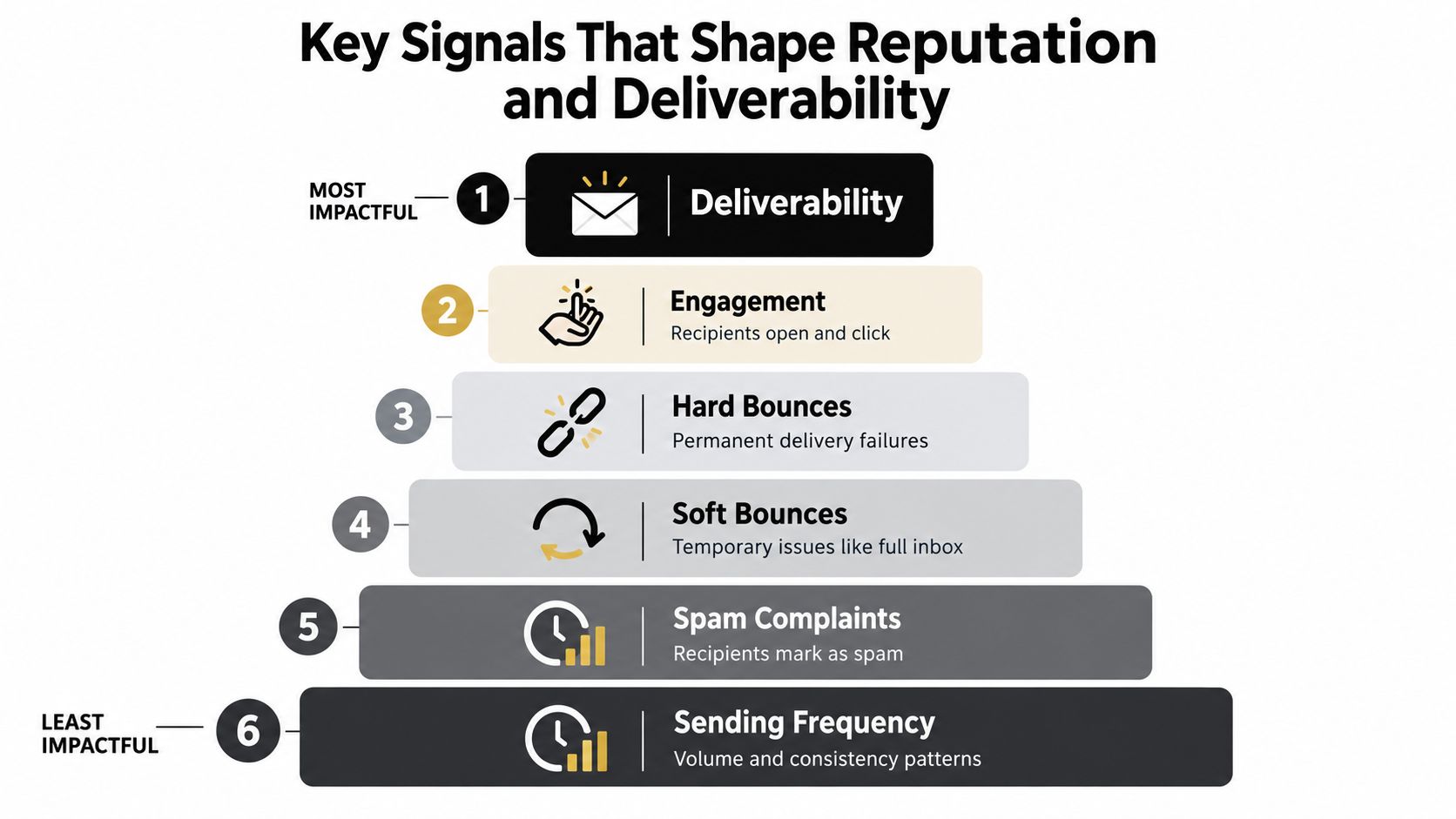
Five broad signals shape how providers assess sender behavior, while address-level checks add more detail about the recipient. Together, they explain why an address reputation check must go beyond a simple format test.
Engagement tells providers whether people want the mail
When recipients open, click, reply, save, or otherwise interact with messages, those actions provide context about relevance. Engagement isn't proof that every message is welcome, but consistent positive interaction supports the idea that the sender is reaching an interested audience.
A campaign sent to a carefully collected list may still perform poorly if the audience no longer recognizes the brand. That can create a weak feedback pattern, with fewer positive actions and more deletions or complaints. Marketers should therefore treat list relevance and address validity as separate controls.
Hard bounces reveal permanent delivery failure
A hard bounce usually means the address can't receive the message because the mailbox is invalid, the domain is wrong, or the recipient no longer exists. These failures matter because they show that the sender attempted delivery without a usable destination.
The 2025 Belkins dataset found an overall bounce rate of 1.71% across 7.5 million messages, with 128,605 bounces. Belkins also reported that May peaked at 2.26%. Those results offer useful context for list hygiene, but they aren't a substitute for diagnosing each address with multiple checks.
Soft bounces need interpretation
A soft bounce can result from a temporary condition, such as a full mailbox or a short-lived server problem. One temporary failure doesn't automatically make an address unsafe, but repeated failures deserve attention.
A sensible system records the event and avoids repeatedly sending to an address that continues to fail. The decision should account for recency, repetition, and the reason returned by the receiving server.
Complaints send a stronger warning
A spam complaint is a direct signal that a recipient didn't want the message. Complaints can arise from poor targeting, unclear consent, misleading content, or a difficult unsubscribe process. They affect the sender's reputation rather than proving that a particular recipient address is invalid.
Sending history adds another layer. Consistent volume and predictable behavior make the sender easier for providers to interpret, while abrupt changes can create uncertainty. Authentication, including SPF, DKIM, and DMARC, helps receiving systems assess whether the sender is authorized, but authentication can't rescue a list filled with invalid or unwanted addresses.
For the recipient side, deeper validation should inspect syntax, DNS/MX, SMTP behavior, catch-all status, disposable-provider signals, role-account patterns, historical bounce information, and a final recommendation. You can see how domain checks fit into this workflow in CleanMyList's email address domain validation guide.
Why Sender Reputation and Recipient Risk Are Not the Same
Many people search for an “email reputation score” and expect to enter any address to receive one definitive answer. That expectation is misleading because providers generally score the sender, while verification tools estimate the risk of the recipient address.
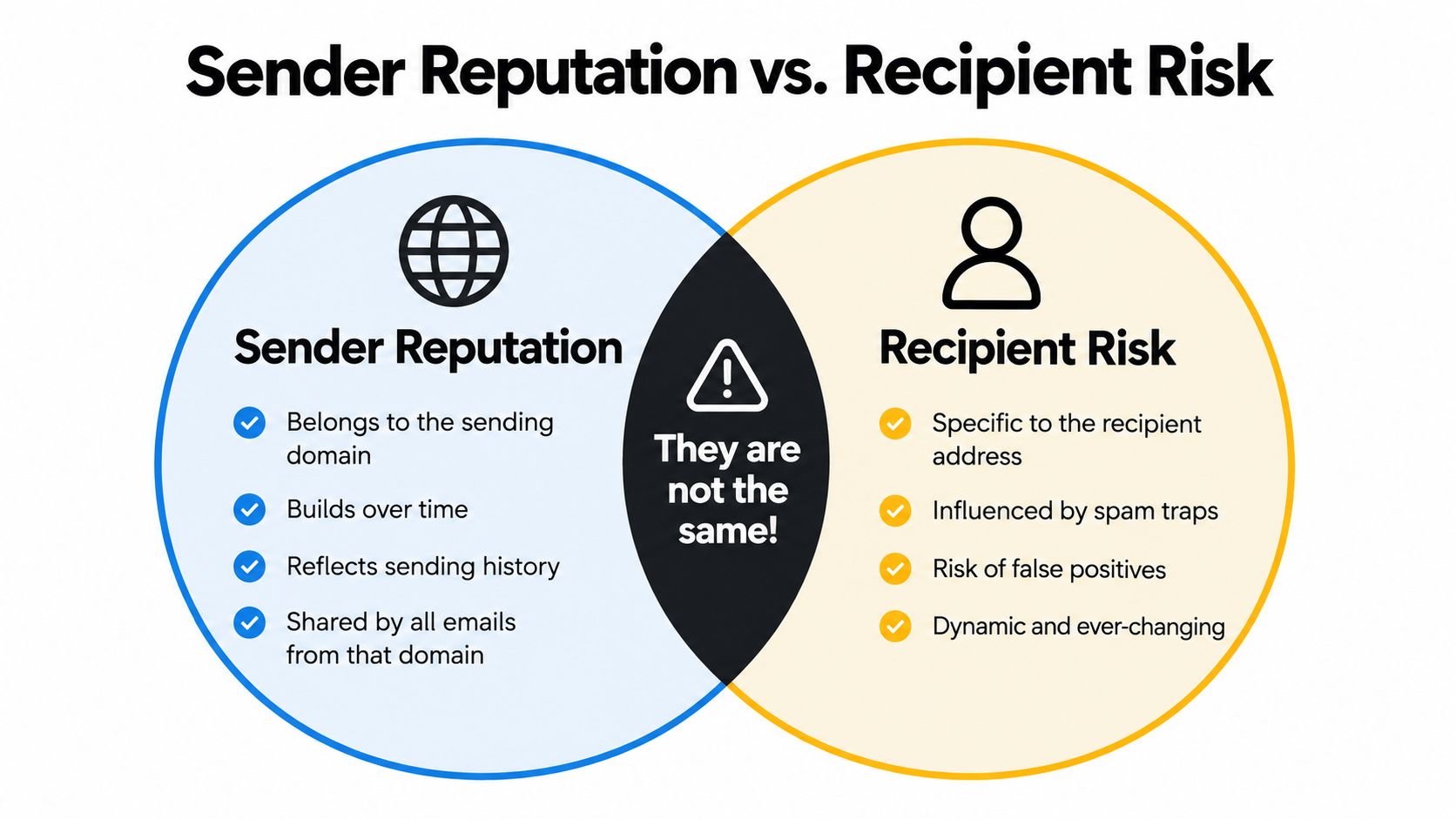
A sender reputation belongs to your sending domain, IP infrastructure, and history. It reflects how your campaigns behave across recipients. Provider dashboards can show indicators such as authentication results, delivery errors, complaint signals, and reputation bands for the sending side.
Recipient risk is narrower. It asks whether alex@example.com appears deliverable and whether sending to it may create avoidable problems. The address might contain a typo, belong to a disposable service, use a catch-all domain, or represent a role account that needs different treatment. None of those facts automatically determines your sender reputation, but they influence whether that specific send is sensible.
A side-by-side view
| Question | Sender reputation | Recipient risk |
|---|---|---|
| What does it describe? | Your domain or sending infrastructure | A particular address and its surrounding signals |
| What builds the record? | Sending history, engagement, bounces, complaints, and authentication | Syntax, DNS/MX, SMTP response, catch-all behavior, and risk indicators |
| Where do you inspect it? | Provider dashboards and blocklist monitoring | Verification and validation systems |
| What decision does it support? | Whether your sending operation needs correction | Whether to send, review, or skip an address |
| Can it change? | Yes, as sending behavior changes | Yes, as mailboxes and domains change |
This separation matters because a sender can have a healthy domain reputation and still upload a poor list. It's also possible to have a clean recipient list while sending from a domain with weak reputation. Zeliq's deliverability guidance highlights this overlooked distinction, noting that deliverability diagnostics measure sender health rather than assigning a universal trust score to the mailbox you're contacting.
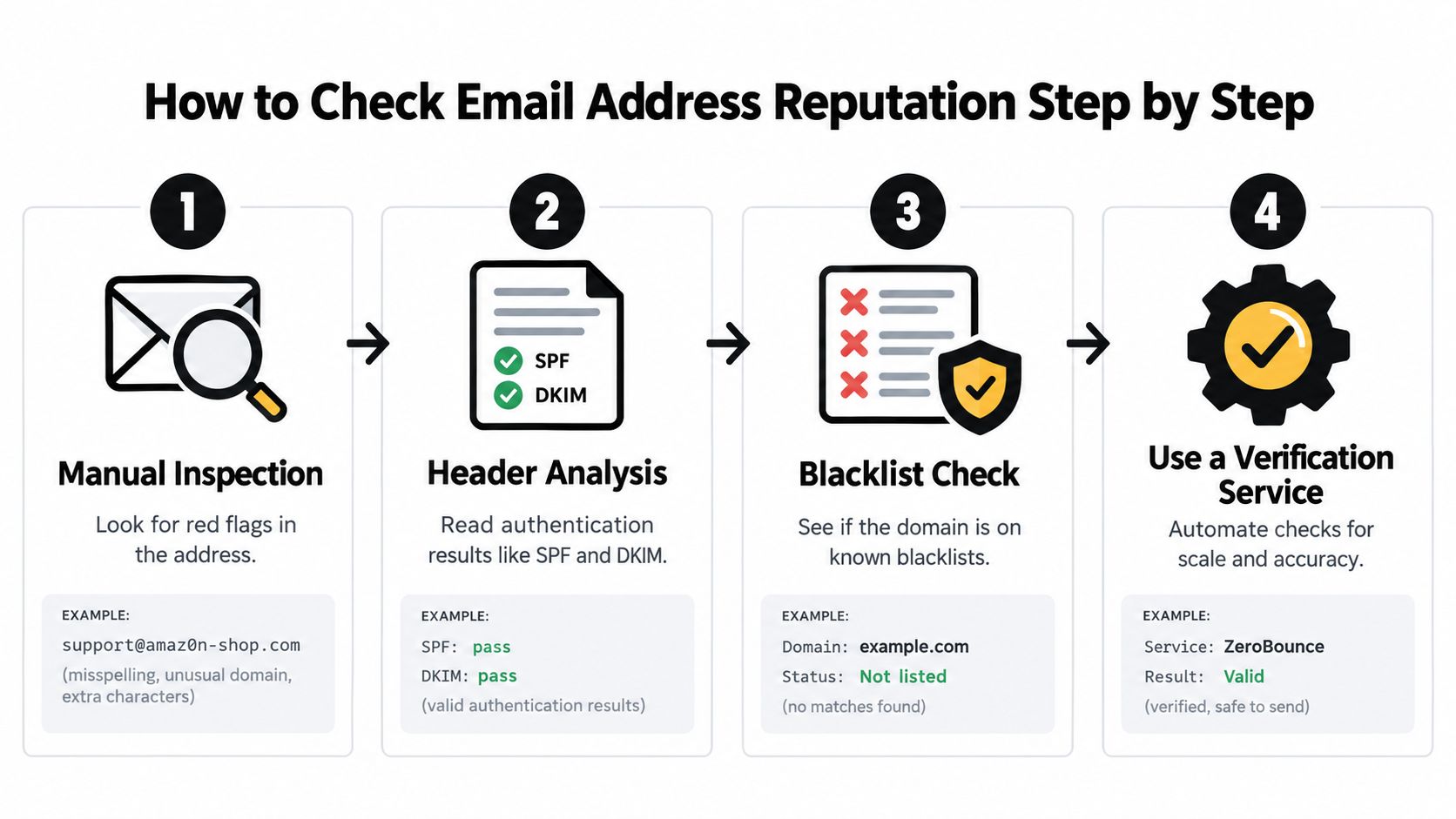
A four-step visual can help teams remember the order: inspect the address, read available authentication information, check domain warning lists, and use a verification service when volume makes manual review impractical.
How to Check Email Address Reputation Step by Step
A marketer is preparing a campaign and finds a list that looks clean at a glance. Before sending, check the evidence in layers. Start with inexpensive signals, then move to technical checks when an address remains uncertain. This prevents a syntax-only pass from becoming an unsafe send decision.
Step 1: Inspect the address manually
Begin with visible clues:
-
Formatting errors: Look for a missing
@, invalid top-level domain, consecutive dots, or leading and trailing hyphens. - Suspicious spelling: A small typo in a familiar domain may route mail to a different organization.
-
Role accounts: Addresses such as
info@,sales@, oradmin@can work, but they often belong in a separate segment because no individual has necessarily requested the message. - Disposable patterns: Temporary inboxes may be unsuitable for newsletters, account records, or long-term outreach.
This review is quick and useful, but it cannot prove that the domain or mailbox receives mail.
Step 2: Confirm DNS and MX capability
An MX check looks for mail-exchange records that identify a receiving server. BounceZero's technical validation recommendations describe MX existence as a hard gate because a domain without MX records cannot receive email.
A correctly formatted address with no working mail setup should be skipped. Syntax answers whether the address looks structured correctly. MX answers whether its domain appears prepared to accept mail.
Step 3: Test mailbox behavior without sending
SMTP verification examines how the receiving server responds when asked whether a mailbox appears to exist. A cautious verifier performs this check without delivering an actual message.
Interpret the response carefully. Privacy controls may hide mailbox information, and a catch-all domain may accept mail for many or all addresses. In either case, an uncertain result should enter a review group rather than receive an automatic yes.
Catch-all status lowers confidence even when the server is active, because the response can make an invalid mailbox look deliverable.
Step 4: Review recipient risk signals
Combine the technical result with address-level context. Check for disposable providers, role accounts, historical bounce or abuse concerns, and signs that the data is old. These findings do not all mean “never send.” They help you decide which addresses can be sent, reviewed, or skipped.
Re-check older records before using them again. Validity's 2026 benchmark report discusses periodic verification and bounce handling, along with gaps in public guidance about stale addresses, recycled mailboxes, catch-all domains, and historical abuse.
As noted earlier, even low overall bounce rates justify checking MX and SMTP signals before sending. The point is to inspect the address, not rely on a single mystery score.
Step 5: Inspect sender-side tools separately
Recipient verification and sender reputation answer different questions. For sender health, use provider-specific dashboards rather than expecting one universal rating. Current guidance points senders toward Google Postmaster Tools for Gmail, Microsoft SNDS for Outlook and Hotmail, Yahoo Sender Hub, and blocklist checks such as Spamhaus, as described in Prospeo's email domain reputation lookup guide.
These tools show whether your sending domain or infrastructure is causing delivery problems across campaigns. They do not confirm that each recipient mailbox is valid.
Step 6: Automate decisions for larger lists
Manual review suits a small list. For larger campaigns, use a service that reports the individual signals and produces a plain-language send or skip recommendation. CleanMyList checks syntax, DNS/MX, SMTP mailbox existence, catch-all behavior, disposable providers, role accounts, historical bounce reputation, and the final recommendation without sending an email. It can also stream results, preserve the original list, and support re-checking older records.
| Method | Best for | What it reveals | Limitation |
|---|---|---|---|
| Manual inspection | Small lists and obvious errors | Spelling, formatting, and role-account clues | Cannot confirm mailbox or server behavior |
| DNS/MX check | Domain-level screening | Whether the domain appears configured to receive mail | Does not prove that the specific mailbox exists |
| SMTP verification | Address-level technical review | Server response and apparent mailbox acceptance | Catch-all and privacy controls can make results uncertain |
| Provider dashboards | Sender reputation monitoring | Domain or infrastructure health at mailbox providers | Does not validate each recipient address |
| Blocklist checks | Abuse and warning-list review | Whether sending infrastructure or domains appear flagged | A clean result does not prove inbox placement |
| Bulk verification | Campaign and CRM hygiene | Multiple address and risk signals at scale | Requires policies for unknown and borderline results |
Use the methods as layers. Read all eight signals before choosing send, review, or skip, and keep sender reputation separate from recipient risk.
What to Do After a Poor Reputation Score With Real Examples
A score is useful only when it changes an action. Treat the output as a traffic-light system, but let the underlying signals explain the color.
Example one, the clean campaign list
A startup has recently collected addresses through a clear signup process. Most entries pass syntax, the domains have mail capability, SMTP responses look consistent, and the list contains few role or disposable addresses. The sender dashboard also shows no obvious warning pattern.
Decision: send, with monitoring.
The team should still suppress hard bounces immediately, watch complaint and engagement signals, and retain the verification results for future comparison. A green light means the evidence supports sending, not that every address will remain valid indefinitely.
Example two, the mixed CRM export
An ecommerce team imports an older CRM segment. The list contains catch-all domains, several role accounts, and addresses that haven't been checked recently. Technical results are mixed, but not every uncertain address is confirmed invalid.
Decision: segment, review, and re-verify.
Send first only to the clearer group that has stronger evidence of current deliverability. Hold catch-all and role-account addresses for a separate review, especially if the campaign requires an individual decision-maker. Re-run the older segment before a later campaign because mailbox status can change.
Example three, the high-risk prospect list
A sales team receives a purchased or scraped file with frequent formatting errors, missing mail capability, disposable addresses, and a substantial number of historical bounce warnings. Sending to the full file would turn uncertainty into real delivery failures.
Decision: skip the risky group and clean the source.
Don't “test” questionable addresses by sending a campaign. Suppress them, investigate how the data entered the system, and use CleanMyList's list scrubbing workflow before any future upload.
| Result pattern | Send or skip | Practical action |
|---|---|---|
| Strong technical checks and low visible risk | Send | Use the clean segment and monitor outcomes |
| Unknown, catch-all, role, or aged records | Review | Segment, confirm context, and re-verify |
| Invalid syntax, no MX, repeated hard-bounce history, or abuse warnings | Skip | Suppress and remove from active campaigns |
Signup protection prevents the same problem from returning. Add real-time validation to forms so typos and obvious fakes don't enter your database, then schedule periodic checks for older records. The strongest decision system doesn't treat every result as a permanent label. It creates a clear path for send, review, suppress, and re-check.
Keeping Your Sender Reputation Healthy Long Term
Reputation maintenance works best as a routine, not an emergency response. Before each important campaign, check newly collected addresses, review recent bounce behavior, and separate uncertain records from the main send. After sending, suppress hard bounces promptly and investigate complaint or engagement changes before increasing activity.
Use a short operating checklist:
- At signup: Validate addresses before they enter your CRM.
- Before campaigns: Check syntax, mail capability, mailbox behavior, and risk signals.
- For older lists: Re-verify instead of assuming a previous result still applies.
- For sender health: Review Google, Microsoft, Yahoo, and blocklist signals separately.
- For decisions: Label records as send, review, or skip, and store the reason.
Teams that manage large inboxes may also benefit from an AI email organizer to keep operational messages, verification alerts, and campaign feedback easier to review. Organization doesn't replace validation, but it can help people notice warnings before the next send.
The central habit is simple: check before sending, act on the reason, and keep checking as data ages. A clean list protects more than one campaign. It helps your sender identity build a consistent history with the providers that decide where your messages go.
CleanMyList checks recipient addresses across eight signals, including syntax, DNS/MX, SMTP mailbox existence, catch-all behavior, disposable providers, role accounts, historical bounce reputation, and a plain-English send or skip recommendation. Upload a list or add validation at signup, then visit CleanMyList to check addresses before your next campaign.