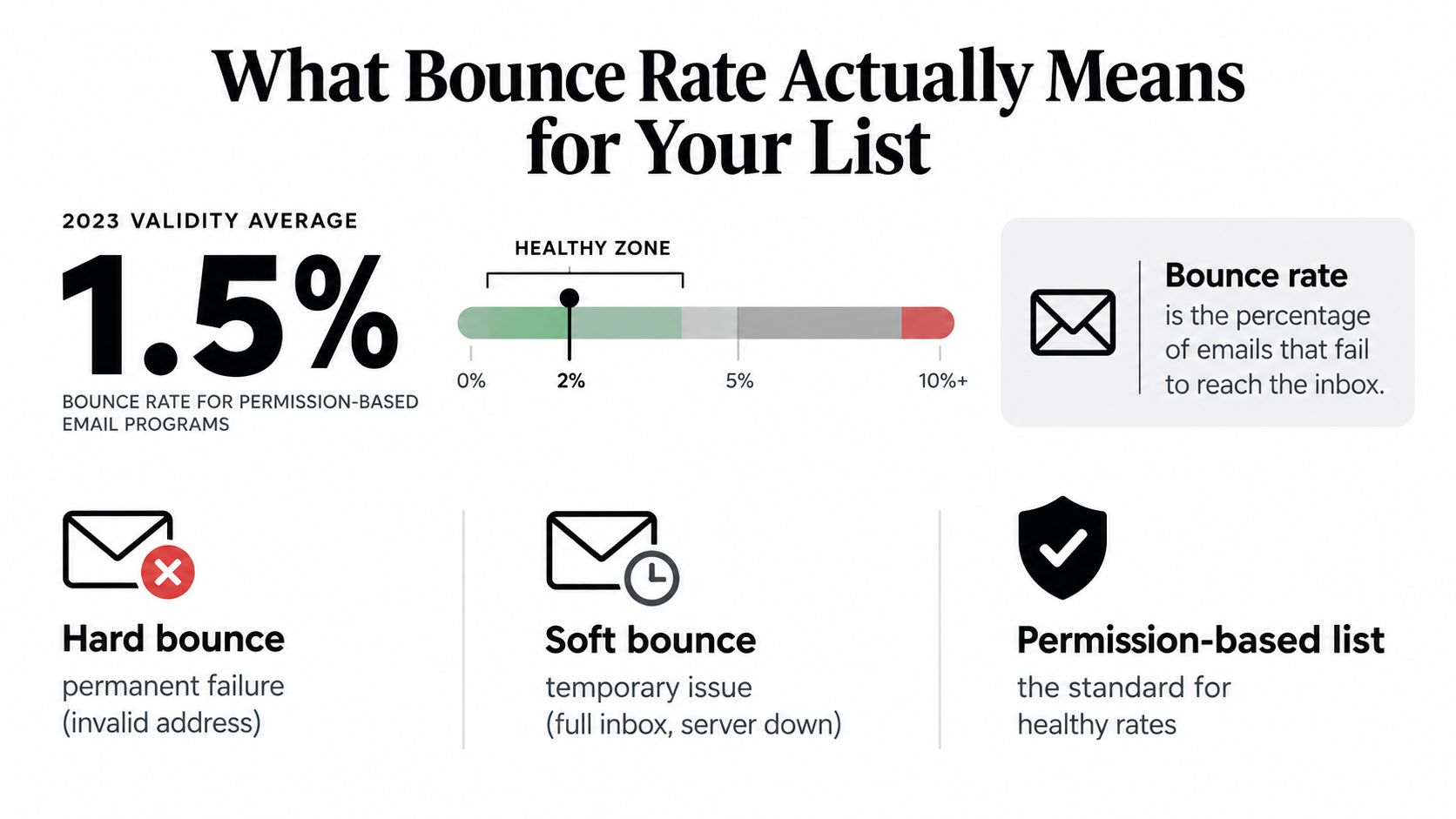
A permission-based email program should usually sit around 1.5% bounce rate, and under 2% is the healthy line. Once you drift past that, bounce rate stops being a minor cleanup metric and starts acting like an early warning on deliverability.
That's the part too many teams miss. They treat high bounce vs low bounce as a simple benchmark question, when it's really a risk curve. A low-bounce list protects sender reputation before inbox placement is even decided. A high-bounce list does the opposite. It tells mailbox providers your data is stale, your acquisition is questionable, or your sending discipline is sloppy.
The 2023 Validity deliverability benchmark is still the cleanest starting point here: permission-based programs averaged about 1.5% bounce, which aligns with the common rule that under 2% is healthy, under 1% is ideal, and above 5% is dangerous. That gives you a practical frame. Job is deciding what action to take at each threshold.
Table of Contents
- What Bounce Rate Actually Means for Your List
- How a List Gets High Bounce in the First Place
- High Bounce vs Low Bounce Lists Side by Side
- Why a Small Bounce Increase Costs a Lot of Inbox
- Bounce Behavior Across Different Sending Scenarios
- When to Clean, Segment, or Re-Permission Your List
- Moving From One-Time Cleaning to Continuous Verification
- A Short Decision Checklist for Your Next Send
What Bounce Rate Actually Means for Your List
Roughly 1 in 10 marketing emails never gets accepted by the receiving server. That alone should end the idea that bounce rate is a minor hygiene metric.
Bounce rate is the percentage of sent emails rejected by the receiving mail server before the message reaches the inbox.
The basic formula is:
Bounce rate = (bounced emails / emails sent) × 100
For an SMB sender, bounce rate is not a flat pass-fail benchmark. It works more like an early deliverability stress signal. A low rate usually means your collection process, list maintenance, and sending cadence are holding up. A rising rate means one of those systems is slipping, and mailbox providers will notice before your team does.
If you want the benchmark ranges and formulas in one place, this guide on email bounce rate covers the basics.
Hard bounces and soft bounces
Separate bounce types first. If you do not, you will make the wrong fix.
- Hard bounce: A permanent failure. The address is invalid, nonexistent, shut down, or blocked at the server level.
- Soft bounce: A temporary failure. Common causes include a full mailbox, temporary server issue, greylisting, or throttling.
Hard bounces are list quality problems. Soft bounces are sending or infrastructure problems. Treating every bounce as a bad address leads to pointless cleaning, while ignoring hard bounces leaves bad records active and keeps reputation pressure on future sends.
Practical rule: Hard bounces tell you whether the list is safe to keep mailing. Soft bounces tell you whether to slow down, retry carefully, or inspect your sending setup.
The line between healthy and risky
Use bounce rate as a decision rule, not a vanity metric.
As noted earlier, under 2% is a healthy working range for a permission-based program. Below 1% is strong. Above 5% is dangerous. Those thresholds do not carry equal risk, though. The difference between 0.8% and 1.6% is usually something to monitor. The difference between 2.4% and 5.2% often means the list, acquisition source, or dormant segment is already dragging inbox placement down.
Here is the right response at each stage:
- Under 1%: Monitor. Your data intake and suppression process are doing their job.
- 1% to 2%: Watch trendline by source and segment. Do not wait for the account-wide number to get worse.
- 2% to 5%: Clean and segment. Isolate older records, recent imports, and weaker acquisition channels.
- Above 5%: Stop broad sends to that audience. Re-permission older contacts or remove them.
That is what bounce rate means for your list. It tells you how much trust your data deserves, and what action you need to take before reputation loss turns into inbox loss.
How a List Gets High Bounce in the First Place
High bounce rarely appears out of nowhere. Teams usually create it slowly, then notice it all at once.
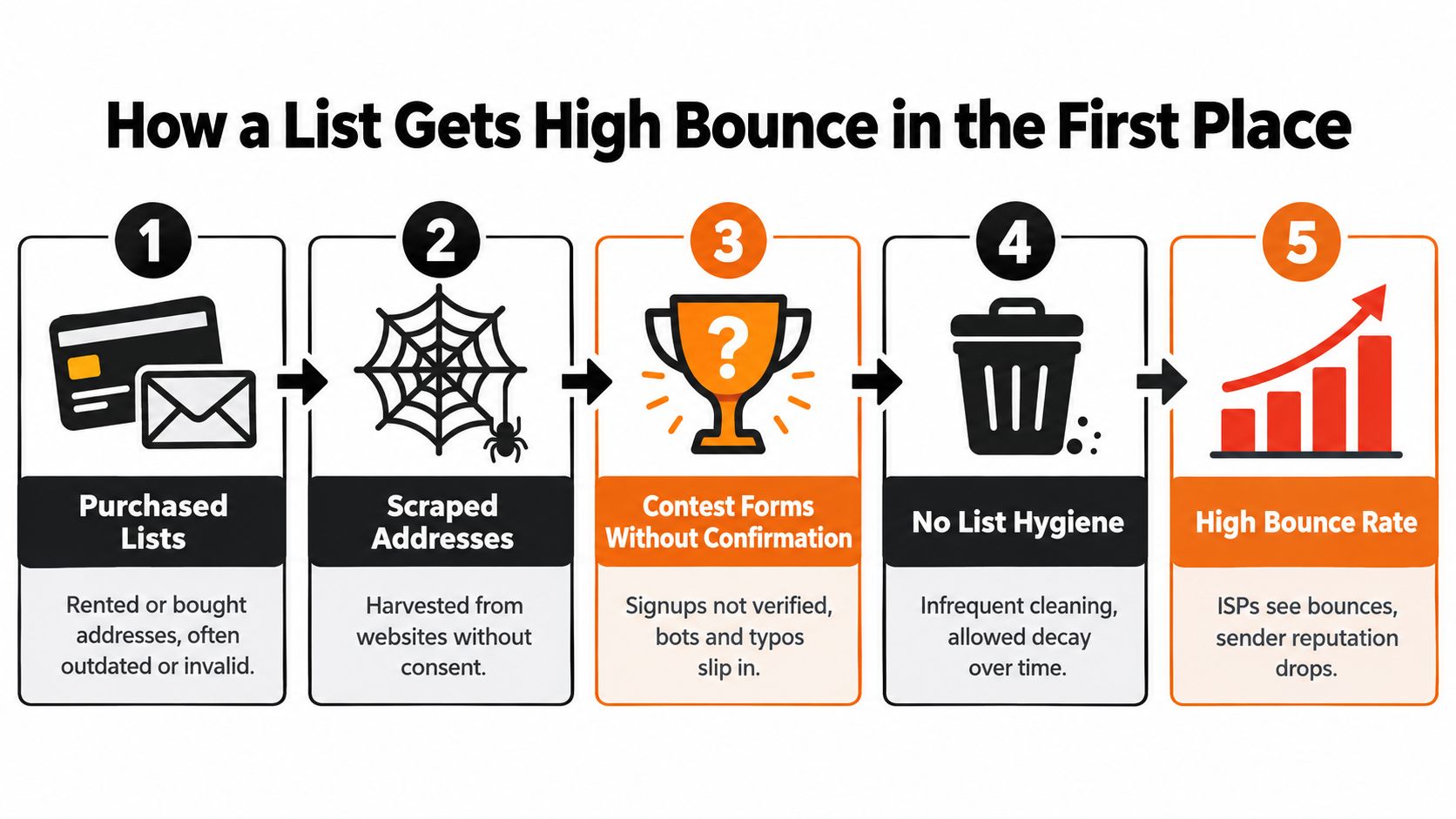
The first cause is acquisition shortcuts. Purchased data, scraped contacts, giveaway forms without confirmation, and old CRM imports all look usable until you send to them. Then the list tells the truth. Invalid addresses, abandoned inboxes, and role accounts start failing in batches.
This overview of common email bounce reasons is worth reviewing if you're trying to trace the root cause instead of just suppressing failed addresses after the fact.
Data decay is constant
Even good lists rot.
People leave jobs. Companies change providers. Domains expire. Shared inboxes like info@ or sales@ get abandoned and then stop accepting mail. If you don't re-check older records, your bounce rate rises even if your signup process was clean on day one.
Here's what usually pushes a once-healthy list into trouble:
- Legacy imports: Old files from prior tools or teams often contain addresses nobody has touched in a long time.
- Long sending gaps: Dormant periods let address decay build up unseen.
- Weak signup controls: Typos, disposable emails, and fake entries slip through when forms accept anything.
- Mixed acquisition sources: Lists built from events, lead magnets, referrals, outbound scraping, and manual imports almost always behave unevenly.
Not every bounce is a list problem
Sometimes infrastructure contributes. Authentication failures, inconsistent domain setup, or unstable sending patterns can produce rejection behavior that looks like pure data failure from the outside.
That's why modern verification is layered. A basic syntax check won't save you. Real list hygiene looks across multiple signals such as syntax, domain status, mailbox configuration, SMTP behavior, catch-all patterns, role accounts, disposable providers, and risk markers like spam traps. If your process only checks whether an email “looks valid,” you're still sending blind.
A high-bounce list is usually a history problem. It reflects how the addresses were collected, how long they sat untouched, and whether anyone verified them before pressing send.
High Bounce vs Low Bounce Lists Side by Side
Analysts at Mailshake set a hard-bounce target below 0.5% and flag total bounce rates above 2% as a warning line. Treat those numbers as decision points, not labels. Bounce rate is not a flat benchmark. It is a trust signal that gets more expensive as it rises.
Here's the comparison that helps you decide what to do next.
| Dimension | High Bounce List | Low Bounce List |
|---|---|---|
| Data quality | Old records, mixed sources, weak source tracking, uncertain mailbox status | Recent verification, clear source history, current mailbox status, disciplined suppression |
| Provider trust | More unknown-user signals and more scrutiny from mailbox providers | Fewer rejection signals and steadier trust over time |
| Inbox stability | Placement swings more from campaign to campaign | Placement stays more predictable across sends |
| Operational response | Requires cleaning, tighter segmentation, or re-permission before the next broad send | Requires monitoring and routine maintenance, not emergency fixes |
| Revenue impact | Good contacts lose inbox access because bad records lower trust across the send stream | Good contacts are less likely to be dragged down by invalid addresses nearby |
A low-bounce list is not "under the benchmark." It behaves in a stable way. You can send to it without wondering whether one older segment will throw off the whole campaign.
A high-bounce list behaves unevenly. One slice may still perform well, while another is loaded with dead mailboxes, abandoned role accounts, or stale imported contacts. That is why bounce rate should drive different actions at different levels.
Use this rule:
- Below 1%: Monitor. Keep sending, but watch source-level trends and segment age.
- Around 1% to 2%: Clean and segment. Stop treating the full file as equally safe.
- Above 2%: Pause broad sends to that segment and verify before mailing again.
- Well above 2% or rising fast after a long gap: Re-permission or suppress the segment. Do not keep pushing volume through it.
The Mailshake benchmark summary is useful because it gives practical limits: hard bounces should stay below 0.5%, soft bounces below 1%, and bounce rates above 2% call for list cleaning before sending again. Those thresholds fit outbound programs especially well, but the decision logic holds for any sender working with older or mixed-quality data.
The mistake is treating all bounce levels as the same problem. They are not. A list at 0.6% needs oversight. A list at 1.6% needs cleanup and tighter targeting. A list above 2% needs intervention before the next send, because mailbox providers read that pattern as declining list control.
Good subscribers pay for bad list hygiene. If you keep mailing bounce-heavy segments, valid contacts on the same domain and IP footprint get less inbox placement too.
Why a Small Bounce Increase Costs a Lot of Inbox
Bounce rate doesn't behave like a flat line. It behaves like a slope that gets steeper as you climb it.
One recent deliverability analysis estimated minimal impact below 1%, a 5% to 10% deliverability drop at 1% to 2%, and much steeper losses once bounce rates move above 2% to 3% (2025 email deliverability report projection). That's the right way to think about bounce thresholds. Not as neat categories, but as increasingly expensive levels of distrust.
Why the curve bends fast
Mailbox providers don't evaluate bounces in isolation. They combine bounce behavior with sender history, domain reputation, engagement patterns, and consistency. A list that moves from low bounce to moderate bounce may still look “not terrible” on paper, but providers often read that change as a quality shift.
That has immediate consequences:
- Suppression quality looks weaker
- Acceptance confidence drops
- Bulk-folder routing becomes more likely
- Future campaigns inherit the damage
A lot of teams keep optimizing subject lines while this is happening. Wrong lever.
Infrastructure still matters
Authentication won't rescue a bad list, but weak authentication makes a moderate bounce problem worse because providers have less reason to trust the sender. If your technical setup is shaky, fix that in parallel. This guide to email authentication for manufacturers is a solid practical reference even if you're outside manufacturing, because the underlying domain trust rules are the same.
Small bounce increases matter most when they cluster by segment, domain, or send window. Averages hide that. Mailbox providers often don't.
The mistake is waiting for a dramatic failure. By the time bounce looks obviously bad in aggregate, inbox placement has usually been sliding for a while.
Bounce Behavior Across Different Sending Scenarios
A 2% bounce rate can be manageable in one program and a deliverability problem in another. Treat bounce as a context signal, not a universal benchmark.
Newsletter publishers
Permission helps, but it does not excuse drift.
For a weekly or biweekly newsletter, low bounce usually means your signup flow is still filtering bad addresses and your inactive subscribers are not piling up unchecked. A small rise in soft bounces is worth monitoring, especially if it shows up in older signup cohorts, imported contacts, or one mailbox provider. That pattern calls for targeted cleanup, not a full-file purge.
Use a simple rule here. Stable and low means monitor. Clustered increases mean clean the affected segments and tighten capture points.
Ecommerce senders
Ecommerce bounce behavior is uneven by design. Recent buyers and transactional mail often stay clean. Reactivation campaigns, holiday blasts, and long-idle promotional segments usually carry the risk.
That difference matters. If bounce rises only in lapsed-customer promos, your list problem is isolated. Segment harder and suppress older records before the next campaign. If bounce starts spreading into recent-buyer promos or core lifecycle sends, your data quality has slipped beyond one segment and needs a broader verification pass.
Recency decides the action.
Cold outbound teams
Outbound gets judged harder because there is no engagement history to soften bad list quality. Unknown-user failures are read as a prospecting problem, not normal list aging.
Keep your standards tighter. Hard bounces should stay under 0.5%, soft bounces under 1%, and total bounce above 2% should stop the next send until you verify and suppress bad records, as noted earlier in the article. If an outbound team keeps pushing through that warning level, acceptance drops fast and recovery gets expensive.
Process is usually the root cause. Sloppy enrichment, rushed imports, and stale prospect sources create bounce long before copy becomes the problem. Teams building outbound at scale sometimes fix that by tightening ownership around sourcing and verification, or by using partners like Hire SDRs when list-building discipline is the weak point.
| Sender Type | Healthy Bounce Pattern | What To Do |
|---|---|---|
| Newsletter publisher | Low overall bounce, with no sustained rise in soft bounces by cohort or domain | Monitor trends. Clean only the pockets showing decay |
| Ecommerce brand | Clean recent-buyer and transactional segments, with bounce concentrated in older promo audiences | Segment aggressively. Suppress stale records before reactivation or seasonal sends |
| Cold outbound team | Very low hard and soft bounce, with little room for variance | Verify before every meaningful send. Pause and clean if total bounce crosses 2% |
Use different rules for different sending models. Flat benchmarks hide risk. Decision rules tied to scenario are what keep inbox placement intact.
When to Clean, Segment, or Re-Permission Your List
A one-point bounce increase can push a list from routine maintenance into deliverability risk. Treat bounce rate as a decision signal, not a flat benchmark.
Under 2 percent
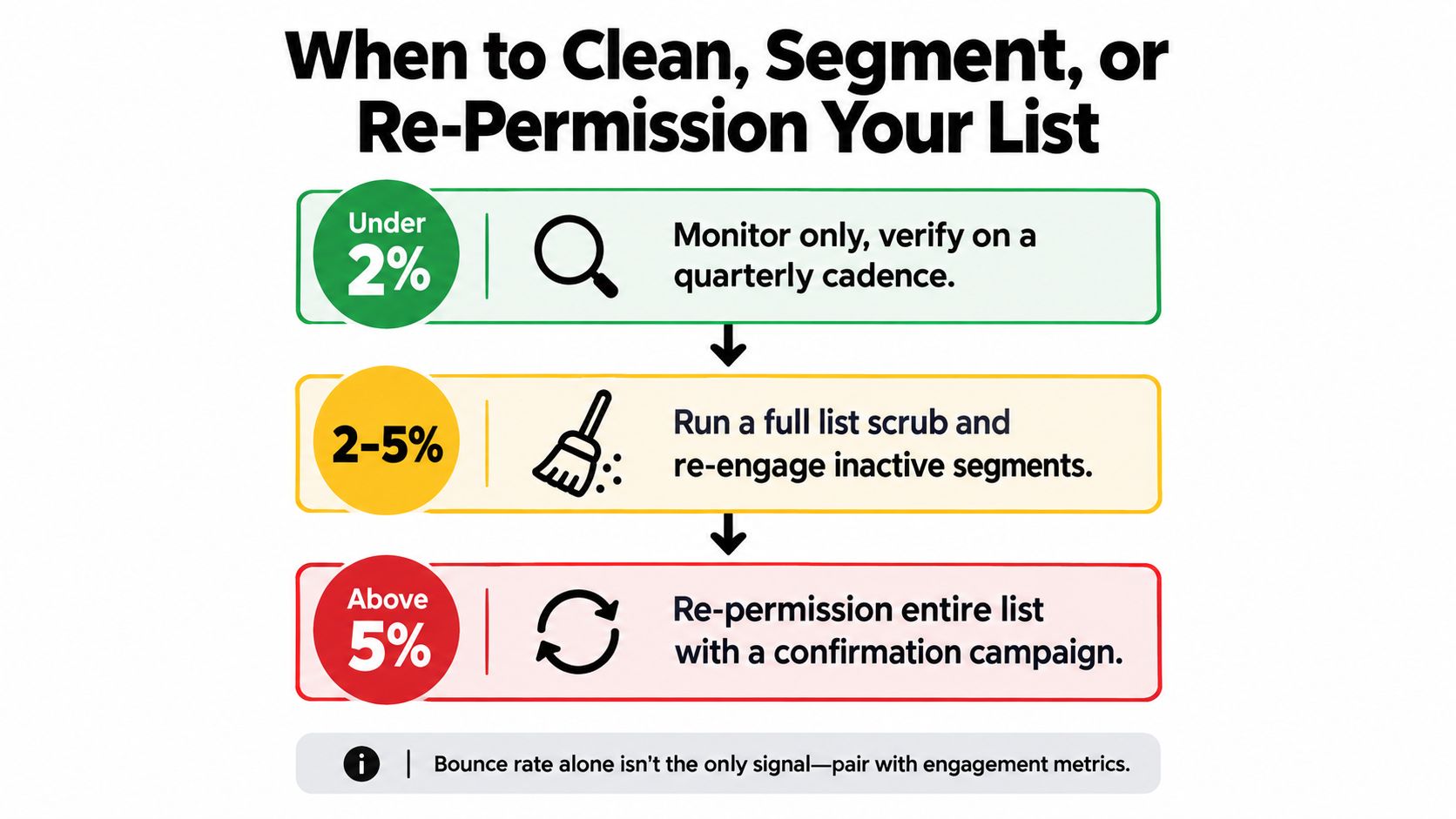
Under 2% means the list is still behaving like a maintained permission file. That does not mean you can ignore it. It means you monitor, because a low overall bounce rate can still hide a bad source, an aging cohort, or a weak signup path.
Action:
- Monitor by segment: Check bounce by source, age, and domain cluster instead of relying on the account-wide average.
- Verify on a schedule: Quarterly works for many SMB programs with steady list growth.
- Block bad data at entry: Tighten forms, imports, and manual uploads before they become a sending problem.
If you want a practical workflow, this walkthrough on using Mail Merge for Gmail to clean shows how teams can organize cleanup around real sending operations.
Between 2 percent and 5 percent
This range needs action before the next broad campaign. Do not keep sending and hope the average settles back down. Bounce is not linear. The move from acceptable to risky happens faster than many teams expect, especially if the problem is concentrated in one stale segment.
Do this in order:
- Run verification on the affected segment or the full file before the next major send.
- Suppress every recent hard bounce.
- Cut or quarantine old inactive records until they prove they still belong on the list.
- Review acquisition source before you touch creative or cadence.
Segment after cleaning, not before. Splitting a dirty list into smaller groups does not reduce invalid addresses. It just spreads the problem around.
For teams that need a tool in this step, CleanMyList is one option. It checks addresses across multiple signals including syntax, domain, SMTP mailbox behavior, catch-all, disposable, role account, historical bounce reputation, and a send or skip recommendation.
Here's a quick visual summary before the more aggressive ranges:
Above 5 percent
Above 5% is a list quality failure, not a normal fluctuation. At that level, broad sending stops until you fix the file.
Action:
- Pause broad sends
- Clean the list aggressively
- Segment by acquisition date, source, and last engagement
- Suppress disposable, role-based, and clearly risky records
- Re-permission only the audience with a realistic chance of still wanting your mail
Re-permission is the right move when the list is old, engagement is weak, and consent is unclear. It is not a rescue tactic for obviously invalid data. Remove bad records first. Then ask the reachable core to confirm interest.
One rule matters here. If you cannot explain why the bounce rate rose, do not scale the next send.
Moving From One-Time Cleaning to Continuous Verification
A one-time scrub helps. It doesn't hold.
Lists keep aging between sends. Employees leave companies, inboxes get abandoned, role accounts churn, and old segments collect risk. You can have a list that looks fine on an annual average and still hit a nasty bounce pocket the moment you reactivate dormant subscribers or launch from a new sending domain.
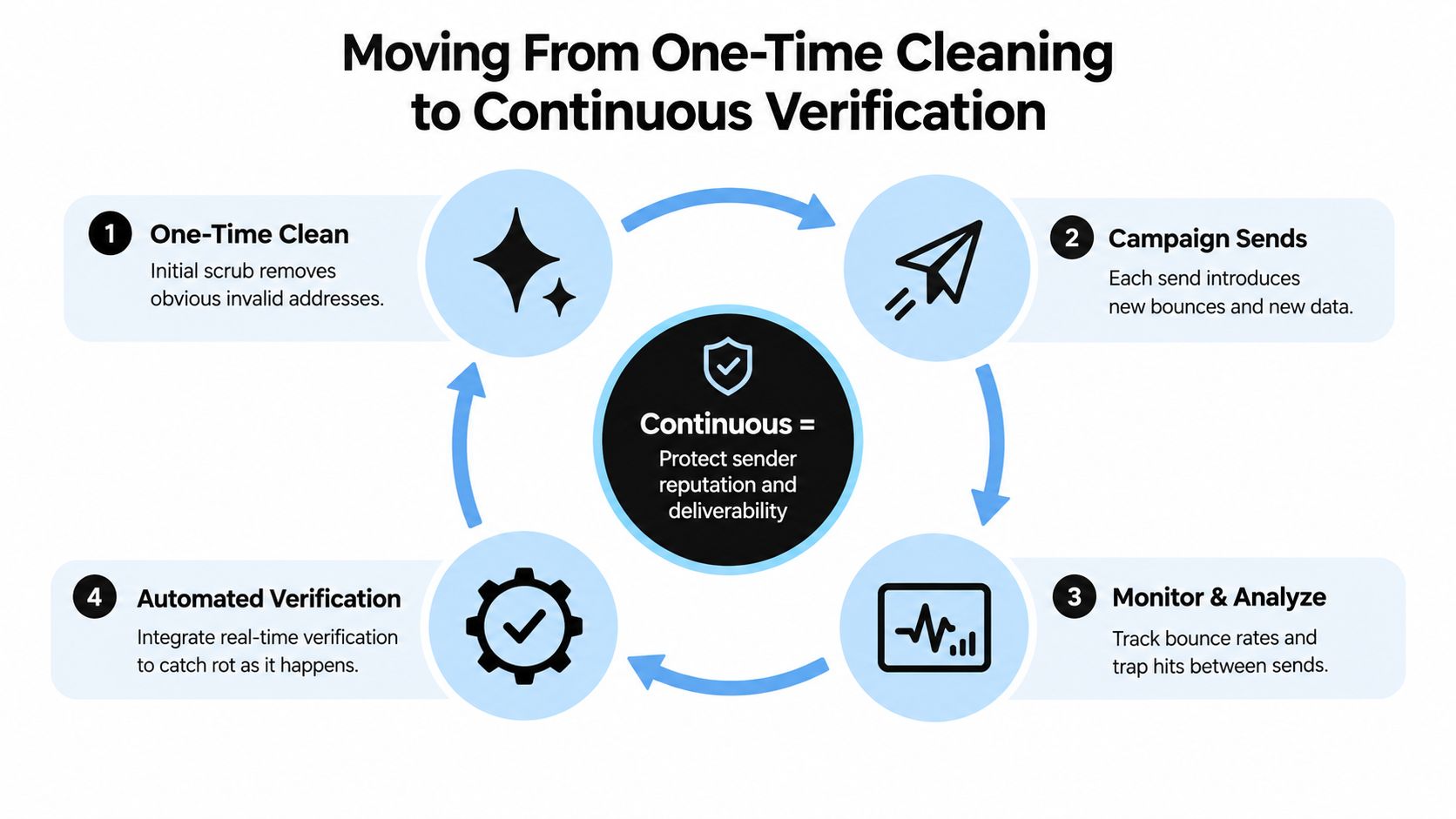
Continuous verification is the safer operating model
The better approach is ongoing control:
- Check new signups in real time
- Review cohort quality monthly
- Re-check the full file quarterly
- Watch for bounce clustering by source or age
If you're adding validation at the form level, this guide to real-time email validation is the right implementation layer to focus on.
Why this beats reactive cleanup
Reactive cleanup waits for the damage report. Continuous verification reduces the chance of damage in the first place.
That matters because bounce harm is front-loaded. A bad send can create trust problems immediately, while recovery takes sustained clean behavior. Teams that rely on annual hygiene projects usually spend the rest of the year paying for old neglect.
The cheapest bounce to fix is the one you block before it enters the database.
A Short Decision Checklist for Your Next Send
Before your next campaign, do this in order.
- Pull recent bounce data: Use the last send window that reflects current behavior, not a long average that hides spikes.
- Separate hard from soft: If hard bounces are pushing past the stricter outbound-style tolerance, clean first and send later.
- Inspect new cohorts: Make sure recent signups or imports were verified at entry.
- Review old segments: Aged records are where hidden bounce pockets usually sit.
- Check domain trust signals: Postmaster and reputation tools won't replace list hygiene, but they'll tell you whether bounce damage is already visible.
- Confirm suppression logic: Hard bounces, complaints, role accounts, and obvious junk should already be excluded.
- Set the next verification date now: If you leave it open-ended, it won't happen.
Keep the checklist short on purpose. Long process docs don't lower bounce rates. Consistent pre-send discipline does.
Clean data before send day, not after the damage shows up. CleanMyList lets you upload a list, verify addresses in bulk, and separate sendable contacts from records that are likely to bounce so you can protect reputation and keep deliverability stable. If your bounce rate is creeping up or you're about to mail an older segment, run it through a verification pass first.