Sorting email domains by popularity is poor advice if you're trying to prevent bounces. A familiar provider name doesn't tell you whether a mailbox exists, whether the owner still uses it, or whether a verification server will give you a clear answer.
Validation behavior matters more than popularity. So do signup quality, previous delivery results, and how long it's been since the contact confirmed their interest. You usually can't establish an account's age from its domain, but you can track when you collected the address and last reached its owner.
A useful list of email domain rules separates three decisions:
- Domain classification: Identify the provider, related domains, and possible misspellings.
- Mailbox confidence: Distinguish confirmed failures from temporary errors, catch-all responses, and inconclusive checks.
- Campaign eligibility: Apply consent, engagement, and suppression rules before sending.
Don't confuse receiving mail with authenticating outgoing mail, either. In its measurement of the internet's most popular domains, Fortra reported that only 7.6% used an enforcing DMARC policy. That's a sender-security signal, not proof that individual recipient addresses work.
The providers below need different handling, but none deserves an automatic pass or blanket block. Use their domain names to choose the right checks, then make the send decision at the address level.
Table of Contents
- 1. Gmail (gmail.com)
- 2. Yahoo Mail (yahoo.com)
- 3. Outlook.com (outlook.com)
- 4. Hotmail (hotmail.com)
- 5. iCloud Mail (icloud.com)
- 6. AOL Mail (aol.com)
- 7. Proton Mail (protonmail.com / proton.me)
- 8. Zoho Mail (zoho.com / zohomail.com)
- 9. GMX Mail (gmx.com / gmx.net)
- 10. Yandex Mail (yandex.com / yandex.ru)
- How the 10 Email Domains Compare for Validation and Risk
- Turn This Domain List Into a Repeatable Validation Workflow
1. Gmail (gmail.com)
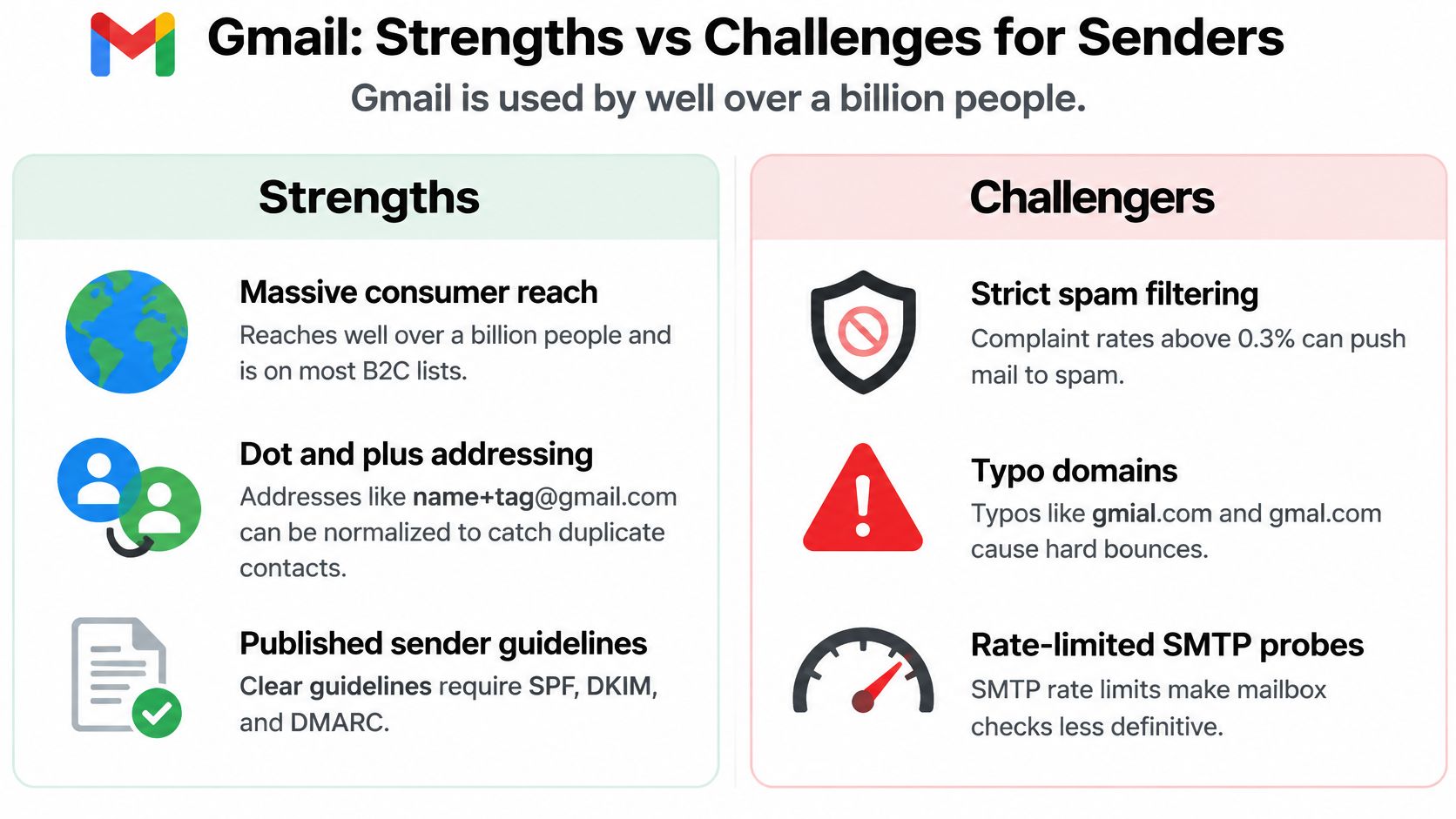
Gmail needs careful typo handling and deduplication, not automatic trust. An address can look perfectly ordinary and still belong to a nonexistent mailbox, an inactive subscriber, or someone who never requested your emails.
At signup, flag likely misspellings such as gmial.com, gmai.com, and gmal.com. Ask the person to confirm the correction rather than changing the destination without consent, especially when you're sending receipts, password resets, or customer information.
Separate Identity Matching From Delivery
For consumer gmail.com addresses, dots and plus tags can create different-looking addresses that reach the same inbox. Build a comparison key for deduplication, but preserve the submitted address for sending and audit records.
- Deduplicate carefully: Compare dotted and plus-tagged variants without deleting the original signup information.
- Preserve consent: Don't merge subscriptions with conflicting preferences just because their comparison keys match.
- Limit the rule: Don't apply Gmail-specific normalization to every business domain hosted by Google.
Say an e-commerce customer subscribes with a plus-tagged address and later enters the base address at checkout. Your system should recognize the possible duplicate without overwriting their preferences.
Use a Gmail account-name check to understand address formatting, but don't treat an available-looking name or a syntactically correct address as mailbox verification. A clean spelling is only the first check.
2. Yahoo Mail (yahoo.com)
An old customer export containing Yahoo addresses needs a freshness review, not a provider-wide rejection. Your relationship history matters more than the age associated with the brand.
Start with the last successful delivery, signup source, unsubscribes, and recent customer activity. A returning buyer with a Yahoo address is a different prospect from an imported contact whose permission history you can't establish.

Group Related Domains Without Rewriting Them
Include ymail.com and rocketmail.com in related-provider reporting, but retain each exact address. The distinction explained in Yahoo Mail versus Ymail is useful when you build domain rules: related services aren't interchangeable recipient addresses.
For a publisher restoring an archived subscriber list, the practical sequence is straightforward:
- Verify first: Remove confirmed invalid addresses before attempting a campaign.
- Check permission: Exclude unsubscribed contacts and addresses without a defensible subscription history.
- Use meaningful activity: Consider clicks, purchases, replies, and account activity alongside email engagement.
Don't send a re-engagement campaign merely to discover which addresses bounce. Verification should happen before the campaign, and re-engagement should go only to eligible contacts.
A temporary server error also isn't the same as a nonexistent mailbox. Preserve the reason for the result so your system can retry uncertain checks without restoring confirmed failures.
3. Outlook.com (outlook.com)
Keep the recipient domain and the hosting family in separate fields. That lets you analyze Microsoft-related delivery patterns without assuming every address behaves identically.
For consumer reporting, group outlook.com, hotmail.com, live.com, and msn.com under a shared provider family. Still retain domain-level results so a problem affecting one segment doesn't disappear inside an aggregate report.

A SaaS team might separate Outlook and Hotmail subscribers in its campaign dashboard, then compare rejection reasons and recent activity. If both groups show policy-related failures, investigate the sending setup before deleting recipients.
Practical rule: A rejection caused by sender policy doesn't prove that the recipient mailbox is invalid.
Read the Failure Reason
Distinguish unknown recipient, temporary deferral, policy rejection, and inconclusive verification. Those outcomes require different actions, even when they arrive from the same provider family.
A confirmed nonexistent mailbox belongs on your suppression list. A temporary error needs a controlled retry, while a policy block calls for a review of authentication, sending practices, and reputation.
The Outlook email-address guide can help you identify address formats, but format alone won't establish deliverability. Also, don't classify a custom business domain as consumer Outlook just because Microsoft hosts its mail.
4. Hotmail (hotmail.com)
A Hotmail address isn't stale just because it ends in hotmail.com. The risk comes from old collection records, repeated delivery failures, and missing permission, not the spelling of the provider's name.
Consider an online store importing a previous customer database. Some Hotmail contacts may still buy regularly, while others haven't interacted since the original import. Treating them as a single risk group would discard useful contacts while retaining questionable ones.
Give Legacy Records a Fresh Decision
Build the import rule around evidence you possess:
- Reject known failures: Keep previously confirmed invalid addresses suppressed, even if a new upload contains them.
-
Confirm likely typos: Flag
hotmal.com,hotmial.com, andhotmai.comrather than correcting them. - Recheck uncertain records: Verify older addresses whose current status you don't know.
- Retain provenance: Preserve the original collection source, permission record, and most recent successful delivery.
Don't let a database migration erase your suppression history. An address that repeatedly failed shouldn't receive a fresh start just because someone uploaded a new CSV.
Group Hotmail with the Microsoft consumer family for troubleshooting, but keep its individual results visible. That combination lets you investigate shared delivery problems while still detecting a poor-quality import.
The useful special rule is historical suppression continuity. It's more defensible than assigning a higher bounce-risk score to every Hotmail subscriber.
5. iCloud Mail (icloud.com)
Separate direct mailboxes from relay addresses before interpreting verification results. An icloud.com address and an Apple private relay address don't represent the same routing arrangement.
A relay forwards messages rather than exposing the person's underlying inbox. That makes it different from a temporary address designed to disappear, so don't automatically classify privacy features as disposable-email abuse.
Preserve the Address the Customer Chose
Recognize privaterelay.appleid.com as a relay domain. Check that the sending configuration supports the relevant relay arrangement, and investigate relay-specific failures before concluding that the customer entered a fake address.
Related Apple domains such as me.com and mac.com can share a reporting category. They aren't safe to merge merely because their local parts match. Only combine customer identities when you have reliable account-level evidence.
- Keep the original destination: Don't replace a relay with a guessed personal inbox.
- Read inconclusive results cautiously: A limited SMTP response isn't proof of invalidity.
- Measure stronger actions: Use purchases, clicks, replies, and account activity rather than relying on opens alone.
Say a DTC customer uses a private relay at checkout. Keep that address tied to the order, preserve the customer's preferences, and investigate a delivery failure through the actual routing path.
Don't make the customer surrender a privacy-protecting address merely to simplify your segmentation.
6. AOL Mail (aol.com)
A nonprofit's long-standing donor list can contain valuable AOL contacts. The right question is whether the person is still reachable and eligible for the campaign, not whether their provider looks dated.
Start with donations, account activity, replies, and successful deliveries. Those signals give you more useful context than assuming every older-looking address has been abandoned.
Don't use a re-engagement email as a substitute for verifying an uncertain list.
Suppress Failures Without Losing Active Supporters
Before an appeal or newsletter, remove unsubscribed contacts and confirmed invalid addresses. Then separate recently active supporters from contacts whose relationship needs review.
A re-engagement message may suit an eligible subscriber who hasn't clicked recently, but it shouldn't go to an address that already has a confirmed hard-bounce history. Nor should it override missing consent.
- Carry suppression records forward: Match new imports against historical failures before sending.
- Review inactivity in context: A donor who gives through your website may still want email despite limited tracked engagement.
- Retain temporary-error details: Don't permanently suppress someone because of a transient receiving-server problem.
For example, a nonprofit could verify its appeal audience, retain recently active donors, and separately review dormant newsletter subscribers. That's safer than sending the same message to the entire archive.
Use AOL as a reporting segment, not a demographic label. The address alone doesn't establish the subscriber's age, interests, or current engagement.
7. Proton Mail (protonmail.com / proton.me)
Privacy preferences aren't a bounce-risk category. Don't classify protonmail.com or proton.me addresses as suspicious because their owners prefer a privacy-focused service.
Mailbox verification, message encryption, and marketing engagement are separate questions. A provider's privacy positioning doesn't establish whether a particular mailbox exists, and low tracked engagement doesn't prove that it doesn't.

Explain Why You're Asking for the Address
For a security newsletter, clear onboarding is more useful than treating privacy-conscious subscribers as a special technical problem. State what you'll send, how subscribers can leave, and what information you need.
-
Preserve exact domains: Don't replace
proton.mewithprotonmail.comor assume matching names belong to the same person. - Inspect verdict reasons: Separate invalid-mailbox findings from temporary or inconclusive responses.
- Use relevant engagement: Replies, confirmed preferences, and account activity can supplement campaign metrics.
Say a privacy-focused software company receives Proton signups that rarely register opens but regularly renew subscriptions. Suppressing those customers solely for low opens would ignore stronger evidence of an active relationship.
Segment Proton addresses if it helps you investigate delivery or messaging differences. Don't assign a favorable or unfavorable risk score just because of the provider.
The special rule is restraint: preserve privacy choices, verify the address, and avoid conclusions that the available signals don't support.
8. Zoho Mail (zoho.com / zohomail.com)
With Zoho, the visible domain may not identify the hosting provider. A business can use a custom domain for email, so a list filtered only for zoho.com and zohomail.com won't capture every Zoho-hosted contact.
For business lists, distinguish the address domain, its mail routing, and the individual recipient's status. The MX-record overview explains how mail-exchange records identify receiving hosts and their routing preferences, but that routing information doesn't confirm a particular employee's mailbox.
Expect Business-Specific Ambiguity
A working company mail server can coexist with departed employees, shared inboxes, forwarding rules, and catch-all behavior. Don't translate domain-level acceptance into certainty about each contact.
-
Separate role accounts:
info@andsales@may be appropriate for some business messages but aren't individual subscribers. - Review catch-all results: Keep them distinct from confirmed mailbox-level acceptance.
- Check relationship changes: Reverify contacts before outreach when their employment or company status may have changed.
Say a startup changes email providers while keeping its domain. The address suffix stays the same even though routing and recipient behavior may change.
Conversely, an employee can leave while the company's DNS remains perfectly healthy. That's why provider detection and mailbox verification must remain separate fields.
For outbound teams, technical acceptance also doesn't create permission or relevance. Verify your legitimate contact list, then apply the campaign's legal and relationship requirements before deciding who receives a message.
9. GMX Mail (gmx.com / gmx.net)
Group GMX domains for operational analysis, not automatic identity matching. Keep gmx.com and gmx.net intact when storing recipients, even if you place them under a shared provider label.
A matching local part across those domains isn't enough to merge records. Nor does either suffix reliably establish a subscriber's preferred language, residence, or applicable legal requirements.
Use Declared Preferences for Localization
A regional publisher might receive GMX signups through several language-specific forms. Store the form language and the subscriber's selected preferences rather than guessing from the email suffix.
- Localize from evidence: Use declared language, account settings, or the signup context.
- Retain permission records: Keep the collection source and subscription status attached to each address.
- Compare actual delivery: Review mailbox failures separately from policy blocks and temporary errors.
For a German-language newsletter, that means verifying the GMX segment before launch while checking that subscribers requested German content. Don't send translated campaigns because their domain seems associated with a particular market.
Authentication is another separate layer. The TMA domain-authentication paper reinforces the distinction between authentication configuration and mailbox-level verification: a correctly configured domain can still contain invalid or dormant addresses.
Your special rule should preserve regional context without inventing it. Provider grouping helps troubleshooting, while subscriber-provided information should guide language, timing, and campaign eligibility.
10. Yandex Mail (yandex.com / yandex.ru)
For Yandex addresses, separate technical deliverability from jurisdictional review. A mailbox can accept email while your proposed processing or campaign still requires a legal assessment.
Don't infer someone's residence, nationality, or business location from yandex.com or yandex.ru alone. Use the customer information and transaction context you legitimately hold.
Keep Compliance Decisions Outside the Mailbox Verdict
If a campaign involves regions subject to particular restrictions, review the rules relevant to your organization, recipients, services, and data handling. A domain suffix isn't a substitute for that assessment, and a successful verification result doesn't clear it.
Decision boundary: Mailbox verification can inform a send decision. It can't authorize a transaction or establish legal eligibility.
A software company preparing a regional campaign should keep language preferences, account country, permission status, and verification results in separate fields. That lets the campaign owner apply the right rules without turning the provider domain into a crude geographic proxy.
-
Preserve domain variants: Don't rewrite
.ruaddresses as.com, or the reverse. - Inspect rejection reasons: Separate a nonexistent recipient from a policy or routing failure.
- Document exclusions: Record why a contact was withheld so future imports don't undo the decision.
The practical trade-off is administrative effort. More precise records take work, but they prevent both indiscriminate blocking and unjustified sending.
Use Yandex as a technical segment, not a complete risk profile.
How the 10 Email Domains Compare for Validation and Risk
| Item | Audience Profile | Main Data-Quality Risk | Common Typo Variants | Key Validation Signal |
|---|---|---|---|---|
| Gmail (gmail.com) | Large global consumer and B2C audience | Strict filtering; typos can cause hard bounces | gmial.com, gmai.com, gmal.com | Combine syntax, DNS, typo, and bounce signals; SMTP checks may be ambiguous |
| Yahoo Mail (yahoo.com) | Long-standing accounts, often older users | Inactive or abandoned accounts in aged lists | No specific typos noted; ymail.com and rocketmail.com are related domains | Pair verification with engagement history and historical bounce data |
| Outlook.com (outlook.com) | Consumer and professional users, including Microsoft ecosystem users | Legacy addresses may be stale; SMTP checks can be throttled | No specific typos noted; hotmail.com, live.com, and msn.com are related domains | Use verdict reasons and historical bounce data; SMTP responses may be inconsistent |
| Hotmail (hotmail.com) | Older consumer audiences and long-lived accounts | Dormant legacy accounts and resulting bounces | hotmal.com, hotmial.com, hotmai.com | Re-verify older addresses and check historical bounce reputation |
| iCloud Mail (icloud.com) | Apple users, including consumer and higher-income audiences | Hide My Email relays can obscure recipients and forwarding status | No specific typos noted; me.com, mac.com, and privaterelay.appleid.com are related domains | Flag relay addresses; combine DNS and reputation signals rather than relying on SMTP |
| AOL Mail (aol.com) | Older demographics and long-standing subscribers | Dormant or decayed accounts may bounce or stop engaging | No specific typos noted | Combine verification with activity and historical bounce data |
| Proton Mail (protonmail.com / proton.me) | Privacy-conscious and security-focused users | Privacy features can limit the usefulness of mailbox checks | No specific typos noted; protonmail.com and proton.me are related domains | Use syntax, DNS, and disposable-address checks; interpret mailbox checks cautiously |
| Zoho Mail (zoho.com / zohomail.com) | Small businesses, startups, and professional contacts | Business addresses may become outdated when employees leave | No specific typos noted; zoho.com and zohomail.com are related domains | Combine verification with recent activity and role-account checks |
| GMX Mail (gmx.com / gmx.net) | Consumers in German-speaking Europe | Inactive legacy accounts and regional compliance needs | No specific typos noted; gmx.com, gmx.net, and gmx.de are related domains | Pair verification with consent records and regional segmentation |
| Yandex Mail (yandex.com / yandex.ru) | Users in Russia, Eastern Europe, and Central Asia | Regional regulation, data handling, and deliverability concerns | No specific typos noted; yandex.com and yandex.ru are related domains | Consider regional context and legal requirements alongside the verification result |
Turn This Domain List Into a Repeatable Validation Workflow
Use domain groups as rules for investigation, not permanent verdicts. Your import process should preserve the submitted address, create a separate normalized comparison field, and flag likely spelling errors for confirmation.
Normalize provider labels without rewriting recipient destinations. Gmail-specific alias handling shouldn't spread to unrelated domains, and related provider domains shouldn't become interchangeable addresses.
Keep Technical Signals Separate
Store the verification timestamp and reason alongside the result. A useful record distinguishes domain routing, mailbox response, catch-all behavior, role-account status, disposable-provider status, and historical delivery failures.
Authentication belongs in a separate category. EasyDMARC's global adoption analysis distinguishes missing, monitoring-only, and enforcing DMARC policies, which describe sender protection rather than recipient-mailbox existence.
- Send: The address passes your technical checks and meets permission, suppression, and campaign requirements.
- Investigate: The result is ambiguous, catch-all, temporarily unavailable, or inconsistent with previous delivery.
- Skip: The mailbox is confirmed invalid, the contact is unsubscribed, or the address otherwise fails your campaign rules.
Don't automatically block every recipient domain without DMARC. Equally, don't assume an enforcing authentication policy makes every mailbox valid.
Recheck Before the Campaign, Then Preserve the Outcome
Verify aged lists before major sends and choose an ongoing review schedule based on collection quality, campaign frequency, and previous failures. Fresh signup data and an archived customer export shouldn't receive identical treatment.
Tag shared inboxes and known temporary providers so campaign owners can apply appropriate exclusions. Role accounts may be useful in a legitimate business relationship, but they shouldn't enter an individual-subscriber campaign.
We preserve your original list and return a label, score, and plain-English reason for each address. You can download the cleaned results or push them back to your connected email tool, keeping bad addresses tagged for future suppression.
The final review still belongs to the sender. Check consent, campaign relevance, unresolved results, and historical suppressions before releasing the audience.
Keep a feedback loop after sending. Feed confirmed failures and unsubscribes back into your source system so the next import doesn't recreate the same problem. Account and billing questions can go to help@cleanmylist.io.
CleanMyList offers no-subscription bulk email verification to help you check domains, mailbox responses, catch-all behavior, and other signals before sending. Visit CleanMyList to upload a CSV or paste your addresses, review the plain-English verdicts, and export a cleaner campaign audience.